What Is a Deployment: A Comprehensive 2026 Guide
Understand what is a deployment in modern software. Explore 2026 best practices for CI/CD, blue-green strategies, and safe web experimentation.


A deployment is the moment a software change leaves the team's workspace and starts running in an environment that other people can use. It works like putting a new menu item into the kitchen, not just writing the recipe. The idea sounds technical, but the effect is visible across the business.
A deployment decides when a new landing page is available, when updated checkout logic starts handling orders, and when an experiment can begin collecting clean data. For engineers, that means shipping code safely. For product managers, it means coordinating timing and risk. For marketers, it means knowing whether a campaign or test is live, stable, and being measured properly.
That is why deployment matters more than the final button press.
Behind the scenes, deployment usually includes preparing the code, moving it into the right environment, checking that it behaves as expected, and watching for problems once it is running. A team might deploy a bug fix, a design change, a backend service update, or a new experiment variant. If your day-to-day work includes conversion testing, a practical example is this guide to Shopify theme split testing, where getting changes live safely affects both engineering quality and business results.
A simple definition helps. Deployment is the process of putting software changes into a running environment in a controlled way so users, teammates, or test traffic can access them. That controlled part matters. Safe deployment is what lets teams test ideas quickly without turning every release into a gamble.
From 'It Works On My Machine' to Live In The Wild
A developer finishes a checkout change on Tuesday afternoon. The page loads. The button works. Test orders go through. By Tuesday evening, the same change is live for real shoppers, paid traffic is hitting the page, analytics needs to stay clean, and a product manager wants to know whether the test can start on schedule.
That shift from a working change to a working customer experience is deployment.
Teams use the word in slightly different ways, which is why it can feel fuzzy outside engineering. In practice, deployment means taking a change that exists in development and putting it into an environment where other people can use it. That change might be a homepage update, a backend service, a pricing experiment, or a new checkout path tied to a campaign.
A restaurant analogy helps here. Finishing the recipe in the test kitchen is not the same as serving the dish during dinner rush. The live environment has real customers, real timing pressure, and real consequences if something breaks. Software works the same way. A page that looks correct in a local setup still has to behave properly with production traffic, live integrations, tracking scripts, consent tools, different devices, and all the messy conditions of actual use.
That distinction matters beyond engineering. For marketers, deployment affects whether an A/B test starts collecting trustworthy data. For product managers, it affects release timing and risk. For developers, it determines whether a change reaches production safely or creates a late-night incident. If your team runs experiments on storefronts, a practical example is Shopify theme split testing in production, where getting changes live safely affects both conversion data and customer experience.
Why the term gets mixed up
People often use deploy, release, and launch as near-synonyms, but they describe different moments.
- Deploy means the software has been put into an environment where it can run.
- Release usually means users can access the new behavior.
- Launch usually means the business has decided to promote it, announce it, or support it with campaigns.
Those differences matter in real work. A team might deploy an experiment behind a feature flag on Monday, release it to 10 percent of traffic on Wednesday, and launch the campaign around it on Friday. Same project. Different actions.
What a good deployment really includes
Newer teams sometimes treat deployment like a handoff at the very end. Strong teams treat it like controlled delivery.
That delivery usually includes a few checks:
- Build readiness: the code has been packaged into something the target environment can run
- Validation: tests and basic checks show the main user flows still work
- Configuration: settings, secrets, URLs, and integrations match the target environment
- Visibility: the team can spot problems quickly after the change goes live
The last point is easy to underestimate. A deployment is only successful if the site stays available, the feature behaves as expected, analytics still record the right events, and customers can complete the action the business cares about. That is why deployment is not just an engineering detail. It is part of how teams ship ideas, measure them, and decide what to do next.
The Core Concept The Journey From Code To Customer
A deployment is the moment software moves from a team's workspace into a real environment where it can do its job.
That sounds simple. In practice, this is the point where technical work meets business reality. A feature can look finished in code review and still fail to help anyone if the server settings are wrong, the database change did not run, or the analytics event disappears. For engineers, that means debugging. For product managers and marketers, it means unclear results, delayed launches, and A/B tests you cannot trust.
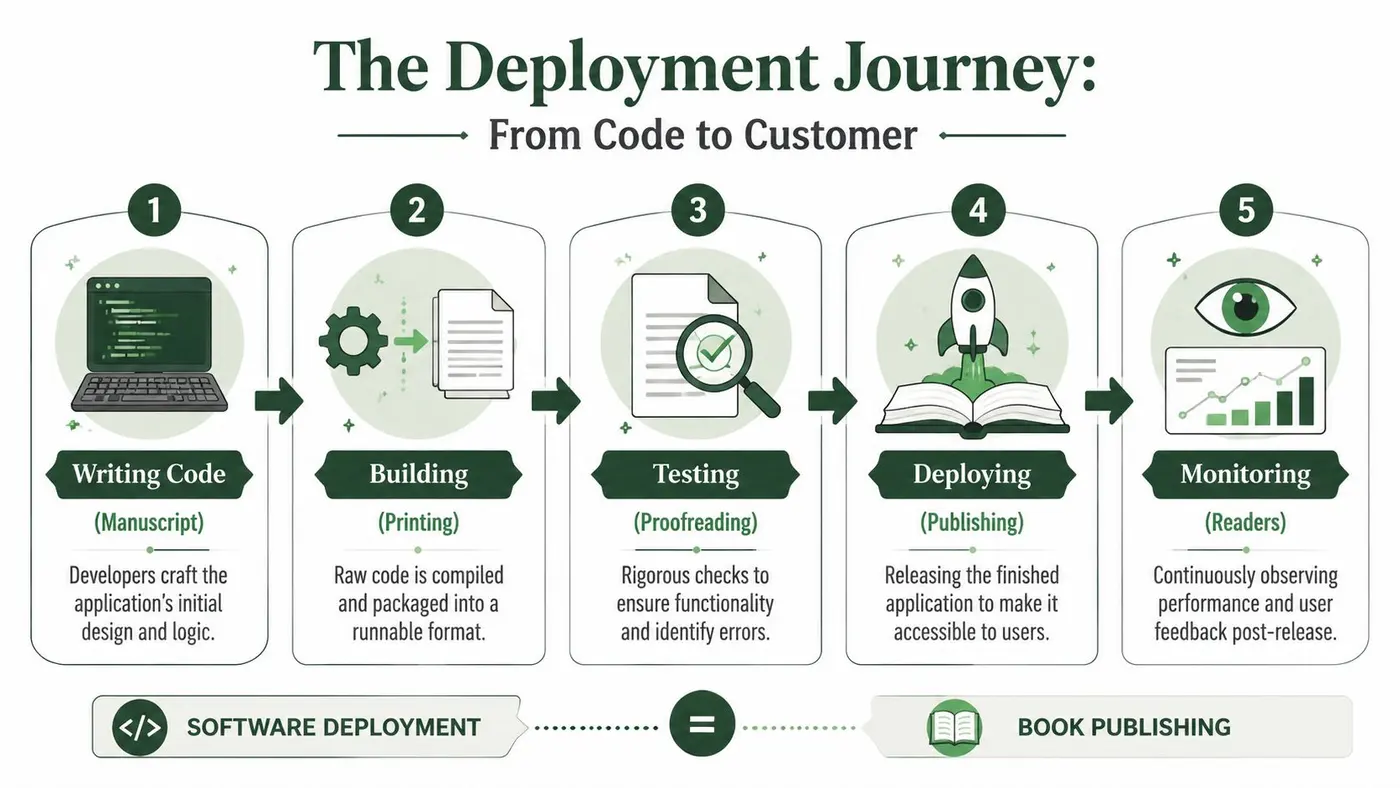
The five practical stages
Here is the mental model I use with new teammates. It helps separate writing software from getting it in front of customers.
-
Write the code
Someone changes the product. That could be a new feature, a bug fix, a design update, or a tracking event for a campaign. -
Build it
The source code is turned into something the target system can run. Depending on the stack, that might be compiled assets, a container image, static files, or a packaged service. -
Test it
The team checks that the software works before it reaches real users. This usually includes automated tests and hands-on checks in a test environment. If you want a clearer picture of how those environments differ, this practical guide to test environments is a useful reference. -
Deploy it
The built version is placed into the target environment and configured so it can run there. -
Monitor it
After the change goes live, the team watches for errors, slow pages, failed integrations, or broken tracking.
Why deployment is more than copying files
New teams often picture deployment as uploading the latest code to a server. That is only the visible part. The work that matters is making the software behave correctly in its new home.
A useful comparison is moving a restaurant from a test kitchen into a busy downtown location. The recipes may be the same, but service still fails if the ovens are wired wrong, the suppliers are missing, or the payment terminal cannot connect. Software behaves the same way. Code can be correct and still break during deployment because the environment around it is different.
That work often includes:
- Configuration: setting environment variables and service options
- Connections: linking the app to databases, APIs, and third-party tools
- Migrations: updating data structures when the new version needs them
- Version control: knowing exactly what changed and how to reverse it if needed
The essential work is making the software behave correctly in the environment where customers will use it. That is why deployment problems often show up as business problems, not just technical ones.
A simple example
Say a marketer wants to test a new product page headline.
A developer adds the experiment logic. The team builds the updated site, checks that the page renders correctly, and confirms the analytics event still fires. Then they deploy the change so real visitors can be included in the test.
If the new headline appears but conversion tracking stops, the code shipped, but the deployment did not do its full job. The team can no longer trust the experiment data. That is the connection many definitions miss. Safe deployment does not only help engineers ship code. It helps product and marketing teams learn which version works.
Understanding Your Environments Staging vs Production
The safest teams don't push changes straight from a laptop to the live site. They use environments. Think of them as separate places where the software can run under different levels of risk.
Production is the live environment. Customers use it. Revenue depends on it. Staging is the dress rehearsal. It should behave like production, but without exposing mistakes to the public.
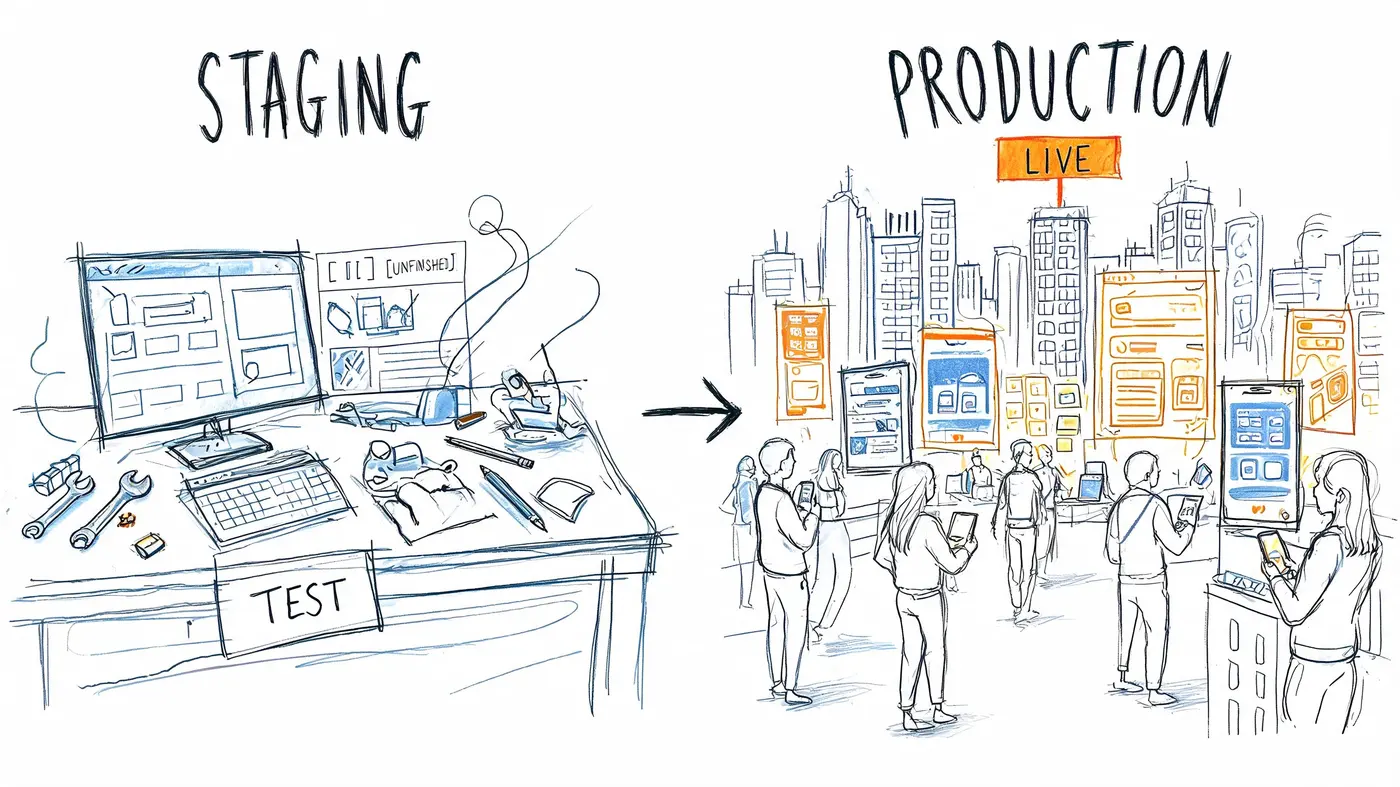
The dress rehearsal analogy
If you were opening a play, you wouldn't invite the paying audience to watch the first run where props are missing and cues are late. You'd rehearse in a realistic setting first.
That's what staging is for.
A team can use staging to check:
- Visual behaviour: Does the page look right on common devices?
- Functional behaviour: Do forms submit, buttons work, and APIs respond?
- Tracking quality: Are analytics, goals, and experiment events recorded properly?
- Operational fit: Are the correct settings enabled for the target environment?
Why this matters for experimentation
In web experimentation, staging is essential for those who value trustworthy results. The experiment might appear to run correctly while the measurement behind it fails without any visible warning.
The deployment model commonly used in experimentation pushes changes from local development to staging to production, moving left to right so teams can validate experiment logic and conversion tracking before release, as described in Mimo's deployment glossary.
Practical rule: If an A/B test is visible but the conversion event is broken, you haven't launched an experiment. You've launched confusion.
That risk is exactly why teams keep environments separate. You want to catch the broken purchase event, missing API key, or misconfigured script in staging, not after the board asks why yesterday's test has no usable data.
Staging and production side by side
| Environment | Who uses it | Main purpose | Risk if it breaks |
|---|---|---|---|
| Staging | Internal team | Validate behaviour before release | Delay and rework |
| Production | Real users | Deliver the live experience | User frustration, lost trust, bad data |
If you're building your team's process from scratch, this practical guide to test environments is a useful reference because it turns the abstract idea of “separate environments” into concrete testing habits.
Common Deployment Strategies Explained
A campaign is ready. Design signed off, copy approved, tracking plan agreed. The last question is operational: how do you release it without breaking checkout, polluting experiment data, or forcing support to explain a bug to customers?
That is what a deployment strategy answers. It is the method your team uses to put change in front of real users while controlling risk. For engineers, that means uptime and rollback. For product managers and marketers, it means something just as practical: can we launch a test, trust the data, and change course quickly if results or user behaviour look wrong?
A restaurant rollout works as a useful comparison. A chain can introduce a new menu item in every branch at once, in a few branches first, or in a parallel setup before the public switch. Software teams make the same kind of choice.
Rolling updates
A rolling update replaces the old version in stages.
Instead of switching the whole application at once, the team updates one server, container, or instance at a time. During that window, some users may reach the old version while others reach the new one.
That trade-off is often acceptable for low-risk changes because the release stays steady and infrastructure costs stay modest. The catch is consistency. If a marketer is checking a landing page and a PM is reviewing analytics at the same moment, they may be looking at different versions briefly.
Blue-green deployment
Blue-green deployment keeps two near-identical production environments available. One is live. One holds the new release.
A theatre set swap is a good way to picture it. The audience watches the current scene while the next set is built behind the curtain. When the new set is ready, the spotlight moves. If something is wrong, the crew can return to the previous set quickly.
That clear switch makes blue-green deployment easier to explain across teams. Engineering gets a cleaner rollback path. Product and marketing get a more predictable launch window, which matters when an ad campaign, pricing test, or homepage experiment is timed to the minute.
Canary releases
A canary release exposes the new version to a small percentage of real users first.
The benefit is controlled exposure. You are testing in production, but you are not placing the full audience at risk. If errors rise, pages slow down, or conversion tracking starts failing, the team can stop the rollout before the issue affects everyone.
Canary releases are especially useful when a change looks safe in testing but may behave differently under real traffic. A checkout flow, recommendation engine, or personalisation feature often falls into that category.
A/B testing
A/B testing is usually framed as a growth or optimisation method, but it also depends on deployment discipline. The technical pattern is simple: different user groups receive different versions, and the team measures what happens next.
That connection is easy to miss. A marketer may call it an experiment. An engineer may call it traffic splitting or feature delivery. In practice, both groups are talking about the same operational question: how do we show one version to some users, another version to others, and keep measurement accurate enough to make a decision?
Research from Google Cloud's 2023 DORA report has repeatedly tied stronger delivery performance to better organisational outcomes. For startup teams trying to turn ideas into learnings quickly, release process matters because each delay stretches the time between hypothesis and answer. For a founder or team lead looking at the bigger operational picture, DevOps best practices for startup founders gives a helpful overview of how release habits affect speed and reliability. For the experimentation side, Econsultancy's coverage of A/B testing and conversion optimisation is a better place to verify performance claims than repeating unattributed headline numbers.
The practical lesson is straightforward. Deployment strategy is part of experimentation strategy. If releases are risky, teams test less. If releases are predictable, teams can run more experiments, learn faster, and make product and campaign decisions with less guesswork.
Deployment Strategy Comparison
| Strategy | How It Works | Pros | Cons |
|---|---|---|---|
| Rolling update | Replaces old instances gradually | Lower disruption, no big cutover | Mixed versions can be live at once |
| Blue-green | Runs old and new environments side by side, then switches traffic | Fast rollback, clean switch | Higher infrastructure overhead |
| Canary | Sends a small share of users to the new version first | Limits exposure, good for real-world validation | More monitoring complexity |
| A/B testing | Serves different variants to different user segments | Strong for learning, product and marketing optimisation | Needs careful tracking and statistical discipline |
Match the rollout method to the cost of failure. A homepage headline test and a payment-flow rewrite should not be released with the same level of caution.
Automating Releases with a CI/CD Pipeline
A marketer is waiting for a landing page test to go live before a campaign starts at 9 a.m. A PM needs a pricing update published before sales outreach begins. A developer has fixed a signup bug that was blocking conversions overnight. If releasing those changes depends on one person manually copying files, running scripts from memory, and hoping nothing was missed, the whole business is working with unnecessary risk.
That is why teams use a CI/CD pipeline.
CI/CD stands for Continuous Integration and Continuous Delivery or Continuous Deployment. It works like an assembly line for software. A change enters at one end, and the pipeline runs the same checks and release steps every time so the team can trust the result.
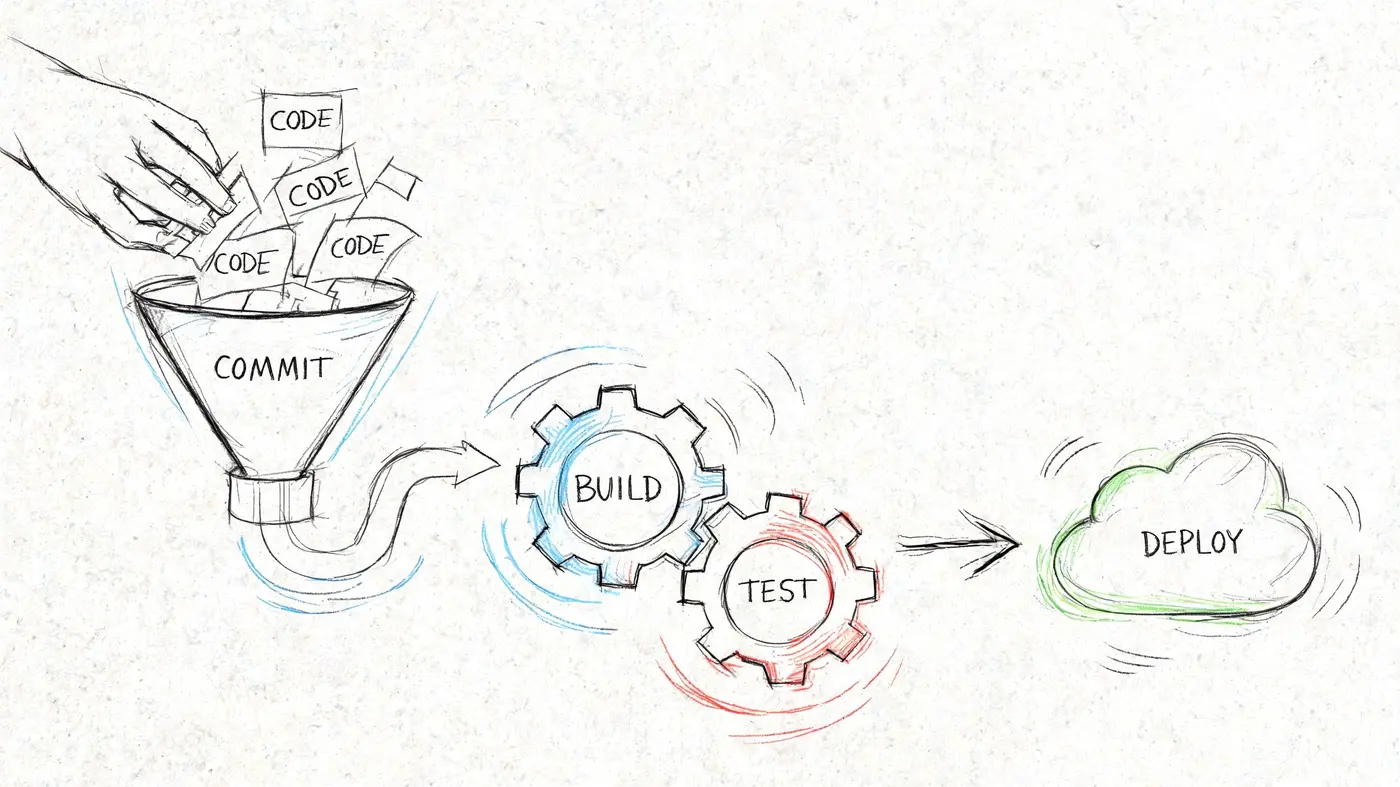
What the pipeline usually does
A typical pipeline handles a sequence like this:
- Integration: code is merged into a shared codebase
- Build: the application is packaged into a deployable artefact
- Testing: automated checks run against the change
- Promotion: the build moves into staging or another review environment
- Deployment: the change is released, either automatically or with approval
The value is consistency.
A pipeline runs the same process on a quiet Tuesday and during a high-pressure launch. It does not rely on someone remembering every command or every checklist item. That repeatability matters far beyond engineering. It is what lets product, marketing, and support plan around releases with fewer surprises.
For experimentation teams, deployment becomes a business tool instead of a backend detail. If every release is small, checked, and predictable, you can ship a new headline variant, pricing message, or signup flow change without turning each test into a mini launch event. Teams also need to handle user data carefully while doing that work, especially when release changes affect tracking or personal information. A clear product privacy approach helps keep experimentation aligned with customer trust.
Why mature teams care about deployment frequency
One useful signal of pipeline health is deployment frequency, one of the DORA metrics discussed earlier in the article. The point is not to chase a big number. The point is to reduce the cost and stress of releasing change.
Teams with reliable pipelines can ship smaller updates more often. That usually means less waiting, faster feedback, and fewer giant releases packed with unrelated changes. It also helps non-engineering teams. A PM can validate a product tweak sooner. A marketer can launch an A/B test while the campaign is still relevant. A growth team can stop guessing and start learning from live behavior.
High-performing engineering organisations often deploy many times a day across different services. You do not need that pace to benefit from CI/CD. Even a smaller company gets real gains when releases stop being rare, fragile events and start becoming routine.
If you want a founder-friendly explanation of how smaller teams put these habits in place, this guide on DevOps best practices for startup founders is worth a read.
Continuous delivery versus continuous deployment
People often blur these terms together, but they describe two different release choices.
- Continuous delivery means the software is kept in a deployable state, but a person decides when it goes live.
- Continuous deployment means every change that passes the pipeline can be released automatically.
The better choice depends on the type of work. A team updating internal UI text might be happy with automatic releases. A team coordinating a pricing change with ads, sales enablement, and legal review may want human approval before production. Neither approach is automatically better. The fundamental question is how much confidence your testing, monitoring, and organisational process can support.
A short visual helps if you want to see the rhythm of modern pipelines in action:
Monitoring Security and Rolling Back Safely
A deployment can look fine at 10:00 and still be harming the business by 10:05.
A new release goes live. The homepage loads. Checkout still opens. No alarms fire. Then a marketer notices paid traffic is no longer tied to conversions, or a PM sees experiment data drifting because one event stopped firing on mobile. The system is up, but the release is not healthy yet.
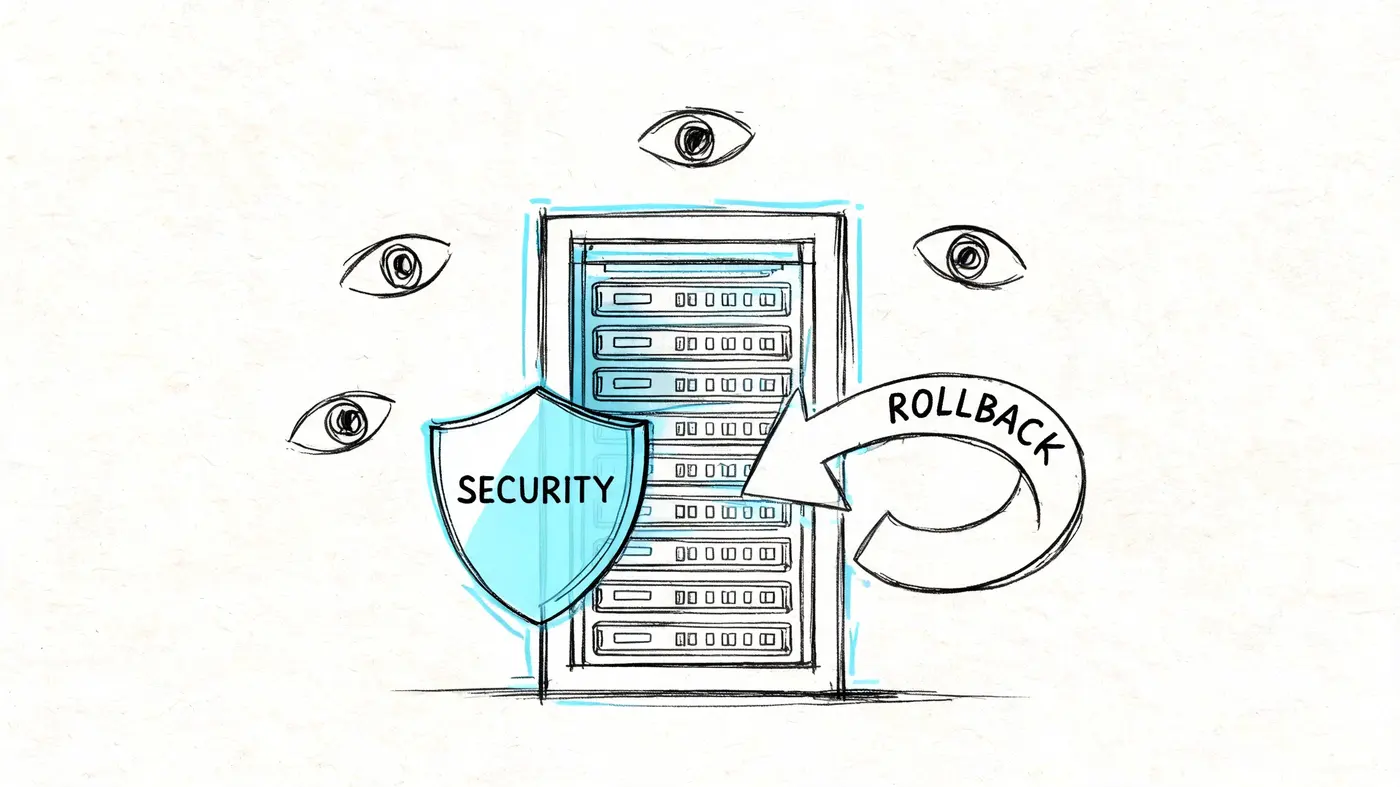
What to monitor straight away
The first few minutes after deployment are like watching a plane just after takeoff. You do not only care that it left the runway. You care that it is climbing normally, the instruments agree, and the passengers are still on the intended route.
That is why post-release checks should cover both technical signals and business signals.
Look at:
- Errors: Are pages returning failures, forms breaking, or APIs timing out?
- Performance: Did the release make key pages slower or interactions laggy?
- Tracking: Are conversions, purchases, and experiment events still attributed correctly?
- Security posture: Did a new dependency, script, or config change create risk?
This matters beyond engineering. If an experiment ships with broken tracking, the growth team may pause a winning test or scale a losing one. If a pricing page slows down, paid acquisition can become less efficient even though the deploy "worked."
For teams shipping SaaS products, security checks should sit inside normal release hygiene. A practical overview of hosted application testing is available in this piece on Affordable Pentesting solutions.
Silent failures are the expensive ones
Outages are obvious. Silent failures are harder.
A release can keep the site online while breaking the parts the business depends on: consent banners, revenue events, experiment assignments, CRM handoffs, or checkout analytics. That is why healthy teams verify a few customer journeys by hand after deployment, even when dashboards look calm.
For product managers and marketers, this is the part that often feels abstract until an A/B test result stops making sense. Blue-green deployment works a bit like opening a second shop next door before sending customers in. Monitoring tells you whether the new shop is taking orders correctly, charging the right amount, and recording sales in the right ledger. Without that check, traffic can move successfully while measurement fails.
If your deployment touches consent, event collection, or user data handling, review the promises described in your privacy policy guidance and confirm the live setup still matches them.
A calm dashboard can still hide broken business logic.
Rollback is a safety system
Rollback means returning to the last stable version quickly and predictably. Good teams plan it before release day, the same way a venue plans fire exits before opening the doors.
That plan should answer four practical questions:
-
What triggers a rollback?
Error spikes, failed health checks, broken checkout, missing experiment events, or corrupted attribution. -
Who can approve it?
Name the owner in advance so nobody waits through an incident for a chain of Slack messages. -
How is it executed?
Revert the build, shift traffic back, disable the feature flag, or restore the last stable environment. -
What gets checked after rollback?
Confirm the customer journey, analytics, and security controls are back to normal before closing the incident.
Rollback is not an admission that the team failed. It is controlled risk management. The faster you can reverse a bad release, the safer it becomes to ship changes that support campaigns, product launches, and A/B tests without putting revenue or trust at risk.
Deployment in Practice How to Run Web Experiments
A web experiment often looks simple on a planning slide. Change a headline. Show a new button color to half of visitors. Measure conversions. In production, it is closer to changing the signs in a busy airport while passengers are already walking to their gates. The wording has to appear for the right people, at the right time, without slowing anyone down or sending them to the wrong place.
That is why deployment matters to marketers, product managers, and developers alike. An experiment is only useful if three things stay true at the same time. Users get the intended experience, traffic is split correctly, and the measurement behind the test remains accurate. If any one of those fails, the team can end up debating results from a broken test rather than learning from a real one.
What a safe experiment deployment looks like
A careful rollout usually includes four checks:
- Validate the variant first: confirm the new headline, layout, or call to action renders correctly across the pages and devices that matter
- Confirm the measurement layer: make sure views, clicks, purchases, and revenue events are attached to the correct variant
- Protect performance: keep extra scripts light and avoid visible flicker that makes the page feel unstable
- Limit initial exposure: start with a smaller audience when the change affects high-value journeys such as product pages, lead forms, or checkout
That last point is where deployment strategy becomes practical for experimentation. A canary rollout works like opening a new store entrance for a small group before sending everyone through it. You watch how people move, check whether the signs make sense, and fix problems before the full crowd arrives. In testing, that means exposing a smaller share of traffic first so the team can catch tracking bugs, layout issues, or performance regressions before they distort the experiment.
Why this matters beyond engineering
A slow or unstable deployment does more than annoy users. It can corrupt the business decision that follows. If one variant flickers into place late, or if purchases are logged under the wrong branch, the winning result may be the least broken version.
That matters for growth teams because experiment quality sits at the intersection of statistics and operations. You need enough traffic to reach a reliable conclusion, and you need a release process that preserves the integrity of the test while that traffic flows through it. If you are checking both before launch, this guide on how to calculate sample size pairs well with deployment planning.
A successful experiment deployment does not just ship a variation. It protects site speed, keeps reporting trustworthy, and gives marketers and PMs a clean read on what customers actually responded to.
If you want to run experiments without hurting site speed or reliability, Otter A/B is built for that workflow. Its lightweight setup, zero-flicker delivery, precise traffic splitting, and clear reporting make it easier for marketers, PMs, and developers to launch tests safely and learn faster.
Stop guessing
Ready to start testing?
Set up your first A/B test in under five minutes. No credit card required.
- 14-day free trial
- No credit card required
- Cancel anytime