How to Calculate Sample Size: A 2026 Guide for A/B Testing
Learn how to calculate sample size for valid A/B tests. Master power, MDE, and formulas to ensure trustworthy experimental results with Otter A/B in 2026.

You launch a test on Monday. By Wednesday, Variant B looks ahead. By Friday, the gap narrows. Someone in Slack asks whether you should call it early, roll it out, and move on.
That moment is where a lot of A/B programmes go wrong.
Most bad testing decisions don't come from poor ideas. They come from poor measurement. Teams change a headline, CTA, layout, or offer, then rely on intuition to decide whether they've seen enough data. On a Shopify store or WooCommerce site, that usually means one of two mistakes: stopping too early and backing a false winner, or letting a weak test drag on and burn valuable traffic.
Sample size is what turns that guesswork into a plan. If you know how to calculate sample size before launch, you know roughly how much evidence you need, what trade-offs you're making, and whether the test is even worth running in the first place.
Why Your A/B Test Results Might Be Misleading
A familiar scenario. A marketer changes the hero copy on a product page, splits traffic evenly, and checks results every morning. After a few days, one variant appears to be winning. The temptation is obvious: ship the winner, report the uplift, and start the next experiment.
That's exactly how false confidence sneaks in.
If the sample is too small, normal variation can look like a meaningful result. If the sample is larger than necessary, you can waste weeks sending traffic to a version that doesn't deserve it. Both outcomes hurt. One gives you bad decisions dressed up as insight. The other slows down learning.
The real problem isn't maths fatigue
Many ecommerce teams don't ignore sample size because they think statistics are irrelevant. They ignore it because they're trying to move quickly. A fast-moving ecommerce team wants practical answers, not a lecture in probability theory.
But there's one number worth remembering. With a 5% margin of error, 95% confidence, and the conservative assumption of 0.5 for the population proportion, the required sample size comes out at about 385 participants per variant, according to SurveyMonkey's sample size explanation. That same guide also notes that if you want to double precision, you need four times the sample.
That's why “we'll just wait a bit longer” isn't a strategy. Precision gets expensive quickly.
Practical rule: If you haven't defined how much data you need before launch, you're not running a disciplined experiment. You're watching a chart and hoping it settles in your favour.
Why teams misread early winners
Three things usually sit behind misleading A/B results:
- Early volatility: The first stretch of traffic often swings harder than the final result.
- Weak effect assumptions: Teams test tiny changes while hoping for a clear signal.
- Error blindness: They don't think seriously about false positives and false negatives until after the test disappoints.
If you need a clean explanation of those errors in plain English, this guide on Type I vs Type II errors is worth reading before you launch anything important.
The core point is simple. Sample size isn't a box to tick after you build a variant. It's the part that decides whether your conclusion deserves trust at all.
Understanding the Key Concepts Before You Calculate
Most teams jump straight to a calculator. That's backwards. The calculator only reflects the assumptions you feed into it, and weak assumptions produce weak plans.
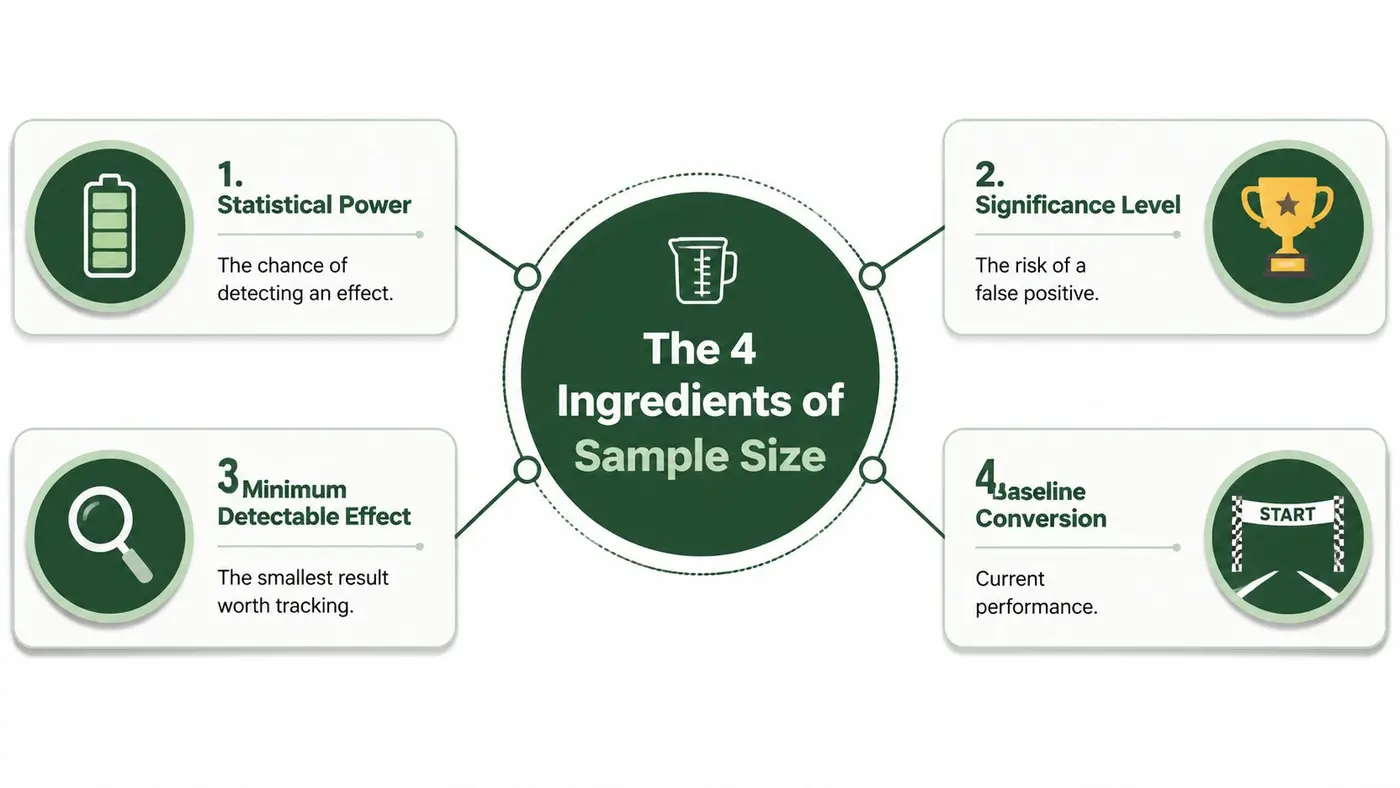
Baseline conversion
Your baseline conversion rate is your starting point. It's the current performance of the page, funnel step, or experience you're testing against. Everything else in your sample size calculation depends on that base.
Low-converting experiences require higher traffic volumes to detect subtle improvements. While a minor absolute shift can be commercially significant, it is statistically more difficult to distinguish from random noise.
For teams running conversion tests on Shopify stores, planning often gets realistic very quickly. If your add-to-cart rate or checkout completion rate is lower than you'd like, a subtle copy tweak probably won't produce a fast, decisive result.
Minimum detectable effect
The minimum detectable effect, usually shortened to MDE, is the smallest change worth caring about. This is the most strategic input in the whole process.
A lot of teams choose an MDE emotionally. They pick a tiny uplift because they'd love to find one. The platform doesn't care what you'd love to find. It only cares whether the traffic volume can support that ambition.
A good MDE is tied to business value. If the change wouldn't alter revenue, margin, lead quality, or funnel efficiency in a meaningful way, it may not be worth testing as a standalone experiment.
Small MDEs lengthen tests. Bigger, bolder changes usually shorten them because the signal is easier to detect.
One mistake shows up repeatedly in ecommerce: confusing relative lift with absolute lift. A low baseline makes this especially dangerous. In the example cited by PMC, when baseline conversion is 2%, detecting a 10% relative improvement means detecting only a 0.2 percentage point absolute lift, which requires 3,500 to 4,200 samples per variant at 80% power. That's why so many tests look sensible in a planning doc and impossible in production.
Significance level
The significance level, often called alpha, is your tolerance for a false positive. In plain English, it's how willing you are to risk declaring a winner when there isn't one.
Most A/B teams work at the conventional threshold associated with 95% confidence. That doesn't remove risk. It sets a standard for how much evidence you require before acting.
If your team gets confused by confidence intervals, this explanation of what a confidence interval means in statistics helps translate the jargon into decision-making terms.
Statistical power
Power is your ability to detect a real effect when one exists. Teams often focus on significance and barely think about power. That's a mistake.
Low power creates a frustrating testing programme. Strong ideas appear inconclusive. Stakeholders lose patience. You start hearing that testing “doesn't work” when the actual issue is that the programme was underpowered from the start.
A useful way to think about the four ingredients together:
- Baseline tells you where you start
- MDE tells you what change matters
- Significance sets your evidence standard
- Power tells you how likely you are to spot a real winner
If one input is unrealistic, the whole plan drifts off course.
Sample Size Formulas for Proportions and Means
You'll almost always use a calculator in practice. Still, it helps to understand the machinery underneath it. Once the formula stops looking mysterious, it becomes much easier to spot bad assumptions and bad test plans.
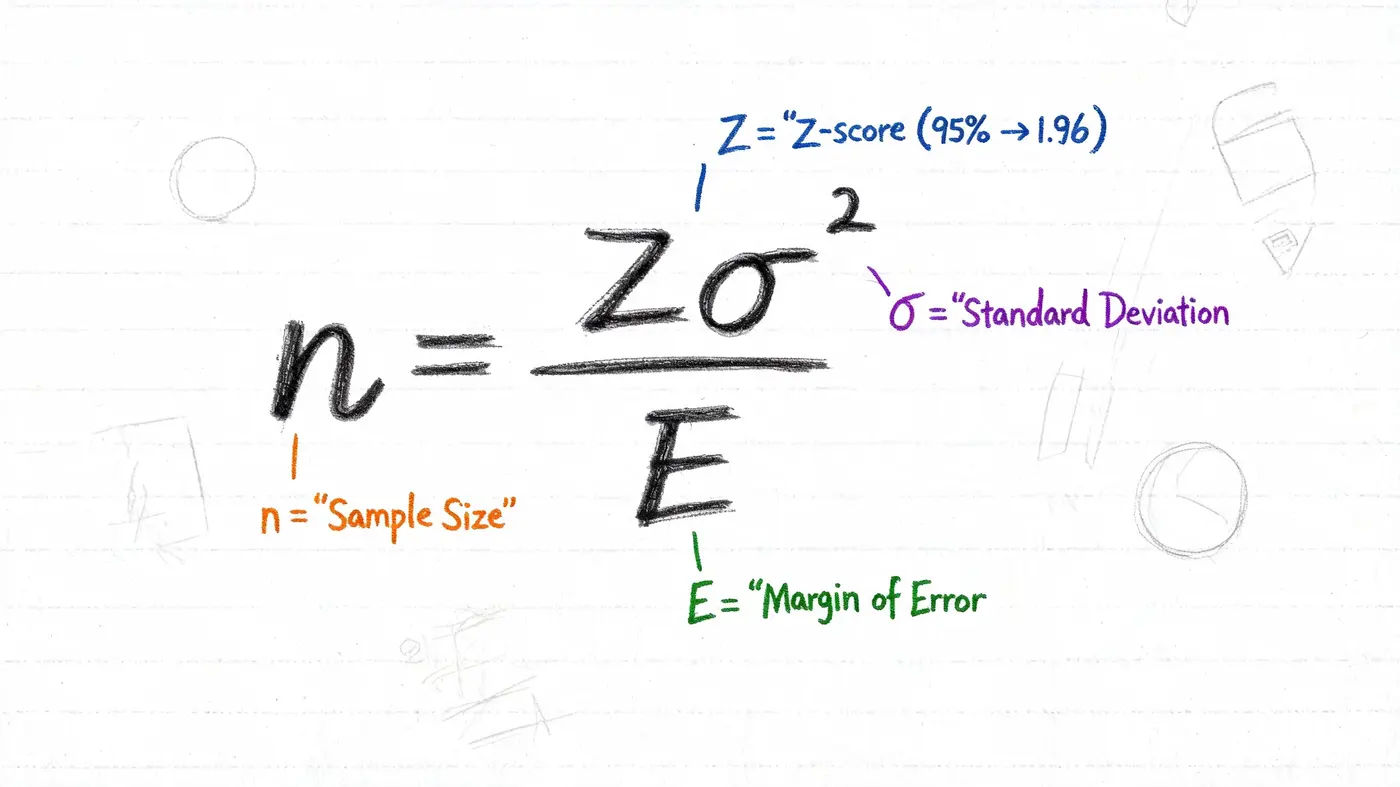
The formula most A/B tests use
For conversion-rate testing, the common setup is a comparison between two proportions. The standard sample size formula is:
n = ([Z_α + Z_β]² × [p₁(1-p₁) + p₂(1-p₂)]) / (p₁ - p₂)²
That formula looks dense, but each part maps cleanly to something you already know:
- p₁ is the baseline conversion rate
- p₂ is the expected conversion rate for the variant
- Z_α reflects your significance threshold
- Z_β reflects your target power
Using Z_α = 1.96 for 95% confidence and Z_β = 0.842 for 80% power, the Northwestern sample size presentation gives a worked example where detecting a change from 20% to 30% requires 291 subjects per group.
That example matters because it shows what really drives sample size: not the formula itself, but the gap you're trying to detect.
What the formula means in plain English
The denominator contains the difference between the two rates. If that difference is small, the denominator gets smaller and the required sample rises fast.
That's why cosmetic changes can be statistically awkward. You might care a great deal about a slight conversion improvement, but the maths still demands enough evidence to distinguish that improvement from ordinary fluctuation.
A/B testing maths rewards clarity. The clearer and larger the expected effect, the less traffic you need to prove it.
Proportions versus means
Most CRO teams work with proportions. Did the visitor convert or not? Did they click or not? Did they reach checkout or not?
Sometimes the main outcome is a mean instead. Average order value is a good example. In those cases, the logic is similar, but the calculation depends on spread rather than a simple yes-or-no conversion outcome. In practice, this means average-order-value tests can become messy if order values vary a lot.
That's one reason many practitioners evaluate both conversion metrics and revenue metrics together rather than treating average order value as a standalone testing target.
If your team is comparing testing approaches rather than just formulas, this primer on the difference between Bayesian and frequentist testing is useful context.
Why calculators still win in practice
No experienced CRO team sits around solving formulas by hand before every headline test. The point of learning the formula is judgement.
It helps you recognise:
- When the planned effect is too small
- When your baseline assumptions are unrealistic
- When the result will take longer than the business can tolerate
If you want a visual walkthrough before using a calculator, this explainer is a useful companion:
Once you understand what the variables mean, “how to calculate sample size” stops being a stats question and becomes a planning question. That's where good experimentation teams separate themselves from teams that just launch tests and refresh dashboards.
Using Sample Size Calculators and Quick Rules of Thumb
The practical workflow is usually simple. Pull your baseline conversion rate from analytics, decide what minimum improvement matters, choose your evidence threshold, and enter those values into a calculator.
That's the easy part. The hard part is staying honest about what the output means.
What calculators are good for
A calculator gives you a planning estimate. It tells you whether the proposed test is plausible given your traffic and your appetite for waiting.
If the number looks manageable, great. If it looks impossible, that's useful too. You've discovered a strategy problem before wasting design, dev, and traffic on a test that was never likely to finish with a clear answer.
A related planning exercise is financial scenario modelling. If your team also needs to pressure-test upside and downside before prioritising an experiment, it's useful to test financial assumptions using Monte Carlo alongside your experimentation plan.
A useful baseline rule
For broad proportion-based planning, Cochran's formula remains a practical benchmark. The Qualtrics guide to determining sample size notes that 385 samples per variant is the standard estimate for 95% confidence and a ±5% margin of error in large populations. It also shows that if the audience is finite, the modified formula can reduce that requirement. In the example with 10,000 monthly visitors, the estimate drops from 385 to about 368.
That won't rescue an underpowered low-traffic programme, but it's useful for smaller ecommerce sites with a defined audience.
Quick reference table
The exact sample size for your test depends on your assumptions and calculator setup, so the table below is best used directionally rather than as a final answer.
| Required Sample Size Per Variant (95% Significance, 80% Power) | |
|---|---|
| Baseline Conversion Rate | Interpretation for 10% Relative MDE, 15% Relative MDE, 20% Relative MDE |
| Low baseline | Needs the most traffic because small absolute shifts are hard to detect |
| Mid baseline | More manageable for standard landing page and funnel tests |
| Higher baseline | Usually easier to read, especially when the variant is a meaningful change |
If you want something more concrete than a directional table, use your actual baseline and MDE in a calculator rather than relying on generic benchmark charts. That's especially true on stores with volatile traffic sources, heavy promotion periods, or uneven product mix.
Field note: The fastest way to improve a calculator output isn't hunting for a different tool. It's choosing a test idea with a larger expected effect.
How to Handle Real-World Testing Constraints
Theory meets the mess in this scenario. You run the numbers, and the required sample size is far larger than the traffic available in a sensible time frame. The test would need to stay live through merchandising changes, campaign swings, stock variation, and all the other things that make clean experimentation difficult.
At that point, you have a business decision to make.
The three levers you can actually pull
When sample size requirements are too high, teams usually have only a handful of realistic options:
- Test a bigger change: A bolder offer, stronger layout shift, clearer CTA rewrite, or sharper positioning change is more likely to create a detectable effect.
- Run the test longer: This works, but long runtimes increase operational risk. Sites change while the test is still collecting evidence.
- Accept weaker sensitivity: You can lower your ambitions about what effects you'll detect, but that means some worthwhile improvements may never register decisively.
What doesn't work is pretending the traffic problem doesn't exist. That usually leads to half-finished tests, selective interpretation, and conclusions that collapse under scrutiny.
Why static sample sizes are only part of the story
Most guides stop at pre-calculating a fixed N and telling you not to peek. That's incomplete for modern experimentation programmes.
The overlooked issue is sequential analysis. The GeoPoll discussion of sample size gaps highlights a major problem in mainstream guidance: continuously monitoring results and stopping early can inflate Type I error risk, which means static, pre-calculated sample sizes don't automatically hold up in tools that check significance throughout the test.
That matters because most real teams do monitor continuously. They don't launch a test, disappear, and come back at the end. They check performance every day.
Most practitioners peek. The real question isn't whether they'll look. It's whether the testing method is built to handle that behaviour without breaking statistical validity.
What sequential testing changes
Sequential analysis doesn't mean sample size no longer matters. It means the old “set one fixed number and ignore the dashboard until you hit it” model no longer describes how many teams operate.
In practice, corrected frequentist approaches can allow teams to monitor results while protecting the decision threshold more carefully than a naive fixed-sample setup. The benefit is practical, not just academic. You may be able to end strong tests earlier while avoiding the false confidence that comes from uncorrected peeking.
That's especially important in environments where:
- Traffic is limited
- Merchandising changes often
- Seasonality can distort long tests
- Stakeholders want frequent updates
- Multiple variants compete at once
A note on A/B/n testing
The moment you add more than one challenger, the problem gets tougher. More variants can be useful creatively, but they split traffic and raise the complexity of the statistical decision.
For practitioners, that means two things. First, don't add variants unless each one represents a meaningful hypothesis. Second, expect stronger evidence requirements or longer runtimes when you widen the test.
If traffic is modest, a disciplined sequence of sharper A/B tests usually beats a crowded A/B/n setup full of small differences.
Putting It All Together with Otter A/B
The practical value of all this isn't in memorising formulas. It's in building a testing process that respects the maths without making your team slower.
That's where tooling matters.
A modern testing workflow should help you answer four questions quickly:
- Is this experiment likely to reach a decision?
- How strong is the evidence so far?
- Can we monitor results without corrupting the process?
- Did the winning variant improve the business metric that matters?
Otter A/B is built around that reality. Its frequentist z-test engine continuously evaluates experiments at a 95% confidence threshold, which means teams don't have to manually guess when the evidence is strong enough. That's a meaningful step up from static workflows where marketers export numbers into spreadsheets, check significance ad hoc, and argue about whether they've “probably seen enough”.
The other practical advantage is commercial context. Good CRO teams don't stop at clickthrough rate. They want to know whether a variant improved purchases, average order value, and revenue per variant, because a test that lifts a shallow metric while hurting value isn't a win.
That's particularly relevant for agencies and consultants who need to present outcomes clearly to clients. If you work in that model, shops like Full Circle Agency reflect the kind of partner environment where testing needs to be transparent, explainable, and easy to share with stakeholders who care more about commercial movement than statistical jargon.
The lesson is straightforward. Learn how to calculate sample size so you can plan responsibly. Then use a platform that handles the hard parts of monitoring and decisioning in a way that matches how teams work.
Sample size is where discipline starts. Reliable testing is what happens when the platform and the process support that discipline instead of fighting it.
If you want a faster way to run statistically sound experiments without wrestling with spreadsheets and stop-start decisions, try Otter A/B. It helps you launch tests quickly, monitor significance clearly, and judge winners based on business outcomes, not just surface-level clicks.
Stop guessing
Ready to start testing?
Set up your first A/B test in under five minutes. No credit card required.
- 14-day free trial
- No credit card required
- Cancel anytime