What Is a Confidence Interval in Statistics? A Simple Explainer
Struggling with what is a confidence interval in statistics? This guide breaks down how they work in A/B testing and how to interpret them for better decisions.

Let's be honest, statistics can feel a bit daunting. But when it comes to understanding your A/B test results, there’s one concept that's absolutely crucial: the confidence interval.
So, what is it? Put simply, a confidence interval gives you a range of plausible values for something you're trying to measure, like your true conversion rate. Instead of giving you a single, precise number that’s almost certainly wrong, it provides a "safe zone" where the real value most likely lives.
An Intuitive Guide to Confidence Intervals
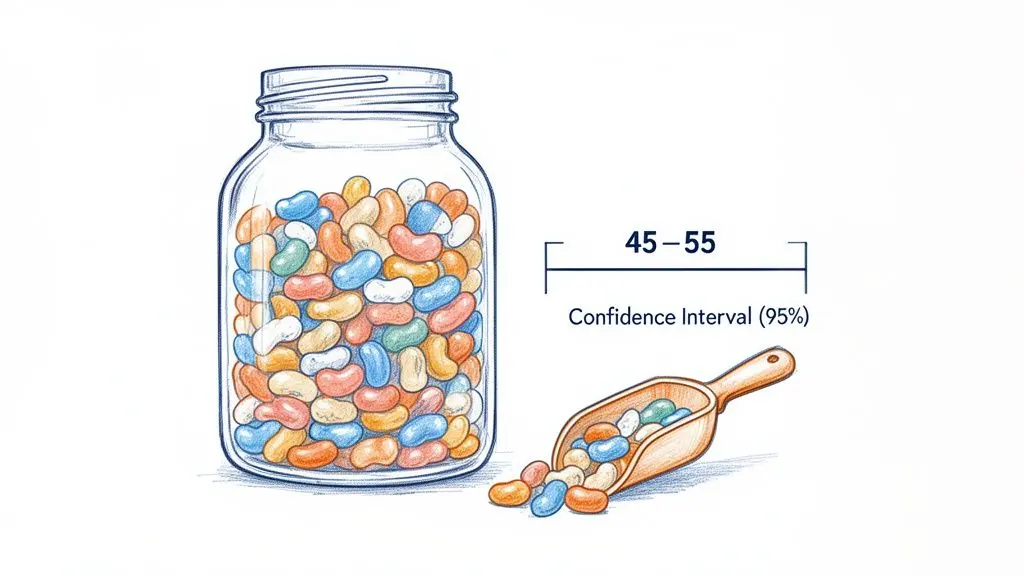
Picture a huge jar filled with thousands of jellybeans. Your goal is to figure out the average number of beans a scoop will grab. You dip in a scoop (your sample) and count them—you get 50.
Is the true average for that entire jar exactly 50? Probably not. That single number, what statisticians call a point estimate, is incredibly fragile. It's a guess, and a very specific one at that.
A confidence interval is a much smarter, more realistic way to answer the question. Instead of just saying "50," you can say something far more powerful: "I am 95% confident the true average number of jellybeans per scoop is somewhere between 45 and 55."
This range-based approach beautifully accounts for the natural uncertainty that comes with sampling. It paints a more honest and genuinely useful picture of what your data is telling you. In A/B testing, this is the difference between saying, "Variant B got a 5% lift," and the far more insightful, "We are 95% confident the lift from Variant B is between 2% and 8%."
Understanding the 95% Confidence Level
Now, what does being "95% confident" really mean? This is where many people get tripped up. It does not mean there’s a 95% chance that the true value is inside your specific interval.
The confidence level is all about the reliability of the method you used to create the range.
If you were to run your experiment or take a sample 100 times, and you calculated a 95% confidence interval for each of those attempts, you'd expect about 95 of those 100 intervals to contain the true value.
This is a subtle but critical distinction. We aren't making a wild claim about a single result; we're expressing our trust in a repeatable process. The 95% confidence level has become the gold standard in conversion rate optimisation (CRO) because it provides a strong, consistent benchmark for making decisions.
It strikes the perfect balance between the need for certainty and the practical realities of running a business. It's the framework that allows you to interpret results from platforms like Otter A/B and make data-driven decisions you can actually stand behind.
Confidence Interval Concepts at a Glance
To help you get comfortable with the terminology, here’s a quick breakdown of the key concepts you'll come across when working with confidence intervals.
| Term | Simple Explanation | Why It Matters in A/B Testing |
|---|---|---|
| Point Estimate | A single number guess (e.g., "a 5% conversion rate"). | This is your raw result, but it's rarely the full story. It's the starting point for your interval. |
| Confidence Interval | The range around your point estimate (e.g., "between 3% and 7%"). | It shows the real-world uncertainty of your result. A narrow interval means more precision. |
| Confidence Level | The reliability of the method (e.g., 95%). | This is your quality control. 95% is the industry standard for trusting an experiment's outcome. |
| Margin of Error | Half the width of your confidence interval. | It tells you how much "wiggle room" there is in your point estimate. A smaller margin is better. |
| Population | The entire group you want to know about (e.g., all your website visitors). | You can never measure everyone, which is why we use samples and confidence intervals to estimate. |
| Sample | The subset of the population you actually measured (e.g., your A/B test participants). | The size and quality of your sample directly impact the width and reliability of your confidence interval. |
Think of these terms as the building blocks for making smarter, more reliable decisions from your A/B testing data.
Why Confidence Intervals Matter in A/B Testing
Let's be honest about A/B testing: you aren’t testing a new headline or button on every single person who will ever visit your site. You're working with a small sample of your total audience. Because of this, there's always a degree of uncertainty—a gap between what your sample did and what your entire user base might do. This is called sampling error, and confidence intervals are the single best tool you have to manage it.
Think of them as your defence against being fooled by random chance.
Imagine you run a test for one day and your new variant boasts a 10% uplift in conversions. It's tempting to pop the champagne, but is that 10% real? A confidence interval cuts through the noise by giving you a range of plausible outcomes. For that 10% uplift, the interval might be something like "-2% to +22%."
That range tells you the real story. Since it dips into negative territory, you can't be certain your variant is an improvement at all. In fact, it could even be performing worse than the original. If you act on that single 10% number, you risk rolling out a change that actually tanks your conversion rate. That's a costly mistake known as a Type I error.
Shielding Your Decisions from Random Noise
This is where a confidence interval becomes your statistical safety net. By pairing it with a confidence level—usually 95% for A/B tests—you create a solid framework for making decisions. It means you’re using a method that, if repeated over and over, would capture the true result 95% of the time.
So, if your interval for the uplift is entirely positive (for instance, "+2% to +18%"), you have a statistically significant result. You can be confident the improvement is real.
This is the very heart of making data-driven design decisions instead of just gambling on a single, hopeful number. It’s how you ensure you’re investing time and money into changes backed by genuine evidence, not just wishful thinking.
Of course, the goal is always to move from uncertainty to confident action. Just as it's useful to learn the specifics behind a confidence level definition, it’s crucial to understand how sample size affects your interval. More data brings more precision, which leads to narrower, more actionable confidence intervals.
A great example of this comes from a University of Southampton analysis of a major crime survey. They calculated a 95% confidence interval for public trust in the police and found it was an incredibly tight range: from 13.4856 to 13.5675. The only reason they could achieve such precision was their massive sample size of over 42,000 people. You can read more in their analysis of the Crime Survey for England and Wales.
The same principle applies directly to your A/B tests. As more users flow through your experiment, your confidence interval will naturally shrink. A tighter interval gives you a much clearer picture of the variant's true impact, allowing you to declare a winner with confidence and drive real, measurable growth. Without it, you’re just flying blind.
Calculating a Confidence Interval for Your A/B Test
Now, let's pop the bonnet and see how the engine of a confidence interval actually works. While your A/B testing tool, like Otter A/B, handles all the heavy lifting for you, truly understanding your test results means getting to grips with the recipe behind them. We’ll focus on the calculation for a conversion rate, which is the bread and butter of most optimisation work.
The formula might look a bit academic at first, but it’s really just three simple ideas bolted together.
Confidence Interval = p̂ ± Z * SE
Let's unpack what each of these symbols means using a classic e-commerce example. Imagine we’re running a test on a new, much brighter “Add to Cart” button.
Identifying the Components
First up is p̂, pronounced "p-hat". This is just the statistician's shorthand for your sample conversion rate. It’s the raw result you see from your test – the number of people who converted, divided by the number of people who saw the variation.
- Example: Our new button was shown to 2,000 visitors, and of those, 180 clicked to add an item to their cart.
-
Calculation:
180 conversions / 2,000 visitors = 0.09 - So, our sample conversion rate (p̂) is 9%. This is our single best guess, or point estimate.
Next, we have the Z-score (Z). Think of this as your confidence setting. It’s a fixed number that corresponds to the level of confidence you want. It answers the question: "How many standard deviations do we need to stretch to capture the desired amount of certainty?" In A/B testing, 95% confidence is the undisputed industry standard.
- The Z-score for a 95% confidence level is always 1.96.
- If you wanted to be extra certain, you could use a 99% confidence level, which has a Z-score of 2.58.
We'll stick with 1.96. It offers a great balance, giving us a high degree of confidence without making our interval range impractically wide.
Finally, we need the Standard Error (SE). This is arguably the most important piece of the puzzle. It’s a measure of the statistical "wobble" in our result. Because we're only using a sample of our users (2,000 visitors), our 9% conversion rate is unlikely to be exactly the true rate. The standard error quantifies that uncertainty.
The formula for the standard error of a proportion is: SE = √[p̂(1-p̂) / n]
- p̂ = our sample conversion rate (0.09)
- n = our sample size (2,000 visitors)
Let's plug in our numbers from the button test:
-
p̂(1-p̂)=0.09 * (1 - 0.09)=0.09 * 0.91= 0.0819 -
p̂(1-p̂) / n=0.0819 / 2000= 0.00004095 -
√[p̂(1-p̂) / n]=√0.00004095≈ 0.0064
Our standard error (SE) is 0.0064, which is the same as 0.64%.
Putting It All Together
We've gathered all our ingredients:
- p̂ = 0.09 (our raw result)
- Z = 1.96 (our confidence setting)
- SE = 0.0064 (our measure of uncertainty)
The first step is to calculate the margin of error. This is the ± part of the interval and is found by multiplying our Z-score by the standard error.
Margin of Error = Z * SE = 1.96 * 0.0064 ≈ 0.0125 or 1.25%
Now for the final step: simply add and subtract this margin of error from our sample conversion rate (p̂).
-
Lower Bound:
0.09 - 0.0125= 0.0775 (or 7.75%) -
Upper Bound:
0.09 + 0.0125= 0.1025 (or 10.25%)
And there we have it. We can be 95% confident that the true, long-term conversion rate of our new button lies somewhere between 7.75% and 10.25%. This range gives us a far more honest and useful picture than the simple 9% point estimate ever could.
When you’re looking to make real business improvements, applying this same statistical rigour to other areas, such as your AI chatbot analytics, helps ensure that the gains you think you're seeing are real and not just a mirage in the data.
How to Interpret Your Confidence Intervals Visually
Let's be honest, you don't need a degree in statistics to make sense of your A/B test results. While the maths behind confidence intervals is important, their real value for conversion rate optimisation (CRO) is how simple they are to interpret visually.
Think of it this way: when you run a test, you get a confidence interval for your original version (the control) and another for your new version (the variant). Each interval is just a range of plausible results for that version. By placing these two ranges side-by-side, you can see the story of your test unfold.
This flowchart gives you a straightforward guide for what to do based on how the two intervals interact.
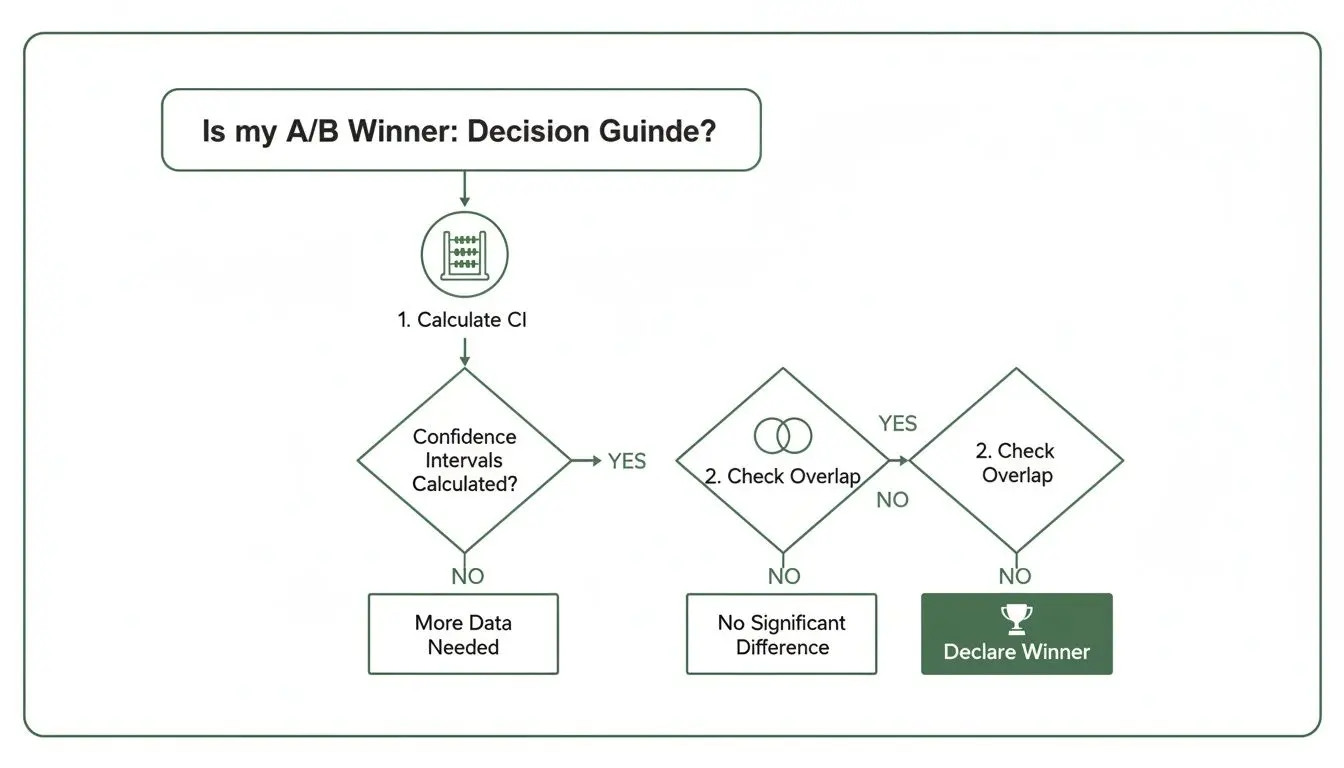
Ultimately, it all comes down to a single question: how much do the confidence intervals for the control and variant overlap? The answer tells you everything you need to know about statistical significance.
The Three Scenarios of Overlap
In any A/B test, you'll end up in one of three situations based on how the intervals look. Each one points to a clear decision.
-
No Overlap: A Clear Winner
- What it looks like: The entire range for your variant is higher than the entire range for your control. There is clear blue sky between them.
- What it means: This is the gold standard—a statistically significant win! You can be 95% confident that the variant is genuinely better.
- Your next move: Pop the champagne (or just a can of fizzy water) and roll out the winning version.
-
Complete Overlap: Inconclusive
- What it looks like: The two intervals are sitting almost perfectly on top of each other.
- What it means: You haven’t found a difference. Any small lift you might see is almost certainly just random noise, not a real effect.
- Your next move: Accept that this test was a dud. You can either stop the test and stick with the original or head back to the drawing board to brainstorm a new hypothesis.
-
Partial Overlap: More Data Needed
- What it looks like: The intervals overlap, but one is noticeably higher than the other. You can see a trend, but it isn't decisive yet.
- What it means: Your result isn't statistically significant yet, but it’s looking promising. The uncertainty is still too high, which is why the intervals overlap.
- Your next move: Be patient. Let the test continue to gather more data. As more users see the test, the intervals will shrink, and you'll hopefully see them separate into a clear winner.
The width of your confidence intervals is directly linked to your sample size. A bigger sample means more certainty, which translates to narrower intervals that are less likely to overlap. This makes it far easier to spot a real winner.
For a real-world example of this in action, look at the UK's 2001 Census. The Office for National Statistics managed to get a 95% confidence interval of just +/- 0.2% for the entire population of England and Wales. This incredible precision was only possible due to a massive sample size. As you can learn from the ONS data, huge amounts of data create incredibly tight confidence intervals.
For e-commerce sites using Otter A/B, the lesson is the same: getting enough traffic is crucial for shrinking your intervals and proving, with confidence, that your new design is truly better.
Confidence Intervals, P-Values, and Significance
When you're running A/B tests, you'll constantly hear about confidence intervals, p-values, and statistical significance. It's easy to get the impression they're all the same thing, but it's more accurate to think of them as close relatives. They all work together to answer one crucial question: is your test result meaningful, or is it just noise?
Let's start with the p-value. In simple terms, a p-value answers a very specific, hypothetical question: "If there was absolutely no difference between my control and the new variant, what’s the chance I’d see a result this dramatic just because of random luck?"
A small p-value—the industry standard is typically below 0.05—tells you that your result probably wasn't a fluke. This is what we mean when we say a result is statistically significant.
The Direct Connection
So, how do confidence intervals fit into all of this? The connection is actually very direct and cuts through a lot of the confusing jargon.
If your 95% confidence interval for the uplift does not contain zero, your p-value will be less than 0.05, and your result is statistically significant.
Think about that for a moment. If your test shows an uplift with a confidence interval of +2% to +8%, the entire range is positive. This means the "range of plausible values" for the true uplift doesn't even include the possibility of zero effect or, worse, a negative effect. Your data is pointing strongly towards a real improvement.
On the other hand, what if your interval is -3% to +7%? Because this range includes zero, it suggests that it’s plausible there’s no real difference at all. In this scenario, your p-value will be greater than 0.05, and the result is not statistically significant. You can learn more about these nuances in our complete guide to testing statistical significance.
This isn't just A/B testing theory; it’s the same logic high-stakes organisations use to make decisions under uncertainty. The Bank of England, for instance, often reports GDP growth with a confidence interval, like 0.6% +/- 0.2%. It provides a reliable range, not just a single, misleading number. You can even explore how central banks use these datasets themselves.
For Otter A/B users on Shopify or WooCommerce, seeing a result like +15% +/- 5% offers the same kind of dependable insight. It connects your actions to a predictable range of outcomes, giving you the confidence to make the right call.
Once you grasp how these three concepts are intertwined, they stop being intimidating statistical terms. They become a practical toolkit for telling a clear story about your results and whether you can truly trust your data to declare a winner.
Common Mistakes and Practical Tips
Getting your head around the theory of confidence intervals is one thing. But using them correctly in the wild—and avoiding the traps that lead to bad business decisions—is a whole different ball game. Let’s walk through the most common slip-ups I see and how you can run A/B tests with genuine rigour.
The biggest misunderstanding, by far, is thinking a single 95% confidence interval has a 95% chance of containing the true conversion rate. It sounds intuitive, but it’s not quite right. The 95% actually refers to the reliability of the method you used to calculate the interval over the long run, not the probability of any single result.
Once you’ve calculated an interval, the true value is either in there or it isn’t—you just don’t know which. The confidence is in your process, not in a single outcome.
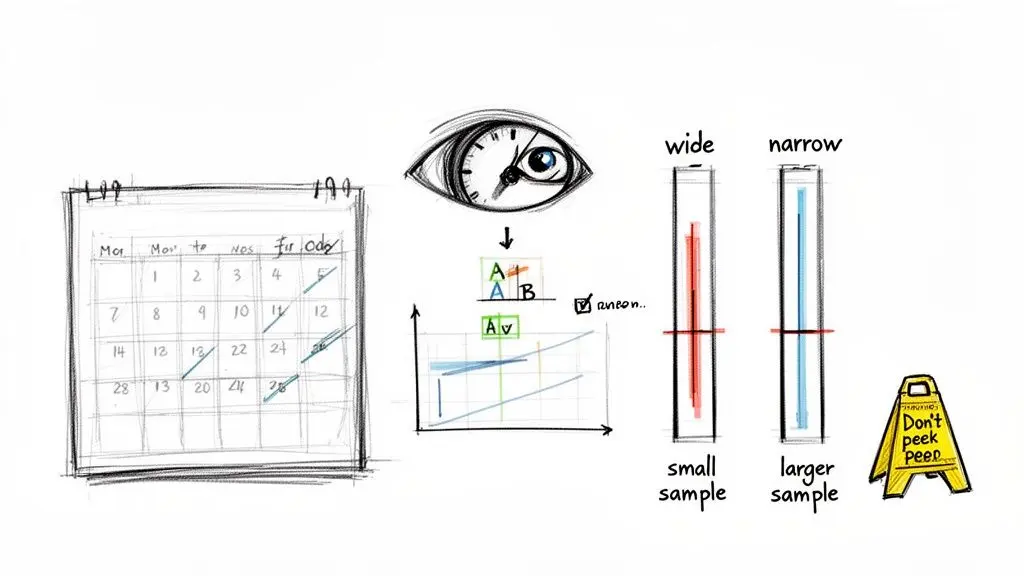
Another classic mistake is peeking at your test results while they’re still running. It’s incredibly tempting to call the test as soon as one variant noses ahead. But doing this completely torpedoes your statistical integrity. Stopping a test based on an early peek massively inflates your chances of being fooled by random noise, a classic mistake known as a Type I error. If you want to go deeper on this, we've got a full guide on what is a Type I error.
Practical Tips for Trustworthy Results
If you're serious about building a data-driven culture, you have to commit to the science behind the stats. This means making a few promises to your team before you even think about launching a test.
-
Determine Your Sample Size First: Before anything goes live, your first job is to use a sample size calculator. This tells you exactly how many visitors you need for each variation to have a fighting chance of detecting a real effect. Don't even think about stopping until you hit that number.
-
Bigger Samples, Tighter Intervals: Your sample size is the single biggest lever you can pull to influence the width of your confidence interval. More data leads to a narrower, more precise range. A wide interval like -5% to +15% screams uncertainty, whereas a tight one like +6% to +8% gives you a much clearer signal to act on.
-
Resist the Itch to Stop Early: Make a pact. No one declares a winner until the pre-determined sample size is met and the results are statistically significant. Patience is what separates teams that find real uplifts from those that just chase lucky flukes.
Frequently Asked Questions
Still have a few questions? You’re not alone. Let’s tackle some of the most common queries CRO specialists have when they're getting to grips with confidence intervals.
What Is the Difference Between a 95% and a 99% Confidence Interval?
A 99% confidence interval will always be wider than a 95% interval for the exact same data. Think of it as casting a wider net. To be more certain you’ve caught the true value, you simply have to cover a larger area.
While being 99% certain sounds impressive, the trade-off is precision. That wider net often gives you a range so broad it’s not particularly useful for making a business decision. For most A/B testing platforms, a 95% confidence level is the standard because it offers a great, practical balance between being confident and being precise.
Can a Confidence Interval for a Conversion Rate Include Negative Numbers?
For a single variant’s conversion rate, absolutely not. A conversion rate can only be a positive value between 0% and 100%, so its confidence interval will always fall within that range.
However, it’s a different story for the confidence interval of the difference between two variants. That range absolutely can, and often does, include negative numbers. If the interval for the uplift is, say, -1% to +5%, it tells you the real difference could plausibly be negative (a loss), zero, or positive (a gain). It’s a classic sign that you haven’t found a statistically significant winner.
Why Did My Confidence Interval Get Wider After More Traffic?
This one is a common head-scratcher, but it can definitely happen, especially early on in a test. The width of an interval is a tug-of-war between two things: your sample size and the variability (or variance) in your data.
If your first handful of visitors all acted in a very similar way, but later visitors showed more varied behaviour, that sudden jump in variance can temporarily overpower the effect of the increased sample size, making the interval wider. Don't panic. As you collect more data, the law of large numbers eventually takes over, and the interval will reliably start to narrow again.
Make every decision data-driven with Otter A/B, the lightweight A/B testing platform that helps you find a winner without slowing your site down. Start your free trial.
Stop guessing
Ready to start testing?
Set up your first A/B test in under five minutes. No credit card required.
- 14-day free trial
- No credit card required
- Cancel anytime