Your Heat Map Creator Guide to Smarter A/B Tests
Use our heat map creator guide to understand user behaviour. Learn to set up tracking, analyse data, and turn insights into winning A/B tests with Otter A/B.


You're staring at a dashboard that looks tidy enough to reassure a stakeholder and vague enough to frustrate the person doing the work. The pricing page gets traffic. The lead form gets views. Conversion is weaker than it should be. Bounce is higher than you expected. None of that tells you why visitors hesitate, where they get distracted, or what they thought was clickable but wasn't.
That's where a heat map creator earns its place. Not as another reporting layer. As a way to see behaviour before you start changing layouts, copy, or calls to action. Good CRO work starts when you stop asking only “what happened?” and start asking “what did people try to do?”
A junior team will often jump straight from analytics to redesign. That's usually backwards. Heat maps help you diagnose the page first, then build cleaner hypotheses for testing. If you use them well, they become the missing link between messy user behaviour and a structured A/B testing programme.
Beyond Analytics When Numbers Arent Enough
Standard analytics are good at counting outcomes. They're weak at explaining interaction. You can see that a page underperforms, but you can't see whether users ignored the main CTA, stalled at a pricing table, or kept clicking a design element that looked interactive and wasn't.
A heat map creator changes the question you ask. Instead of treating a page as a single conversion number, you treat it as a sequence of micro-decisions. Where did attention cluster? What got skipped? Which section absorbed clicks it didn't deserve?
What heat maps reveal that dashboards miss
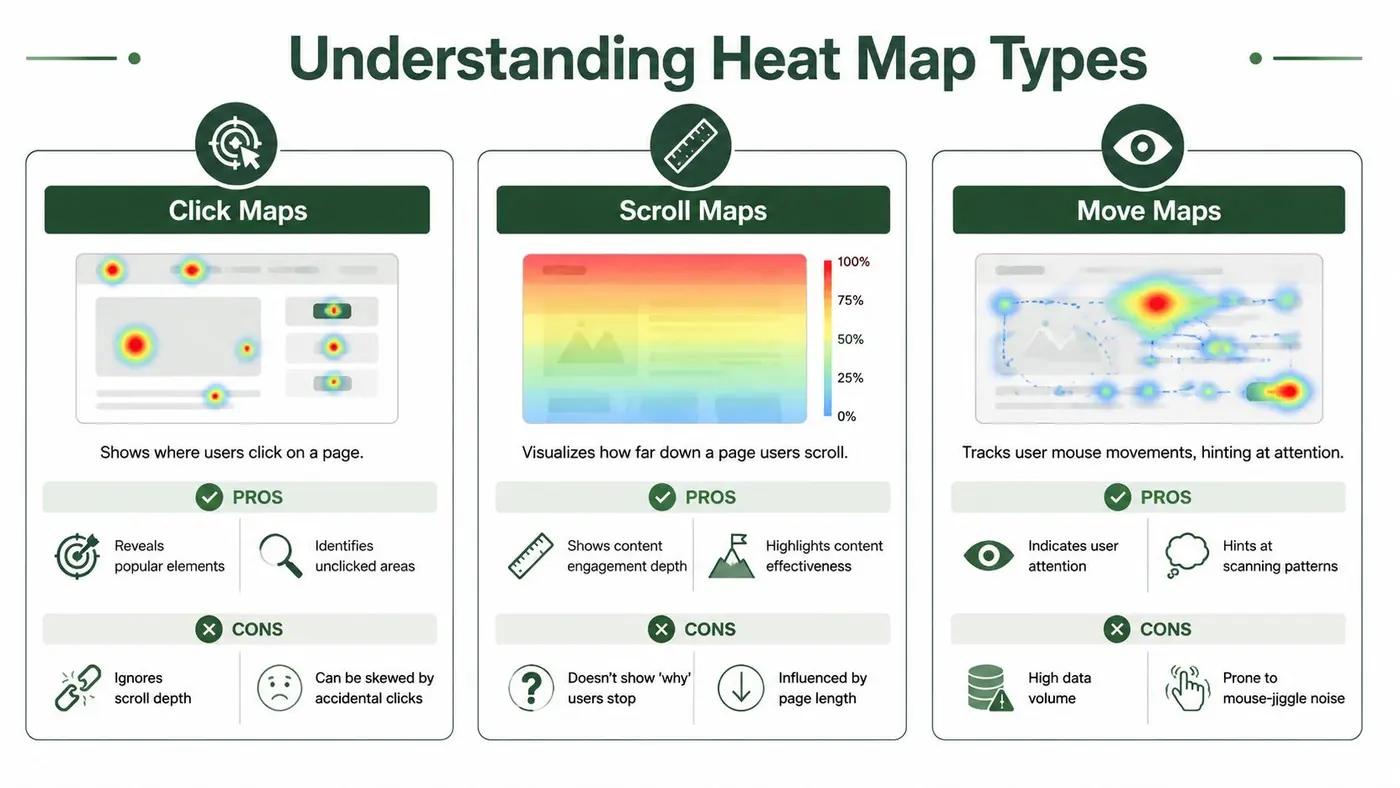
Three things usually matter most on a first pass:
- Click behaviour shows where visitors believe action lives on the page.
- Scroll behaviour shows whether they even reached the content you care about.
- Movement patterns can hint at attention, scanning, and hesitation.
That sounds basic, but it changes how you debug a page. If analytics tell you the form submit rate is low, heat maps can show whether users never reached the form, reached it and hesitated, or tried to interact with the wrong element first.
Practical rule: Don't treat a heat map as proof. Treat it as evidence that points you towards a testable explanation.
That distinction matters. Heat maps are diagnostic. They help you spot friction and opportunity. They don't confirm causality on their own.
What this looks like in practice
A paid landing page is a common example. Traffic arrives with clear intent, but conversions lag. Analytics might show exits near the top of the page. A heat map may reveal something more useful: users clicking a hero image, ignoring the primary button, and failing to scroll to the value proposition lower down.
That's no longer a vague “landing page problem”. It's a specific interaction problem. You can work with that.
The same applies to e-commerce category pages, product pages, and checkout steps. A metric tells you there's leakage. A visual behaviour layer shows where that leakage begins.
Technical Setup for Accurate Heat Map Data
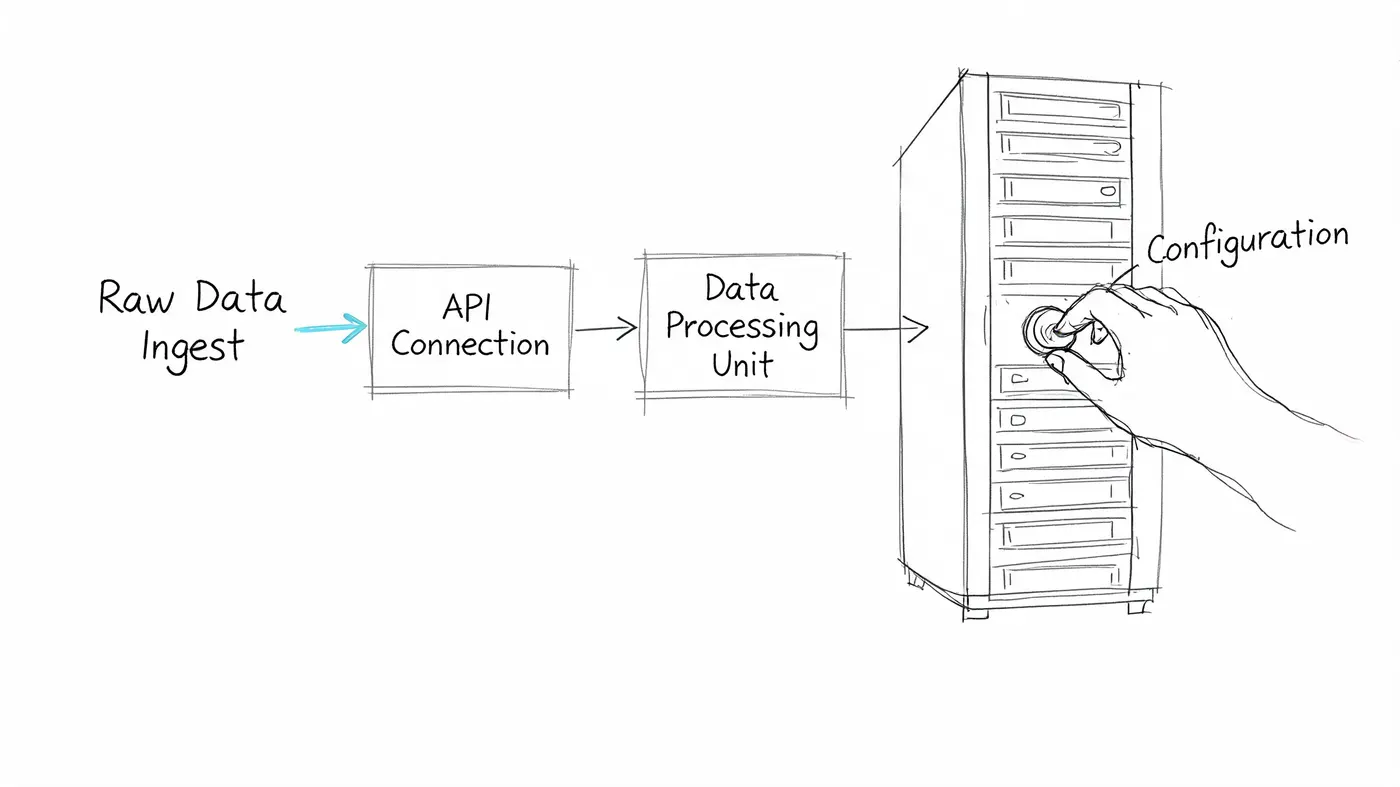
Most bad heat map analysis starts with bad setup. The tool gets installed quickly, everyone feels productive, and then the team spends days interpreting noise. If you want useful outputs, the implementation has to be boring, clean, and deliberate.
For UK e-commerce testing, at least 5,000 sessions per variant over 7 to 14 days is the benchmark for reliable analysis, and 15 to 20% of data can be contaminated by unblocked internal IPs if you don't filter them properly, as noted in LiveSession's heat map guidance. That one mistake can distort what looks like user behaviour.
Install lightly and predictably
Use a lightweight script and deploy it through Google Tag Manager when possible. That gives you cleaner control over where the script fires and lets you manage changes without repeated engineering tickets.
Keep the setup disciplined:
- Limit the initial scope. Start with a small set of key templates or URLs, not the whole site.
- Fire on the right pages only. Don't waste collection on low-value pages you won't analyse.
- Check dynamic elements. Accordions, slide-outs, sticky bars, and SPA-style transitions need validation after install.
- Verify page speed impact. The heat map creator shouldn't become the reason a page feels slower.
If you're already running experiments or plan to, keep your implementation notes in one place. A central reference like the Otter A/B documentation is useful for tracking how snippets, goals, and test environments are configured across the site.
Filter junk before you analyse anything
Internal traffic is the obvious problem, but it's not the only one. QA sessions, agency reviews, repeated stakeholder visits, and bot noise can all pollute the picture.
Use filters for:
- Internal office and remote team traffic
- Developer and QA sessions
- Known staging or preview environments
- Bot and scraper traffic where your tool supports it
Pattern interpretation is fragile. If your own team repeatedly clicks a menu item while reviewing a redesign, a click cluster appears that has nothing to do with customer intent.
The cleanest-looking heat map can still be the wrong story if your collection rules are sloppy.
Handle the pages that usually break tracking
Junior teams often assume every page behaves like a static landing page. It doesn't. Product filters, quick views, modals, localisation switches, and client-rendered content can all create mismatches between what the script sees and what users do.
Use a short validation checklist after deployment:
| Check | Why it matters |
|---|---|
| Sticky headers | They can concentrate clicks and hide true body interactions |
| Lazy-loaded content | It can distort scroll interpretation if sections appear late |
| Single-page app transitions | They can break page-level reporting if route changes aren't tracked |
| Variant rendering | Test changes can alter DOM structure and affect map overlays |
After setup, don't rush straight to the colour layer. Pair your first heat map review with session-level evidence. If you need a good primer on when replay adds context that aggregate maps miss, the benefits of session replay are worth reviewing before your first analysis round.
Strategically Choosing Which Pages to Track
The homepage gets too much attention in heat map projects. It feels important, so teams start there by default. Sometimes that's right. Often it's a distraction.
A better question is simple: where can behaviour insights change revenue or lead quality fastest? That's the page set worth tracking first.
Start with pages tied to a commercial decision
If a page sits close to conversion, small interaction fixes matter more. That usually puts these near the top of the list:
- Pricing pages where users compare plans, skim detail, and decide whether to continue.
- Lead generation pages where forms, trust elements, and CTA placement compete for attention.
- Product detail pages where image galleries, descriptions, and add-to-basket actions need to work together.
- Checkout steps where confusion compounds quickly.
Teams often overvalue high-traffic pages and undervalue high-friction pages. A support page with heavy traffic may be interesting. A basket page with visible hesitation is usually more valuable to analyse.
Build a journey, not a collection of snapshots
Tracking isolated pages creates isolated insights. That's not enough for CRO. You want to see where intent builds, where it weakens, and where it breaks.
A stronger tracking plan follows a user journey:
- Entry page from paid or organic traffic
- Key decision page such as product, pricing, or comparison
- Conversion step such as basket, lead form, or checkout
- Confirmation or drop-off branch if your tool supports it
Many heat map resources fall short in this regard. As Maptive's overview highlights, there's a real gap between creating heat maps and using them inside a CRO workflow. That gap matters because a useful heat map isn't the final deliverable. It's the first diagnostic layer before an experiment.
The pages I'd skip at first
Not every page deserves immediate tracking. I'd usually defer:
- Blog archives unless they're a major acquisition path
- Low-intent informational pages with no clear commercial next step
- Thin utility pages where there's little meaningful interaction to interpret
Track pages where a design or content decision can plausibly produce a better test hypothesis. If a page can't lead to action, a heat map often becomes an interesting screenshot rather than an optimisation input.
How to Interpret Different Types of Heat Maps
A heat map creator doesn't produce insights by itself. It produces visual signals. Your job is to separate signal from decoration.
The fastest way to go wrong is to assume warm colours mean success. They don't. A hotspot can mean intent, confusion, friction, or repeated failed interaction. Context decides which one you're looking at.
If you want a companion read while reviewing examples, Otter's article on heat maps on websites is a useful reference for framing behaviour patterns against page intent.
Click maps and the difference between demand and frustration
A good click map shows concentration around the actions the page was designed to support. On a landing page, that might be the primary CTA, navigation to supporting proof, or a key form field progression.
A bad click map usually shows one of three things:
- Clicks on non-clickable elements
- Scattered attention across too many competing options
- Heavy interaction with decorative content instead of action content
Teams frequently overread heat. UK test analysis cited by Sprig's discussion of heat map mistakes found that 40% of hot clicks on non-CTAs come from frustration rather than intent, and rage-click detection above 3 clicks per second on a small element is a sign of UX failure, not engagement.
Watch for this: If users hammer a fake-looking button, image, or pricing card, they're telling you the interface promised an action it didn't deliver.
That doesn't mean you should make everything clickable. It means your visual hierarchy is making the wrong promise.
Scroll maps and misplaced assumptions about visibility
Scroll maps answer a narrow but important question. How much of the page do people reach?
Good interpretation depends on matching scroll depth to business importance. If your core proposition, trust proof, or CTA sits below the point where engagement fades, the content may be strong and still underperform because people never see it.
A useful review looks like this:
| Pattern | Likely reading |
|---|---|
| Strong depth through key message blocks | Content order is supporting engagement |
| Sharp drop before the main CTA | Offer or page structure may be delaying action |
| Steady scroll with weak click activity | Visitors may be reading but not finding a convincing next step |
Scroll maps also create false comfort. Teams see that some users reached the lower half of the page and assume placement is fine. Don't do that. The right question is whether enough of the right users reached the section that needed to carry the conversion.
Move maps and noisy attention signals
Move maps can be helpful, but they're the easiest to overinterpret. Cursor movement can align with reading behaviour. It can also reflect idle motion, habit, or device-specific quirks.
Use move maps as a secondary layer. They're best for spotting scanning patterns around dense content, comparison tables, or forms with multiple decision points. They're weaker as standalone evidence for redesign.
A sensible reading sequence is:
- Start with click maps for action signals.
- Check scroll maps for visibility and sequencing.
- Use move maps to support or challenge your first interpretation.
- Validate suspicious clusters with session replay before changing the page.
That order keeps you grounded in behaviour that affects conversion.
Turning Heat Map Insights into Winning A/B Tests
Teams often stop one step too early. They generate heat maps, share screenshots, agree that something “looks off”, and then drift into opinion. That's where optimisation stalls.
The main job starts when you turn a behavioural clue into a testable hypothesis.
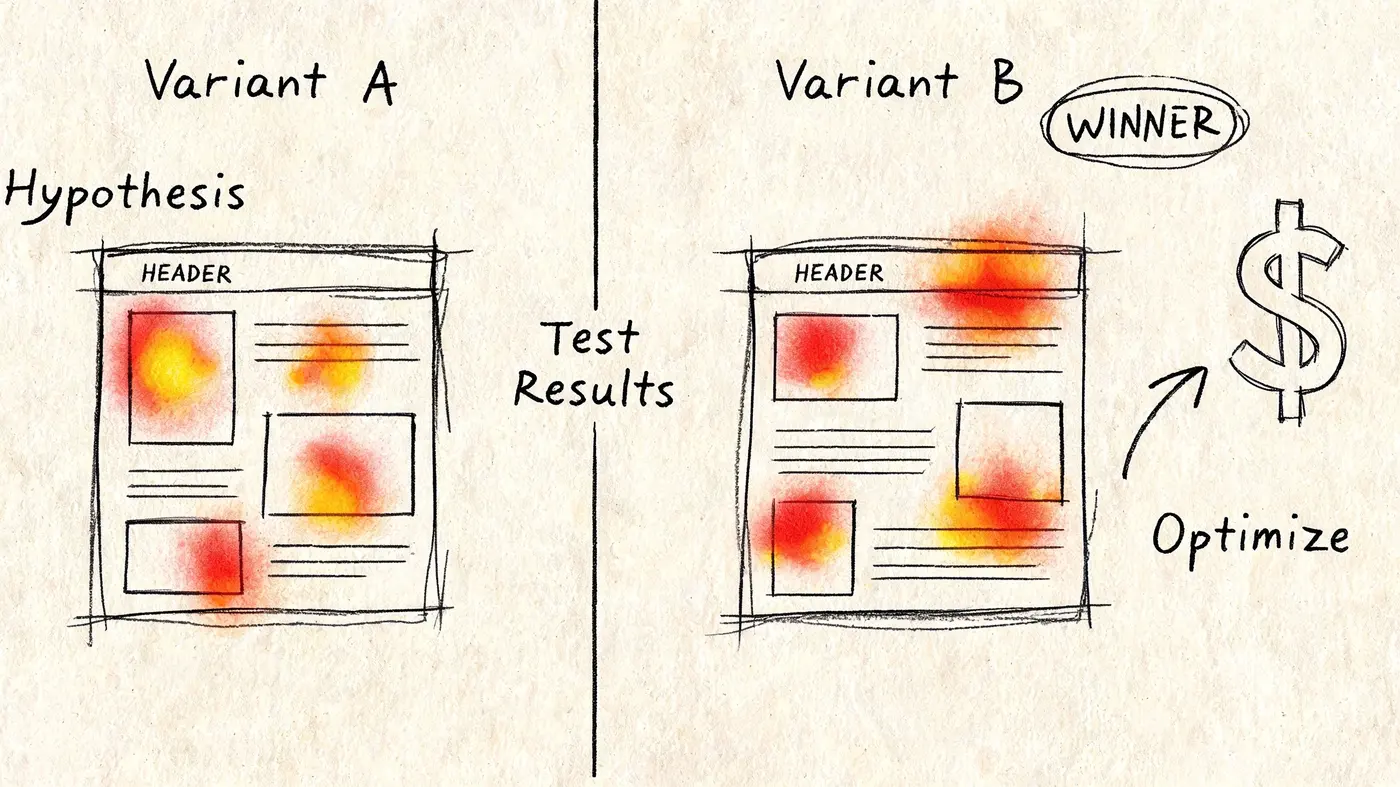
Many articles explain the first half of this process and stop there. That's the gap. As Maptive's feature page suggests, heat maps are often discussed as visual tools without being connected to the CRO workflow that makes them commercially useful. The value appears when the insight becomes an experiment.
A simple workflow that junior teams can repeat
Take a common scenario. A scroll map shows that visitors aren't consistently reaching a CTA placed lower on a landing page. The click map also shows dispersed interaction in the hero area, with attention going to secondary elements.
That gives you a working diagnosis: the page delays the main action and lets visitors spend attention too early on lower-priority elements.
From there, build the hypothesis properly.
- Observation: Users don't reliably reach the main CTA, and early clicks scatter elsewhere.
- Hypothesis: Moving the CTA and its supporting value message higher on the page will increase meaningful action because visitors will encounter the decision point sooner.
- Test change: Create a variant that brings the primary CTA into the first major viewport, simplifies nearby competing links, and tightens supporting copy.
- Primary goal: Measure the conversion event that reflects the page's job, such as form submissions, product adds, or completed checkouts.
- Secondary checks: Watch for changes in downstream quality, not just top-level clicks.
That structure stops you from testing random design preferences.
What a good experiment brief includes
Before anyone opens the testing tool, write the brief. Keep it short enough to use and strict enough to prevent drift.
A practical version should include:
| Part | What to write |
|---|---|
| Problem statement | One sentence describing the friction |
| Evidence | The observed behaviour from heat maps and related page data |
| Hypothesis | Why the proposed change should improve conversion |
| Variant scope | Exactly what changes and what stays fixed |
| Success metric | The conversion event that decides the winner |
If your team skips the brief, they'll change too many things at once. Then they won't know what helped.
Heat maps generate the question. A/B testing answers it.
That's the full optimisation loop. One without the other is incomplete.
Keep the test focused enough to learn
A first experiment should be narrower than many might prefer. Don't rewrite the hero, redesign the navigation, change the form, swap testimonials, and alter pricing presentation in one go unless you have a strong reason and enough traffic to justify broad variance.
For newer teams, I'd rather see one strong structural test than five bundled ideas. If the issue is CTA visibility, test CTA visibility. If the issue is false affordance on images or cards, test making the right element more obvious or the misleading element less prominent.
For a broader set of landing page ideas outside your own backlog, Altitude Design web optimization tips are useful for comparing messaging, layout, and CTA treatment patterns before you finalise a variant plan.
Later in the process, this kind of explainer can help align stakeholders before launch:
Decide what deserves a test and what deserves a fix
Not every behaviour insight needs experimentation. Some issues are plain usability failures. If users rage-click a dead element, misread a faux button, or get trapped by a broken mobile interaction, fix that directly.
Use experiments when the solution has trade-offs. For example:
- moving a CTA earlier might improve visibility but reduce context
- simplifying navigation might raise conversion but lower exploration
- shortening copy might boost action but weaken qualification
That's the right territory for a controlled test. If you need a team framework for prioritisation, Otter's piece on deciding what to A/B test is a useful model for sorting hypotheses by business impact and clarity.
The feedback loop that actually improves pages
Strong teams don't treat heat maps as one-off diagnostics. They use a cycle:
- Observe behaviour on a key page.
- Identify one likely friction point.
- Form a hypothesis tied to that behaviour.
- Launch a focused variant.
- Review the result.
- Return to behavioural evidence to understand why the test won or lost.
That last step matters. A winning test tells you what outperformed. Revisiting behaviour helps you understand why it outperformed, which makes the next test smarter.
Common Pitfalls to Avoid in Your Analysis
Most weak heat map work doesn't fail because the tool is poor. It fails because the analysis is lazy. Teams collect screenshots, point at bright areas, and jump to redesign. That's not CRO. That's decoration with opinions attached.
Use this as a final check before you present any finding.
The mistakes that waste the most time
-
Reading small samples like settled truth
Early patterns can look persuasive and still collapse under more traffic. Wait until the dataset is mature enough to support interpretation. -
Confusing activity with success
A hotspot isn't automatically good. High interaction may signal friction, distraction, or failed expectations. -
Ignoring device context
Desktop and mobile users often interact with the same page very differently. Don't merge behaviour that should be analysed separately. -
Treating correlation as causation
A drop-off near one page section doesn't prove that section caused it. It only tells you where to investigate. -
Collecting maps with no action path
If the team can't turn the observation into either a fix or a test, the insight probably isn't useful yet.
Don't reward yourself for finding “interesting” behaviour. Reward yourself for finding behaviour that leads to a decision.
The standard to hold is simple. Every heat map review should end with one of three outputs: fix now, test next, or ignore for lack of business relevance. If it ends with a screenshot in a slide deck, the process has broken down.
If you want to turn behavioural clues into statistically grounded experiments, Otter A/B gives you a lightweight way to test headlines, CTAs, and layouts without slowing the site down. Use heat maps to find the friction. Then use Otter A/B to verify which change improves conversion.
Stop guessing
Ready to start testing?
Set up your first A/B test in under five minutes. No credit card required.
- 14-day free trial
- No credit card required
- Cancel anytime