Personalization in E commerce A Complete Guide for 2026
A complete guide to personalization in e commerce. Learn the types, benefits, KPIs, and implementation steps to boost revenue and delight your customers.

A lot of e-commerce teams are in the same spot right now. You have product data, analytics, email flows, maybe a recommendation widget, and a long list of ideas labelled “personalization”. But when someone asks a simple question, the room goes quiet.
Is any of this improving revenue?
That’s the challenge with personalization in e commerce. Teams often don’t struggle to imagine customized experiences. They struggle to define them clearly, implement them without creating technical mess, and prove that the effort is paying back.
UK shoppers don’t treat relevance as a nice extra anymore. Consumers in the UK are 80% more likely to purchase from sites offering personalized experiences, and those experiences drive a 34% average spend increase according to UK personalization statistics. The same source notes that 91% of shoppers abandon non-personalised sites. That means generic experiences don’t just underperform. They actively push buyers away.
The good news is that personalization doesn’t have to mean building a giant AI system from scratch. In practice, it starts with a simple discipline. Show different users different experiences based on useful signals, measure the outcome against a control, and keep only what creates real business value.
Beyond a First-Name Welcome
A shopper clicks a paid ad for waterproof jackets during their commute. They browse two black styles, check delivery details, then leave. That evening they come back. A generic homepage makes them start over. A personalised homepage picks up the thread, shows outerwear first, keeps darker colours visible, and answers the question that often blocks the sale: when will it arrive?
That difference explains why first-name personalisation is such a poor benchmark. Using someone’s name is polite. It does not help them buy.
Good personalization in e commerce works more like a well-briefed shop assistant. The assistant does not just greet the customer. They notice what the customer looked at, what they seem to need, and what might help them decide with less friction. Online, the job is the same. Use the signals you already have to reduce irrelevant choices and make the next step clearer.
What personalization really means
Personalization is fundamentally a business strategy, not a widget or a cosmetic feature. You are adapting the store to the shopper in front of you, using available signals to improve relevance, conversion, and revenue.
Those signals usually fall into four practical groups:
- Past behaviour such as viewed products, purchases, and category interest
- Current context such as referral source, device, location, or page type
- Declared preferences such as size, style, or communication choices
- Commercial value such as whether the visitor is new, returning, or likely to buy again
The goal is not to impress people with clever technology. It is to remove effort.
That distinction matters because many teams overestimate what counts as personalisation. Swapping in a first name, showing a recently viewed product, and changing a banner by traffic source are not equal. Some changes are cosmetic. Some change behaviour. The discipline is knowing the difference, then proving it with a control group rather than assuming relevance equals impact.
Personalization works when it feels like help.
Why generic journeys waste strong signals
A generic journey treats every visitor as if they arrived with the same intent. In practice, that means valuable clues get ignored. A returning customer sees the same hero banner as a first-time browser. Someone comparing delivery options gets the same page treatment as someone still discovering the category. A high-intent visitor is forced back into browsing mode.
That creates two problems. The customer has to do extra work, and your team cannot tell whether a personalised idea is earning its place.
Measurement reshapes the discussion. Instead of debating personalisation as a broad concept, you can test one adjustment at a time. Show one group the standard experience. Show another group a version shaped by a clear signal, such as category interest or returning-visitor status. Tools such as lightweight server-side or privacy-conscious setups in Otter A/B make this much easier to run without turning the site into a tracking project. That matters for UK teams trying to improve relevance while staying sensible about UK GDPR and data minimisation.
It also improves recommendation quality. If your recommendation blocks only push the obvious bestsellers, relevance can rise while product discovery gets worse. A better approach balances accuracy with variety, as this guide to diverse product recommendations explains.
The practical question is not whether personalisation sounds smart. It is whether a specific version helps more shoppers complete the job they came to do, and whether you can measure that improvement cleanly.
The Four Engines of E-commerce Personalization
Not all personalization works the same way. Teams often bundle very different approaches into one bucket, then wonder why the results are inconsistent.
It helps to think in terms of four engines. Each one uses different logic, needs different data, and suits different business problems.
Rule-based personalization
This is the bouncer. It checks a clear list and applies a fixed decision.
If the visitor is in the UK, show the UK delivery message. If they came from a “Winter Sale” campaign, show the sale banner. If they’re a returning customer, swap the homepage CTA from “Discover the range” to “Pick up where you left off”.
Rule-based personalization is simple and often underrated. It’s especially useful when your merchandising logic is already clear and you want control.
Typical examples include:
- Campaign-specific banners for paid traffic
- Returning customer homepage modules
- Category-specific promotions based on entry page
- Device-aware adjustments such as shorter mobile copy
Its main weakness is that it doesn’t learn. Someone has to write the rules, maintain them, and decide when they’re outdated.
Contextual personalization
This is the concierge. It responds to what the shopper is doing right now.
A customer browsing hiking boots gets content related to outdoor gear. Someone reading returns information might see reassurance messaging and support options. A user who just added an item to basket gets complementary products and delivery timing.
Contextual personalization relies less on identity and more on immediate behaviour. That makes it practical for anonymous traffic, where historical data may be limited.
What teams often miss is that contextual logic is still personalization, even when the site doesn’t “know” who the shopper is. It knows enough about intent in that session to adapt usefully.
Practical rule: If you can’t identify the user, personalise to the session.
Collaborative filtering
This is the savvy friend who says, “People like you also bought this.”
Instead of relying only on the current user’s behaviour, collaborative filtering looks for patterns across many users. If shoppers who buy espresso machines often buy a grinder next, the engine can recommend the grinder to future espresso machine buyers.
This model is common in recommendations because it scales well across large catalogues. It can surface associations that human merchandisers wouldn’t spot manually.
One challenge is sameness. If every recommendation chases the most obvious pattern, the store can become repetitive. That’s why work on recommendation diversity matters. If you want a good technical and strategic primer on that problem, NILG.AI has a useful guide to diverse product recommendations.
Predictive and AI-driven personalization
This is the personal stylist. It tries to anticipate what the shopper is likely to want next.
AI-driven recommendation engines combine historical purchase history with real-time behavioural signals, according to Emarsys on e-commerce personalization examples. That means the engine doesn’t just ask, “What did people buy before?” It also asks, “What is this user signalling right now?”
That same source notes that generative AI can discover profitable audience segments up to 30 times faster than manual methods. For a growth team, that matters because audience discovery is often the slowest part of personalization. You may know how to build an offer, but not which segment deserves it first.
Comparison of personalization models
| Model Type | Core Logic | Data Required | Example Use Case | Primary Benefit |
|---|---|---|---|---|
| Rule-based | Predefined if-then logic | Simple business rules, referral or segment data | Show a seasonal banner to traffic from a winter campaign | Control and speed |
| Contextual | Reacts to in-session behaviour | Clicks, page views, cart activity, device or session context | Show accessory recommendations after an add-to-cart action | Relevance in the moment |
| Collaborative filtering | Uses patterns from similar users | Aggregated browsing and purchase patterns | “Frequently bought together” modules | Efficient cross-sell discovery |
| Predictive and AI-driven | Forecasts likely interest using multiple signals | Purchase history plus real-time behavioural signals | Re-rank products based on intent and past affinity | Higher precision and scalability |
How to choose the right engine
Most shops don’t need to start with the most advanced model. They need the right model for the decision.
Use this rough filter:
- Choose rule-based when the business logic is obvious and you want fast implementation.
- Choose contextual when session intent matters more than identity.
- Choose collaborative filtering when you need recommendation coverage across a broad catalogue.
- Choose predictive models when you have enough clean data and enough traffic to justify deeper optimisation.
The mistake isn’t using a simpler model. The mistake is calling everything AI when a clear rule would do the job better.
The Business Case for a Personal Touch
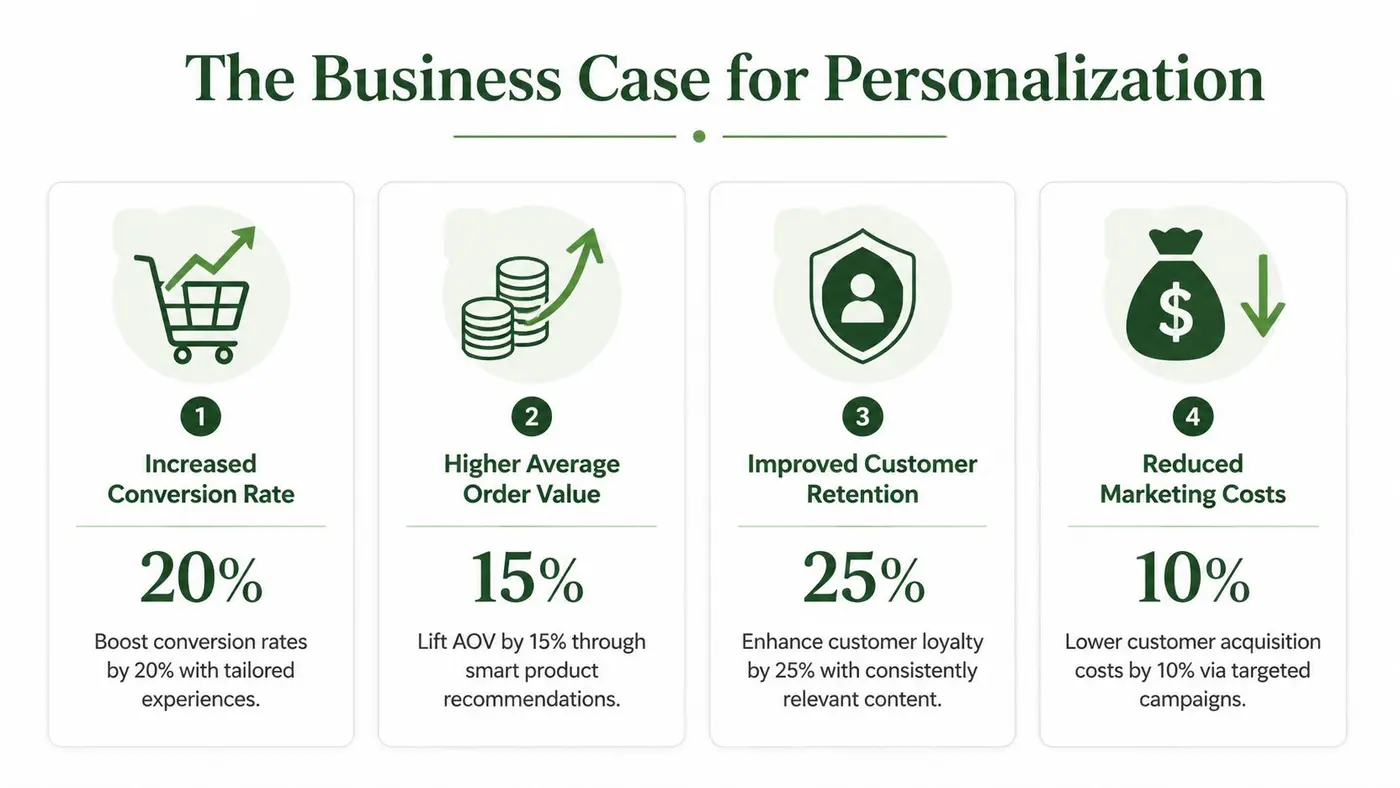
Personalization only earns budget when it changes commercial outcomes. The strongest argument for it isn’t that customers “like relevant experiences”. It’s that relevance can move the numbers your trading, marketing, and product teams already track.
In UK e-commerce, that commercial case is already visible. 78% of retailers report increased sales from personalised product recommendations, with an average sales uplift of 20%, and 31% of all e-commerce revenue stems directly from recommendations according to Bloomreach on ecommerce personalization. The same source says many retailers achieve over 400% ROI on personalization investments.
Where personalization changes the numbers
The easiest way to think about business impact is to map each tactic to one KPI.
- Conversion rate: Relevance reduces decision friction. A better hero message, better product ordering, or a better recommendation set can help more visitors move into product discovery and basket building.
- Average order value: Recommendation logic often shines in this area. Complementary items, bundles, and better “next best product” suggestions can increase basket size without changing acquisition spend.
- Retention and repeat purchase: A store that remembers useful context saves the customer work on the next visit.
- Merchandising efficiency: Teams spend less time manually forcing every product journey if the system can adapt based on intent and behaviour.
If you’re already working on CRO more broadly, this guide for better shopper conversion rates is useful because it places personalization in the bigger picture of reducing friction across the journey.
Why recommendations get budget first
Often, teams begin with product recommendations because the path from feature to outcome is easier to explain. If a recommendation block improves basket composition, you can usually see the effect in revenue, AOV, and product attachment.
That’s one reason recommendations dominate personalization roadmaps. They’re visible, measurable, and close to the transaction.
But they shouldn’t be viewed in isolation. Personalization also improves conversion by changing what people see before they ever reach the basket. A homepage that reflects intent, a product grid that prioritises likely-fit items, and a category page that reduces noise can all affect downstream revenue.
The best personalization programmes don’t optimise one widget. They make the whole journey feel more relevant.
Treat it as a growth system, not a campaign
A common mistake is treating personalization like a one-off launch. Teams add a recommendation engine, watch it for a month, then move on.
That approach misses how value compounds. Once you can identify segments, deliver variant experiences, and connect those experiences to KPIs, personalization becomes part of your operating model. It starts shaping campaign planning, merchandising, lifecycle messaging, and UX prioritisation.
For teams thinking about customer relevance more broadly, Otter A/B’s article on client engagement strategies is a helpful way to frame personalization as part of ongoing relationship building rather than a narrow onsite feature.
How to Implement Your Personalization Strategy
Most failed personalization projects don’t fail because the idea was bad. They fail because the team started with a shiny experience layer and ignored the plumbing underneath.
If your data is messy, your logic will be messy. If your tools don’t connect, your experience will break in strange places. And if you try to personalise everything at once, your roadmap will stall.
Start with data you can trust
Real-time personalization depends on processing clickstream data as users interact with the store. But the technical challenge is substantial. 82% of retailers say maintaining a clean, real-time customer data feed is their greatest personalization challenge, according to Constructor on ecommerce personalization.
That single fact explains why many personalization programmes disappoint. The model wasn’t the first problem. Data quality was.
You need three things at minimum:
- Product data that is consistent: titles, categories, availability, price, imagery, and core attributes should be structured and reliable.
- Behavioural events that are verified: page views, product views, add-to-cart actions, purchases, search interactions, and refinements need clean definitions.
- Identity logic that is practical: even if you don’t have a full customer profile, you should know when you’re dealing with a new session, returning browser, or logged-in customer.
Focus on first-party and zero-party inputs
In the UK, privacy constraints make this even more important. You want signals the customer has either generated directly or explicitly shared with you.
Useful starting points include:
- First-party behavioural data from on-site browsing and purchase activity
- Zero-party preference data from quizzes, style finders, size selectors, and account preferences
- Transactional history such as previous orders and product affinity
- Session context including referral source, landing page, and device type
This is also where teams should be cautious about overengineering. You don’t need a giant identity graph to begin. You need reliable, useful inputs tied to clear business questions.
Build a simple stack, not a sprawling one
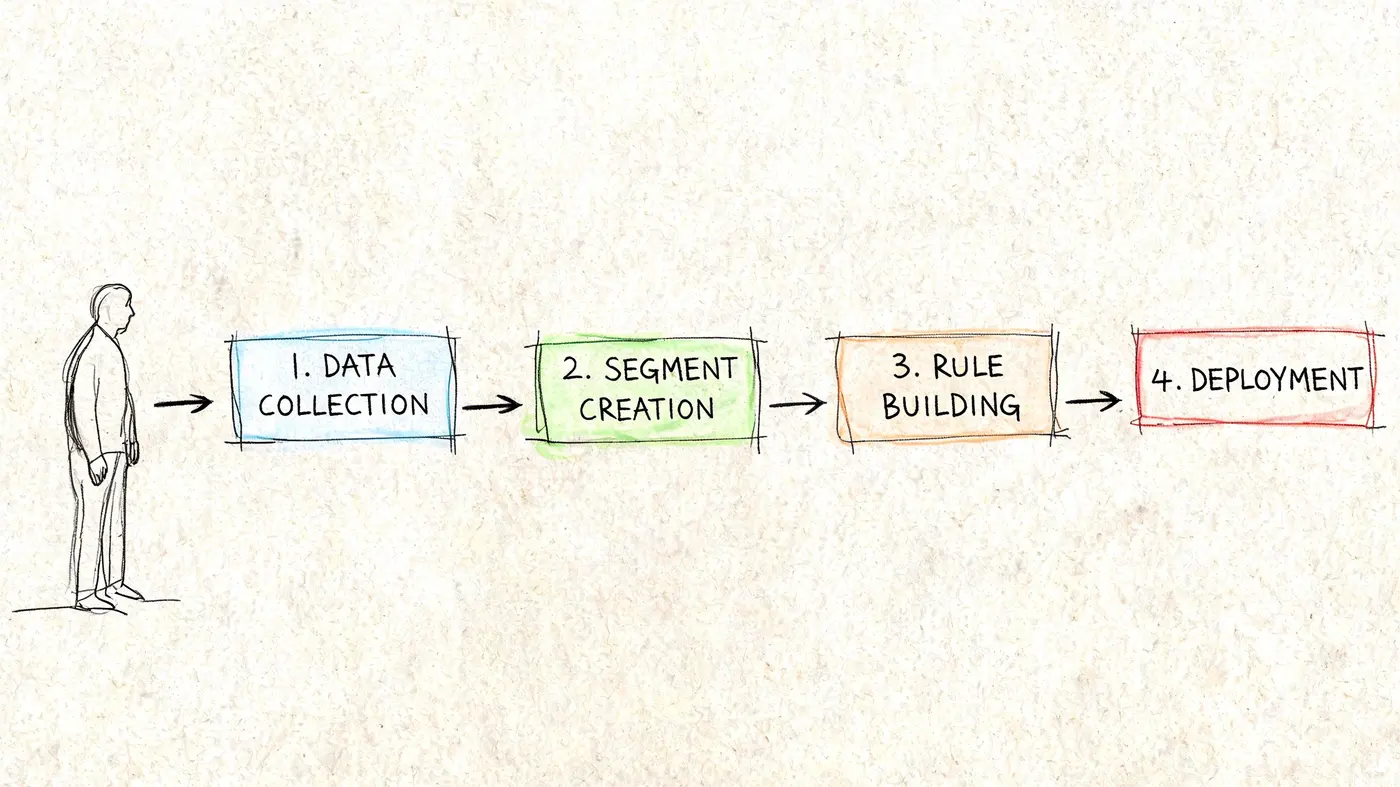
A practical personalization stack usually has three layers.
Data layer
This captures and stores behavioural and product signals. Some teams use a CDP. Others work from analytics, commerce platform events, and a warehouse. The right answer depends on complexity, but the principle is the same. Bring customer and product signals together in a form your team can put to use.
Decision layer
This is the logic engine. It can be rule-based, recommendation-led, or AI-assisted. If you’re evaluating how modern tooling supports this layer, Wonderment Apps offers a useful overview of AI's role in personalization.
Experience layer
The customer encounters the outcomes of personalization at this stage. Homepage modules, product recommendations, category sorting, email content, and onsite messages are all present here.
A lot of teams skip straight to the experience layer because it’s visible. But visible isn’t the same as ready.
Start small and choose high-leverage use cases
Don’t launch with a dozen journeys. Pick one use case where the signal is strong and the measurement path is clear.
Good starting points include:
-
Returning visitor homepage message
Change the hero content for users who’ve already browsed a category or product type. -
Category page recommendation logic
Surface more relevant products or reorder merchandising blocks based on recent behaviour. -
Basket cross-sell module
Test whether contextual accessory recommendations increase basket value. -
Exit-intent reassurance message
Show delivery, returns, or stock reassurance only when hesitation signals appear.
If your team is also working on broader site performance, this article on e-commerce conversion rate optimization helps frame personalization as one conversion lever among many, not a separate discipline.
After the data and stack decisions are in place, this walkthrough adds a useful product view of how implementation tends to look in practice.
A practical rollout sequence
Many teams need a roadmap that feels manageable. This is the one I usually recommend:
- Phase one: Clean product and event data
- Phase two: Define a few meaningful segments
- Phase three: Launch one simple personalised experience
- Phase four: Compare it against a non-personalised control
- Phase five: Expand only after you can explain the commercial impact
That order matters. Personalization isn’t hard because the concept is complicated. It’s hard because relevance, data quality, and measurement all have to line up at once.
How to Measure and Experiment with Personalization
The fastest way to waste time with personalization is to launch it and call the higher engagement a win.
More clicks on a recommendation carousel might mean it’s useful. Or it might mean it’s distracting people from buying. More users interacting with a banner might mean better relevance. Or it might mean the main path became less clear.
That’s why personalization needs experimentation. Not as a nice analytical extra, but as the way you separate helpful change from expensive theatre.
Why control groups matter
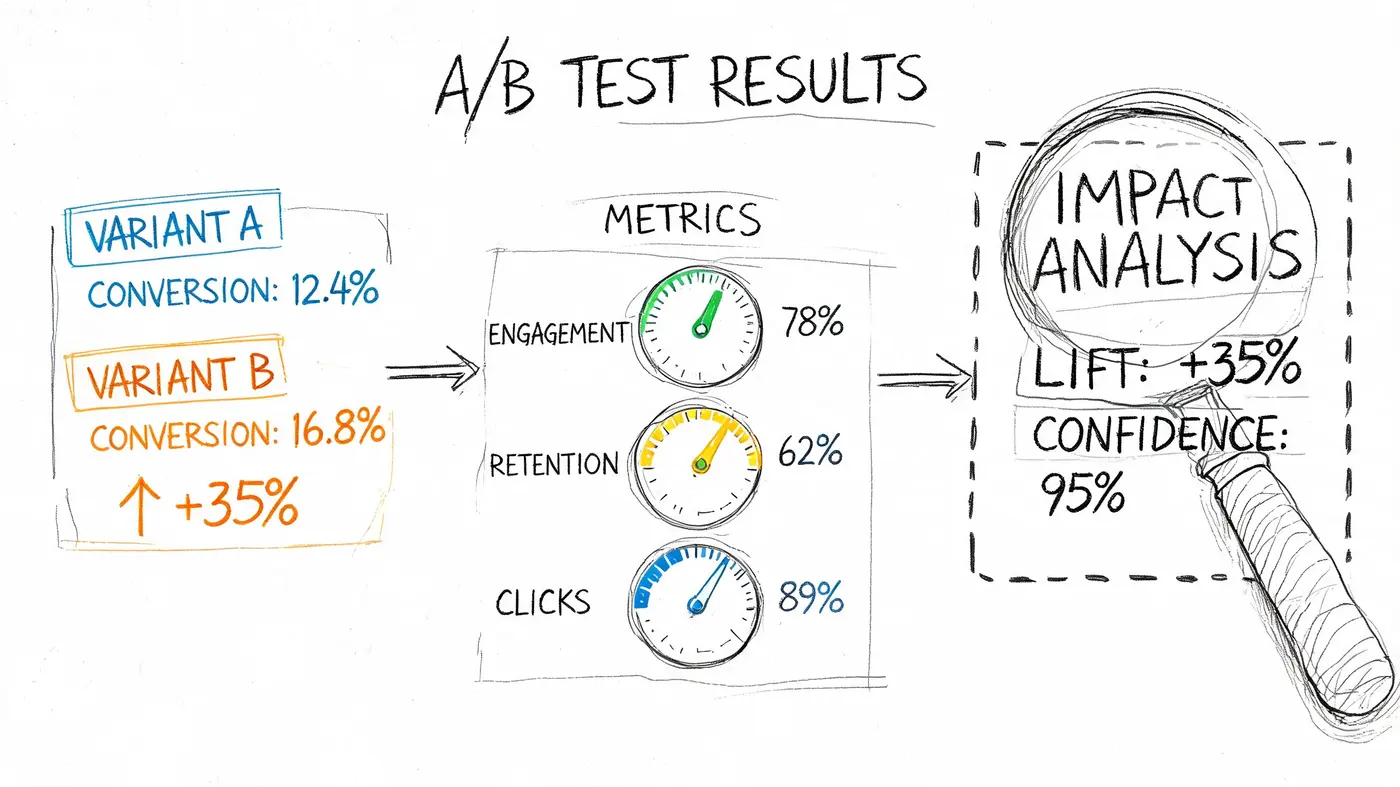
A personalised experience should beat a non-personalised baseline. If you can’t compare those two conditions, you don’t know whether the new logic produced incremental value.
The cleanest setup is simple:
- Control group: sees the standard experience
- Treatment group: sees the personalised variant
- Primary KPI: one commercial outcome, such as conversion rate, revenue per visitor, or average order value
- Secondary KPIs: supporting signals such as add-to-cart rate, product discovery depth, or recommendation interaction
Many personalization features appear effective in dashboards, though these dashboards were never designed to prove causality.
Don’t ask whether users interacted with the personalised feature. Ask whether the business outcome improved because of it.
What to test first
You don’t need a giant machine-learning initiative to begin measuring personalization. Start with hypotheses that connect a clear audience to a clear page and a clear outcome.
Examples:
-
Returning visitors on the homepage Hypothesis: a hero module customized to previously viewed categories will increase product exploration and downstream purchases.
-
High-intent product page visitors
Hypothesis: contextual recommendations based on current browsing behaviour will increase basket additions. -
Cart users showing hesitation
Hypothesis: personalised reassurance around delivery or returns will reduce abandonment.
Each of these can be tested against the standard experience. That gives you an answer that’s commercially useful, not just interesting.
Measure revenue, not just interaction
A lot of teams stop at click-through rate because it’s easy to collect. But personalization often changes basket composition, order value, and product mix. If you only measure clicks, you can miss the actual business effect.
Track metrics in layers:
| Measurement Layer | What to Look At | Why It Matters |
|---|---|---|
| Experience metrics | Clicks, engagement, module interaction | Shows whether users noticed the change |
| Journey metrics | Add-to-cart, checkout starts, bounce behaviour | Shows where the experience affects flow |
| Commercial metrics | Conversion rate, AOV, revenue per variant | Shows whether the tactic deserves budget |
For teams deciding where to place tests, this resource on deciding what to A/B test is helpful because it forces a sharper link between page hypotheses and commercial outcomes.
A simple test blueprint
If your team needs a practical starting pattern, use this one.
Choose one audience
Keep it narrow enough that the logic is believable. Returning visitors, recent category browsers, or users with previous purchases in a specific product family are usually better starting groups than “all traffic”.
Change one meaningful element
Swap the homepage hero. Re-rank a product block. Change the recommendation set. Add a personalised basket message. Avoid changing six elements at once, or you won’t know what caused the result.
Define one primary KPI
Pick the metric that best reflects value. For some pages, that’s conversion. For others, it’s revenue per visitor or average order value.
Hold everything else steady
If merchandising, pricing, or campaign traffic changes heavily during the test, interpret the result carefully. Personalization tests need a stable enough environment to reveal true differences.
Decide what “win” means before launch
A lot of bad interpretation starts after the data arrives. Teams become tempted by any positive movement. Don’t do that. Set the commercial threshold upfront.
Why lightweight experimentation matters
Heavy testing setups can damage the experience they’re meant to optimise. Slow scripts, visible flicker, and implementation friction all make teams less likely to test personalization frequently.
That’s why lightweight experimentation frameworks are often a better fit for this work. You want clean deployment, fast load behaviour, and a simple way to compare variants against revenue outcomes. The easier it is to launch and read a test, the more likely your team is to treat personalization as an iterative discipline rather than a rare campaign.
In other words, the core value of experimentation isn’t just proving wins. It’s giving the team a safe way to learn where personalization helps, where it doesn’t, and where the idea itself needs refining.
Avoiding Common Pitfalls and Navigating Privacy
Personalization can improve an e-commerce journey. It can also make a site feel broken, intrusive, or oddly persistent if the team uses it badly.
Most of the problems fall into three buckets. The store knows too little, so the personalisation is wrong. The store tries too hard, so the experience feels creepy. Or the store adds so much technology that performance and compliance start slipping.
The common mistakes
The first mistake is false confidence in weak data. If the site guesses too aggressively from a handful of clicks, recommendations can become comically irrelevant. A customer glances at one gift item and the store behaves as if that’s their entire personality.
The second mistake is overpersonalising too early. Some teams rush to make every page dynamic before they’ve proved that the basic journey works. They end up multiplying complexity on top of a weak funnel.
The third is treating privacy as a legal footnote. In the UK, that’s especially risky.
UK GDPR is not a side issue
Post-Brexit compliance has made the ground more complicated for e-commerce teams. According to InsiderOne on ecommerce personalization strategy, 65% of personalisation-related fines in the ICO’s 2025 enforcement actions targeted non-compliant consent mechanisms. The same source notes that only 42% of UK consumers trust e-commerce sites with their behavioural data.
That combination is the primary challenge. Customers want relevance, but many don’t trust the way sites collect and use behavioural signals.
A privacy-first personalization strategy isn’t a constraint. It’s how you make relevance believable.
What privacy-safe personalization looks like
A privacy-conscious approach usually has a few characteristics:
- It explains the value exchange clearly so customers understand what data is collected and why.
- It prioritises first-party and zero-party data instead of chasing opaque data sources.
- It keeps consent mechanisms clean and defensible rather than relying on dark patterns.
- It personalises to context when identity is unnecessary so the site can still be useful without overreaching.
Many teams need a mindset shift. They assume stronger privacy means weaker personalization. Often the opposite is true. When the customer explicitly shares preferences, or when the site uses transparent first-party signals, the resulting experience is usually more relevant and easier to justify internally.
Use privacy as a competitive advantage
If only a minority of shoppers trust e-commerce sites with behavioural tracking, trust itself becomes a differentiator. A brand that is clear about consent, restrained in its use of data, and accurate in its personalization can stand out in a market full of noisy, awkward implementations.
That also improves decision-making inside the company. Teams become more disciplined about which signals matter. Instead of hoarding data “just in case”, they focus on the signals that improve the journey.
A simple rule helps here:
- If the data doesn’t improve the customer experience in a clear way, don’t collect it.
- If the experience would feel invasive if explained aloud, redesign it.
- If the consent path feels slippery, fix that before launching anything new.
That approach lowers risk, improves trust, and often leads to better experimentation because your inputs are cleaner and easier to defend.
Your Action Plan for Smarter Personalization
The strongest personalization programmes don’t start with a giant transformation plan. They start with one useful signal, one clear audience, and one measurable test.
For growth marketers, the next move is to pick a segment you already understand. Returning visitors, recent product viewers, or basket users are usually good candidates. Build one hypothesis around a single page or module, then define the KPI that would make the effort worthwhile.
For developers and product managers, audit the data path before you build anything new. Check whether product data is structured, behavioural events are reliable, and the team can distinguish key user states such as anonymous, returning, and logged-in.
For merchandising and CRM teams, identify places where you’re still showing generic content out of habit. Homepage blocks, category modules, recommendation sets, and post-purchase messages often hide easy wins.
A sensible first sprint usually looks like this:
- Choose one audience: keep it specific
- Choose one experience: one block, banner, page element, or recommendation set
- Choose one KPI: conversion, AOV, or revenue per visitor
- Run a controlled test: compare personalised against standard
- Keep only what proves value: relevance without measurement is guesswork
That’s the durable lesson in personalization in e commerce. Good personalization isn’t a trick, and it isn’t only about AI. It’s a disciplined process of listening to customer signals, designing more relevant journeys, and testing whether those journeys produce better outcomes.
If you want a lightweight way to test personalization ideas without slowing down your site, Otter A/B is built for that job. You can launch controlled experiments on headlines, CTAs, layouts, and customized experiences, then judge them by conversion rate, average order value, and revenue per variant instead of guesswork.
Stop guessing
Ready to start testing?
Set up your first A/B test in under five minutes. No credit card required.
- 14-day free trial
- No credit card required
- Cancel anytime