Shopify Conversion Optimization: Your 2026 Playbook
Master shopify conversion optimization with our 2026 playbook. Learn to audit, test, and analyze to drive real revenue growth for your Shopify store.

You're probably looking at a Shopify dashboard that says traffic is fine, sessions are growing, and sales still feel softer than they should. Paid media keeps getting more expensive. Product margins don't leave much room for waste. Every extra visitor costs money, but too many of those visitors still slip through the funnel without buying.
That's where shopify conversion optimization stops being a nice-to-have and becomes an operating system. Not a bag of tricks. Not a redesign project that happens once every couple of years. A system that helps you find friction, test fixes, and tie every decision back to revenue.
Beyond Tactics A Systematic Approach to Shopify CRO
Most Shopify teams start in the wrong place. They ask, “What should we change?” That usually leads to random tweaks. Move the button. Rewrite the headline. Add a badge. Swap a hero image. Sometimes one of those changes helps. Most of the time, they create noise.
The better question is, how do we build a process that keeps finding profitable changes?
That matters because the upside is large even before you touch acquisition. UK e-commerce benchmarks commonly sit around 2.5% to 3%, while Shopify's global average is closer to 1.4%, and top Shopify stores reach about 4.7% according to MDS on Shopify conversion rate benchmarks. If you move a store from 1.4% to 2.8%, you've effectively doubled revenue from the same traffic, as noted in that same benchmark context.
Why random tactics underperform
A tactic without a diagnosis is just a guess. That's the part many teams miss.
A sticky add-to-cart bar can help one store and hurt another. More reviews can reduce hesitation on one product page and make no difference on another. A shorter product description can improve scannability for impulse purchases and damage conversion for technical products that need more reassurance before checkout.
Practical rule: Treat every change as a revenue hypothesis, not a design preference.
The stores that improve consistently don't chase hacks. They run a repeatable loop:
- Measure the funnel
- Find the biggest friction point
- Form a clear hypothesis
- Test one meaningful change
- Judge the result by revenue, not aesthetics
- Document what you learned and run the next test
Revenue is the only north star that scales
CRO gets more useful when it stops being a marketing side project and becomes part of how the business operates. That means using benchmarks to understand the opportunity, then building a workflow that keeps turning customer behaviour into better decisions.
That also means aligning CRO with the broader goal of driving ecommerce revenue with Shopify, not just making the storefront look cleaner. Good optimisation improves paid efficiency, raises the value of existing traffic, and gives you a better return from the acquisition channels you already fund.
What works is less glamorous than most CRO content suggests. It's disciplined prioritisation, clean testing, and a refusal to confuse activity with progress.
The Foundation A Revenue-Focused Conversion Audit
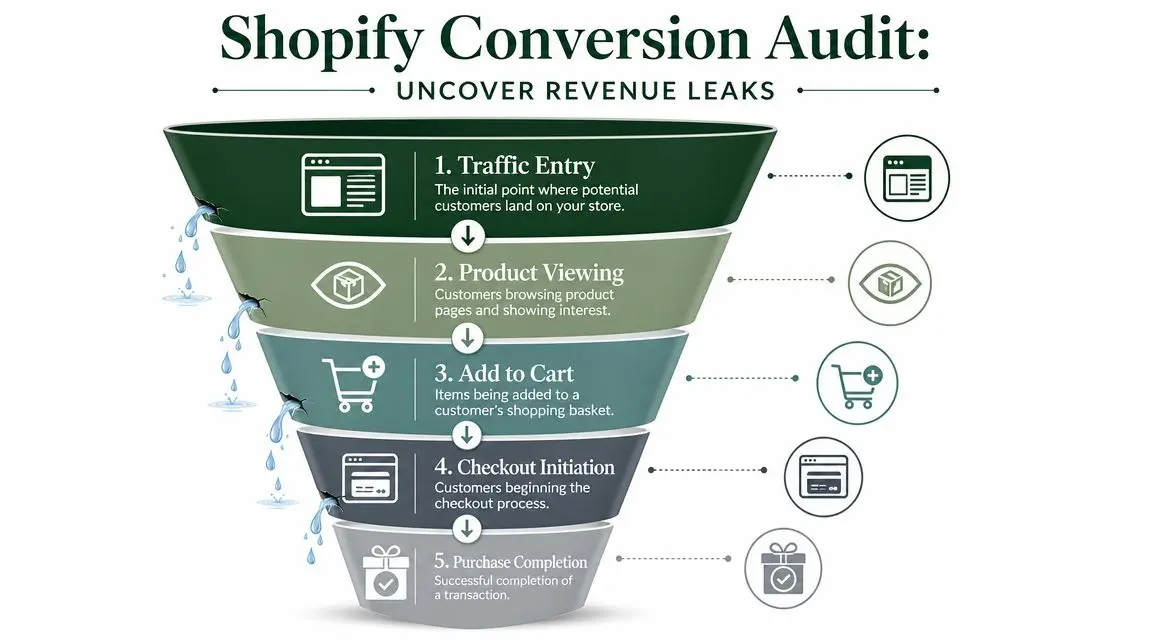
Before you test anything, audit the funnel like a leak detector, not like a designer reviewing pages. The purpose of a conversion audit isn't to generate a long wish list. It's to isolate where revenue is being lost right now.
Start with the numbers you already have
Shopify Analytics and Google Analytics are usually enough to identify the first set of problems. Shopify Academy's CRO guidance recommends a disciplined workflow: identify friction points first, then form hypotheses and run tests. It also notes that average Shopify stores convert around 1.4% to 1.8%, top performers exceed 3.2%, and you should have at least 500 sessions for a more reliable conversion calculation, according to Shopify Academy's CRO guidance.
When I audit a Shopify store, I look at the funnel in order:
-
Landing page engagement
Are visitors reaching relevant product or collection pages, or bouncing early because the page doesn't match intent? -
Product page progression
Do product pages earn attention and action, or do people stall after viewing details? -
Cart behaviour
Are users adding items and then hesitating when shipping, returns, or total cost become more visible? -
Checkout start
Is the cart strong but checkout starts weak? That often points to friction before commitment. -
Checkout completion
If users begin checkout and fail to finish, the problem is usually trust, form friction, payment friction, or mobile usability.
Pair quantitative and qualitative evidence
The numbers tell you where the leak is. Behaviour tools help explain why.
Heatmaps, scroll maps, and session recordings are useful when they answer a specific question. Don't watch recordings for entertainment. Watch them to validate a hypothesis. If users repeatedly miss size guidance, fail to notice delivery information, or abandon after trying to edit quantities on mobile, you've found test material.
A strong audit usually combines:
- Shopify Analytics for funnel and sales metrics
- Google Analytics for page flow and drop-offs
- Heatmaps for visibility and engagement gaps
- Session recordings for confusion, hesitation, and broken interactions
- On-site feedback or support logs for recurring objections in customers' own language
The best audit output is short. Three to five validated friction points are more useful than thirty speculative ideas.
Audit pages by commercial importance
Not all pages deserve equal attention. Focus first on pages closest to revenue:
- Best-selling product pages
- High-intent collection pages
- Cart and mini-cart experiences
- Checkout entry points
- Mobile templates used by most paid and organic landing traffic
If your team sells on more than one channel, it also helps to compare merchandising friction across marketplaces. Teams that have optimized my listings on Amazon often already understand how detail-page clarity, review visibility, and image sequencing affect purchase intent. The same discipline applies on Shopify, but you have more freedom to test the full journey.
For a practical checklist, use this guide to a conversion rate optimisation audit. It's a good reference when you need to structure findings before building a test queue.
Generating and Prioritising Smart Hypotheses
A useful hypothesis is specific enough to test and commercial enough to matter. “Improve the product page” isn't a hypothesis. It's a vague ambition. “Because mobile users hesitate before add to cart on the PDP, moving delivery and returns messaging closer to price will reduce uncertainty and increase completed purchases” is a hypothesis.
That difference sounds small. It changes everything.
Build hypotheses from evidence
Good hypotheses follow a simple structure:
Because we observed [specific behaviour or friction], we believe [specific change] will improve [specific outcome].
Three things make this work:
- Observed behaviour keeps the idea grounded in actual user data.
- Specific change makes the experiment implementable.
- Specific outcome keeps the test tied to a business metric.
Here are stronger examples than the generic ideas most backlogs collect:
- Mobile users scroll past the first CTA before seeing shipping information. We believe surfacing delivery and return details near price will improve product-page progression.
- Shoppers reach cart but hesitate before checkout. We believe clearer guest checkout messaging will increase checkout initiation.
- Users interact with product images but spend little time in the description. We believe restructuring content into scannable sections will improve add-to-cart rate for considered purchases.
Prioritise for revenue, not internal opinion
Once you start writing proper hypotheses, the backlog grows fast. That's why prioritisation matters more than brainstorming.
A simple way to rank ideas is PIE:
- Potential. How much upside does this page or problem likely have?
- Importance. How close is it to revenue and how much traffic reaches it?
- Ease. How difficult is the change to implement cleanly?
| Hypothesis Idea | Potential (1-10) | Importance (1-10) | Ease (1-10) | PIE Score (Avg) | Rank |
|---|---|---|---|---|---|
| Simplify cart-to-checkout messaging on mobile | 9 | 9 | 7 | 8.3 | 1 |
| Rework product page trust block above the fold | 8 | 8 | 8 | 8.0 | 2 |
| Test alternate product image order on best-sellers | 7 | 8 | 8 | 7.7 | 3 |
| Rewrite homepage hero copy | 5 | 5 | 9 | 6.3 | 4 |
The exact numbers in a PIE model aren't sacred. What matters is that your team uses one scoring method consistently instead of letting the loudest opinion win.
What deserves a high score
In practice, the best early tests usually share the same traits:
- They sit on high-traffic, high-intent pages
- They remove friction, not just add decoration
- They are noticeable enough to affect behaviour
- They can be tested without changing six things at once
If the hypothesis can't explain how the change could increase revenue, it doesn't belong near the top of the queue.
A lot of low-value test ideas come from internal bias. Founders want to change brand messaging. Designers want to clean up layout inconsistencies. Merchants want to feature more products. Those changes aren't automatically bad. They're just not automatically important.
What moves first in most programmes is simpler: clarity, trust, speed, and checkout progression.
High-Impact Technical and UX Optimisations to Test
Once the audit has identified the biggest leaks, test changes that alter buying behaviour, not cosmetic details. The highest-impact work on Shopify usually sits in three areas: speed, product page decision support, and checkout friction.
Speed and mobile experience
Site speed deserves a place near the top of the queue because it affects every page and every channel. Bloomreach cites Portent research showing that pages loading in 1 second can convert at 3.05%, while pages loading in 5 seconds convert at 1.08%. The same source also notes that 79% of Shopify traffic comes from mobile and mobile converts 58% lower than desktop, which is why mobile-first optimisation matters so much for merchants, as covered in Bloomreach's Shopify CRO analysis.
That has direct implications for what to test:
- Reduce script weight by removing non-essential apps and third-party tags.
- Audit theme performance before adding any front-end enhancement.
- Compress and structure media so product pages still feel premium without loading like a catalogue PDF.
- Test mobile layout hierarchy because what loads first shapes what gets attention.
If your acquisition plan relies heavily on search, this is also where CRO and SEO overlap. Better UX, cleaner templates, and faster pages support both rankings and conversions. Teams often pair this work with broader visibility efforts such as Upward Engine's SEO solutions so that better traffic lands on a faster store.
Product pages that reduce hesitation
A product page doesn't need more content. It needs the right information in the right order.
Most weak PDPs fail in one of three ways:
- They don't establish trust quickly enough.
- They bury key buying information below the fold.
- They present product details in a way that's hard to scan on mobile.
The best test ideas here usually involve:
- Image sequencing so the first frames answer practical buying questions
- Trust placement near price and CTA, not buried in a lower accordion
- Shipping and returns visibility before commitment
- Variant clarity for size, colour, pack options, and availability
- Review placement where it supports action rather than creating scroll fatigue
For theme-level tests that affect layout, hierarchy, or module order, this guide on a Shopify theme split test is useful because it forces cleaner isolation of changes.
Product page tests work when they reduce uncertainty. They fail when they only rearrange aesthetics.
Checkout and payment friction
Checkout optimisation on Shopify is often discussed too generally. “Simplify checkout” is correct, but not specific enough to drive a strong roadmap.
For UK stores, payment preference tests are one of the more practical levers. UK shoppers commonly use debit cards, PayPal, Apple Pay, and BNPL options such as Klarna or Clearpay. That makes payment visibility and placement a valid test area, especially when tied to completed revenue rather than cart activity alone.
Good checkout-focused tests often include:
- Accelerated wallet visibility higher in the journey
- Guest checkout reassurance where account creation anxiety appears
- Transparent pricing cues before the user feels ambushed
- Fewer competing distractions inside cart and checkout entry points
- Local payment method messaging on product and cart pages
What usually doesn't work is changing several checkout elements at once and then trying to guess what caused the result. Keep variables tight. Test one meaningful friction point at a time.
Implementing A/B Tests with Otter A/B
A/B testing only helps if the setup is clean. The method matters as much as the idea. A sloppy test can produce a confident answer to the wrong question.
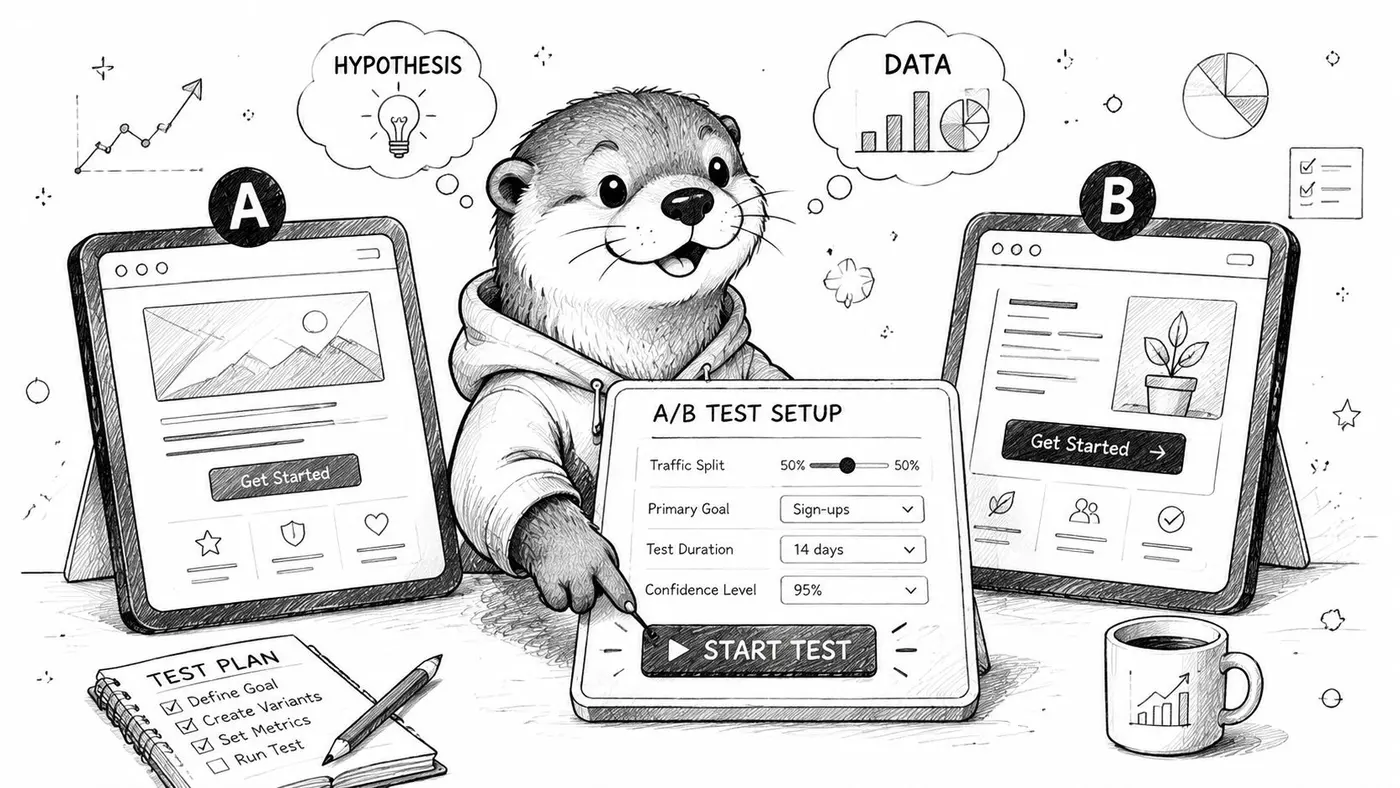
The core principle is simple. Split comparable traffic between a control and a variant, change one meaningful thing, and track the outcome against the metric that matters most.
Set up the test before you design the variant
Before you touch the page, define four things:
-
Target page or template
Pick one commercially relevant surface. A best-selling PDP, mini-cart, cart page, or a high-intent collection page is usually a stronger starting point than the homepage. -
Primary metric
Use the metric that best reflects commercial impact. Revenue should stay central, even if supporting metrics help explain behaviour. -
Audience segment
If the issue is mobile checkout friction, don't dilute the result by including all device types. -
Single testable change
Keep the variant coherent. If you move reviews, rewrite copy, add trust badges, and change image order all at once, you won't know what worked.
Use payment tests where they actually influence behaviour
One strong use case for UK Shopify stores is payment preference testing. UK customers are heavy users of debit cards, PayPal, and BNPL options like Klarna, and testing the visibility and placement of accelerated wallets such as Apple Pay can materially affect conversion, as described in Blackbelt Commerce's Shopify conversion optimisation guidance.
That means practical tests like:
- Showing PayPal or Apple Pay earlier on product or cart surfaces
- Testing wallet button placement above or below the main CTA
- Introducing BNPL messaging near price versus near checkout
- Clarifying guest checkout before login friction becomes a blocker
These are better tests than abstract design experiments because they connect directly to purchase completion and revenue per variant.
Keep the implementation disciplined
A modern testing workflow should be lightweight enough that your team can launch experiments without turning each test into a development project. The mechanics are straightforward:
- Install the test snippet once
- Create the control and variant
- Split traffic deliberately
- Define goals clearly
- Launch with clean QA on desktop and mobile
- Monitor without interfering mid-test
The common mistake isn't technical setup. It's impatience. Teams launch a test, watch early swings, then start editing the experience before enough evidence accumulates.
A running test is not a brainstorming board. If you change the experience mid-flight, you corrupt the result.
If you want a practical walkthrough of setup logic, this guide on how to A/B test Shopify is a useful reference.
A short visual walkthrough helps when you're training a team or aligning stakeholders on process:
Guardrails that protect the result
Clean experiments usually follow a few essential principles:
- Don't test tiny changes on low-intent pages first
- Don't stack multiple unrelated changes in one variant
- Don't call a winner based on early noise
- Don't optimise only for conversion rate if order value or revenue tells a different story
- Don't ignore device-specific outcomes
A/B testing is only valuable when it helps you make better commercial decisions than opinion would.
Analysing Results for True Revenue Lift
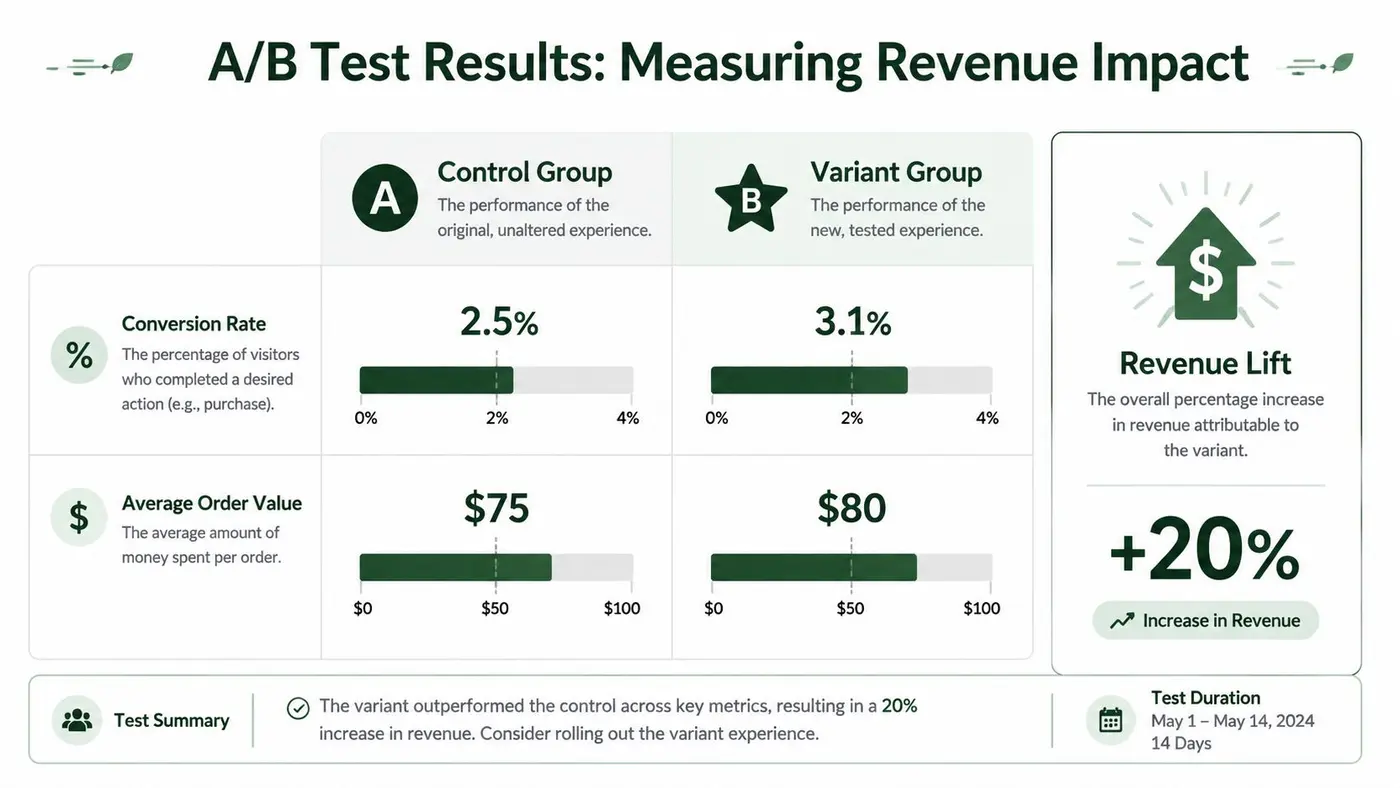
A winning test is not the version with the prettiest chart. It's the version that improves the business. That's why mature teams don't stop at conversion rate.
They look at how a variant changes purchase behaviour across the whole buying journey. Sometimes a variant gets more users to purchase but lowers basket value. Sometimes it raises order value while slightly reducing purchases. The right answer depends on what happens to revenue.
Read the result through a commercial lens
The most useful result review asks three questions:
- Did the variant change purchase behaviour?
- Did it change order quality?
- Did the combined effect improve revenue?
That's also why post-test analysis should focus on revenue alongside conversion rate. Toptal notes that small gains across the funnel can compound. A 20% lift in product views, 15% more add-to-carts, and 15% better order completion can multiply into a much larger revenue gain. The same source also cites research that live chat can increase conversion rates by 40% and personalised experiences can raise sales by around 20%, according to Toptal's Shopify CRO tactics overview.
That doesn't mean every store should add live chat tomorrow. It means funnel effects compound, which is why result interpretation has to extend beyond one surface metric.
Why significance matters
A test result isn't useful just because one line is higher than another. You need enough evidence to trust that the difference is real and not random variation.
The practical threshold many teams use is 95% confidence. That doesn't make a result magically perfect. It does mean the test has reached a level where acting on it is much more defensible than acting on instinct alone.
Here's the part people often get wrong:
- A result can be statistically significant but commercially weak
- A result can be commercially promising but still inconclusive
- A result can be negative and still valuable, because it prevents you from rolling out a bad idea
Don't ask only, “Did variant B win?” Ask, “What did this teach us about how customers buy?”
Decide what to do next
Once the data settles, there are only three sensible outcomes:
| Outcome | What it means | What to do |
|---|---|---|
| Clear winner | The variant improves the core business metric and the result is reliable | Roll it out, document why it worked, and queue the next test |
| Clear loser | The change hurt performance or failed to support revenue | Revert, log the lesson, and avoid repeating the same logic |
| Inconclusive | The result didn't produce a reliable answer | Refine the hypothesis, increase contrast, or choose a higher-impact target |
The biggest mistake after analysis is treating the outcome as the end of the process. The actual value is the learning you carry into the next hypothesis.
Building Your Continuous Optimisation Cadence
Most Shopify brands don't fail at CRO because they lack ideas. They fail because they don't build a cadence. They run one test, get distracted, and slide back into opinion-led changes.
A strong programme behaves more like a weekly operating rhythm than a side project.
Build a repeatable loop
The simplest cadence is often the most durable:
- Review performance
- Identify one or two meaningful friction points
- Write hypotheses
- Prioritise the queue
- Launch a controlled test
- Analyse the result
- Record the learning
- Start again
This needs an owner. Sometimes that's a growth lead. Sometimes it's an ecommerce manager with support from design and development. What matters is accountability. If nobody owns the experiment pipeline, it stalls.
Create a knowledge base, not just a backlog
The practice of documenting wins and forgetting losses is a mistake.
Failed tests are useful because they narrow the field. They tell you which customer objections weren't decisive, which design instincts were misleading, and which page elements matter less than expected. Over time, that creates a store-specific body of knowledge that's more valuable than generic best practices.
A useful test log should capture:
- Hypothesis
- Page or audience tested
- Variant summary
- Primary and secondary metrics
- Result
- Interpretation
- Next action
Keep it simple. The point is to preserve learning, not create admin theatre.
The strongest CRO teams don't just collect winners. They collect evidence.
Tie reporting to business decisions
Stakeholders don't need a tour of every button change. They need to know:
- what was tested,
- whether it improved revenue,
- what was learned,
- and what gets tested next.
That reporting discipline matters because it keeps CRO connected to the commercial plan. If paid acquisition costs rise, optimisation priorities may shift towards checkout completion and order value. If a new product line launches, the focus may move to collection-page progression and PDP trust.
The point is continuity. One experiment rarely changes a business. A consistent optimisation cadence does.
If you want shopify conversion optimization to become an asset rather than a sporadic task, treat experimentation as part of merchandising, UX, analytics, and revenue operations all at once. That's when the compound effect starts to show up.
If you want a lightweight way to turn this framework into a working testing programme, Otter A/B makes it easy to launch Shopify experiments, measure significance at a 95% confidence threshold, and track revenue per variant instead of stopping at surface-level conversion changes. It's built for teams that want faster answers without bloated setup or performance drag.
Stop guessing
Ready to start testing?
Set up your first A/B test in under five minutes. No credit card required.
- 14-day free trial
- No credit card required
- Cancel anytime