Alpha vs Beta Testing: Pick the Right Strategy
Confused by alpha vs beta testing? Our guide compares goals, users, and metrics. Get checklists & a framework to pick the right test for your product.

A feature is coded, QA has signed off on the happy path, and launch pressure is building. Then the familiar argument starts. One person says it's ready for beta. Another says the team hasn't done enough alpha yet. Both sound reasonable, and that's exactly why teams get this wrong.
The problem usually isn't effort. It's that people use alpha testing and beta testing as if they're loose labels for “testing before launch”. They aren't. They answer different questions, involve different people, and produce different kinds of evidence. If you blur them together, you either expose users to issues you should have caught internally, or you stay trapped in internal feedback loops and miss what happens when real customers use the product on real devices in real conditions.
A useful release process treats alpha and beta as separate decisions. First, can the product stand up technically? Then, does it hold up in the hands of actual users? That distinction sounds simple. Running it well often proves difficult.
The Pre-Launch Dilemma Why Testing Phases Matter
A common release meeting goes like this. Engineering says the build is stable enough. Product wants feedback from target users before launch. Support worries about avoidable complaints. Nobody is arguing against testing. They're arguing about which risk matters most right now.
That's the pre-launch dilemma. Not whether to test, but whether you're still dealing with internal quality risk or whether you've reached the point where external learning matters more.
Teams often skip straight to beta because they want realism fast. That usually backfires. External testers don't behave like patient colleagues. If account creation breaks, or a core workflow fails, they won't carefully document the issue and wait for a patch. They'll conclude the product isn't ready. You lose trust and you corrupt the feedback you hoped to collect.
Two very different kinds of risk
Alpha protects against shipping something unstable. Beta protects against shipping something technically sound but awkward, confusing, or brittle in real-world use.
Those are different failure modes, and they need different setups.
Consider a checkout redesign. During internal testing, the flow might work perfectly on staging. Payment succeeds. Validation messages appear. Analytics events fire. That can still hide serious problems. A slow mobile connection, an unusual browser setting, or an accessibility obstacle may only show up when external users try it under normal conditions.
Practical rule: If users are still likely to hit obvious defects, you're not choosing between alpha and beta. You're still in alpha.
Launch discipline matters more than launch enthusiasm. Teams that treat testing phases as quality gates make cleaner decisions about readiness, staffing, and feedback handling. Teams that don't usually end up improvising under pressure.
If your release planning is already messy, it's worth tightening the wider process as well. A more structured approach to product launch strategies helps teams decide what needs internal validation, what needs market validation, and what should never be exposed half-finished.
Defining Alpha and Beta Testing
Most confusion disappears once you stop treating the terms as synonyms.
In UK software practice, the basic rule is clear: alpha = internal and controlled, beta = external and real-world, as described in Indeed's explanation of alpha vs beta testing. That distinction became more important as web products had to work across more devices, browsers, and network conditions.
What alpha testing actually is
Think of alpha testing as the product's internal dress rehearsal. The product team, QA, developers, and sometimes internal stakeholders use the product in a controlled setup before it reaches outside users.
The emphasis is not broad opinion. It's defect discovery, workflow validation, and release readiness.
Alpha works best when teams are testing things like:
- Core journeys: Sign-up, login, checkout, onboarding, settings, search, and account recovery.
- Failure handling: Error states, validation messages, retries, timeouts, and edge cases.
- Technical reliability: Whether bugs can be reproduced consistently, logged clearly, and fixed quickly.
A strong alpha isn't casual “have a click around” testing. It's structured. Test cases are defined. Owners are assigned. Bugs are triaged by severity. Re-tests happen quickly.
What beta testing actually is
Beta testing starts after the product is stable enough that outsiders can use it without constant frustration. The audience changes. Instead of employees and internal teams, you involve external users in their own environment.
That changes the value of the phase. Beta is where teams learn how the product behaves in the wild. You see mismatched expectations, unclear copy, odd device behaviour, missing onboarding context, and the kind of messy usage patterns that don't appear in a tidy internal setup.
Beta is also where release operations become more visible. You need recruitment, onboarding, communication, support, and a way of shipping updates without creating chaos. For mobile and cross-platform teams, practical resources on streamlining app beta updates can help reduce friction once external users are involved.
Alpha asks whether the product works well enough to expose. Beta asks what happens once you do.
That's why the two phases shouldn't be collapsed into one vague “pre-launch testing” bucket. One is for hardening the product. The other is for learning from reality.
The Core Comparison Alpha vs Beta
The fastest way to understand alpha vs beta testing is to compare the operating conditions, not just the definitions.
Early in a release cycle, teams need control. Later, they need exposure. Those aren't competing ideas. They are sequential needs.
| Criteria | Alpha testing | Beta testing |
|---|---|---|
| Who takes part | Internal staff such as QA, developers, product, and internal stakeholders | External users from the target audience |
| Where it happens | Controlled environment such as staging or internal setup | Real-world conditions on users' own devices and networks |
| Product state | Not ready for broad exposure, but ready for structured internal use | Stable enough for outside users to complete meaningful tasks |
| Main purpose | Find major defects and validate core functionality | Gather usability, reliability, and acceptance feedback |
| Feedback style | Technical bug reports, reproducible issues, blocked workflows | Behavioural feedback, friction points, confusion, edge cases |
| Decision outcome | Is this safe enough to expose to external users? | Is this ready for wider release or further iteration? |
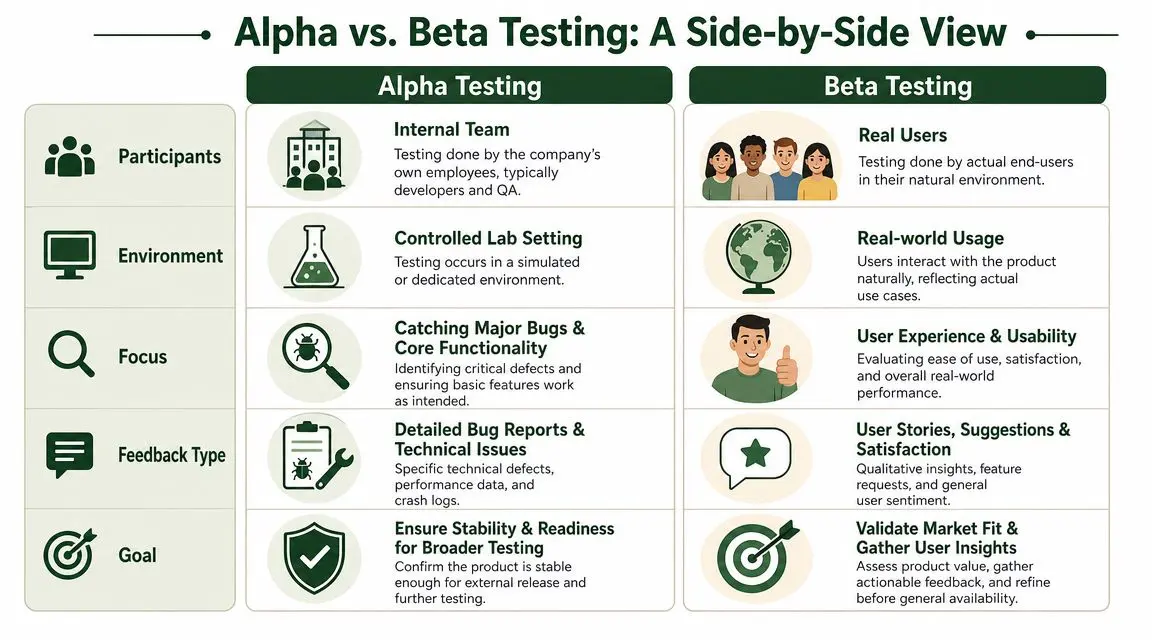
Environment changes the data you get
A key differentiator is environment control. In alpha, teams work in a constrained setup that makes defect reproduction much easier. In beta, users operate in live conditions where browser, device, and network variation create noisier and more unpredictable signals, as outlined in Webflow's discussion of beta vs alpha testing.
That matters because each environment answers a different question.
- Controlled setups help teams isolate causes.
- Real-world setups reveal combinations the team didn't anticipate.
- Mixed environments often produce the worst of both. Too messy for reproducible debugging, too limited for genuine market learning.
Participants change the quality of feedback
Internal testers usually know too much. They know what the feature is supposed to do, where to click, and what the workaround is if something breaks. That makes them good at bug discovery and bad at representing normal user behaviour.
External users bring the opposite value. They don't share the team's mental model. They expose weak onboarding, confusing labels, brittle assumptions, and journeys that only make sense if you built them.
A short walkthrough can help anchor the comparison before you decide how to structure your own process.
Internal testers tell you where the product breaks. External testers show you where the product doesn't make sense.
Stability determines timing
The biggest mistake here is timing beta too early. If the build still has known severe issues, beta participants become unpaid QA. That wastes their time and gives your team low-quality feedback because every comment gets overshadowed by basic instability.
Beta works when the product is already coherent enough that users can experience its value, not just its defects.
A Deeper Look at Goals and Success Metrics
Teams often fail testing phases because they measure the wrong things. They bring beta-style questions into alpha, or they judge beta only by whether a crash was reported. That muddies decisions.
The simplest way to fix this is to tie each phase to a different standard of success.
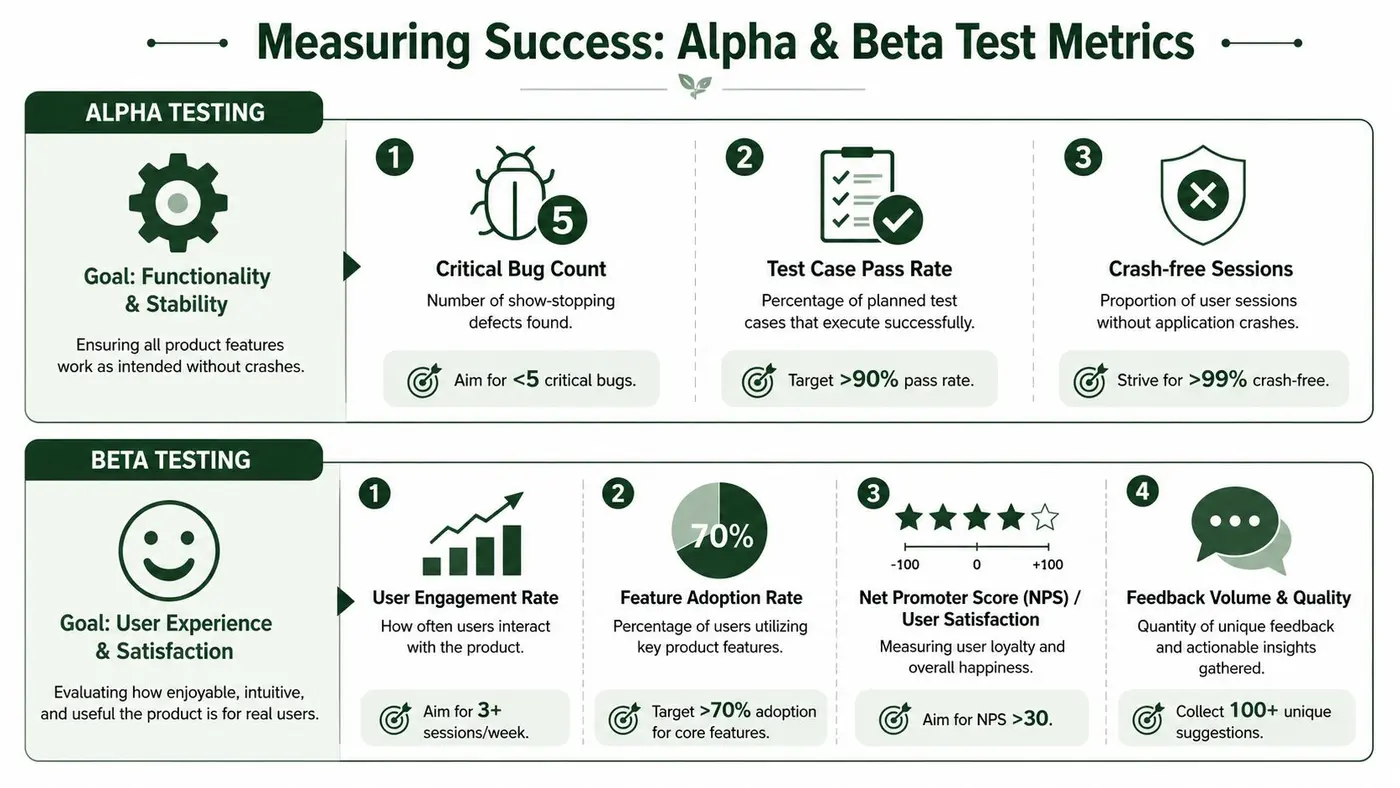
What success looks like in alpha
Alpha is about functional confidence. The product doesn't need to delight anyone yet, but it must stop breaking in ways that make external testing pointless.
Useful alpha measures are operational rather than aspirational:
- Critical defects: Are there any issues that block core journeys or create obvious release risk?
- Completion of key flows: Can internal testers consistently finish the main tasks the product exists to support?
- Reproducibility: When a defect appears, can the team isolate it and verify the fix?
- Regression discipline: Do fixes create fresh breakage elsewhere?
In alpha, a smaller set of high-severity issues matters more than a long list of cosmetic complaints. Therefore, triage quality is paramount. Teams that treat every bug as equal usually move too slowly on what primarily threatens release readiness.
What success looks like in beta
Beta shifts the lens from correctness to real-world acceptance. A beta can succeed even if users surface a meaningful list of problems, provided those problems are the sort you wanted beta to reveal.
Look for evidence such as:
- Task completion: Can users finish important actions without guidance from the team?
- Drop-off patterns: Where do users hesitate, abandon, or circle back?
- Support burden: What do users ask repeatedly, and what does that say about clarity?
- Feedback quality: Are comments specific enough to drive design, copy, onboarding, or prioritisation changes?
The best beta metrics usually combine behavioural signals with direct feedback. Product analytics might show where people struggle. Interviews, surveys, support threads, or beta communities tell you why.
Watch for this: If beta feedback is dominated by crashes, broken permissions, or failed saves, the problem isn't your beta programme. The problem is that alpha didn't finish its job.
Don't force the same scorecard onto both phases
One anti-pattern appears again and again. Teams create a single “test success dashboard” and use it for everything. That sounds efficient, but it hides the difference between technical stability and user acceptance.
A practical split looks like this:
| Phase | Best judged by | Poorly judged by |
|---|---|---|
| Alpha | Severity of defects, consistency of core journeys, fix and re-test cycle | Broad satisfaction or feature preference |
| Beta | Usability feedback, reliability in real conditions, user acceptance | Raw bug volume without context |
When a team keeps those scorecards separate, decisions get easier. You know whether to keep hardening the build, refine the experience, or move toward general availability.
A Decision Framework When to Run Each Test
Many teams don't need more definitions. They need a better release call.
The easiest way to decide between alpha and beta is to ask what kind of failure would hurt you most right now. If a user would hit broken fundamentals, stay in alpha. If the product is stable but you still don't know how it behaves in normal use, move to beta.
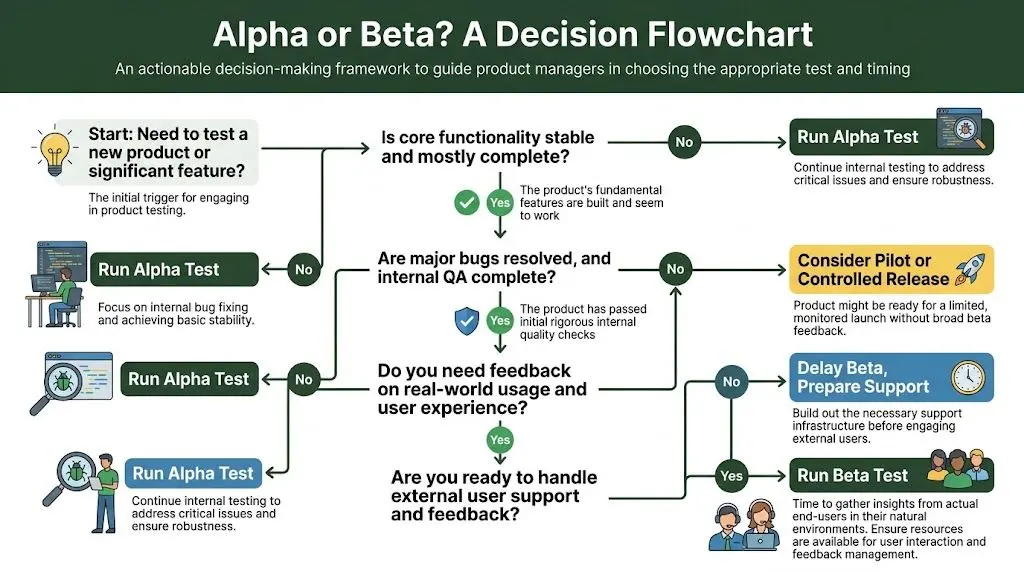
Run alpha when the product still needs hardening
Alpha should remove high-severity defects before any outside exposure. Beta is not the right phase for foundational stability work, and it should begin only after core features are reliable and major alpha defects are resolved, as noted in QAWerk's guidance on alpha vs beta testing.
Run alpha when any of these are true:
- Core journeys are still fragile: Sign-up, payment, onboarding, or settings can still fail under normal use.
- You've changed something deep: A rewrite, new integration, architecture shift, or permission model change increases technical risk.
- Compliance-sensitive paths are involved: Consent flows, checkout behaviour, or accessibility support need disciplined internal validation.
- Bugs are still hard to classify: If the team is still discovering whether issues are cosmetic, functional, or systemic, don't expose users yet.
If your answer to “Would I be comfortable watching a customer use this without apologising every few minutes?” is no, keep the build inside.
Run beta when you need reality, not theory
Beta becomes valuable once the product is coherent enough that user behaviour means something.
That usually happens when:
- The main workflow works reliably internally
- Internal QA has already covered the obvious defects
- You need feedback on clarity, trust, usefulness, and fit
- Device, browser, or context variation is likely to affect experience
Beta is especially useful when the team is debating design choices that can't be settled internally. Users won't describe those problems in product language. They'll hesitate, ignore a feature, abandon a step, or use something in an unexpected way. That's the signal you're looking for.
If the main question is “does it work?”, stay in alpha. If the main question is “does this hold up for real users?”, go to beta.
Don't forget the operational readiness check
A team can be technically ready for beta and still operationally unready.
Before you invite external users, check these points:
- Support ownership: Someone must respond to incoming issues and questions quickly.
- Feedback routing: Comments need a clear path into product, design, and engineering decisions.
- Release discipline: The team must be able to patch, communicate, and onboard without confusion.
- Expectation setting: Beta users need to know what kind of experience they're joining and how to report problems.
A rushed beta without support capacity creates frustration on both sides. The build may be ready. The programme isn't.
Practical Workflows and Modern Approaches
Good testing phases don't run on good intentions. They run on repeatable workflows.
The old textbook model suggests a neat progression from alpha to beta to launch. Real teams rarely work that cleanly now. Releases are more frequent, product surfaces are more fragmented, and user feedback often continues through private cohorts long after the first public launch.
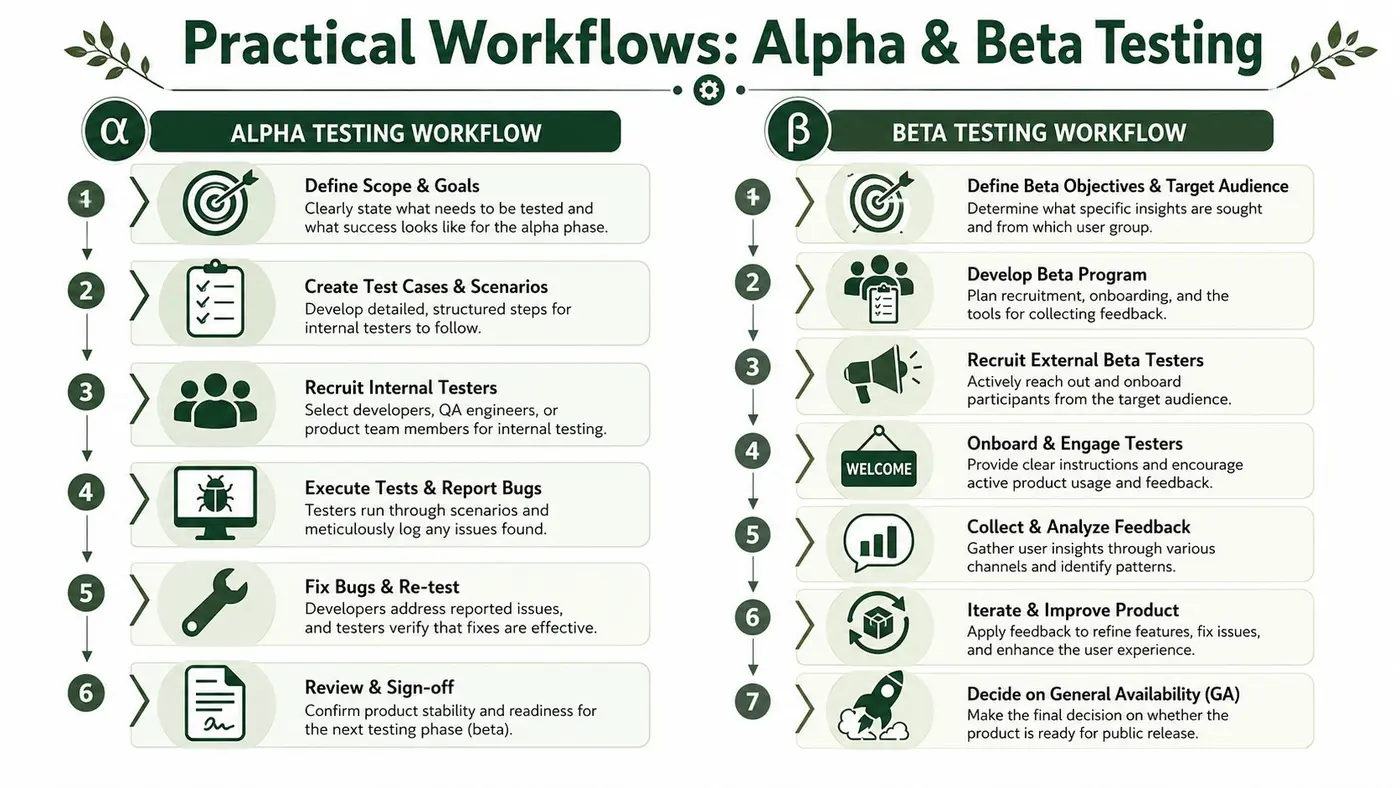
A practical alpha workflow
A useful alpha process is structured enough to surface defects quickly without slowing the team down.
-
Set a narrow scope
Don't try to “alpha the whole product” in one vague pass. Define the workflows that must be trusted before external exposure. -
Write targeted scenarios
Create test cases for expected behaviour, broken inputs, edge paths, and recovery actions. Internal testers need prompts, not guesswork. -
Assign the right people
QA should lead, but product, engineering, and support often catch different classes of issues. Internal diversity helps. -
Log and triage centrally
Every issue needs a single home, clear severity, reproduction notes, and ownership. If your defect process is messy, resources on how to streamline bug tracking with Linear are useful for tightening hand-offs between testers and engineers. -
Re-test fast
Alpha loses value when findings sit in backlog limbo. The cycle should be test, fix, verify, and decide.
For teams that want a more formal view of how these stages fit into a broader QA process, this guide to the test lifecycle is a practical reference.
A practical beta workflow
Beta needs more than a release build and an invite email. The workflow is partly product, partly programme management.
A solid beta usually includes:
- Defined tester profile: Pick users who match the audience you care about, not whoever is easiest to recruit.
- Clear onboarding: Tell testers what's new, what to try, what to ignore, and where to send feedback.
- Visible communication channels: Use a dedicated inbox, community space, support flow, or structured form.
- Feedback review cadence: Product and engineering should review patterns regularly, not only at the end.
The main discipline in beta is synthesis. Individual comments matter less than recurring themes. One user saying “this is confusing” is a clue. Ten users getting stuck in the same step is a prioritisation signal.
The modern shift from gates to staged learning
The classic alpha-then-beta framing is becoming less useful in continuous delivery. UK Government service guidance emphasises iterative delivery, private beta, public beta, and ongoing user research, a shift discussed in Virtuoso QA's article on alpha vs beta testing.
That's closer to how strong teams already operate. They don't treat beta as a one-off ceremonial phase. They move from internal validation to external validation in stages.
That staged-learning model works well because it accepts two realities:
- internal testing never captures full real-world complexity
- external testing shouldn't become a substitute for internal discipline
So yes, alpha and beta still matter. But the strongest teams treat them as modes of learning, not rigid calendar milestones.
Beyond Beta Continuous Optimisation with A/B Testing
Beta testing is not the finish line. It gets you from “we think this works” to “real users can use this in plausible conditions”. That's a big step, but it still doesn't tell you which version of an experience performs best.
Teams often stall at this stage. Beta users report that onboarding copy is unclear, pricing language feels vague, or a CTA doesn't stand out. Those are good findings. They are not final answers. You still need a disciplined way to test alternatives after launch.
Beta tells you what feels wrong
Beta is strong at surfacing friction:
- users hesitate on a form
- people miss an important button
- onboarding instructions create confusion
- a layout works technically but feels awkward
That feedback is valuable because it tells you where to look. But beta usually can't settle close optimisation choices with confidence. If you have two competing headlines, two checkout layouts, or two onboarding sequences, you need experimentation on live traffic.
That's why post-launch optimisation should be treated as the next operating phase, not an afterthought. Teams that keep learning after release turn beta feedback into measurable product changes rather than a pile of observations.
A/B testing answers a different question
A/B testing sits downstream from alpha and beta. The product is already live. The issue is no longer “is this stable enough?” or “do users understand it at all?” The issue is “which version leads to better outcomes?”
There's also a terminology trap here. In hypothesis testing, alpha means the level of significance, commonly set at 0.05 (5%) according to National University's statistics resource on alpha and beta. In that context, alpha is the probability of a Type I error, or a false positive. That is completely different from the software phase called alpha testing.
This distinction matters because many experimentation programmes wait for a 95% confidence threshold before calling a winner, which follows from that same statistical framing in frequentist testing. If your team mixes up the product meaning of alpha with the statistical one, discussions get confusing fast.
Beta helps you generate hypotheses. A/B testing helps you choose between them.
For teams evaluating what comes next after launch, it helps to review the range of A/B testing platforms and choose a setup that fits your stack, traffic, and decision process.
The most effective teams don't treat launch as the end of testing. They treat it as the point where testing changes form.
Otter A/B helps teams keep learning after beta by testing headlines, CTAs, and layouts on live traffic without slowing the site down. If you want a lightweight platform built for fast experiments, clear significance tracking, and straightforward reporting, take a look at Otter A/B.
Stop guessing
Ready to start testing?
Set up your first A/B test in under five minutes. No credit card required.
- 14-day free trial
- No credit card required
- Cancel anytime