What Is Smoke Testing
Discover what is smoke testing, why it's crucial for stable software, and how it differs from sanity or regression testing. Get your practical 2026 checklist.
You've probably lived some version of this already. A build goes out to staging on a busy afternoon. Product wants a quick look. Developers are waiting on feedback. QA starts preparing a larger round of checks. Then someone notices the login button does nothing, or the app opens to a blank screen, or checkout fails before a user can even enter card details.
That kind of breakage creates instant noise. The release manager wants to know whether to roll back. Developers start asking whether the issue is environment-related or a real defect. QA has to stop what it was doing and switch from planned validation to triage. A simple question suddenly matters a lot: is this build stable enough to test at all?
That's where smoke testing comes in. If you've ever asked what is smoke testing, the short answer is this: it's the fastest possible check that tells the team whether the build is alive, usable, and worth further effort.
The Dev Team Nightmare Smoke Testing Prevents
A team pushes a new build. The change looked small in code review. Maybe it touched authentication, a shared component, or a deployment setting that seemed harmless. Nobody expected drama.
Then QA opens the app and hits the first critical path. Login fails. Or the home page loads but the main navigation is dead. Or the checkout page appears, yet the order button throws an error. At that point, every deeper test becomes pointless because the build has already failed the basics.
In UK software practice, smoke testing is generally treated as a rapid, high-level quality gate after a new build or deployment. It checks the most critical functions before deeper testing starts, and it's typically completed in about 15 minutes or less as a pass/fail gate for further work, as described in Amplitude's smoke testing overview.
Why this failure hurts so much
The immediate problem isn't just the bug itself. It's the wasted motion around it.
- QA loses time because people begin regression or exploratory work on a build that never should have passed the front door.
- Developers lose focus because they get defect reports mixed with noise from an unstable environment.
- Product loses confidence because the release process starts to look chaotic, even when the underlying issue is simple.
Smoke testing stops that chain reaction early. It gives the team a quick answer before anyone invests serious time.
Practical rule: If the product can't complete its core journey, don't keep testing. Reject the build, report the blocker, and wait for a stable version.
Clear reporting matters here. When a smoke test fails, the handoff back to engineering needs to be crisp, reproducible, and easy to scan. A structured AI-ready bug reporting template can help teams capture the environment, steps, expected result, and actual failure without turning the report into guesswork.
Smoke testing is small, but it prevents big messes. That's why experienced teams treat it as the most valuable few minutes in the release cycle.
The Core Idea Behind Smoke Testing
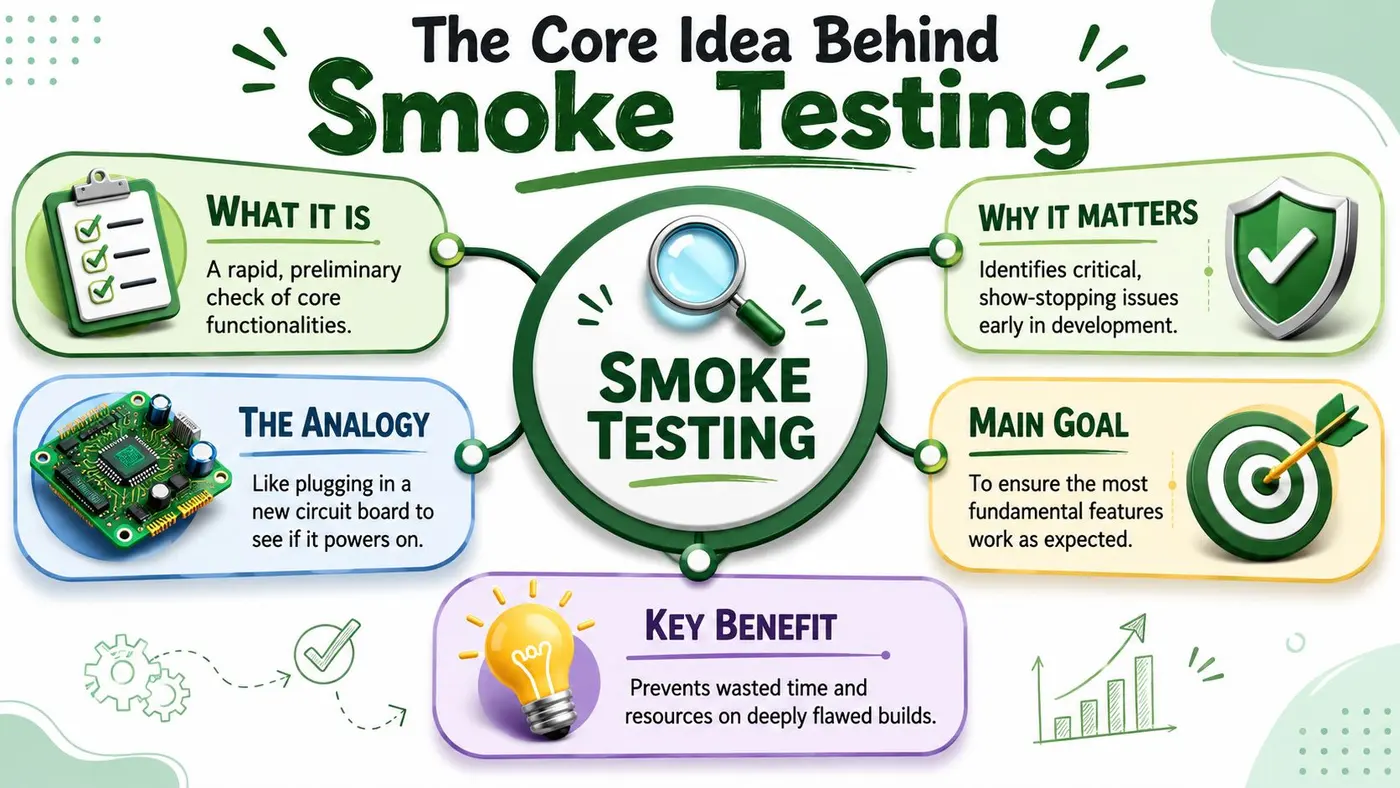
Smoke testing got its name from hardware. Engineers would power on a new circuit board and check whether it started smoking. If smoke appeared, they didn't keep testing. They stopped immediately because the system had already failed the most basic check.
Software teams borrowed the same logic. A new build doesn't need a full investigation first. It needs a quick check to see whether the essentials work.
What smoke testing is really asking
When people ask what is smoke testing, they often think it means “a small test suite”. That's partly true, but it misses the point.
Smoke testing is a build-gate technique. A fresh build gets a minimal, high-value set of checks to verify that core workflows run without immediate failure before deeper QA begins. If it fails, teams should stop regression or exploratory testing because continuing would waste time on a build that isn't stable enough to validate, as explained in TechTarget's definition of smoke testing.
Smoke testing gives you a go or no-go decision. Nothing more, and nothing less.
That's why you'll also hear terms like build verification testing or confidence testing. All three names point to the same core purpose: prove that the build is not obviously broken.
What smoke testing is not
Smoke testing doesn't try to answer every quality question. It doesn't measure edge cases. It doesn't check every browser combination. It doesn't verify detailed business rules.
It answers a narrower question:
- Can the application launch?
- Can a user reach the core screens?
- Can the primary journey complete without a major failure?
If yes, the team can continue. If no, the team should stop.
A simple mental model
Think of smoke testing as the receptionist at the front desk, not the full audit team.
- It checks identity first. Is this build even fit to enter the pipeline?
- It doesn't investigate everything. That comes later with broader QA.
- It protects time. It keeps the team from spending hours on a build that should have been rejected in minutes.
New teams often overcomplicate smoke testing by trying to include too much. The fastest way to break a smoke suite is to turn it into mini-regression. Once that happens, it loses the speed that makes it useful.
A good smoke test feels almost blunt. It asks only the most important questions, and it expects quick, decisive answers.
Smoke vs Sanity vs Regression Testing
Confusion often arises for many teams. The names sound similar. The intent overlaps. People sometimes use them loosely in meetings, which makes the confusion worse.
The easiest way to separate them is to look at the question each type of testing answers.
The quick comparison
| Testing Type | Primary Goal | Scope | When It's Performed | Analogy |
|---|---|---|---|---|
| Smoke Testing | Check whether the build is stable enough for further testing | Broad and shallow across core paths | Right after a new build or deployment | Turning the key in a car to see whether it starts |
| Sanity Testing | Check whether a specific fix or recent change works | Narrow and focused | After a bug fix or small change | Testing one repaired brake light after the mechanic's fix |
| Regression Testing | Check whether existing functionality still works after changes | Wide and deep | After the build passes basic gates | Inspecting the whole car after multiple parts were changed |
| Unit Testing | Check whether one small piece of code behaves correctly | Very narrow and isolated | During development and build execution | Testing one bolt, switch, or function on the workbench |
Smoke testing compared with sanity testing
Smoke testing asks, “Is this build testable?”
Sanity testing asks, “Did that specific change behave as expected?”
A smoke test might verify that the login page loads, accepts credentials, and sends the user to the dashboard. A sanity test might focus only on a recent password reset fix to make sure that one changed flow now works.
That difference matters. Smoke testing is broad but shallow. Sanity testing is narrow but deeper in the changed area.
Smoke testing compared with regression testing
Regression is much larger. It checks whether existing functionality still behaves correctly after changes. That means more features, more combinations, and more time.
Smoke testing comes first because it acts as a filter. If the app can't launch or the main purchase flow is broken, there's no point running a large regression suite.
A helpful way to think about the testing lifecycle is this:
- Unit tests catch local code issues.
- Smoke tests decide whether the build is usable.
- Sanity tests verify targeted fixes or changed areas.
- Regression tests check broader stability across the product.
If your team also works with release stages beyond internal QA, this comparison pairs well with the ideas in alpha vs beta testing, because those phases answer different questions again. They're about readiness with broader users, not just basic build viability.
Where unit testing fits
Unit testing belongs closer to the code. Developers use it to verify small pieces of logic in isolation. A unit test might confirm that a discount function calculates the right total or that an API helper returns the expected structure.
Smoke testing sits much higher. It cares whether the integrated product works in a deployed environment.
Here's the difference in plain language:
- Unit test says, “This function works.”
- Smoke test says, “This product starts and its key flow doesn't immediately break.”
If unit tests prove the parts are built correctly, smoke tests prove the assembled machine is alive.
The mistake teams make most often
The most common mistake is treating smoke testing and regression as size variants of the same thing. They aren't. They serve different decisions.
Regression asks whether the system is still correct across a broad area. Smoke testing asks whether the team should even bother continuing today.
That's why smoke testing should stay lean, deliberate, and unforgiving.
A Practical Smoke Testing Workflow
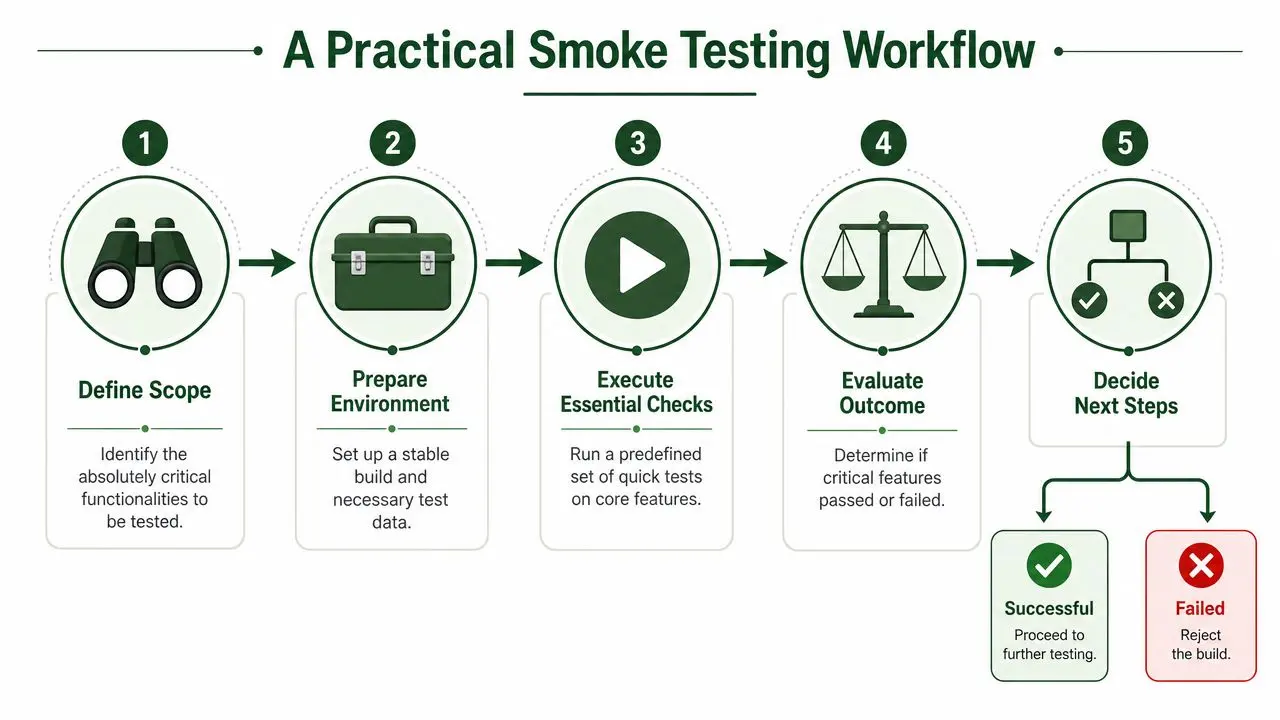
A useful smoke process doesn't start with test tools. It starts with business risk. You need to know which journeys absolutely cannot fail.
For most products, those paths are obvious once you name them plainly. Can a user sign in? Can they reach the main area of the product? Can they perform the primary action the product exists for?
Start with the journeys that matter most
Operational guidance on smoke testing is clear on one point. The suite should stay small, but it should cover the most failure-prone end-to-end paths such as app launch, login, primary navigation, payment or checkout, and other core user journeys. The aim is confidence, not completeness, as summarised in GeeksforGeeks' smoke testing overview.
That means you shouldn't start by listing every feature. Start with the actions the business cannot tolerate being broken.
For a typical product, ask:
- What must work for any user to get value?
- What breaks revenue, onboarding, or access if it fails?
- What path would trigger immediate support tickets if it went down?
Build a short, stable suite
Once you know the critical paths, create a lightweight set of checks. Keep them repeatable. Keep them boring. Boring is good here because smoke tests should be dependable.
A practical smoke suite usually includes:
- Environment check: The correct build is deployed and reachable.
- Authentication check: A valid user can sign in.
- Landing experience: The first meaningful screen loads.
- Primary task: The main transaction or workflow completes at a basic level.
- Exit or recovery path: Logout, confirmation, or basic return navigation works.
Don't pack in edge cases. Don't test every validation message. Don't chase layout polish. That belongs elsewhere.
Prepare before you run
Teams often blame “flaky smoke tests” when the actual problem is poor setup. Good smoke testing needs a known environment, stable test accounts, and predictable data.
Use a short pre-run checklist:
- Confirm the build version in staging, test, or the target environment.
- Verify test data such as working accounts, seeded products, or sandbox records.
- Check dependencies that the core path relies on, like auth or a critical API.
- Make pass/fail criteria explicit before execution starts.
A deployment-aware mindset helps here, especially when teams release frequently. If you want a clearer mental model for how builds move through environments, what is a deployment is a useful companion read.
A visual walkthrough can help if your team is designing its first repeatable flow:
Decide quickly and communicate clearly
Smoke testing only works if the outcome is decisive.
If a critical check fails, reject the build. Don't let the team drift into “testing around” the issue. That creates muddy reports and false progress.
Release gate: A failed smoke test means the build is unstable. Stop downstream testing and send it back with a clear defect summary.
If the build passes, move on to richer validation. That may include exploratory testing, targeted sanity checks, or broader regression.
For teams shipping storefront experiments or layout changes, this same discipline matters during front-end rollout. Even when you're changing only themes or presentation logic, a fast gate before deeper validation saves time. That's one reason teams running e-commerce changes often care about Shopify theme split testing alongside release checks.
Automating Smoke Tests in Your CI/CD Pipeline
Manual smoke testing is a good starting point. It helps teams learn what matters and forces useful conversations about critical paths. But once releases become frequent, manual checks alone start to drag.
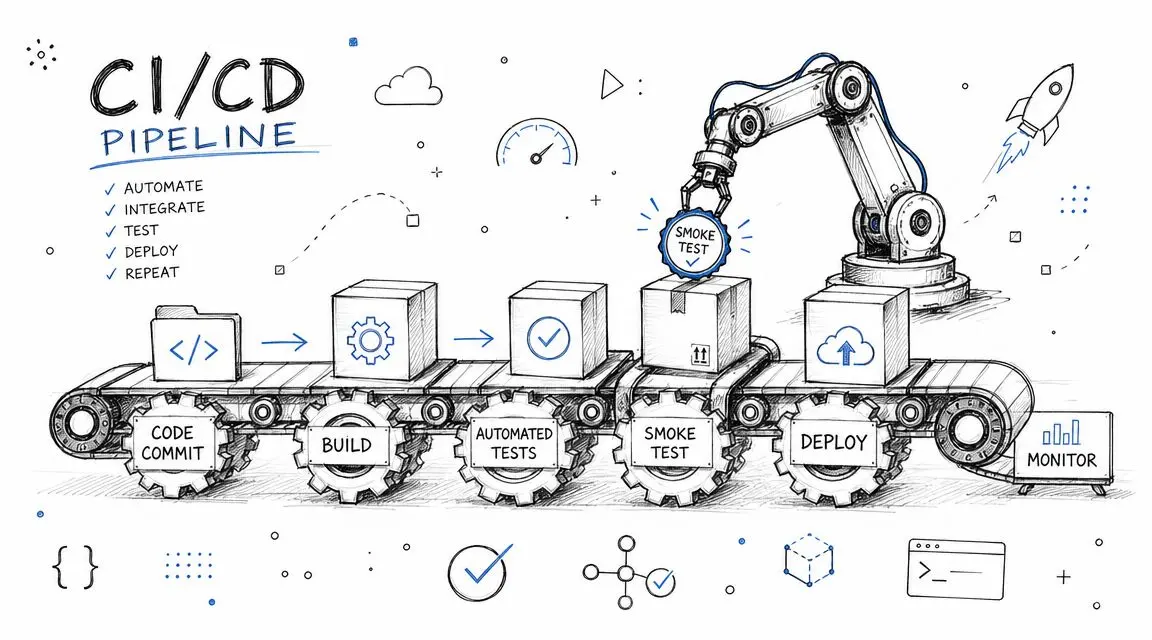
Automation turns smoke testing into a dependable gate instead of a task someone remembers when they're busy.
Where automated smoke tests belong
In a CI/CD pipeline, smoke tests usually run after the build is created and deployed to a testable environment. The pipeline should pause there and wait for a pass/fail result.
That pattern works well because smoke testing is meant to be fast. If the suite says the build is broken, the pipeline can stop early. If it passes, the team can continue to broader testing or staged release steps.
Popular tools for this include Cypress, Playwright, and Selenium for browser flows, plus API-level checks written in your existing test framework. The best tool is usually the one your team can maintain cleanly.
Automation changes the team's behaviour
Once smoke tests run on every build, the habit of “we'll just have a quick look later” starts to disappear. Developers get earlier feedback. QA spends less time on obvious failures. Product sees a cleaner release rhythm.
This is also where newer tooling can help. If your team is exploring AI-powered software testing, it's worth thinking about AI as support for test maintenance, failure triage, and coverage suggestions. It shouldn't replace your judgement about which smoke checks matter most.
Smoke testing is not monitoring
This is an important distinction, especially for teams doing frequent releases, canary rollouts, or A/B tests.
Smoke tests answer one question: is this build obviously broken right now? Monitoring answers a different one: is the system healthy over time? That distinction is highlighted in Wikipedia's overview of smoke testing).
So don't use smoke tests as a substitute for observability. You still need logs, alerts, uptime checks, and production metrics. Smoke testing happens at the gate. Monitoring stays on guard after the gate opens.
Keep the suite small even when it's automated
Automation creates a temptation to add more and more checks because the machine can run them. Resist that. If the suite gets too large, it stops being smoke testing and turns into a slow acceptance pack.
Use automation to preserve speed, not to justify sprawl.
Smoke Test Examples and a Ready-to-Use Checklist
Theory helps, but teams need examples they can use. A strong smoke suite looks different for an e-commerce site, a SaaS platform, and an API, even though the principle stays the same.
Some QA teams keep a stable checklist of roughly 20 to 50 test cases so the suite remains small enough to stay fast while still covering critical paths, according to Ranorex's guide to smoke testing.
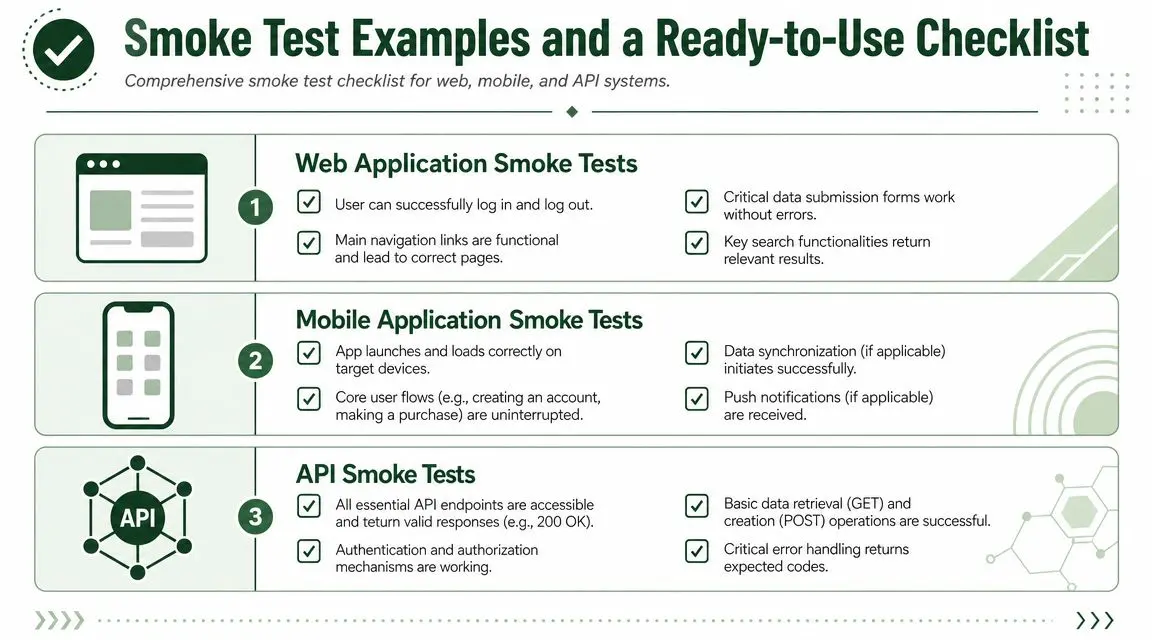
Example smoke tests by product type
For an e-commerce site
- User can open the homepage
- Search returns a result
- Product page loads
- Add to basket works
- Checkout starts
- Order confirmation appears in the expected basic flow
For a SaaS platform
- Login works for a valid user
- Main dashboard loads
- Key navigation menu opens the correct areas
- A core record can be created or edited
- A save action completes successfully
- Logout works without error
For a mobile app
- App launches without crashing
- Login or account access works
- Home screen loads essential content
- Main action completes
- App returns from background without breaking the session
For an API
- Health or core endpoint responds
- Authentication works
- A basic GET request returns valid data
- A basic POST request succeeds
- Expected error handling appears for an invalid request
A ready-to-use checklist
Use this as a starter template and adapt it to your own product:
- Build available: Correct version deployed to the target environment
- Access working: App or site opens successfully
- Authentication stable: Valid sign-in completes
- Core navigation working: User can reach the main product areas
- Primary journey alive: Main business action completes
- Data handling basic check: Important data can load, save, or submit
- Critical integration reachable: Essential dependency responds as expected
- No blocker-level errors: No crash, blank screen, or dead-end flow
- Pass or fail decision recorded: Team knows whether to proceed or reject the build
If you keep that checklist current and ruthless, smoke testing stops being theory and becomes a daily release habit.
If your team also runs experiments on live pages, Otter A/B helps you test headlines, CTAs, and layouts without slowing the site down. It's a lightweight A/B testing platform built for teams that want fast experiments, clear results, and an easier path from idea to evidence.
Stop guessing
Ready to start testing?
Set up your first A/B test in under five minutes. No credit card required.
- 14-day free trial
- No credit card required
- Cancel anytime