10 Actionable Conversion Rate Optimization Best Practices for 2026
Boost revenue with these 10 conversion rate optimization best practices. Learn to A/B test, optimise copy, and improve UX with our comprehensive guide.

In the competitive world of online business, simply driving traffic to your website isn't enough. The real challenge, and where significant growth is unlocked, lies in converting that traffic into meaningful actions: sales, sign-ups, or leads. This is the core of conversion rate optimisation (CRO), a disciplined practice that turns your website into an efficient engine for growth. Moving beyond hunches and guesswork, a structured approach to CRO allows you to make informed decisions that directly impact your bottom line.
This guide provides a definitive roundup of the top ten conversion rate optimization best practices, offering an actionable framework for continuous improvement. We will explore everything from the foundational principles of A/B testing and compelling copywriting to the technical necessities of page speed and Core Web Vitals. You will learn how to form strong hypotheses, design effective experiments, and measure what truly matters, such as revenue per visitor and customer lifetime value. For those diving deep into this field, understanding the comprehensive role of a conversion optimization expert is invaluable for building a successful program.
Throughout this article, we'll demonstrate how to implement these strategies using lightweight, modern tools like Otter A/B. This ensures your optimisation efforts are not only effective but also maintain a fast and responsive user experience. Get ready to shift from random changes to a systematic process that delivers repeatable, measurable results, transforming your website's performance one data-backed test at a time.
1. A/B Testing as the Foundation of CRO
A/B testing, also known as split testing, is the methodical process of comparing two versions of a webpage or app element to determine which one performs better. It is the bedrock of effective conversion rate optimisation best practices because it replaces guesswork with empirical evidence. The process involves splitting your audience into two or more groups, showing each group a different version (e.g., Version A, the 'control', versus Version B, the 'variation'), and then statistically analysing which version led to more conversions.
This controlled approach allows you to make data-driven decisions that progressively improve user experience and business metrics. For example, Amazon's culture of continuous experimentation means they test thousands of variations annually, optimising everything from button colours to checkout flows. Similarly, Netflix frequently tests new UI layouts to increase content discovery and viewing hours, directly impacting user retention.
Actionable Tips for A/B Testing
To implement A/B testing effectively, focus on a structured approach:
- Prioritise High-Impact Elements: Begin by testing elements that have the greatest potential to influence user behaviour, such as headlines, primary calls-to-action (CTAs), page layouts, and form fields.
- Run Tests for a Sufficient Duration: Let tests run long enough to account for daily and weekly fluctuations in traffic behaviour. A typical test should run for at least one to two full business cycles (e.g., 7 or 14 days).
- Set a Clear Confidence Threshold: Aim for a statistical significance level of at least 95%. This minimises the risk of a false positive, where you mistakenly conclude a variation is a winner due to random chance. You can learn more about how to interpret test results using a confidence interval.
- Document Everything: Maintain a detailed log of all your hypotheses, test setups, results, and learnings. This creates an institutional knowledge base that informs future experiments and prevents repeating past mistakes.
2. Headline and Copy Optimisation
Your headline and body copy are often the first elements a visitor interacts with, making them critical for capturing attention and persuading action. Optimising your copy is one of the highest-impact conversion rate optimisation best practices because it directly addresses user motivation and clarity. The process involves methodically testing different value propositions, emotional triggers, and messaging angles to discover what resonates most deeply with your target audience and compels them to convert.
This focus on language can produce significant gains with relatively little development effort. For instance, Unbounce famously increased form submissions by 90% simply by changing a generic button call-to-action from 'Submit' to the more benefit-oriented 'Yes, Send Me Updates'. Similarly, e-commerce sites often find that using specific numbers in their copy, such as 'Save £47 today', consistently outperforms vaguer alternatives like 'Big savings inside'. These examples show how precise wording can dramatically influence user behaviour and business outcomes.
Actionable Tips for Headline and Copy Optimisation
To effectively test and improve your copy, implement a focused and structured approach:
- Test One Variable at a Time: Isolate the element you are changing in your headline. For example, create variants that test a benefit-driven angle (e.g., "Get Flawless Skin in 30 Days") against a curiosity-driven one (e.g., "The Skincare Secret Used by Dermatologists").
- Use Power Words and Specificity: Incorporate words that elicit an emotional or psychological response, such as proven, guaranteed, or exclusive. Whenever possible, replace generic statements with specific numbers and data. "Join 15,000+ happy customers" is far more compelling than "Join our community".
- Align Messaging with User Intent: Tailor your headline and copy to match where the user is in their journey. A visitor from a brand-aware search query requires different messaging than someone clicking an ad about a specific product feature.
- Draw from Customer Research: Your best copy ideas will come directly from your customers. Analyse support tickets, read reviews, and conduct interviews to understand their pain points, goals, and the exact language they use to describe them. These insights are a goldmine for creating high-converting copy variants.
3. Call-to-Action (CTA) Button Optimisation
The call-to-action (CTA) button is the pivotal final step in most conversion funnels, directly prompting a user to act. Optimising its copy, colour, size, and placement can produce dramatic effects on conversion rates. Small changes to CTAs often yield a high return on investment in CRO testing because they directly remove friction at the decisive moment of conversion.

This practice is fundamental to any conversion rate optimisation best practices framework. For instance, HubSpot increased form submissions by 22% simply by changing button text from a generic 'Submit' to the value-driven 'Get Free Consultation'. Similarly, Optimizely saw a 45% increase in clicks by adding urgency copy ('Limited Time: Get Access Now'). These examples show how precise language and design cues can significantly alter user behaviour.
Actionable Tips for CTA Optimisation
To implement CTA optimisation effectively, focus on a systematic testing plan:
- Use Action-Oriented Verbs: Replace passive words like 'Submit' with commanding, benefit-focused verbs. Test phrases like 'Get My Free Plan', 'Discover Your Score', or 'Start Your Trial'.
- Test High-Contrast Colours: The button should stand out visually from the rest of the page. Test colours that have high contrast but still align with your brand guidelines. The goal is to draw the user's eye, not to clash with the overall design.
- Add Supporting Microcopy: Alleviate last-minute user anxiety by placing reassuring text near the CTA. Phrases like 'No credit card required', 'Join 50,000+ happy customers', or 'Secure checkout' can boost confidence and reduce friction.
- Ensure Mobile Accessibility: A button that’s hard to tap is a conversion killer on mobile. Ensure your CTAs have a minimum touch target size of 48x48 pixels to be easily usable on smaller screens. Incorrectly concluding that a larger button is worse due to random chance is a risk; this highlights the importance of understanding statistical errors, such as a type I error in A/B testing.
4. Form Field Reduction and Progressive Profiling
Forms are the final hurdle in many conversion journeys, but each additional field creates friction that increases abandonment rates. Form field reduction is a core tenant of conversion rate optimisation best practices, focusing on minimising the effort required from a user to convert. The strategy involves removing non-essential fields, while progressive profiling gathers user information over time, balancing the need for quality data with a smooth user experience.
This optimisation is crucial because the correlation between form length and conversion is direct and unforgiving. Research from HubSpot found that conversion rates can drop significantly with each field added. Similarly, landing page platforms frequently report conversion lifts of 30-50% simply by stripping out unnecessary information requests. This method replaces bulky, intimidating forms with a streamlined, user-friendly process.

Actionable Tips for Form Optimisation
To successfully reduce friction on your forms, consider the following structured tactics:
- Start with the Absolute Minimum: For any given form, identify the single most critical piece of information you need (e.g., an email address). Use this as your baseline and only add fields if they are absolutely essential for the next step in the customer journey.
- Test Field Removal Systematically: Instead of guessing which fields to remove, run A/B tests where you remove one field at a time. This helps you identify the specific fields causing the most friction and quantify their impact on your conversion rate.
- Implement Progressive Profiling: For lead generation, avoid asking for everything at once. Collect a name and email on the first interaction. On subsequent visits or interactions, use smart forms to ask for additional details like company size or job title. This gradual approach feels less intrusive.
- Optimise Field Order and Defaults: Place easy, low-friction fields like "First Name" and "Email" at the beginning. Use smart defaults or pre-fill information for returning users to further reduce their effort.
- Test Form Structure: Don't assume a single-step form is always best. For complex processes, a multi-step form can feel less overwhelming by breaking the process into smaller, manageable chunks. Test this against a single-page version to see what your specific audience prefers.
5. Landing Page Layout and Design Testing
The overall layout of a page, including its visual hierarchy, content placement, whitespace, and design elements, significantly influences user behaviour and conversion rates. Landing page layout testing is a core conversion rate optimisation best practice that involves comparing different page structures to see what guides users most effectively towards a desired action. This could mean testing a hero-first design against a content-heavy one, or a single-column layout versus a multi-column grid.
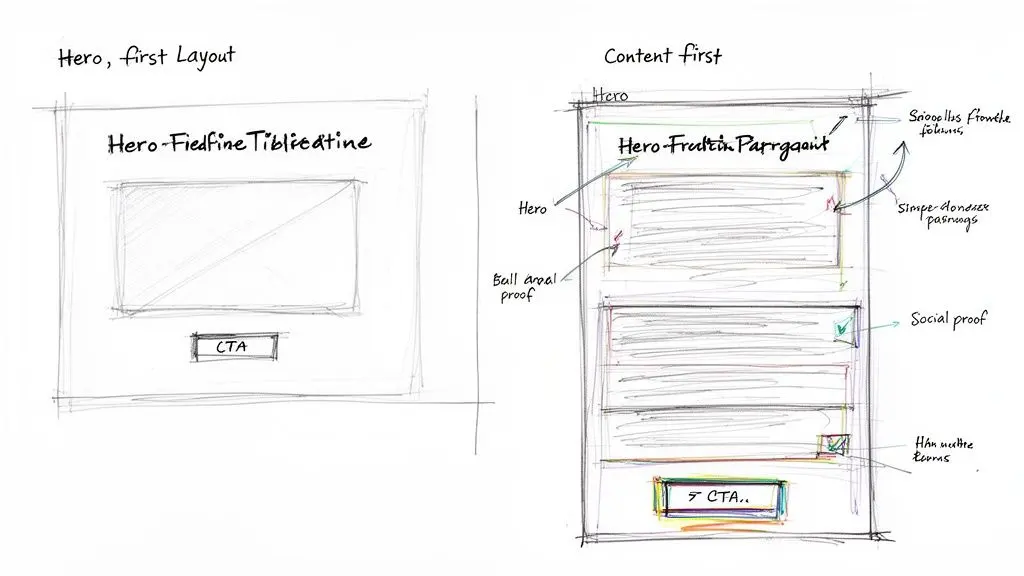
These experiments move beyond simple element changes to test fundamental assumptions about how users consume information. For instance, ConvertKit famously increased sign-ups by 60% by simplifying its hero section and removing distracting elements. Similarly, Zendesk improved pricing page conversions by 40% by implementing a clearer visual hierarchy and adding comparison tables, making it easier for users to evaluate options.
Actionable Tips for Layout and Design Testing
To run effective layout tests, combine user research with a structured experimental approach:
- Start with a Layout Audit: Before building variations, use heatmaps and session recordings to understand how users currently interact with your page. This analysis will reveal areas of friction or opportunity.
- Test Radical Changes: Don’t be afraid to test fundamentally different layouts. For example, pit your current design against a version that moves the primary value proposition and call-to-action much higher on the page.
- Prioritise Mobile-First Design: Given that a majority of traffic often comes from mobile devices, design and test layout variations specifically for smaller screens. A layout that works on desktop may fail completely on mobile.
- Use Whitespace Strategically: Test layouts that use more or less whitespace to guide the user's eye towards important elements like forms and CTAs. Strategic use of space can reduce cognitive load and improve focus.
- Validate with Statistical Rigour: Big layout changes can produce dramatic results, but it's crucial to ensure they are not due to chance. To do this, it is essential to understand the principles of testing statistical significance to validate your findings.
6. Social Proof and Trust Signal Optimisation
Social proof is a psychological principle where people assume the actions of others reflect correct behaviour for a given situation. In digital marketing, this translates to using signals like customer testimonials, reviews, user counts, and case studies to build credibility and reduce purchasing anxiety. Optimising these trust signals is a core part of conversion rate optimisation best practices because it directly addresses a new visitor’s primary question: “Can I trust this company?”
By showcasing positive experiences from existing customers, you lower the perceived risk for prospects. For instance, Amazon's prolific use of customer ratings and review counts is a foundational element of its e-commerce dominance. Similarly, SaaS companies often display logos of well-known clients or state “Trusted by 10,000+ businesses,” which immediately establishes credibility and encourages sign-ups by tapping into our instinct to follow the crowd.
Actionable Tips for Social Proof and Trust Signal Optimisation
To effectively integrate social proof, you should test its type, format, and placement:
- Test Testimonial Placement: Experiment with placing your strongest testimonials in different high-visibility areas. Compare their performance above the fold, mid-page to address specific feature benefits, or directly next to a primary call-to-action to reduce last-minute hesitation.
- Prioritise Specificity and Authenticity: A quote like "We increased our lead-to-close ratio by 40% in three months" is far more compelling than a generic "Great product!" Where possible, test video testimonials against text-based ones to see which format resonates more with your audience.
- Display Trust Badges Strategically: Security and privacy seals (e.g., SSL certificates, third-party payment provider logos) are most effective when placed near points of friction, such as checkout forms or email sign-up fields. Test different badges to identify which ones your audience recognises and trusts most.
- Keep Social Proof Fresh: Regularly collect and rotate testimonials and case studies. Seeing a recent date on a review or case study adds to its relevance and proves that your business continues to deliver value. A stale testimonial from five years ago can have the opposite effect.
7. Pricing Page and Offer Optimisation
The pricing page is often the final hurdle between a prospect and a customer, making it a critical point for conversion rate optimisation. This is where users make a direct value-for-cost calculation, and even minor friction or confusion can lead to abandonment. Optimising your pricing page involves methodically testing everything from the pricing models themselves (one-time vs. subscription) to the psychological framing of your offers.
This practice is fundamental for any business, particularly SaaS and e-commerce, as it directly impacts revenue and customer acquisition. For instance, Stripe famously increased annual plan adoption by 30% simply by making the yearly savings more prominent. Similarly, many B2B SaaS companies have seen conversion lifts of 40-50% just by improving the clarity and structure of their pricing tables. Testing the inclusion of a money-back guarantee can also provide a significant boost, often increasing sign-ups by 15-25% by reducing perceived risk.
Actionable Tips for Pricing Optimisation
To effectively refine your pricing and offers, focus on testing high-impact psychological triggers:
- Test Annual vs. Monthly Billing Prominence: Clearly display the savings associated with an annual commitment. Many users will opt for the yearly plan if the value is immediately obvious, improving your cash flow and customer lifetime value.
- Use Visual Anchoring: Present your highest-priced plan first (on the left, as we read left-to-right). This "anchor" price makes subsequent, lower-priced options seem more reasonable and affordable by comparison.
- Make the Recommended Plan Stand Out: Use visual cues like a coloured border, a "Most Popular" badge, or a slightly larger size to guide users towards the plan you want them to choose. This simplifies choice and reduces decision paralysis.
- Test Risk Reversals: Experiment with different guarantees like a "30-day money-back guarantee" or a "60-day free trial". Test the specific language as well, such as "no questions asked" versus "full refund guarantee," to see what resonates most with your audience.
- Simplify Choices: If you have a pricing tier that consistently underperforms and attracts few sign-ups, consider removing it. A cleaner, more focused set of options can often lead to higher overall conversions by making the decision easier for the user.
8. Page Speed and Performance Optimisation
Page speed is a critical, non-negotiable component of modern conversion rate optimisation best practices. It refers to the time it takes for content on your URL to load for a user. A slow-loading page creates friction and frustration, causing potential customers to abandon your site before they even see your offer. The impact is direct and quantifiable; studies famously show that for every 100-millisecond delay in load time, conversion rates can drop by as much as 1%.
The importance of performance is validated by major industry players. Amazon's research found that a 100ms delay cost them 1% in conversions, while Google's Core Web Vitals update integrated page experience signals directly into search rankings. For mobile e-commerce, a one-second improvement in site speed can boost conversions by 7%. Likewise, Pinterest saw a 15% increase in conversion rates simply by improving its Core Web Vitals, proving that speed is a direct path to revenue.
Actionable Tips for Performance Optimisation
To ensure your website is fast and responsive, you must actively manage its performance:
- Audit and Monitor Performance: Regularly use tools like Google PageSpeed Insights and WebPageTest to audit your current performance. This provides a baseline and identifies specific areas for improvement, such as your Core Web Vitals (LCP, FID, CLS).
- Optimise Media Assets: Compress and resize all images before uploading them. Use modern image formats like WebP where possible and implement lazy loading for images and videos that appear below the fold.
- Minify and Defer Code: Reduce the size of your HTML, CSS, and JavaScript files by minifying them. Defer or load asynchronously any JavaScript that is not essential for the initial page render to speed up the perceived load time.
- Use a Content Delivery Network (CDN): A CDN stores cached versions of your site on servers around the world, delivering content from the location closest to the user. This dramatically reduces latency for a global audience.
- Choose a Flicker-Free Testing Tool: When running experiments, it's vital that your A/B testing tool does not degrade performance. Solutions like Otter A/B, which load in under 50ms and prevent content flicker, ensure your optimisation efforts don't inadvertently harm the user experience and invalidate test results.
9. Video and Multimedia Content Testing
Integrating video and other multimedia elements into your digital properties can dramatically increase user engagement and drive conversions. This practice involves methodically testing the impact of different multimedia formats, such as product demos, customer testimonials, or explainer animations, on user behaviour. It goes beyond simply adding a video; it means evaluating its presence, placement, autoplay settings, and even the content of the video itself to see what resonates most with your audience.
This is a key part of modern conversion rate optimisation best practices because video communicates value and builds trust more efficiently than text alone. Research from Wistia indicates that using video can boost conversion rates by up to 80%, depending on its context. Similarly, SaaS companies often see a 20-30% improvement in trial sign-ups after adding product demo videos, as they clarify the value proposition and user experience in a compelling, digestible format.
Actionable Tips for Video and Multimedia Testing
To successfully test video content and maximise its conversion potential, adopt a structured experimental approach:
- Test Presence First: The most fundamental test is presence versus absence. Start by creating a variation with a video on a key landing page and test it against the control (no video). Not all audiences or page contexts benefit equally, so this establishes a baseline.
- Keep Videos Concise: User attention is finite. Aim for videos under two minutes for top-of-funnel content to maintain viewer retention. Longer, more detailed videos can be tested further down the funnel for highly-engaged prospects.
- Experiment with Autoplay and Sound: Test different playback options. A common setup involves comparing autoplay with sound muted against a user-initiated play (play-on-click). Autoplay can capture attention, but muted audio respects the user experience.
- Optimise Thumbnails: The video’s thumbnail acts as its own call-to-action. Test different custom thumbnail images, such as a smiling face, a key product feature, or an intriguing question, to see which one encourages the most clicks.
- Vary Video Placement: The location of your video matters. Test it in the hero section for immediate impact, mid-page to support specific claims, or near a primary CTA to provide a final persuasive push.
- Prioritise Mobile and Accessibility: Ensure your video is fully responsive and loads quickly on mobile devices. Always include captions to accommodate sound-off viewing (common on mobile) and improve accessibility for all users.
10. Personalisation and Segmentation-Based Testing
Personalisation moves beyond the one-size-fits-all approach by tailoring web experiences to individual user segments. This key component of conversion rate optimisation best practices involves customising content, offers, and interactions based on attributes like traffic source, device, location, or past behaviour. Instead of showing everyone the same webpage, segment-based testing helps you discover which messages and layouts resonate with different audience groups, thereby delivering a more relevant user experience.
This strategy is about acknowledging that not all visitors are the same. For instance, Amazon's famed recommendation engine, which personalises product suggestions based on browsing and purchase history, reportedly increases conversions by 10-30%. Similarly, an e-commerce store might show a different promotional banner to a first-time visitor from a paid ad campaign compared to a loyal returning customer, leading to a significant uplift in engagement and sales. The goal is to make each user feel understood, which directly impacts their likelihood to convert.
Actionable Tips for Personalisation and Segmentation
To begin personalising your user journeys, start with clearly defined segments:
- Segment by Traffic Source: Test different headlines and offers for visitors arriving from organic search versus those from a paid social media campaign. Their intent and expectations are likely different.
- Target New vs. Returning Visitors: First-time visitors may need more trust-building content, like social proof or introductory offers. Returning visitors might respond better to loyalty rewards or messages about new product arrivals.
- Utilise Geographic Data: Customise your site by showing local currencies, translating language, or highlighting location-specific offers and shipping information. This simple step can dramatically reduce friction for international customers.
- Create Dynamic Calls-to-Action (CTAs): A powerful personalisation tactic is to change CTA copy based on user status. A new user might see 'Start Your Free Trial', while an existing user on a free plan sees 'Upgrade Your Account'.
Top 10 CRO Practices Comparison
| Item | 🔄 Implementation Complexity | ⚡ Resource Requirements | ⭐ Expected Effectiveness | 📊 Expected Outcomes | 💡 Ideal Use Cases / Key Advantage |
|---|---|---|---|---|---|
| A/B Testing as the Foundation of CRO | 🔄🔄🔄 Moderate–high: experiment setup + stats | ⚡⚡ Moderate: testing tool, traffic, analyst time | ⭐⭐⭐ High: rigorous, generalizable insights | Quantifiable conversion lifts; needs sufficient sample size | Validate hypotheses across pages/channels; builds institutional learning |
| Headline and Copy Optimization | 🔄🔄 Low–moderate: iterative copy tests | ⚡⚡ Low: copywriter + A/B tool | ⭐⭐⭐ High: often high ROI on engagement | Improved CTRs and conversion rates (fast wins) | Test benefit vs. curiosity; prioritize headlines and primary CTAs |
| Call-to-Action (CTA) Button Optimization | 🔄🔄 Low: simple element swaps | ⚡⚡ Low: design + quick tests | ⭐⭐⭐ High: immediate, measurable impact | Rapid lift in clicks/conversions; low risk | Use action verbs, high-contrast colors, mobile-friendly sizing |
| Form Field Reduction & Progressive Profiling | 🔄🔄 Low–moderate: form logic + UX | ⚡⚡ Low: dev effort + analytics | ⭐⭐ Moderate: strong for forms/leads | Lower abandonment; tradeoff between quantity and lead quality | Start with minimal fields; add progressive profiling later |
| Landing Page Layout & Design Testing | 🔄🔄🔄 Moderate–high: layout redesigns | ⚡⚡⚡ Medium–high: design, dev, testing | ⭐⭐⭐ High: broad engagement impact | Significant changes in engagement and conversions | Use heatmaps; test hero vs. content-first; ensure performance |
| Social Proof & Trust Signal Optimization | 🔄🔄 Low: content placement tests | ⚡⚡ Low: collect/format testimonials or badges | ⭐⭐ Moderate: improves credibility for new users | Increased trust leads to higher conversion likelihood | Place near CTAs; use specific metrics and verified sources |
| Pricing Page & Offer Optimization | 🔄🔄🔄 Moderate–high: revenue-sensitive tests | ⚡⚡ Medium: analytics, billing, legal review | ⭐⭐⭐ High: direct revenue and AOV impact | Can materially change revenue mix; needs careful tracking | Test anchoring, annual vs monthly, highlighted savings |
| Page Speed & Performance Optimization | 🔄🔄🔄 High: technical optimization work | ⚡⚡⚡ High: infra, dev, CDN, tooling | ⭐⭐⭐ High: improves UX, SEO, conversions | Faster pages reduce bounce and raise conversions | Optimize images, lazy-load, monitor Core Web Vitals |
| Video & Multimedia Content Testing | 🔄🔄 Moderate: embed and placement tests | ⚡⚡⚡ Medium–high: production + optimization | ⭐⭐ Moderate–high: context-dependent | Can boost engagement substantially; variable CR lift | Test presence vs absence; keep short, mobile-optimized, captioned |
| Personalization & Segmentation-Based Testing | 🔄🔄🔄 High: segmentation + variant management | ⚡⚡⚡ High: data, tooling, engineering | ⭐⭐⭐ High for targeted audiences | Higher conversion for relevant segments; longer test durations | Start simple (mobile/new vs returning); measure by segment |
From Practice to Profit: Implementing Your CRO Strategy
You have now journeyed through a detailed map of conversion rate optimization best practices. We've dissected everything from the bedrock of A/B testing and headline optimisation to the nuanced power of segmentation and the technical demands of Core Web Vitals. The individual tactics, while potent, find their true power when woven into a coherent, continuous strategy. The goal is not to execute a single, perfect test but to build a self-sustaining engine of insight and growth.
True mastery in CRO is less about finding a mythical "silver bullet" and more about cultivating a culture of disciplined curiosity. It's about shifting your organisation's mindset from "we think this will work" to "let's test this to find out". This foundational change transforms your website from a static brochure into a dynamic laboratory where every visitor interaction provides valuable data. The practices we've outlined, such as optimising CTAs, simplifying forms, and reinforcing trust signals, are the methodologies for conducting experiments within that lab.
Turning Theory into Tangible Results
The path from knowledge to profit is paved with action. To avoid analysis paralysis, your immediate next step should be small, focused, and measurable. Don't attempt to overhaul your entire website at once. Instead, identify one single, high-leverage opportunity based on your analytics.
- Is your main landing page headline vague? Start there.
- Is the CTA on your highest-traffic product page getting lost? Focus on its colour, copy, or placement.
- Is your checkout form long and cumbersome? Test a simplified version.
This focused approach allows you to secure a quick win, which builds momentum and demonstrates the value of CRO to stakeholders. By using a lightweight tool like Otter A/B, you can launch these initial experiments without negatively impacting your site's performance or creating a poor user experience with flickering content.
Building Your Library of Insights
Remember, a "failed" test is often as valuable as a successful one. An experiment that doesn't produce an uplift still provides a crucial insight into what your audience doesn't respond to. This is why meticulous documentation is one of the most critical, yet often overlooked, conversion rate optimization best practices.
Every hypothesis, variant, and result should be recorded. Over time, this creates an invaluable library of customer intelligence unique to your business. This repository will inform not just future A/B tests but also product development, marketing campaigns, and your overall business strategy. For e-commerce businesses, particularly those on platforms like Shopify, there are specific nuances to consider. To go deeper, exploring detailed conversion optimization best practices tailored for that ecosystem can provide an additional competitive edge.
Ultimately, CRO is a journey of a thousand small steps, not a single giant leap. It’s about the persistent application of a scientific method to your digital marketing efforts. By committing to this iterative process, you move beyond guesswork and begin making decisions based on real user behaviour and hard data. Start today, be patient with the process, and watch as these powerful practices compound into sustained, profitable growth for your business.
Ready to stop guessing and start testing? Otter A/B is a flicker-free, privacy-first A/B testing tool built for speed and accuracy. Launch your first experiment in minutes and begin turning these conversion rate optimization best practices into real revenue with Otter A/B.
Stop guessing
Ready to start testing?
Set up your first A/B test in under five minutes. No credit card required.
- 14-day free trial
- No credit card required
- Cancel anytime