10 Data Cleaning Best Practices for A/B Testing in 2026
Boost your A/B test accuracy with our 2026 guide to data cleaning best practices. Learn to handle duplicates, outliers, and missing values for reliable results.

You've just wrapped a month-long A/B test. Variant B appears to be the winner, stakeholders are already talking about rollout, and the dashboard looks clean enough at first glance. Then someone spots a tracking issue: purchase events fired twice for a slice of users, or a Next.js route change dropped variant IDs on a key funnel step, or a Shopify checkout app sent revenue in a different format than the rest of the stack.
That's how “wins” turn into retractions.
Dirty experimentation data rarely fails in an obvious way. It sneaks in through duplicate events, missing assignments, inconsistent timestamps, flaky client-side tracking, and bot sessions that look just legitimate enough to slip into analysis. The result isn't just messy reporting. It's invalid inference. You think you're measuring treatment effect, but you're really measuring implementation noise.
For CRO teams, that's expensive in all the ways that matter. You ship the wrong design, pause a good test too early, or lose trust from product, engineering, and leadership because the numbers keep changing after the fact. Before you can trust a p-value, a confidence interval, or a revenue-per-visitor chart, you need to trust the event stream underneath it.
If your team is dealing with tracking debt, this guide will help. These data cleaning best practices are built specifically for A/B testing workflows across stacks like Shopify, Next.js, and Webflow. They're practical, sometimes unglamorous, and directly tied to validity. If you're also working on preventing poor data quality, this is the experimentation-specific layer that keeps test results defensible.
1. Implement Data Validation at Collection Point
Cleaning after collection is necessary. Preventing bad records from entering the system is better.
If a conversion event arrives without a user ID, variant ID, timestamp, or goal name, it shouldn't proceed into your warehouse unaddressed, with repair expected later. In experimentation, missing structure doesn't just create messy rows. It breaks assignment logic and can make one variant look stronger merely because its records were easier to process.
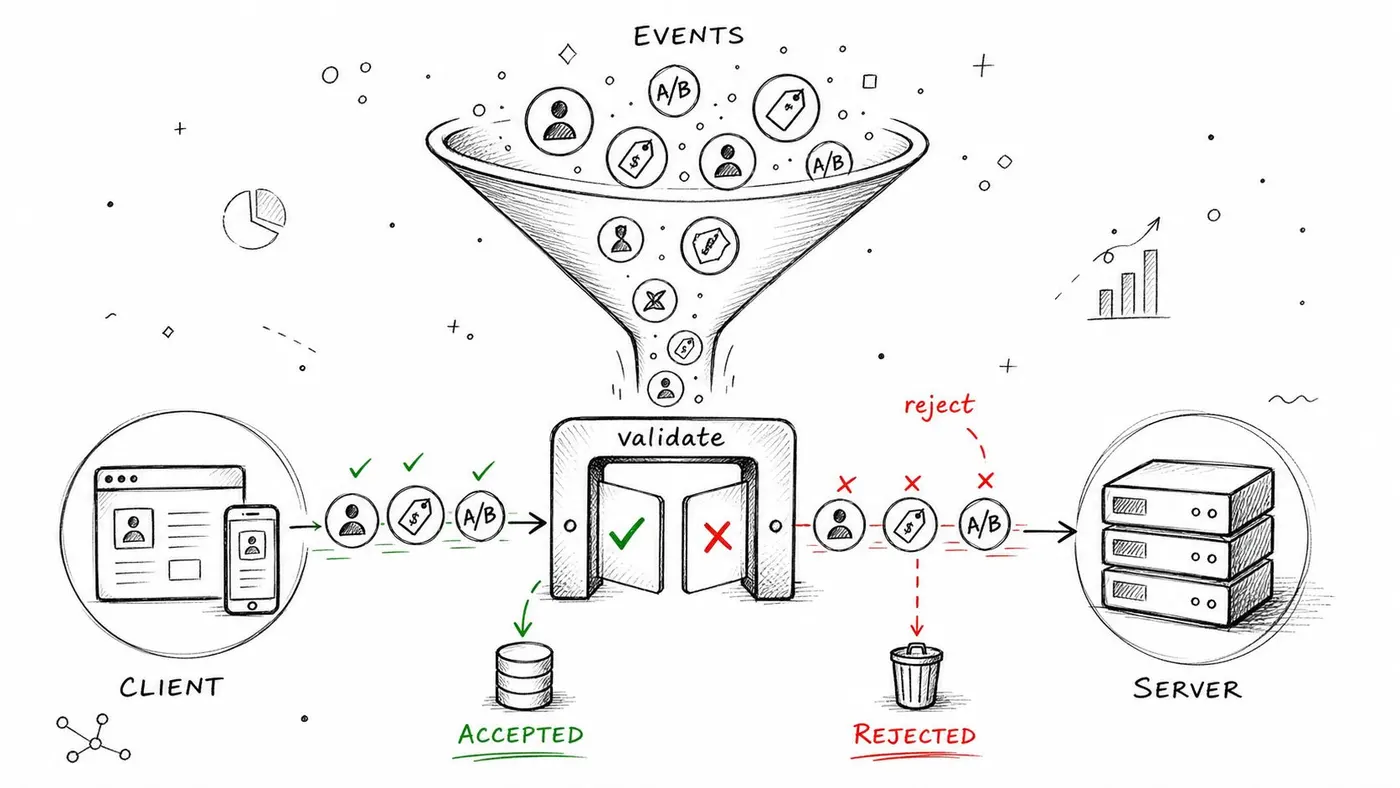
A Shopify store is a good example. If a purchase event fires without a valid order reference, deduplication gets harder later. In a Next.js app, if a client event payload changes shape after a component refactor, you can end up with engagement events that still fire but no longer match the experiment schema. On Webflow, form submissions may arrive without the variant code you thought was embedded.
What validation should block
Use strict rules at the SDK, tag manager, or ingestion layer. Validate required fields, accepted value types, allowed event names, and sensible payload structure before storage.
- Required identifiers: Every experiment event should include the minimum join keys needed for analysis, such as visitor identity, variant assignment, and event timestamp.
- Typed values: Revenue should arrive as a numeric field, not a formatted string copied from the UI.
- Schema conformity: Custom events should match a defined payload contract, especially in JavaScript-heavy builds.
Practical rule: If an analyst needs to guess what a field means, the validation layer already failed.
Teams often underestimate how much this depends on implementation discipline. If you run experiments through Google Tag Manager, validate your tagging setup before launch, not after the readout. Otter A/B's guide to Google Tag Manager testing is useful here, especially when multiple tags can fire on the same interaction. Front-end teams handling custom forms should also treat browser-side checks as part of data quality, not just UX. A practical reference is Mastering Form Validation JavaScript.
2. Remove Duplicate Records and Sessions
Duplicate events are one of the fastest ways to create fake winners.
In experimentation data, duplicates usually come from retries, page reloads, browser back-button behaviour, double-mounted components, or analytics scripts loaded twice. A duplicated purchase in a monthly sales report is bad. A duplicated purchase in an A/B test is worse, because it can change which variant appears to win.
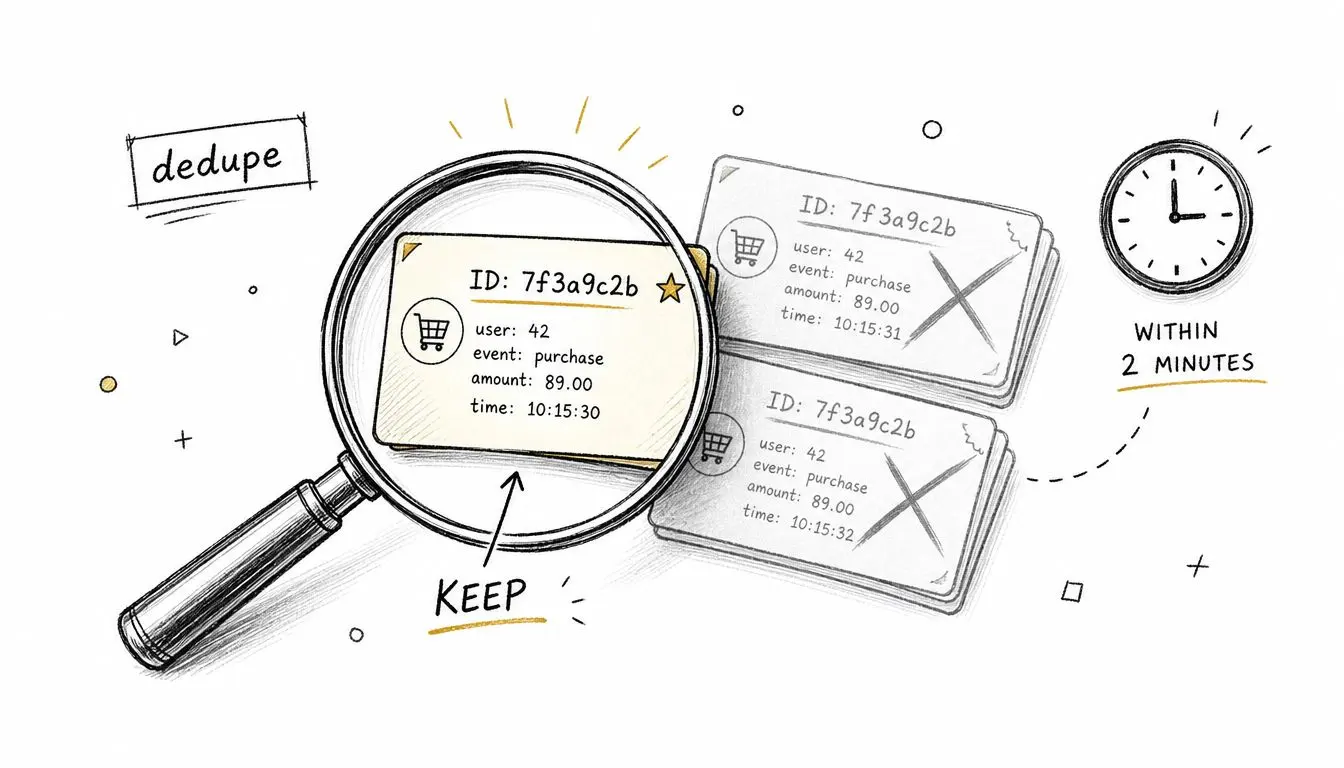
I've seen this often on ecommerce builds where the thank-you page is reloaded, or when a Webflow store triggers a purchase event on both a front-end click and a confirmation page view. In mobile-like web experiences, network retries can also resend the same conversion event when connectivity is unstable.
How to deduplicate without losing legitimate behaviour
The cleanest approach is to define uniqueness before the test starts. Don't rely on “looks duplicated” during analysis week.
- Use composite keys: Combine fields like user identifier, event type, event identifier, and timestamp proximity.
- Keep the earliest valid record: That preserves the event sequence and reduces downstream confusion.
- Flag spikes in duplicate rate: A rise in deduped events often points to a deployment issue, not user behaviour.
There's also a trade-off worth stating clearly. Aggressive deduplication can erase legitimate repeat events. That matters if your goal is something like multiple add-to-cart actions or repeat content engagement. For hard conversion goals, though, especially purchases or lead submissions, deduplication should be strict.
Some duplicates are data problems. Some are product behaviour. Your rule should reflect the metric, not just the database.
If your stack involves multiple operational systems, logistics, inventory, and storefront events can add another layer of event replay and timestamp confusion. The broader analytics perspective in Faberwork LLC on logistics analytics is a useful reminder that duplicate detection often depends on process knowledge, not just SQL.
3. Handle Missing and Null Values Systematically
Missing values aren't just blanks. They're clues.
When variant assignment is missing for a segment of sessions, that's usually not a harmless gap. It often means your client-side experiment script loaded too late, a cookie wasn't readable, consent logic blocked assignment, or a route transition in Next.js broke persistence between pages. If you ignore those records without thought, you may inadvertently bias the result toward users with more stable tracking conditions.
A common CRO example is revenue analysis with incomplete order metadata. If transactions arrive but revenue is null for some sessions, average order value becomes fragile. The same goes for custom goals like scroll depth or video completion when a property is absent for one variant more than the other.
What usually works, and what usually doesn't
Deletion is often safer than imputation for experiment-critical fields. If variant assignment is unknown, you usually shouldn't guess it. If a conversion timestamp is absent, you usually shouldn't invent one. In experimentation, preserving validity matters more than preserving row count.
That said, not every missing field deserves the same treatment.
- Critical fields: Drop records when the missing value makes causal interpretation impossible.
- Supplementary fields: Keep the event and mark the property as unknown when the core analysis still holds.
- Pattern-level gaps: Investigate whether missingness clusters by browser, device, region, or variant.
Missing data that affects one variant more than another is not a cleaning nuisance. It's a validity issue.
Where teams go wrong is inconsistency. They exclude null revenue in one test, fill it with defaults in another, and then compare learnings across both as if the methodology stayed constant. It didn't. Write the rule down, apply it across variants, and mention it in the experiment readout.
4. Standardise Data Formats and Units
You can't compare variants cleanly if the underlying units don't match.
This shows up more often than people expect. One system stores revenue as pounds, another as dollars. One timestamp is local browser time, another is server UTC. A subscription trial length is tracked in seconds on one page and milliseconds on another because a front-end component changed. The test dashboard may still render a number, but the analysis underneath is unstable.
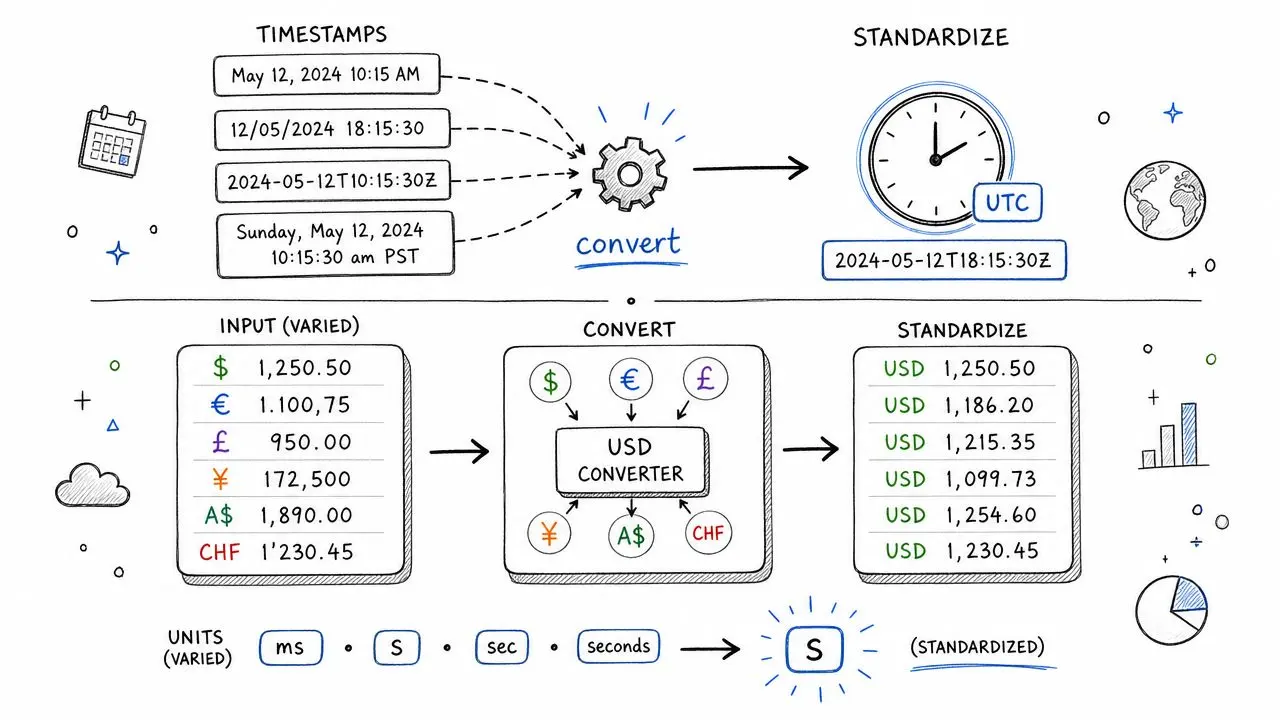
This matters a lot for brands selling internationally through Shopify Markets or multi-region storefronts. If one variant gets more traffic from one geography and your revenue normalisation is inconsistent, your “lift” may reflect formatting differences rather than customer response.
Standardisation rules worth enforcing early
A data dictionary sounds boring until you're debugging a test that crosses tools and time zones. Then it becomes essential.
- Timestamps: Store and analyse in one canonical timezone, ideally with unambiguous formatting.
- Currency fields: Convert or label clearly before aggregation, not after reporting.
- Durations and counts: Keep units consistent across all event producers.
One practical habit proves more beneficial than often realized: compare a sample of raw records against cleaned ones after every major implementation change. If the source says one thing and the cleaned layer says another, catch it before the experiment accumulates weeks of flawed data.
In CRO work, standardisation is less about neatness and more about preventing hidden segmentation effects. A mobile-heavy variant can look stronger if mobile events use one timestamp logic and desktop another. The fix isn't better analysis. It's consistent input.
5. Identify and Handle Outliers Appropriately
Not every extreme value is bad data. Some are your highest-value customers.
That's why blunt outlier removal causes as many problems as it solves. In A/B testing, especially on revenue metrics, a handful of unusual transactions can swing the mean sharply. But those transactions might be genuine. A wholesale order, a bundle purchase, or a large B2B checkout can be rare without being wrong.
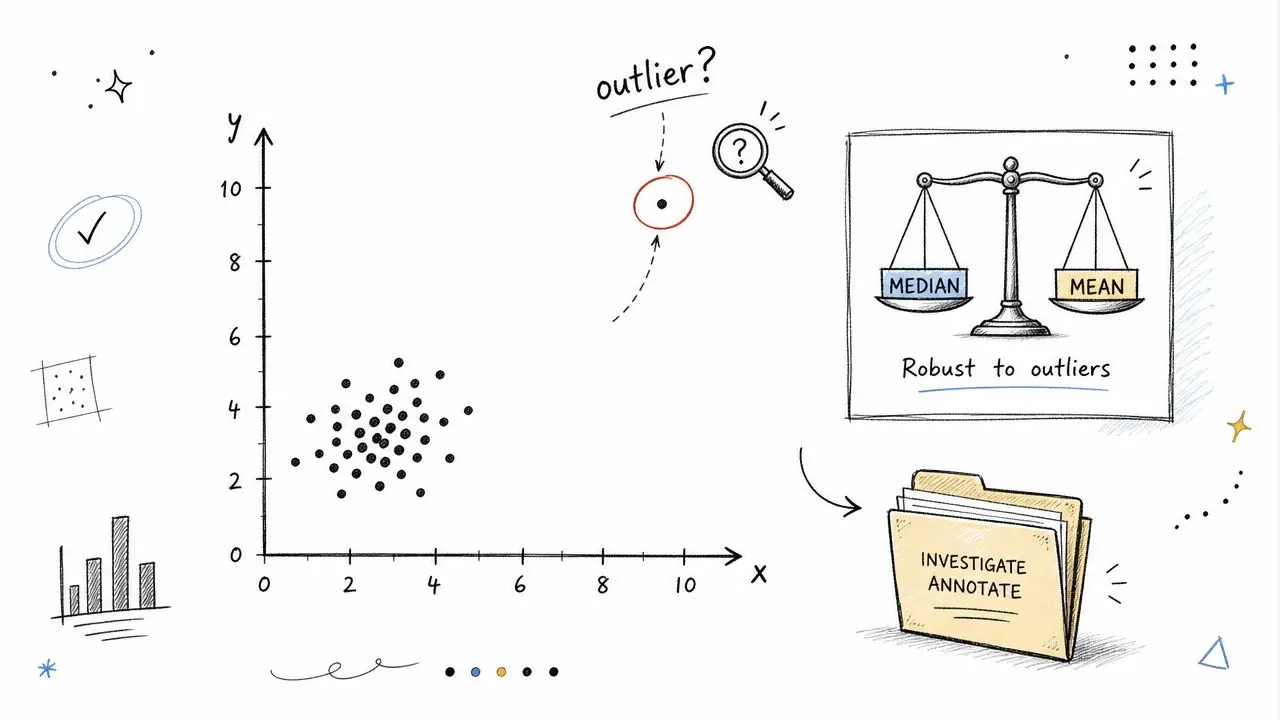
The first question isn't “should we remove this?” It's “what is this?” A transaction can be extreme because of customer behaviour, bot behaviour, implementation error, or back-office correction. Those cases shouldn't be handled the same way.
A sensible outlier workflow
Use business context first, then statistical methods.
- Investigate origin: Check whether the event lines up with known product, order, or session behaviour.
- Prefer reliable summaries: Median-based views often give a more stable read than means when revenue is noisy.
- Compare both cuts: Look at results with and without flagged outliers before making a decision.
I'm especially cautious with revenue per visitor when the sample is still maturing. One or two exceptional orders can make a variant look unbeatable even though conversion behaviour hasn't changed. If the business cares about typical shopper response, reliable measures matter. If the business prioritizes capturing rare large orders, removing those values may hide what matters.
Clean analysis doesn't mean sanding off all extremes. It means knowing which extremes belong in the story.
For engagement metrics, outliers often point to tracking mistakes instead. A single session with implausibly long dwell time can come from a tab left open overnight. That's not user engagement. That's instrumentation noise.
6. Implement Cross-Validation and Data Integrity Checks
Single-source cleanliness isn't enough. Experiment data needs to agree with itself across systems.
A record can look valid in isolation and still be wrong. A user may show a conversion event without any variant assignment. A revenue event may exist without a corresponding completed order state. Session end times may precede start times because data came from mixed collectors. These issues don't always appear in a simple event table scan.
Cross-validation catches relationship failures. That's what matters for experimentation, because tests depend on linked facts being true at the same time: the user saw a variant, the event belongs to that user, the event happened in the right order, and the business outcome is the one you think it is.
Checks that save experiments
Run these integrity checks automatically, ideally every day while a test is live.
- Assignment consistency: Every conversion should trace back to a recorded variant assignment.
- Chronology checks: Exposure should happen before attributed conversion.
- Goal coherence: Revenue should align with the purchase goal, not appear in isolation.
Staging quality often matters more than acknowledged. If your experiment configuration differs between environments, tracking can pass QA and still fail in production because selectors, routes, or event bindings changed. Otter A/B's notes on staging and configuration are a practical reference for reducing that mismatch before launch.
If your analytics tool says a user converted, but your experiment log can't prove which variant they saw, treat that record as untrusted.
For teams working across Shopify themes, Next.js front ends, and separate checkout or CRM systems, integrity checks often become the main source of confidence. Not because they make data perfect, but because they catch contradictions before stakeholders act on them.
7. Implement Sampling-Aware Cleaning for Large Datasets
At scale, record-level cleaning can become expensive, slow, and oddly misleading.
High-traffic experiment programmes often produce far more event data than a human team can inspect sensibly. If you're running continuous tests on a large storefront or product funnel, cleaning every single impression and micro-event in the same way isn't always the best use of effort. You still need raw data preserved, but your primary cleaning workflow may need to operate at an aggregated level.
This is especially useful when your question is operational rather than forensic. Are conversion counts behaving normally by variant? Did revenue tracking break on a particular day? Did one release introduce a persistent discrepancy on mobile Safari? Aggregated views can answer those questions faster.
Where aggregation helps, and where it doesn't
Hourly or daily summaries by variant can expose anomalies that event-level review hides in noise. Sudden drops, flatlines, or asymmetries become visible more quickly when you bucket the data.
- Use aggregated monitoring: Track variant-level summaries for trends, gaps, and unusual shifts.
- Keep raw events available: You still need drill-down capability when a bucket looks suspicious.
- Match cleaning to inference: Cleaned daily summaries support operational oversight, not every type of causal analysis.
One trade-off matters here. Aggregation is useful for monitoring data quality, but it can mask user-level problems like duplicate session stitching or assignment leakage. Don't replace raw inspection entirely. Layer it.
If you're planning tests on high-volume pages, sample-size discipline also affects how you approach cleaning and monitoring. Otter A/B's guide on how to calculate sample size is relevant here because expected scale should shape your pipeline before the experiment starts, not after the event stream becomes unwieldy.
For large programmes, the best pattern is usually simple: monitor aggregates, preserve raw events, and escalate to record-level investigation only when the summary layer shows something that shouldn't be happening.
8. Establish Clear Data Quality Rules and Thresholds
Many teams clean data with unwritten instincts. That doesn't hold up under scrutiny.
If one analyst removes suspicious orders because they “look wrong” and another keeps them because they “might be real”, your experimentation programme depends on personal judgement more than a repeatable standard. That's a problem when results inform roadmap decisions, budget allocation, or client recommendations.
Data quality rules should be explicit enough that another analyst, or your future self, can apply them the same way. For CRO teams, that means thresholds tied to business reality: what counts as a valid conversion, what attribution lag is acceptable, which traffic sources are excluded, how internal visits are filtered, and what constitutes an implausible order or session.
What a good rule set includes
The best rules are strict enough to protect validity and flexible enough to reflect the business model.
- Metric definitions: Define exactly what qualifies as a conversion, purchase, signup, or qualified lead.
- Boundary rules: Specify valid event timing, accepted revenue structures, and excluded environments.
- Review ownership: Make analytics, product, and business stakeholders agree before the test runs.
CRO work distinguishes itself from generic analytics. A newsletter signup test and a high-consideration ecommerce test shouldn't share identical quality thresholds. The rulebook has to fit the funnel.
Write down the rationale too. “Exclude employee traffic” is useful. “Exclude employee traffic because internal QA repeatedly triggers goal events during launches” is much better. When a rule has context, teams are less likely to apply it mechanically where it doesn't belong.
9. Implement Attribution Window and Temporal Boundary Controls
A/B tests don't just need clean events. They need clean timing.
If a user sees Variant A near the end of a test and converts later, does that conversion count? If a user purchased before exposure but the event sync arrived afterwards, should that revenue attach to the experiment? If one team analyses same-day conversions and another includes a longer post-exposure window, they're not evaluating the same experiment.
Temporal boundaries affect fairness between variants. They also affect business interpretation. Short windows can undercount genuine impact for considered purchases. Long windows can over-credit a variant for behaviour that would have happened anyway.
Keep the window consistent and defensible
The important part isn't choosing a universally “correct” window. It's choosing a window that fits the buying cycle and applying it symmetrically.
For Shopify stores selling impulse products, the useful attribution window may be tighter than for a SaaS onboarding test or a considered purchase on a content-heavy site. On a Next.js product funnel, route changes and delayed account creation can make event timing especially messy. On Webflow lead-gen pages, CRM sync delays can shift conversions out of the apparent session even when the user behaviour was valid.
A few rules help:
- Anchor attribution to exposure: Don't count conversions that can't be placed after a known experiment touchpoint.
- Use the same window for all variants: Asymmetric treatment creates bias immediately.
- Document cut-off handling: Decide how to treat users exposed late in the experiment before analysis day.
One of the most common validity mistakes in CRO is ending the test, freezing the dashboard, and forgetting that part of the audience is still within the allowed conversion window. That doesn't just create undercounting. It can favour whichever variant happened to get earlier traffic.
10. Create Audit Logs and Version Control for Data Cleaning Processes
If you can't explain how the cleaned dataset was produced, you can't defend the result.
This becomes painfully obvious when a stakeholder asks why reported revenue changed between the initial readout and the follow-up. Without audit logs, your answer sounds vague. With logs and versioned cleaning rules, you can point to the exact deduplication logic, missing-data policy, filter update, or attribution correction that changed the output.
In experimentation, reproducibility matters because results are often challenged after the fact. A developer remembers a hotfix. A marketer notices an excluded traffic source. A client asks why a previous test used one set of filters and the new one uses another. You need traceability.
What to log every time
This doesn't need to be complicated, but it does need to be disciplined.
- Transformation history: Record what rule ran, when it ran, and which records it affected.
- Rule versions: Store cleaning logic in version control so changes are reviewable.
- Decision notes: Add short reasons for manual interventions, exclusions, or exceptional handling.
Good audit logs turn “trust us” into “here's exactly what changed”.
For agencies and in-house growth teams alike, this habit pays off beyond debugging. It improves handovers, supports client reporting, and reduces the temptation to “tidy” borderline data differently when the result is close. Once a team knows every cleaning decision is visible, consistency usually improves.
A clean experiment isn't one where no judgement was required. It's one where every judgement can be reconstructed later.
10-Point Comparison of Data Cleaning Best Practices
| Item | 🔄 Implementation Complexity | ⚡ Resource Requirements | 📊 Expected Outcomes | Ideal Use Cases | ⭐ Key Advantages |
|---|---|---|---|---|---|
| Implement Data Validation at Collection Point | Medium, schema design + SDK updates | Medium, dev time, testing, logging | High, fewer invalid events; cleaner analytics | Real-time tracking, new SDK rollouts | Prevents bad data entering pipeline; reduces downstream cleaning |
| Remove Duplicate Records and Sessions | Medium, deduplication logic & thresholds | Medium, compute for batch/stream, tuning | High, avoids inflated conversion/revenue metrics | Checkout flows, mobile apps with retries | Produces accurate counts; removes bias from duplicates |
| Handle Missing and Null Values Systematically | Medium, define policy & imputation strategy | Low–Medium, analyst time, some compute | Medium–High, preserves sample size & validity | Tests with incomplete tracking or optional fields | Maintains statistical power; enables sensitivity checks |
| Standardise Data Formats and Units | Low–Medium, conversion rules & schema enforcement | Low, transformation scripts, data dictionary | High, consistent aggregations and calculations | Multi-region revenue, timezone-normalisation | Prevents format errors; simplifies tool integration |
| Identify and Handle Outliers Appropriately | Medium–High, detection + domain review | Medium, statistical tooling, investigations | High, reduces distortion from extreme values | High-variance revenue metrics, fraud detection | Protects significance tests; reveals tracking issues |
| Implement Cross-Validation and Data Integrity Checks | High, multi-source rules & automation | High, access to sources, monitoring infrastructure | Very High, catches systematic pipeline issues | Complex pipelines, CRM/SDK reconciliation | Ensures referential integrity; early problem detection |
| Implement Sampling-Aware Cleaning for Large Datasets | High, aggregation-aware methods & validation | High, scalable infra, statistical expertise | High, scalable cleaning with preserved stats | High-traffic continuous experiments, millions of rows | Reduces compute cost; maintains statistical properties |
| Establish Clear Data Quality Rules and Thresholds | Medium, define, version and govern thresholds | Low–Medium, stakeholder alignment, documentation | High, consistent, reproducible results | Organizations running many experiments | Consistency across tests; easier stakeholder communication |
| Implement Attribution Window and Temporal Boundary Controls | Low–Medium, config + enforcement logic | Low, configuration, analysis effort | High, fair attribution; reduced temporal bias | Purchase funnels, long-conversion cycles | Prevents lookback bias; standardises conversion credit |
| Create Audit Logs and Version Control for Data Cleaning Processes | Medium, logging, versioning policies | Medium, storage, process discipline, tooling | High, reproducibility and accountability | Regulated environments, client-facing reports | Traceability of changes; supports audits and debugging |
From Clean Data to Confident Decisions
Data cleaning is not admin work you squeeze in after the “real” experimentation is done. It's the condition that makes experimentation real in the first place. If event collection is inconsistent, if duplicate purchases slip through, if assignment records go missing, or if attribution windows change from test to test, the output may still look polished. It just won't be reliable.
That matters more in A/B testing than in many other forms of reporting. A dashboard error in a descriptive report is frustrating. A data quality error in an experiment can send teams in the wrong strategic direction. You don't just misread the past. You choose the wrong headline, layout, offer, pricing treatment, onboarding flow, or checkout experience for the future. That's why strong data cleaning best practices should sit inside the experimentation workflow, not outside it.
The practical pattern is straightforward. Validate events before they enter the pipeline. Remove duplicates with rules that fit the metric. Treat missing values consistently. Standardise timestamps, currencies, and units. Investigate outliers before deciding whether they belong. Cross-check records across systems. Use aggregated monitoring when scale demands it, but keep the raw layer available. Define quality rules in advance. Keep attribution windows fair. Log every cleaning step so the final numbers are reproducible.
None of this guarantees perfect data. Perfect data doesn't exist, especially when you're working across Shopify apps, custom JavaScript, Webflow forms, client-side experiments, server-rendered pages, and third-party tools that all timestamp and label things a bit differently. What these practices do give you is control. They reduce avoidable noise, surface implementation failures earlier, and make your test conclusions much easier to defend.
That's the true payoff. Better cleaning doesn't just make datasets nicer. It makes decisions safer. It helps CRO teams separate true treatment effects from instrumentation artefacts. It gives analysts a method they can repeat across experiments instead of reinventing the logic every time. And it builds trust with the people who have to act on the result.
Otter A/B can calculate significance, compare variants, and tie tests back to business outcomes. But no experimentation platform can rescue bad input after the fact. The teams that get the most from testing are the ones that treat data quality as part of experiment design, launch, monitoring, and analysis. Build your pre-launch process around that idea, and you'll ship fewer false winners, waste less traffic, and make far more confident calls.
If you want an A/B testing platform that's fast to deploy and easier to trust, Otter A/B is built for teams who care about both experimentation speed and data quality. It works across Shopify, WordPress, Webflow, Next.js, and more, gives you clear statistical readouts, and helps connect experiment results to conversion and revenue outcomes without piling on unnecessary implementation weight.
Stop guessing
Ready to start testing?
Set up your first A/B test in under five minutes. No credit card required.
- 14-day free trial
- No credit card required
- Cancel anytime