Staging and Configuration for Flawless A/B Tests
A practical guide to staging and configuration for A/B testing. Learn to set up environments, QA experiments, and ensure data integrity for flawless releases.
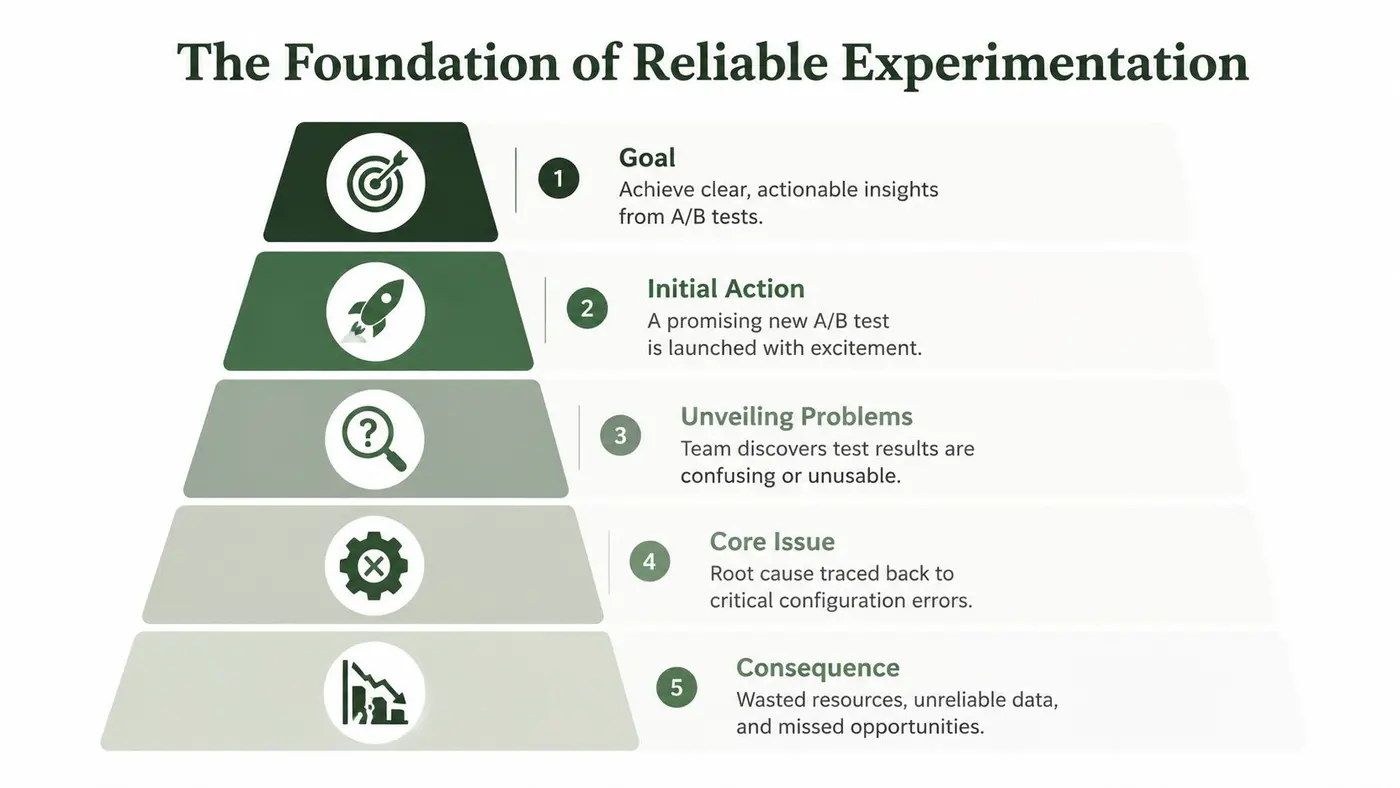
You launch a test on Monday. The hypothesis is solid, the designs look clean, and everyone's already talking about the uplift they expect to see.
By Wednesday, the result is unusable.
One variant fired the wrong analytics event. Mobile Safari rendered the treatment differently from Chrome. The product team approved the staging version, but the production snippet pointed to the wrong environment. Marketing paused paid traffic because the landing page felt off, and engineering now has to untangle whether the issue sits in the code, the targeting rules, or the reporting layer.
This represents a core problem with staging and configuration in experimentation. Teams often don't fail because they lack ideas. They fail because they treat experiments like lightweight website edits instead of production changes with business consequences.
A reliable A/B testing programme needs the same discipline you'd expect in any serious release process. Clean environment separation. Repeatable configuration. Explicit ownership. QA that covers data as well as UI. And a rollout plan that doesn't end when a winner appears in a dashboard.
Laying the Foundation for Bulletproof Experimentation
A test can fail long before anyone reads the results.
The failure usually starts in setup. A targeting rule carries over from an earlier campaign. The staging event name never gets mapped to production. Product signs off the experience, but marketing and engineering are still working from different assumptions about what success looks like. By the time the variant is live, the team is no longer testing a clean hypothesis. It is debugging a release.
That is why experimentation needs the same operational discipline as any other production change. Teams that treat tests as temporary front-end edits usually pay for it later in rework, disputed results, and rollout delays. Teams that define environments, ownership, and release conditions early can move faster because fewer decisions get revisited under pressure. If your team needs a shared baseline for what a controlled release involves, this guide to software deployment and release workflow is a useful reference point.
Build an experiment golden configuration
Reliable programmes do not rebuild the launch process from scratch for every test. They use a fixed template for the decisions that tend to break under deadline pressure.
That template, or golden configuration, should cover:
- Environment rules that define exactly where the experiment can run
- Tracking rules that map primary and secondary events to the analytics layer
- Targeting logic for inclusion, exclusion, audience priority, and overlap with other live tests
- Render behaviour across templates, devices, consent states, and page load conditions
- Rollback conditions that specify when to pause the test and who can make that call
Infrastructure teams deal with the same problem under a different name. Configuration drift creates systems that look similar on paper and behave differently in production. The same risk shows up in testing programmes when staging, tagging, and audience rules diverge over time. This solution for configuration drift with Ansible is a good parallel because the underlying lesson is the same. Standardise the setup, then control changes deliberately.
One practical check works well here. If product, engineering, and marketing would each describe the live test differently, the configuration is still too loose.
Clarify ownership across the full feature lifecycle
A winning test still has to become a shipped feature. That handoff is where many programmes lose momentum.
Ownership needs to cover more than launch. Engineering owns implementation quality and environment safety. Product owns acceptance criteria, release scope, and the decision to absorb the winner into the roadmap. CRO or marketing owns hypothesis quality, targeting logic, and result interpretation. Analytics or data teams often need explicit ownership of event validation and reporting definitions as well.
Without that structure, teams approve different versions of the same experiment. I have seen product approve the staged UI, engineering validate the script install, and marketing report early results, while nobody checked whether the production conversion event still represented the business outcome the team cared about. The test went live on schedule and still failed.
Clear ownership prevents that kind of false confidence.
Process reduces friction later
Teams often resist setup discipline because it looks like overhead. In practice, significant overhead stems from fixing avoidable mistakes after traffic is live.
A short, repeatable process does enough. Define the configuration before build starts. Confirm who signs off the experience, the data, and the release conditions. Record what must stay identical between staging and production. Then keep that record attached to the experiment through launch, analysis, and rollout of the winner.
That is the gap mature teams close. They do not stop at getting a test live. They manage the tested feature from first configuration through production release, with every team working from the same version of the truth.
Architecting Your Staging and Production Environments
Most broken tests start with a simple mistake. The wrong script loads in the wrong place, or a staging condition leaks into production. The architecture doesn't need to be fancy, but it does need to be deliberate.
Pick an environment pattern your stack can support
Different stacks need different staging and configuration patterns. The mistake is copying a setup that works for another platform without checking how your own site renders content.
Here's the practical shortlist:
- Subdomain staging works well for custom apps, headless builds, and many Next.js setups. A dedicated staging domain keeps your environment boundary obvious.
- Preview branches suit teams with modern CI workflows. Every pull request gets an isolated place to validate the experiment before merge.
- Local development plus secure tunnelling helps when front-end engineers need to debug variant code against live-like services before anything reaches shared staging.
- Platform-native staging is often the least painful option on Shopify, Webflow, or similar tools, where theme or page duplication can stand in for a traditional app environment.
What matters is production parity where it counts. The DOM structure, analytics containers, consent behaviour, and page templates in staging should behave like production. If your staging site skips the production tag manager setup or uses placeholder events, your test may pass review and still fail on launch.
Load the correct experiment project by environment
The cleanest safeguard often involves environment-specific configuration through variables. In code, that usually means reading an environment flag and loading the correct project ID. In Google Tag Manager, it means mapping the environment to the correct container variable and firing only under the right conditions.
The rule is simple. Staging tests should never be capable of running in production by accident.
A dependable implementation usually includes:
- A separate project or workspace for staging
- Explicit environment variables for project IDs or API keys
- A visible staging banner so reviewers can't mistake the environment
- Guardrails in tag manager or code to block the wrong snippet from loading
- A checklist for validating that audience rules differ between staging and production where needed
If your team is still handling these settings manually, configuration drift becomes likely. That problem isn't unique to experimentation. Infrastructure teams have dealt with it for years, and CloudCops' guide to Ansible for configuration management is a useful reference for understanding how repeatable config prevents environments from slowly diverging.
The safest setup is the one that makes the wrong action hard, not the one that depends on someone remembering a launch-day detail.
Match architecture to platform reality
The implementation details change by stack.
On Shopify, theme duplication and script scoping often matter more than app-level environment variables. On Webflow, page-specific controls and custom code injection points shape what's feasible. On Next.js, the key concern is usually where the experiment logic runs and how it interacts with server-side rendering, hydration, and route-level changes.
For teams trying to standardise release language before launch, it helps to align experiment rollout with a broader deployment workflow for website changes. That shared vocabulary keeps engineering, product, and growth teams from talking past each other.
A short walkthrough often helps teams visualise how this should work in practice:
Keep production clean
Don't overload production with test scaffolding that exists only for staging convenience. If reviewers need special query parameters, debug toggles, or variant-forcing tools, keep those contained to the environments and users who need them.
Good staging and configuration is mostly subtraction. Remove ambiguity. Remove hidden dependencies. Remove places where the wrong code can run unnoticed.
The QA Workflow That Prevents Costly Errors
A/B test QA fails when teams reduce it to visual approval. A button can look perfect and still break the experiment.
You need to validate three things before launch: the experience, the logic, and the data. If any one of those is wrong, the result can't be trusted.
Start with deterministic checks
Before anyone clicks around casually, force certainty into the process. Review the exact variant assignment, targeting conditions, event mapping, and suppression rules.
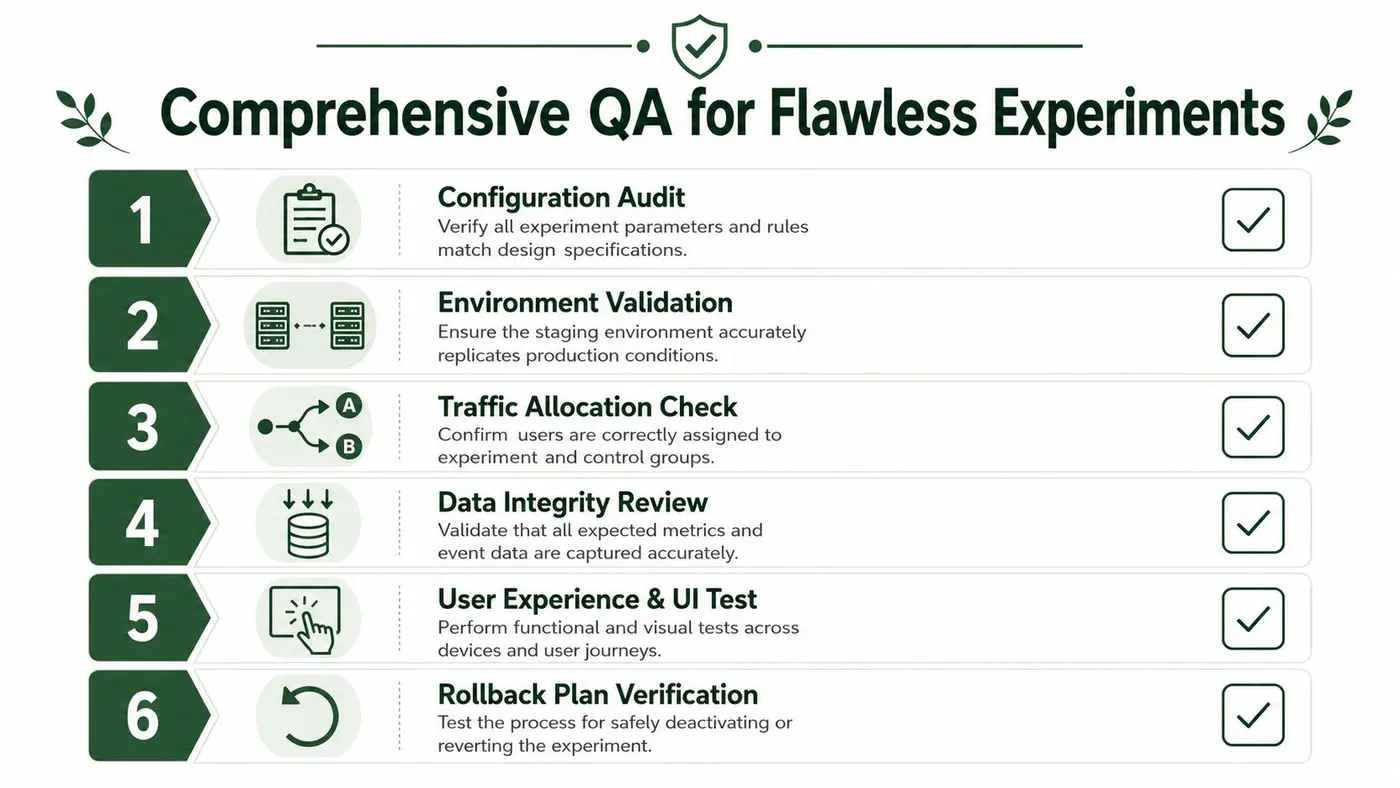
A solid pre-launch pass includes:
- Variant forcing so reviewers can reliably see control and treatment without waiting for random assignment
- Selector checks to confirm the intended elements exist on every template and breakpoint affected
- Event validation in browser tools and analytics debuggers to make sure the expected actions fire once, and only once
- Audience verification for geo rules, device rules, login status, or campaign-based targeting
- Conflict review to catch overlaps with personalisation tools, tag manager scripts, or other live experiments
If a reviewer says “it seems fine”, that isn't QA. It's optimism.
Test the environment, not only the variant
Some experiment failures have nothing to do with the treatment itself. They come from staging and configuration drift between environments.
That's why I want teams to verify the surrounding conditions as aggressively as the changed element. Consent flows, currency formatting, cached assets, cookie behaviour, redirect logic, and analytics naming conventions can all differ in ways that break an otherwise valid test without immediate detection.
Check the path to conversion, not just the changed component. Users don't experience your experiment in isolation.
For teams running technical checks, preview mode for experiment validation is useful because it lets developers and QA reviewers inspect exactly what should render before exposing the test to real traffic.
Use a role-based sign-off
The fastest QA process is not the one with the fewest checks. It's the one where each check has an owner.
| Role | Primary Responsibility |
|---|---|
| Developer | Verify snippet placement, targeting logic, variant rendering, event firing, and rollback behaviour |
| Product manager | Confirm acceptance criteria, user-flow integrity, and that the tested experience matches the approved scope |
| Marketer or CRO lead | Validate hypothesis setup, audience rules, analytics naming, reporting expectations, and business metric alignment |
That table looks simple, but it solves a frequent launch problem. Without it, teams perform duplicate checks in low-risk areas and miss high-risk ones entirely.
Include awkward devices and annoying browsers
Teams often check desktop Chrome, one mobile viewport, and call it done. Then a layout shift appears on an older iPhone or a tracking issue shows up in Safari because the storage behaviour differs.
Run the test through the browsers and devices your audience uses. Check logged-in and logged-out states if relevant. Test with and without prior session history. Confirm the variant still behaves after refreshes, route changes, and interrupted journeys.
A reliable QA workflow feels repetitive because it is. That repetition is what turns launch day into a non-event instead of a firefight.
Managing Traffic Data and Security
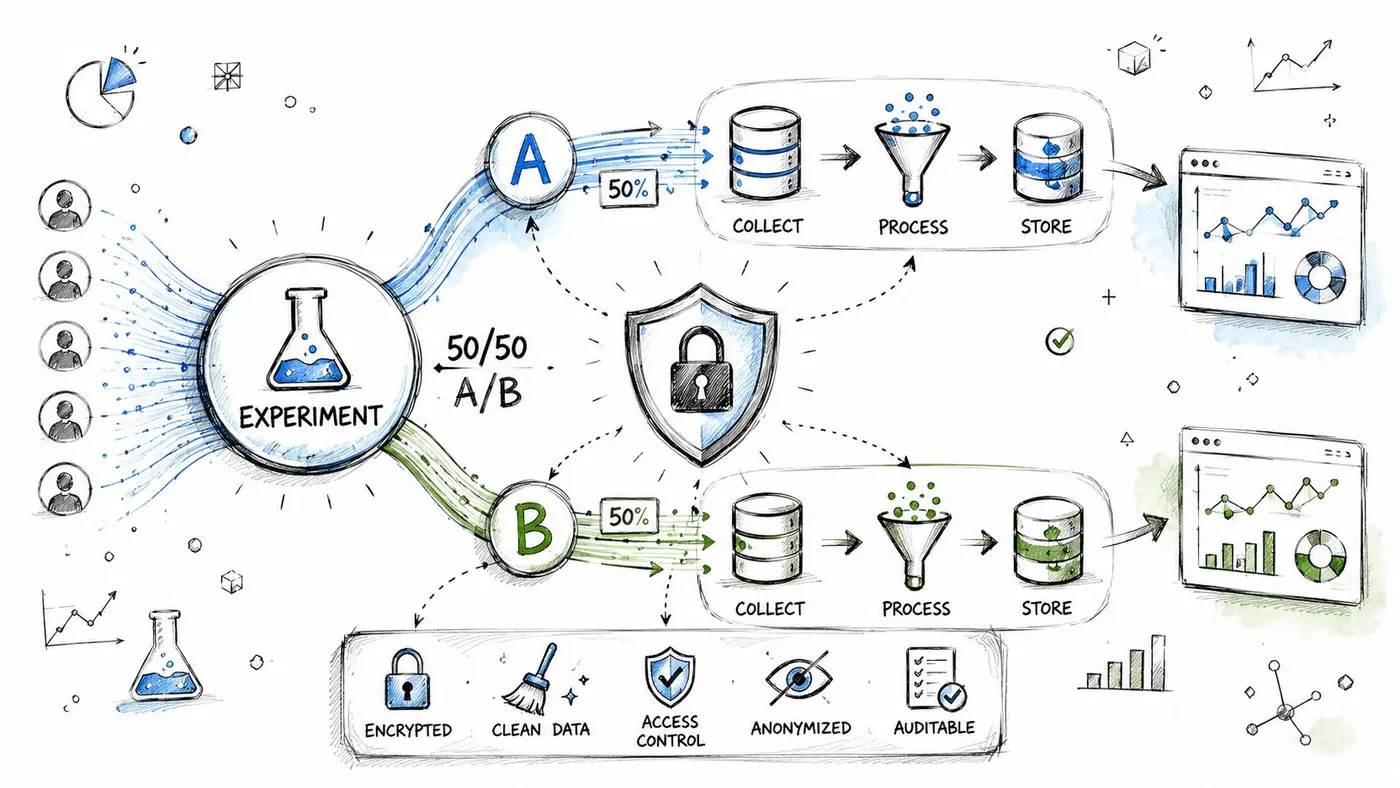
Bad experiment data usually comes from one of two mistakes. Either the wrong people enter the test, or the right people enter it and the wrong data gets recorded alongside them.
Both problems sit inside staging and configuration. They aren't reporting issues you can tidy up later.
Keep staging traffic out of production reporting
Internal testers behave differently from real users. They reload pages, jump between variants, trigger edge cases, and complete flows in strange orders. If that behaviour contaminates production analytics, your experiment readout starts with noise.
The cleanest approach is to isolate staging data before launch:
- Exclude internal users from test eligibility when validating production setups
- Separate analytics destinations where possible, especially for pre-release testing
- Tag internal sessions clearly if they must pass through shared tooling
- Restrict experiment visibility to approved audiences until the launch condition is met
For teams handling internal traffic controls, excluded IP and internal traffic settings provide a straightforward way to stop staff activity from polluting the dataset.
Roll out gradually when risk is unknown
The idea of launching an experiment to everyone at once sounds efficient. It usually isn't. If the test affects checkout, onboarding, pricing visibility, or any critical funnel step, start smaller and watch the behaviour before increasing exposure.
A sensible release path often looks like this:
- Internal validation only
- Limited live exposure to a tightly defined audience
- Expanded rollout once no functional or data issues appear
- Full traffic only after operational confidence is established
This approach is especially important when multiple teams depend on the result. Product needs confidence the experience is safe. Marketing needs confidence the campaign traffic isn't being wasted. Engineering needs confidence they won't be asked to hotfix an avoidable issue.
Protect results while they're still forming
Experiment reports often circulate before the team has finished validating what the numbers mean. That creates a different kind of risk. Sensitive commercial information gets shared too widely, or early reads harden into false certainty.
Good security practice matters here, not because A/B testing is unusually dangerous, but because operational sloppiness spreads quickly. Teams handling access control, credentials, and environment protection can borrow from broader MeshBase security best practices, especially around limiting unnecessary exposure and tightening who can access what.
Preliminary experiment data should be easy for the right stakeholders to review and hard for the wrong audience to stumble into.
Maintain data hygiene during handoff
The moment a test moves from staging to live traffic, the handoff becomes critical. If analytics names change, if goals are remapped midstream, or if reporting tools merge internal and external behaviour, you've created a trust problem that no significance calculation can fix.
That's why traffic management and security belong in the launch workflow, not in a clean-up task after the fact. A result only matters if the data behind it stayed clean from first exposure to final decision.
Optimising Performance and Planning Your Release Process
Friday afternoon is when weak experiment operations usually show themselves. The variant is live, paid traffic is landing, product wants an early read, and engineering is watching page performance dip because the test shipped with too much client-side work. At that point, the team is no longer judging the idea alone. It is judging the idea plus the implementation.
Performance belongs in experiment planning because it affects validity, not just user experience. A slow or unstable variant changes behaviour in ways that have nothing to do with the message, layout, or offer under test. If render is delayed, if content flickers, or if the test script fights with existing tags, the result is contaminated before analysis even starts.
Protect the baseline before chasing uplift
Set performance guardrails before launch. That means agreeing what the experiment is allowed to cost in page weight, execution time, and visual stability. Teams that skip this step usually end up debating results that should have been disqualified earlier.
I treat these checks as release criteria:
- No visible flicker on key templates or devices
- No broken Core Web Vitals trend during the test window
- No extra scripts added without a clear reason and owner
- No variant logic that depends on brittle selectors likely to fail after a CMS change
These are practical trade-offs, not purity tests. A server-side experiment usually gives cleaner performance, but it takes more engineering time and tighter environment parity. A client-side test can ship faster, but it needs stricter QA and closer monitoring in production. The right choice depends on the risk of the journey you are testing and how quickly the team may need to iterate.
Write the rollback plan before launch
A rollback plan needs more than "turn it off if something breaks." It should tell every function what happens when the test underperforms operationally, not just commercially.
Use a short release note that answers four questions:
- What triggers a pause, such as checkout errors, misfiring analytics, layout defects, or a clear performance regression
- Who can disable the test, including outside normal working hours
- How rollback is verified, across pages, devices, and reporting tools
- What happens to the data, especially if the test is stopped because implementation flaws made the result unreliable
Release discipline: Every experiment is temporary code until the team has proved it deserves a permanent place in the product.
That single rule improves behaviour across the whole team. Engineers build cleaner flags. Product defines sharper ship criteria. Marketing stops treating a winning chart as the final step.
Move winners into permanent code properly
A tested feature has a lifecycle. It starts in staging, earns trust through QA, proves itself under live traffic, and then needs a proper production release. Too many teams handle that final step badly and leave the winner inside the testing tool for months.
That creates avoidable debt. New experiments inherit old targeting rules. Front-end teams work around temporary selectors that should have been removed. Analysts lose clarity on what is now baseline behaviour versus what is still experimental.
When a variant wins, ship it like a normal product change. Move it into the core codebase. Remove experiment scaffolding, audience rules, and temporary event workarounds. Record why it won, what metric justified rollout, and what was learned about audience behaviour. That handoff is where experimentation stops being a campaign mechanic and becomes part of how the product improves.
Fostering Cross-Functional Experimentation Culture
Teams don't have a tooling problem. They have a coordination problem.
The experiment brief sits with growth. The implementation sits with engineering. The acceptance call sits with product. The final rollout sits nowhere in particular, so the winner lingers in limbo or goes live without proper ownership. That siloed model is why staging and configuration often feels harder than it should.
Replace hand-offs with shared operating rules
Cross-functional experimentation works better when teams agree on a few core agreements:
- One hypothesis format so product, marketing, and engineering all read the same test intent
- One source of launch truth covering targeting, variants, metrics, and rollback conditions
- One decision owner for go live, pause, and ship-the-winner calls
- One results language so “inconclusive”, “invalid”, and “winner” mean the same thing to everyone
These rules reduce friction because they remove translation work. Engineers don't need to infer what the marketer meant. Product doesn't need to decode an analytics screenshot. Growth doesn't need to guess whether a bug invalidated the run.
Make learning visible, not just wins
Teams often celebrate successful lifts and bury inconclusive tests. That's a mistake. If the setup was sound, a null result still teaches you something about audience behaviour, offer sensitivity, or page constraints.
What matters is whether the programme keeps producing decisions the team trusts.
Staging and configuration isn't a technical checklist. It's the shared discipline that lets different teams trust the same result.
The strongest experimentation cultures don't romanticise speed. They value clean launches, readable evidence, and boring handovers. That's how you get from isolated tests to a dependable testing programme.
If you want a lightweight way to run fast, reliable website experiments without bloating page speed, Otter A/B is built for exactly that. It helps teams test headlines, layouts, and CTAs with a simple snippet, clear reporting, and an implementation model that fits real collaboration between growth, product, and engineering.
Stop guessing
Ready to start testing?
Set up your first A/B test in under five minutes. No credit card required.
- 14-day free trial
- No credit card required
- Cancel anytime