How to Calculate Statistical Power for Your A/B Tests
Learn how to calculate statistical power for your A/B tests. This practical guide covers sample size, MDE, alpha, and pitfalls to avoid inconclusive results.
You ran a test on a new headline. The copy felt sharper, the CTA was clearer, and everyone on the team expected a win. Two weeks later, the result says there's no significant difference.
That usually doesn't mean the idea was bad. It means the test didn't have enough statistical power to detect the kind of improvement you cared about.
For most growth teams, that's where experimentation starts going sideways. They don't lose because they can't write hypotheses. They lose because they launch tests without deciding how much traffic they need, what size of win matters, or how much uncertainty they're willing to tolerate. If you want to know how to calculate statistical power without getting buried in academic jargon or heavyweight software, the practical path is to treat power as a planning constraint, not a post-test diagnosis.
Why Your A/B Tests Keep Ending in a Draw
Most inconclusive tests are underpowered tests.
That's the blunt version. You changed something meaningful, sent traffic to it, waited, and hoped the result would separate cleanly. But if your sample was too small for the effect you were trying to detect, the test never had much chance of producing a decisive answer.
Think of power as the part of your test plan that answers one hard question before launch: if a real improvement exists, do we have enough data to catch it? If the answer is no, you're not running an experiment. You're collecting noise and hoping it looks convincing.
A lot of marketers only start thinking about power after a test finishes with a shrug. That's backwards. Power belongs at the planning stage, right beside your hypothesis and targeting rules. If you need a quick plain-English primer before getting into the mechanics, Trackingplan's guide on calculating statistical power is a useful starting point.
What an underpowered test actually costs
The obvious cost is time. You spend weeks on a result you can't use.
The less obvious cost is decision quality. Teams often react to inconclusive tests in one of three bad ways:
- They call it a loser too early and kill a variant that may have worked.
- They call it a winner on weak evidence because the graph looked promising mid-test.
- They stop trusting experimentation and go back to opinion-led changes.
Practical rule: A test that can't realistically detect the improvement you care about isn't cautious. It's wasteful.
Power fixes that because it forces you to define the minimum win worth chasing, then work backwards to the traffic required. That changes experimentation from “let's see what happens” to “we know what result this test is capable of detecting”.
The Four Pillars of a Powerful A/B Test
You can't calculate power from gut feel. You need four inputs, and each one reflects a business choice as much as a statistical one.
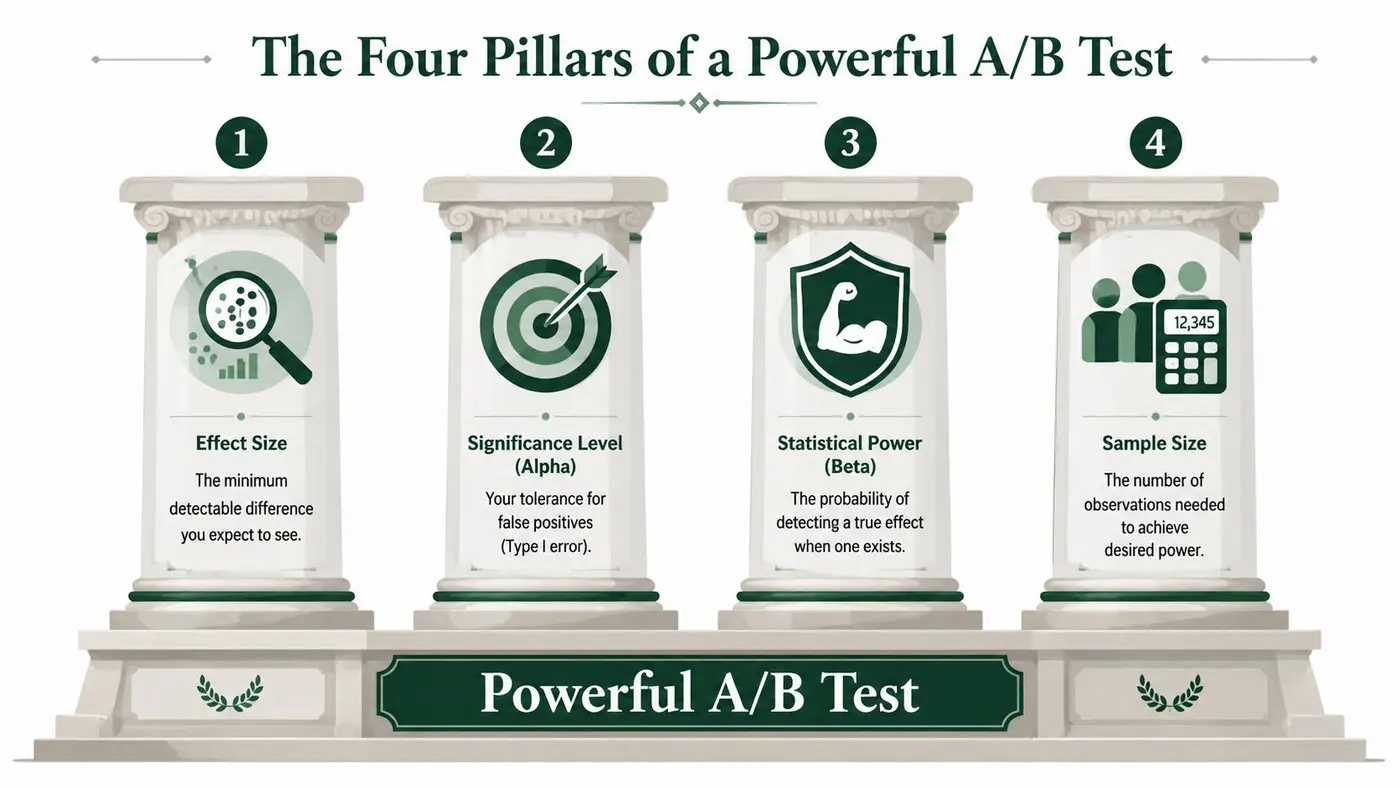
Baseline conversion rate
Your baseline conversion rate is the current performance of the control. If your product page, checkout step, or signup form already converts strongly, small lifts can matter commercially but are harder to detect quickly. If conversion is low, volatility tends to matter more.
This is why old or sloppy baseline data breaks the whole plan. Power calculations assume your starting point is credible. Use recent, stable data from the same page type, same audience, and same funnel step if possible.
Minimum detectable effect
Your minimum detectable effect, or MDE, is the smallest lift worth finding. This is the most important input because it decides what kind of win your test is designed to catch.
If you choose an unrealistically large MDE, the required sample size looks manageable, but you'll miss smaller improvements that might still matter. If you choose a very small MDE, the sample requirement climbs and your test may become too slow to be practical. Otter A/B has a solid explanation of this trade-off in its guide to minimum detectable effect.
Set MDE from business value, not optimism. “What lift do we need for this change to matter?” is the right question. “What lift would make this test easier to run?” is the wrong one.
Significance level
Your significance level, usually written as alpha, controls your tolerance for false positives. In practical terms, it's the chance of declaring a win when there isn't one.
The standard benchmark is α = 0.05 and power = 0.80, and that pairing has been embedded in UK research practice for years. The UK National Institute for Health and Care Excellence explicitly uses that standard in its guidance on health technology evaluation methods.
For marketers, that matters because it gives you a sensible default. You don't need to invent your own threshold for every test.
Statistical power
Power is the probability that your test will detect a real effect of the size you specified. Higher power means a lower chance of missing a genuine win.
Non-technical teams often overcomplicate things. You usually don't need G*Power, R, or a stats package for standard two-variant website tests. You need a clean process, a realistic baseline, and a simple calculator. If you're testing ads as part of the same optimisation workflow, AdStellar AI's ad testing solution is useful context because it shows the same discipline applied upstream in creative testing.
How the four pillars interact
These inputs don't sit separately. They pull against each other:
- Smaller MDE means you need more sample.
- Higher power means you need more sample.
- Stricter significance means you need more sample.
- Noisy or unstable baseline makes planning less reliable.
That's the practical heart of how to calculate statistical power. You're balancing ambition, certainty, and traffic.
How to Calculate Your Required Sample Size
For most A/B tests on conversion, the question you need answered is simpler than “what is power?” It's this: how many visitors do I need per variant before I can trust the result?
The common default in UK experimentation work is to plan around α = 0.05 and 80% power, and a Chartered Institute of Marketing report noted that UK firms using that standard with pre-calculated sample sizes reduced experiment failure rates by 42% compared with ad-hoc sample sizing. The same report states that detecting a 2.0% uplift requires around 1,540 visitors per variant.
The practical formula
If you're comparing two conversion rates, the underlying sample size logic is based on a z-test for proportions. You don't need to do the algebra by hand every week, but it helps to know what drives the result:
- Baseline conversion rate
- Target uplift or MDE
- Alpha
- Power
In plain terms, the calculation asks how much separation there needs to be between control and variant before you can tell the difference reliably rather than attributing it to chance.
A simple workflow for marketers
Use this sequence every time:
- Pull a recent baseline from the page or funnel step you're testing.
- Choose the smallest lift that matters commercially.
- Set alpha and power to your default testing standard.
- Calculate sample size per variant.
- Check traffic reality before launch.
If the resulting sample size is too large for your traffic, don't fudge the maths. Change the test plan. Broaden the audience, simplify the design, test a bigger change, or choose a metric closer to the behaviour you want to influence.
Copy-paste code you can actually use
If you want a lightweight way to estimate sample size without specialist software, here are simple starting points you can adapt.
Python example
from statsmodels.stats.power import NormalIndPower
from statsmodels.stats.proportion import proportion_effectsize

baseline = 0.10
variant = 0.102  # example uplift added to baseline
alpha = 0.05
power = 0.80

effect_size = proportion_effectsize(baseline, variant)
analysis = NormalIndPower()
sample_size = analysis.solve_power(effect_size=effect_size, power=power, alpha=alpha, ratio=1.0)

print(round(sample_size))
JavaScript example
function approximateSampleSizePerVariant() {
  // Placeholder structure for plugging into a proper proportions calculator
  // Inputs
  const baseline = 0.10;
  const variant = 0.102;
  const alpha = 0.05;
  const power = 0.80;

  // In production, connect this to a stats library or server-side calculator
  return { baseline, variant, alpha, power };
}

console.log(approximateSampleSizePerVariant());
The Python example is the more actionable one if you have access to a notebook or script runner. If you don't, use a web calculator or a lightweight experimentation workflow rather than trying to build a stats engine from scratch. Otter A/B's guide on how to calculate sample size is a good reference for that operational step.
A quick reference table
The exact number changes with your baseline and the uplift you want to detect, so there isn't one universal lookup table that fits every site. What does hold up in practice is the decision pattern below.
| Sample Size per Variation (80% Power, α=0.05) | 5% Relative Lift | 10% Relative Lift | 15% Relative Lift |
|---|---|---|---|
| Lower baseline rate | Higher sample need | Moderate sample need | Lower sample need |
| Mid baseline rate | Higher sample need | Moderate sample need | Lower sample need |
| Higher baseline rate | Still substantial for small lifts | More achievable | More achievable |
That may look less satisfying than a hard-number spreadsheet, but it's more honest than inventing figures. The key takeaway is stable across almost every ecommerce scenario: small relative lifts need a lot more traffic than teams expect.
If your test can only finish in a sensible time when you assume a large uplift, that's usually a sign the experiment is too subtle for your traffic level.
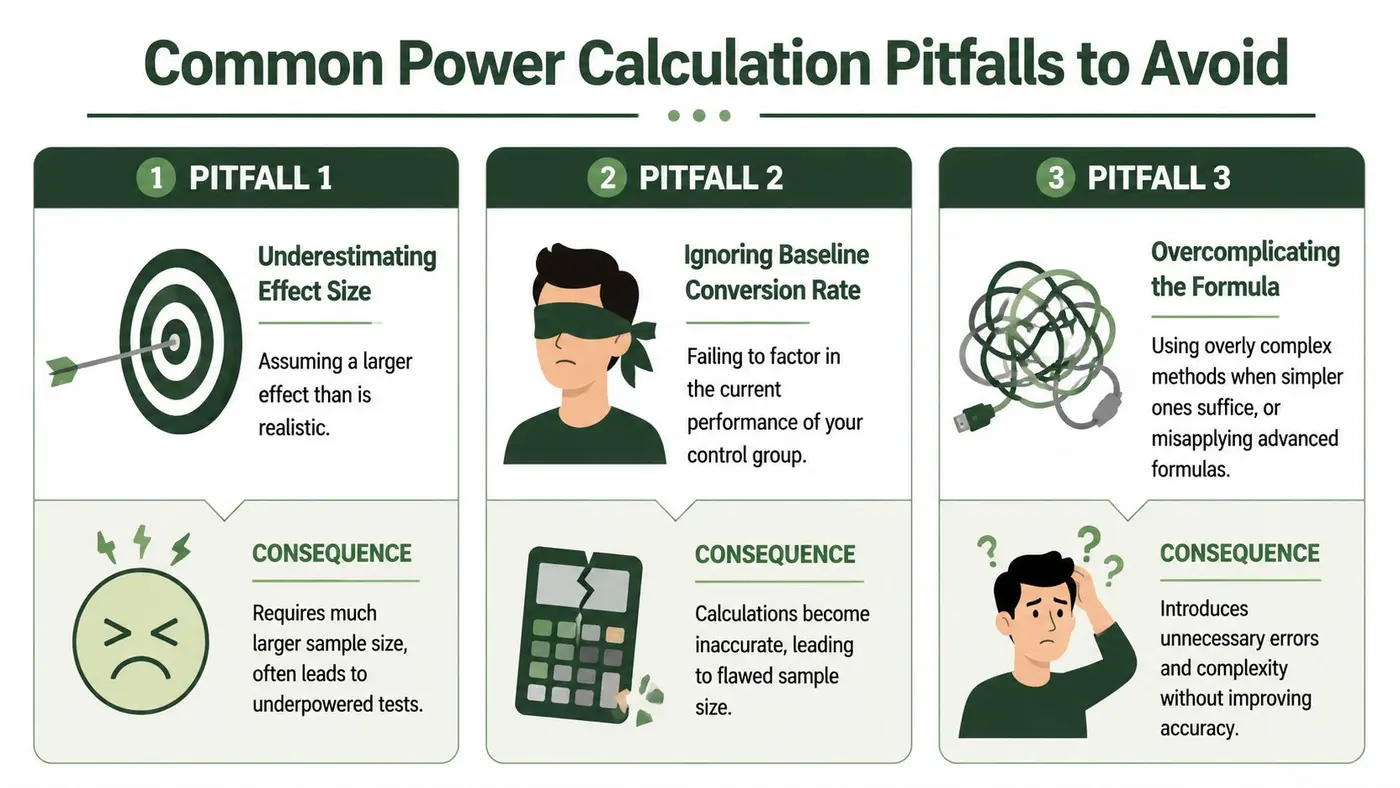
Common Power Calculation Pitfalls to Avoid
Most testing mistakes don't happen in the formula. They happen in the behaviour around the formula.
A major operational problem is tool complexity. A UK Government Behavioural Science Unit publication reported that 82% of non-technical UK teams abandon power planning due to software complexity, and the same evidence base aligns with the finding that over 70% of UK CRO specialists lack access to tools like G*Power. That's why simple workflows matter.
Picking an effect size because it looks convenient
The fastest way to sabotage a power calculation is to set an MDE that fits your traffic rather than your business goal.
Teams do this all the time. They know a realistic uplift will require more patience than they have, so they plug in a bigger target and move on. The result is a neat sample size estimate attached to a test that's only capable of detecting unusually large changes.
What works instead:
- Use commercial value first when defining MDE.
- Use historical wins carefully if you have them, but don't assume every headline or CTA tweak can generate a dramatic jump.
- Reject weak tests early if the traffic-to-MDE ratio doesn't make sense.
Ignoring baseline quality
A power calculation built on stale baseline data is clean-looking nonsense.
If your baseline came from a different audience, different season, different landing page intent, or a recently changed funnel, the output may be technically correct and operationally useless. This matters even more if your product pages or paid traffic mix have shifted.
A related issue is misunderstanding false negatives. If you want a clearer mental model for that, Otter A/B's explanation of Type II error is worth reading.
A weak baseline doesn't just make your estimate fuzzy. It can send you into a test with the wrong expectations about duration, sensitivity, and risk.
Peeking and stopping as soon as numbers look good
This one wrecks otherwise decent experiments.
Teams start a test with a sample target, then check the dashboard daily and stop the moment one variant looks significant. The temptation is obvious, especially when a result appears early and everyone wants to ship the winner.
The problem is that repeated early stopping inflates false confidence. If you keep opening the oven before the cake is done, you don't improve the bake. You just interrupt the process and start reacting to unstable signals.
Three rules protect you here:
- Pre-commit to a sample threshold before launch.
- Avoid winner declarations mid-stream unless your methodology explicitly supports sequential decision-making.
- Treat multi-variant tests with care because more variants complicate interpretation and usually demand more traffic discipline.
Navigating the Trade-Offs in Your Test Plan
The cleanest power calculation in the world won't help if the test plan doesn't fit your traffic, calendar, or commercial urgency.

When speed fights certainty
Every test plan sits inside a tension between three things:
- Speed
- Confidence
- Sensitivity to small lifts
You usually get to optimise two more comfortably than all three. If you need answers quickly and traffic is limited, your test probably has to target a larger effect. If you want to detect a very small lift, the test will usually need more visitors or more time.
That's why good CRO work isn't about memorising formulas. It's about choosing the right lever to move.
The levers you can actually pull
If your sample requirement feels too high, you have a short list of honest options:
| Constraint | Better response | Bad response |
|---|---|---|
| Limited traffic | Test a bolder change | Pretend a tiny tweak will be detectable quickly |
| Tight deadline | Focus on a larger MDE | Stop early when the chart looks promising |
| Noisy baseline | Stabilise measurement first | Trust the calculator anyway |
| Multi-variant ambition | Reduce variant count | Split traffic too thinly |
Non-technical marketers often get trapped, assuming the output of a calculator is fixed truth, when it's really the consequence of a set of planning choices.
Seasonal volatility changes the maths
Generic sample size guides often assume baseline behaviour is stable. UK ecommerce rarely behaves that neatly, especially in Q4.
A British E-commerce Association study found that 68% of UK A/B testing failures during seasonal campaigns came from using year-round average effect sizes, and that during Q4 the minimum detectable effect can shift by ±15%, which means standard calculations may be off by 20-30%.
That matters in practice. If you calculate your Black Friday test as though it were a normal trading week, you can misjudge both the volatility and the traffic dynamics. The fix isn't complicated, but it does require discipline:
- Use seasonal baselines where possible.
- Revisit MDE for high-volatility periods instead of carrying over a normal-month assumption.
- Avoid mixing pre-peak and peak traffic in one neat-looking but hard-to-interpret test.
This short explainer is useful if you want a visual refresher on the trade-offs involved:
A better planning question
The strongest planning question isn't “How can we get this test live fast?”
It's “Given our traffic and timing constraints, what effect size can we realistically detect with confidence?” Once you ask that, a lot of weak experiments disqualify themselves before they waste your month.
From Calculation to Conversion with Otter A/B
Once you've calculated your sample target, the next job is operational discipline.
That means setting the experiment up so the control and variant traffic split stays clean, the conversion goal matches the outcome you care about, and the test keeps running until it reaches the threshold you planned for. The calculation only helps if the execution respects it.
Lightweight tooling matters here because many marketers don't need a research stack. They need a fast way to launch a test, define a goal, monitor progress, and avoid making early calls on weak evidence. That's especially true for teams working in Shopify, Webflow, WordPress, WooCommerce, or custom front ends where experimentation needs to fit existing workflows rather than becoming its own project.
The practical loop is simple:
- Calculate the sample size before launch.
- Build the test around a single clear hypothesis.
- Run to the planned threshold.
- Review the result in the context of the MDE you chose.
- Ship, iterate, or archive based on evidence.
The advantage of a lightweight platform is that it reduces the friction that causes teams to skip proper planning in the first place. Instead of bouncing between spreadsheets, half-understood calculators, and manually tracked visitor counts, you can keep the process tight enough that good statistical habits become the default rather than the exception.
If you want a simpler way to turn sound power calculations into live experiments, Otter A/B is built for exactly that. It gives growth teams a lightweight way to test headlines, CTAs, and layouts without the usual implementation drag, so you can plan properly, launch quickly, and make decisions from real evidence instead of guesswork.
Stop guessing
Ready to start testing?
Set up your first A/B test in under five minutes. No credit card required.
- 14-day free trial
- No credit card required
- Cancel anytime