How do you calculate click through rate: 2026 Guide
Discover how do you calculate click through rate effectively. Our 2026 guide for UK marketers covers formulas, real examples, and strategies to boost CTR.


So, how do you really know if your marketing message is hitting the mark? One of the simplest, yet most powerful, metrics you can track is your click-through rate (CTR).
At its core, calculating your click-through rate is straightforward. You take the total number of clicks your link or ad received, divide it by the number of times it was shown (impressions), and then multiply that figure by 100 to get a percentage. This little formula—(Clicks / Impressions) x 100—is your first clue to understanding audience engagement across all your digital marketing efforts.
Calculating Your Click-Through Rate Instantly
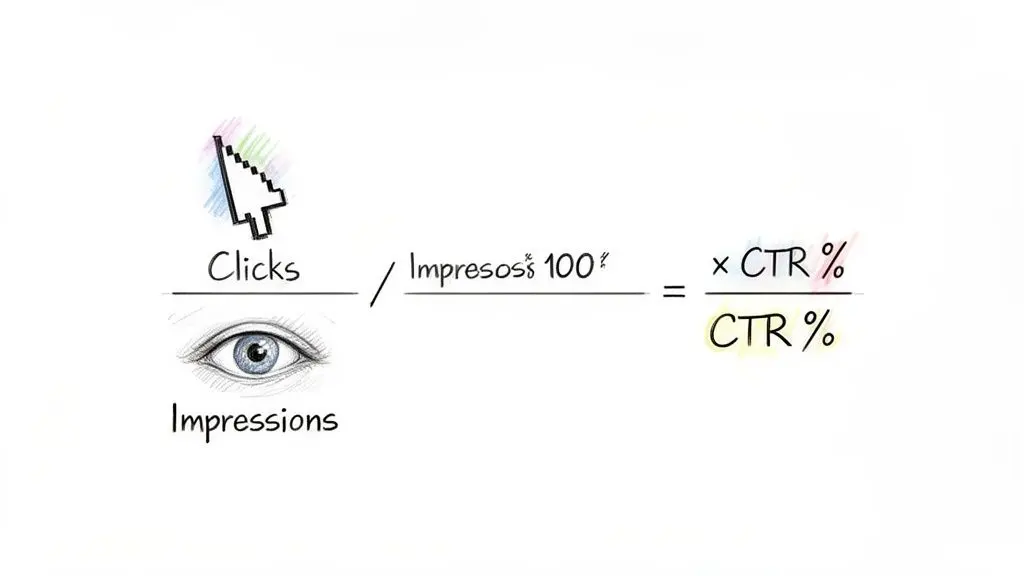
Getting a grip on how to calculate your click-through rate is the first step toward making smarter decisions. It’s a fundamental metric that tells you just how compelling your content, ads, or email subject lines are to your audience. A high CTR suggests you’re on the right track, while a low one is a clear signal that something needs a rethink.
While the formula itself never changes, you'll find the precise definitions of its two main ingredients—clicks and impressions—can differ slightly from one platform to another.
The Two Core Components of CTR
- Total Clicks: This is the raw count of how many times someone clicked on your link, ad, or call-to-action. It’s a direct measurement of user action.
- Total Impressions: This is the number of times your content was displayed or served to users. Critically, an impression doesn't guarantee the user actually saw it, just that it loaded on their screen.
Let's imagine you're running a Google Ads campaign for a local bakery in Manchester. If your ad is displayed 10,000 times (impressions) and gets 300 clicks, your CTR is 3%. The calculation is simply (300 / 10,000) x 100. What this tells you is that for every 100 people your ad was shown to, three were interested enough to click.
Calculating click-through rate is easy: CTR = (Number of Clicks / Number of Impressions) × 100. For those of us in the UK marketing scene, this metric has been a go-to for measuring performance and driving growth since the early 2010s.
We can even see this at a macro level. A hypothetical UK Interactive Advertising Bureau (IAB) Digital Adspend Report for 2025 showed that display ads across UK websites averaged a CTR of 0.38%. This was based on 1.3 billion impressions generating 4.9 million clicks in Q4 alone. You can delve into the history and importance of the CTR formula to see just how foundational it is to modern marketing.
Breaking Down the CTR Formula
To make this crystal clear, here’s a quick reference for the core components you need to calculate your click-through rate.
| Component | What It Means | Practical Example |
|---|---|---|
| Total Clicks | The raw count of every click a link or ad received. | An email campaign receives 250 clicks. |
| Total Impressions | The number of times your content was displayed on a screen. | Your Facebook ad was shown 20,000 times. |
| CTR (%) | The percentage of impressions that resulted in a click. | (250 / 20,000) x 100 = 1.25% CTR. |
This simple calculation is your gateway to performance analysis. Whether you’re a UK business checking organic traffic in Google Search Console or a Shopify store owner monitoring Meta ads, this metric provides the initial insight you need to gauge what's working and what isn't.
Calculating CTR Across Your Marketing Channels
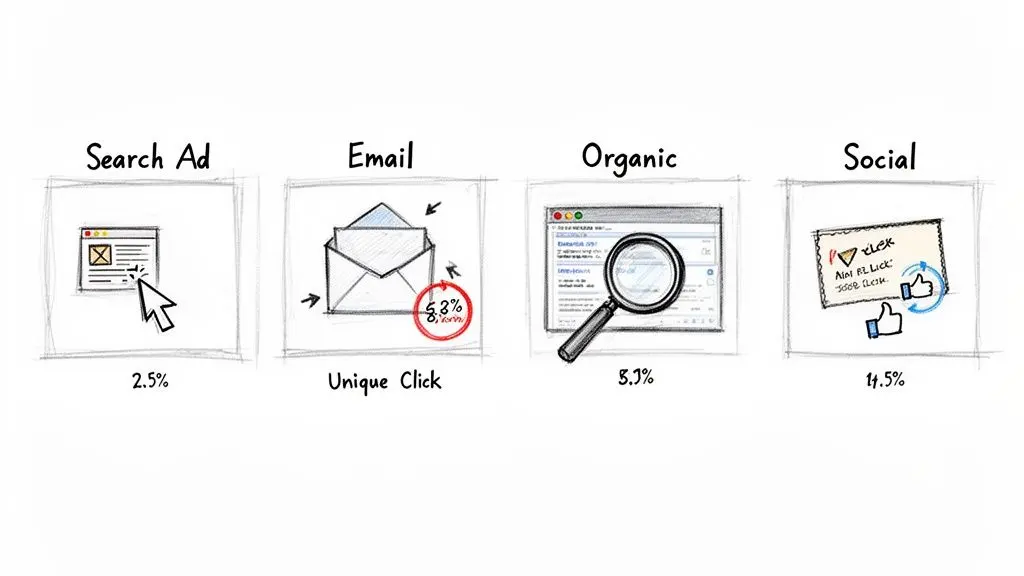
The actual formula for calculating click-through rate never changes, but its meaning can shift dramatically depending on the marketing channel you're looking at. The context behind the clicks and impressions is what truly matters.
Let’s get practical and walk through a few real-world examples to see how this works.
Paid Advertising on Google Ads
Picture this: you run a UK-based Shopify store selling handmade leather goods. You've just launched a Google Ads campaign targeting the keyword "mens leather wallet UK". To see how you're doing, you'll head straight to your Google Ads dashboard.
Your report from last week shows some clear numbers:
- Impressions: 15,000 (Your ad was shown 15,000 times in search results)
- Clicks: 450 (It was clicked on 450 times)
Plugging those numbers into the formula gives us: (450 Clicks ÷ 15,000 Impressions) × 100 = 3% CTR.
A 3% CTR in this context is a really strong start. It tells you that your ad copy and targeting are hitting the mark, grabbing the attention of people who are actively looking for what you sell. It’s a solid sign that your headline and description are resonating.
Organic Search in Google Search Console
Now, let's switch gears to your website's organic performance. For this, your go-to tool is Google Search Console. You want to check the performance of a blog post, "How to Care for Your Leather Bag," specifically for the search query "leather bag care".
Inside the GSC Performance report, you find this:
- Impressions: 5,000 (Your blog post appeared in search results 5,000 times for that query)
- Clicks: 250 (And 250 people clicked through to your site)
Again, we do the maths: (250 Clicks ÷ 5,000 Impressions) × 100 = 5% CTR. An organic CTR of 5% is quite healthy. It suggests your page title and meta description are doing their job, standing out on a busy search results page and persuading users that your content has the answer.
Email Marketing Campaigns
Email is a completely different world. Here, an "impression" is typically counted as a successfully delivered email. Let's say you're a B2B service and you've just sent a promotional email to a specific customer segment.
Your email platform reports the following:
- Emails Delivered: 2,000
- Unique Clicks: 120
We use unique clicks here because it gives a much cleaner picture of engagement. It tells us how many individual people were interested, rather than counting one very enthusiastic person who clicked the same link five times.
The calculation is: (120 Clicks ÷ 2,000 Emails Delivered) × 100 = 6% CTR.
But here’s a pro tip: a much more insightful way to measure email CTR is to divide clicks by opens, not deliveries. If only 600 people actually opened your email, your true engagement rate is 20% (120 clicks ÷ 600 opens). This tells a far more accurate story about how compelling your content was to those who actually saw it.
For UK e-commerce brands, especially with mobile shopping's continued dominance, these numbers are everything. A hypothetical 2026 UK E-commerce Report might show Shopify stores averaging a 2.3% CTR on product pages, stemming from 20.7 million clicks across 900 million impressions. This is a world away from the "banner blindness" that plagues display ads, which have historically struggled with CTRs as low as 0.12%.
If you're interested in digging deeper, you can learn more about how to calculate click-through rates across different channels and their benchmarks.
How to Use A/B Testing to Actually Improve Your CTR
So, you know how to calculate your click-through rate. Think of that number as your starting point. A/B testing is how you make it better. Instead of throwing ideas at the wall and hoping something sticks, Conversion Rate Optimisation (CRO) pros use a methodical approach to find out what really works. It’s all about pitting one version of your page against another to see which one gets more clicks.
And we're not just talking about massive, expensive redesigns. I’ve seen some of the biggest CTR wins come from the smallest tweaks. It could be changing the words on a button, trying a different colour, or rewriting a single headline. You’d be surprised what a difference it can make.
Setting Up Your First Test
Let’s walk through a real-world scenario. Imagine you run a WooCommerce store, and your ‘Add to Basket’ buttons are the standard green. You have a hunch they’re getting lost on the page and that a bolder colour might grab more attention. This gives you a clear hypothesis: “Changing the button colour to a vibrant orange will make it stand out more, leading to more clicks.”
This is where a tool like Otter A/B comes in. It lets you test this hypothesis scientifically. You’d start by creating a ‘variant’ – a new version of your product page with the orange button. Your original page, with the green button, serves as your ‘control’.
Next, you split your website traffic between these two versions. A 50/50 split is typical, meaning half your visitors see the control and the other half see the variant. This is crucial because it ensures things like time of day, traffic source, or special promotions affect both versions equally. The only real difference is the one thing you’re testing: the button colour.
Why You Need to Wait for Statistical Significance
As your test runs, your A/B testing tool will track the clicks for each button and calculate the CTR for both the control and the variant. It's tempting to watch the numbers in real-time and call a winner after a few hours, but that's a classic mistake.
The goal is to reach statistical significance. This is a critical point in any experiment where you can be confident (usually with 95% certainty) that your results aren't just a random fluke. It’s the proof that one version is genuinely performing better than the other.
A good testing platform does the heavy lifting for you, constantly running the numbers. Depending on how much traffic your site gets, reaching significance might take a few days or even a couple of weeks. But being patient is non-negotiable. It stops you from making important business decisions based on shaky data.
Once a clear winner is declared, you have hard evidence of what your audience prefers. For a deeper dive into improving your pages, check out these actionable strategies for A/B testing landing pages.
This same principle applies to everything—from the subject line of your next email campaign to the copy in your Google Ads. A/B testing turns CTR from a passive metric you just report on into an active tool for growth. If you want to understand the maths that powers these decisions, you can learn more about what a confidence interval is in statistics and how it validates your results. By testing just one thing at a time, you can steadily improve every touchpoint in your customer journey.
Avoiding Common CTR Calculation Mistakes
The click-through rate formula looks straightforward on paper, but in practice, several hidden traps can skew your data and lead you down the wrong path. Getting numbers you can actually trust means knowing what to watch out for.
I've seen it happen time and again: a team's CTR looks disappointingly low, but the problem isn't their ad copy or their call to action. The real culprit is an inflated impression count.
This usually stems from two sources: bot traffic and outright impression fraud. Automated bots can crawl your website or trigger ads, racking up impressions without a single human ever laying eyes on your content. This bloats the denominator of your CTR formula, making your engagement look far worse than it actually is.
There's also a more subtle issue to consider: the difference between a 'served' impression and a 'viewable' one. Many platforms will count an impression the second an ad asset loads on a page, even if it's buried at the bottom where no one ever scrolls. A viewable impression, on the other hand, is only counted when a good portion of the ad is actually on-screen for a set amount of time. If you’re not measuring viewable impressions, you’re not getting an honest picture.
The Dangers of Inaccurate Analysis
When you're running A/B tests, it’s incredibly tempting to call a winner the moment one version pulls ahead. But ending a test too early is a classic mistake. A quick burst of clicks could easily be random noise, not proof of superior performance. You absolutely must wait for your test to reach statistical significance to be sure the results are reliable.
Rushing the process often leads to false positives, where you believe a change made a difference when, in reality, it had no effect. This is also known as a Type I error, and it’s a critical concept to understand in testing if you want to avoid making decisions based on bad data. You can read more about what a Type I error is and how it can derail your optimisation efforts.
Finally, one of the biggest missed opportunities is looking only at your overall, blended CTR. This single average can hide crucial performance trends happening within different segments of your audience.
You might discover that mobile users in Manchester have a CTR of 8%, while desktop users in London are only at 2%. Without segmenting your data, you’d just see a mediocre average and miss a golden opportunity to double down on what’s clearly working for a high-performing group.
To combat these issues, we've put together a quick-glance table of the most frequent errors we see in CTR analysis and, more importantly, how to correct them.
Common CTR Errors and Their Solutions
A look at frequent mistakes in CTR analysis and the correct approach to ensure your data is accurate.
| The Mistake | Why It's a Problem | How to Fix It |
|---|---|---|
| Counting all impressions | Inflates your denominator with non-human (bot) or unseen (non-viewable) impressions, artificially lowering your CTR. | Filter for bot traffic and focus your analysis on viewable impressions for a more accurate baseline of human engagement. |
| Ending A/B tests too early | Declaring a winner based on random fluctuations, not true performance. This leads to implementing changes that have no real impact. | Run tests until they reach statistical significance. Use a sample size calculator to determine the required duration before you start. |
| Relying on a single, average CTR | A blended average can mask high-performing segments and hide underperforming ones, preventing you from optimising effectively. | Segment your data. Analyse CTR by device, location, traffic source, new vs. returning users, and other relevant demographics. |
Getting this right ensures your data tells a true story.
A structured A/B testing process is your best defence against messy data, helping you move confidently from setup to analysis.
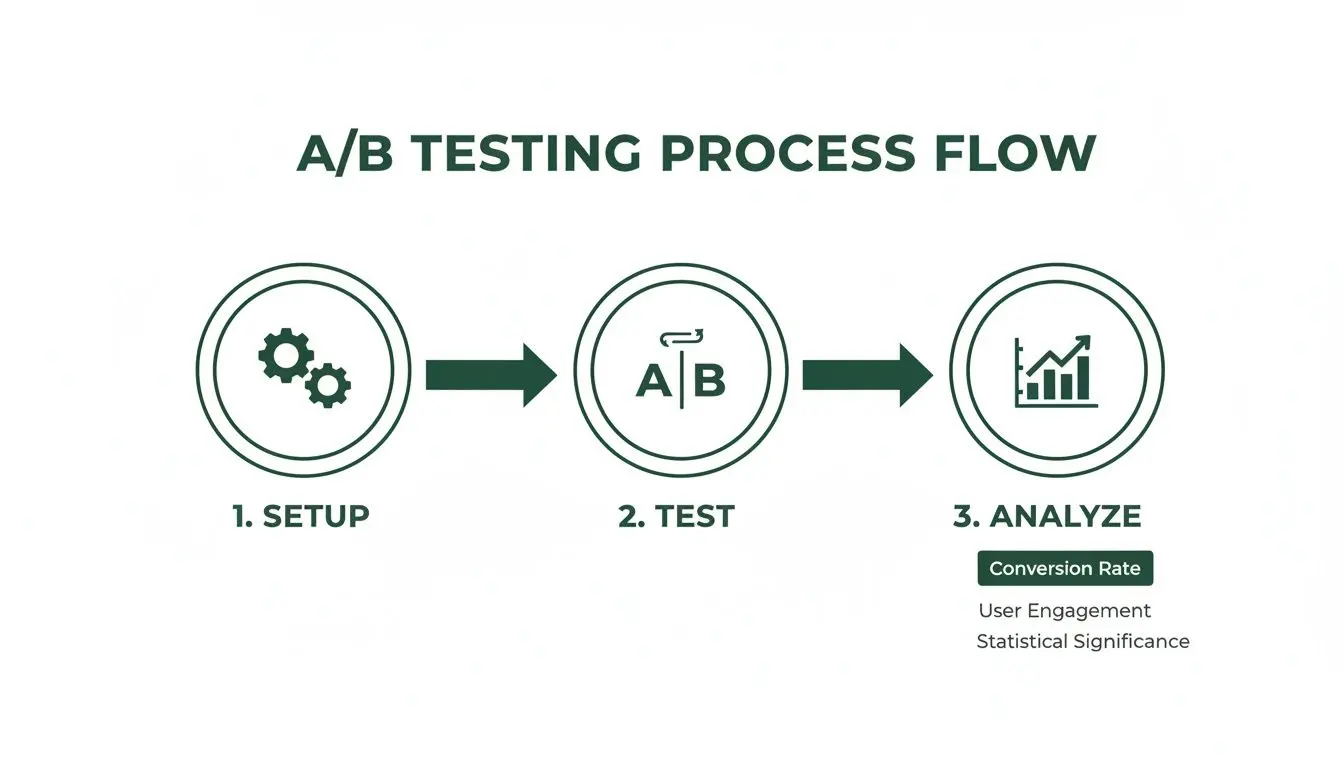
By digging into the details and avoiding these common pitfalls, you transform CTR from a simple vanity metric into a powerful diagnostic tool. It shows you exactly where your strategy is winning and where it needs a bit more work. This level of analysis is what separates good marketers from great ones.
Actionable Strategies for a Higher CTR
Alright, you've mastered the formula and know what pitfalls to sidestep. So, how do you actually get more people to click? The good news is that improving your CTR isn't some dark art. It's about a handful of proven psychological triggers and smart design choices.
Often, tiny tweaks to your headlines, copy, and calls to action are all it takes to see a real jump in your numbers. Let's get into some practical ways you can start coaxing that CTR upward.
Optimise Your Copy and Headlines
Your headline is your first impression. It's the make-or-break moment that determines if someone bothers to read another word. Too many people settle for generic, descriptive headlines like "Digital Marketing Services," which do nothing to stand out.
Instead, aim to spark curiosity or promise a clear benefit. A simple reframe to something like, "Finally, a Marketing Plan That Delivers More Than Just Clicks," creates an immediate question in the reader's mind and hints at a valuable outcome.
Try these angles in your copy:
- Ask a pointed question: "Is Your Website Losing You Customers?"
- Use hard numbers: "Get 3X More Leads in 90 Days"
- Inject some urgency: "Limited Time: 50% Off Our Pro Plan"
- Get hyper-specific: "The #1 SEO Tool for UK E-commerce Stores"
The core idea is to stop talking about yourself and start talking about what your audience gets. That shift is everything.
Design Calls to Action That Demand Attention
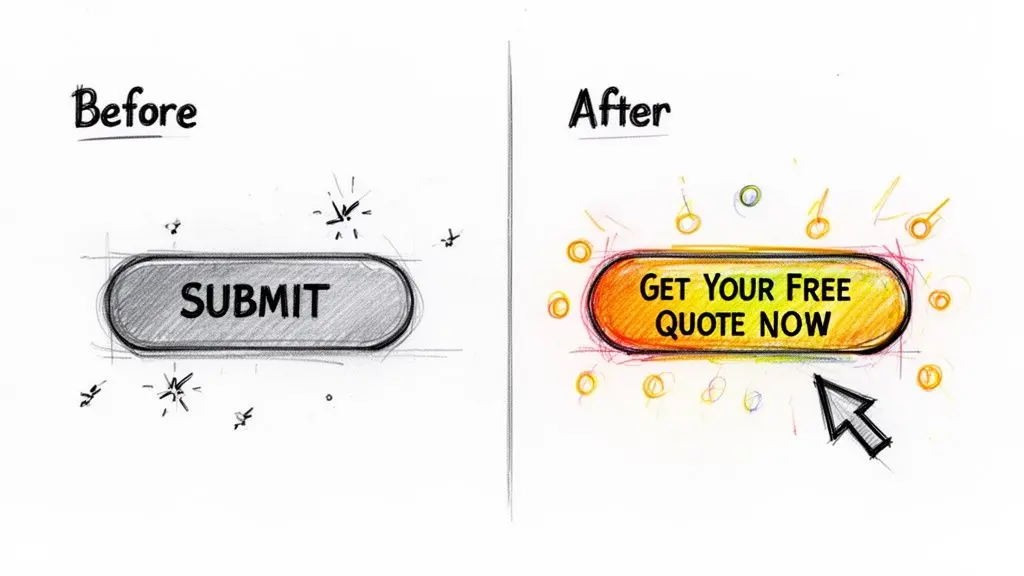
Your call-to-action (CTA) button has one job: to get clicked. It's astonishing how often this critical element is treated as an afterthought. Forget passive, boring words like "Submit" or "Click Here"—they're absolute CTR killers.
The best CTAs are packed with action and value. Swap out a lazy "Submit" for "Get Your Free Quote Now." Suddenly, it’s not a task for the user; it’s a benefit they receive. You're telling them exactly what they're gaining, which makes clicking a much easier decision.
The button's design is just as important. Colour contrast is non-negotiable; if your button blends in, it will be ignored. Make it pop. Its size and placement are also crucial. It needs to be big enough to be easily tappable on a mobile phone but not so huge that it's obnoxious.
If you're running paid ads, this needs constant attention. To keep improving, check out these proven strategies to improve Google Ads CTR for fine-tuning things like ad extensions and keyword relevance—small details that have a big impact on clicks.
Target a Niche Audience
This might sound counterintuitive, but one of the fastest ways to get more clicks is to show your message to fewer people. Trying to appeal to everyone is a classic mistake that results in appealing to no one.
When you narrow your focus, your message becomes infinitely more powerful. Instead of a vague campaign aimed at all of London, what if you targeted "eco-conscious new mothers in North London"? Now you can craft copy and imagery that speaks directly to their values and daily life. You're no longer just another ad; you're a relevant solution.
When your audience feels like you "get" them, they don't just see an ad—they see a conversation. And they're far more likely to click to continue it.
These ideas are all part of the bigger picture of optimisation. To build out your skills further, our guide on conversion rate optimisation best practices offers a complete framework for lifting your site's performance across the board.
Common Questions About Click-Through Rate
Once you start calculating click-through rates, you’ll find that a few questions pop up again and again. Getting these sorted helps you understand what that number on your dashboard actually means for your strategy. Let's dig into some of the most common ones I hear.
What Is a Good Click-Through Rate?
This is the question everyone asks, but the real answer is always "it depends". What’s considered a fantastic CTR in one industry can be completely average in another. It all comes down to the channel and your audience.
For example, a Google search ad for legal services in the UK might have a great CTR at 3-4%. That’s a competitive field. But an ad for a niche hobby, like miniature painting, could easily hit 8% or more because it’s targeting a passionate, specific audience.
To give you a rough idea, here are some general benchmarks we see across the UK:
- Google Search Ads: The average across all industries hovers around 3.17%, but this figure can swing wildly.
- Email Marketing: For clicks on links within an opened email, a good target is anywhere from 10-20%. If you have a highly engaged list, you might even beat that.
- Social Media Ads (Meta): The average is about 1.3%. However, a really engaging video or a can't-miss offer can push this number much higher.
Don’t get too hung up on these numbers. The most important thing is to figure out your own baseline and work on improving it through solid, consistent optimisation.
What Is the Difference Between CTR and Conversion Rate?
It's so easy to get these two mixed up, but they measure two distinct, separate steps in a customer's journey.
Click-Through Rate (CTR) is all about the initial spark of interest. It tells you, "Was my headline, ad, or subject line compelling enough to make someone click?"
Conversion Rate, on the other hand, measures the final, desired action after the click. It answers the question, "Did the person who landed on our page actually buy something, fill out the form, or sign up?"
Think of it this way: a high CTR gets people through the door, but it’s the conversion rate that makes the sale. You absolutely need both. A high CTR with a poor conversion rate is a classic red flag that your ad is making a promise your landing page can't keep.
How Often Should I Check My CTR?
The right frequency really depends on how fast your marketing channel moves.
For something quick and dynamic like a new Google Ads or Meta campaign, you should be checking your CTR daily for the first week. This lets you spot losing ads and shift your budget to the winners before you waste too much money.
For slower, more long-term plays, you can back off a bit. When it comes to SEO and organic traffic, a monthly check-in with your Google Search Console data is usually enough. It gives you sufficient data to spot real trends without getting distracted by day-to-day noise.
Ready to turn those insights into action? Otter A/B makes it simple to run A/B tests and systematically improve your CTR. Start making data-driven decisions today by visiting https://www.otterab.com and sign up for free.
Stop guessing
Ready to start testing?
Set up your first A/B test in under five minutes. No credit card required.
- 14-day free trial
- No credit card required
- Cancel anytime