Boost Conversions: 8 Customer Journey Map Examples
Explore 8 customer journey map examples. Identify pain points, set KPIs, & optimize for higher conversions & revenue with our expert guide.

Many teams reading this have already done the hard part. You interviewed customers, pulled analytics, sketched the stages, colour-coded the pain points, and ended up with a polished journey map that everyone nodded at in the meeting. Then nothing happened.
That’s the common failure. A map shows friction, but it doesn’t remove it. It tells you where attention drops, where doubt appears, where intent weakens. It rarely tells you which test to launch on Monday morning, what KPI to watch, or how to connect a change in one touchpoint to revenue.
That’s why strong customer journey map examples matter. Not as design inspiration alone, but as operating models for experimentation. The most useful maps don’t stop at awareness, consideration, purchase, and retention. They attach a testable hypothesis to each stage. They tell a product team what to change, a marketer what message to sharpen, and a CRO specialist what outcome proves the change worked.
A good example of this action-first mindset appears in these customer journey mapping examples, where the visual structure helps clarify touchpoints. The missing layer, in many teams, is experimentation. A tool like Otter A/B becomes practical here. You can turn a vague note like “users hesitate at checkout” into a live test on payment messaging, button copy, or field order without slowing the site or waiting on a major dev sprint.
Below are eight journey map patterns I’ve seen work across ecommerce, SaaS, agencies, content funnels, mobile apps, enterprise sales, e-learning, and marketplaces. Each one is paired with specific hypotheses, KPIs, and implementation ideas you can put into production quickly.
1. E-Commerce Product Purchase Journey Map
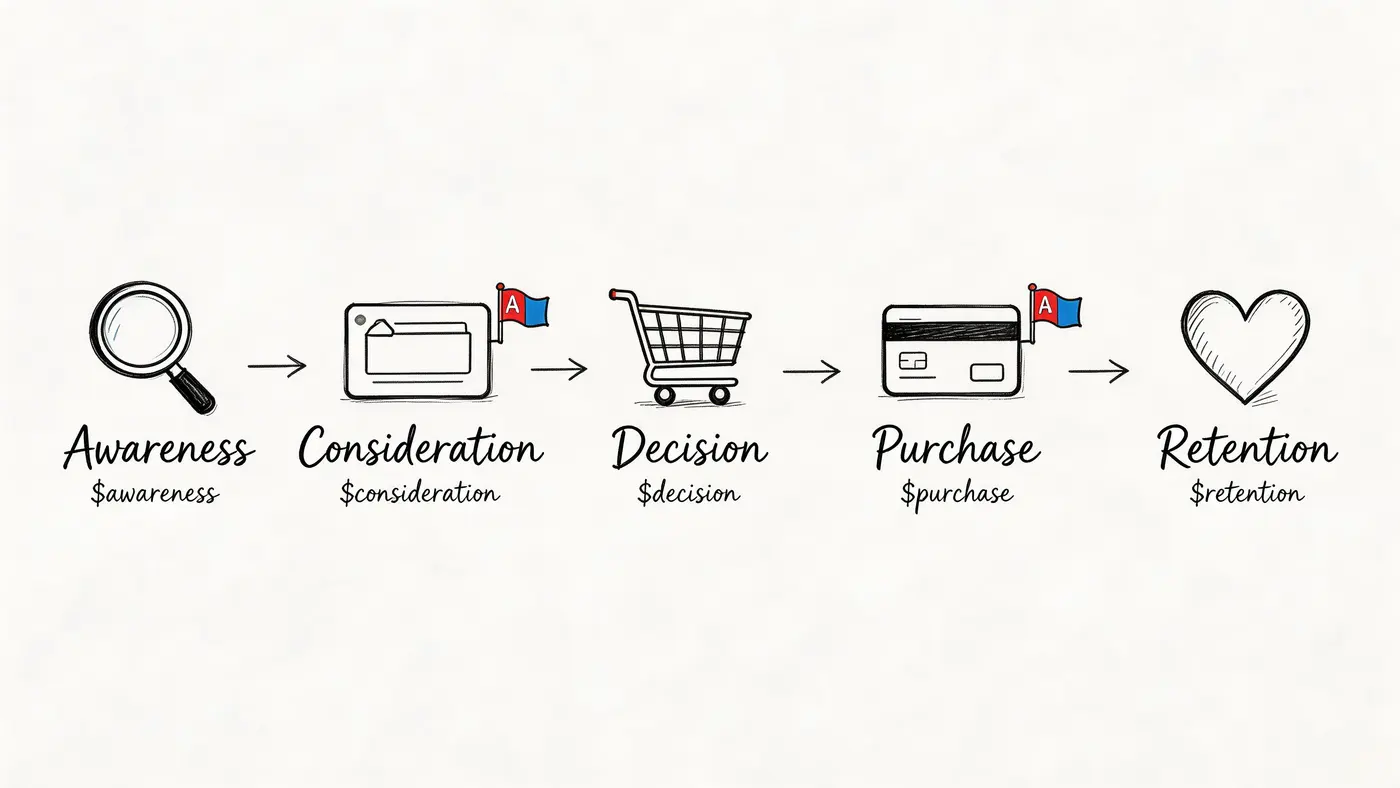
For most Shopify and WooCommerce brands, this is the map that pays for itself fastest. The path is familiar. Ad or social discovery, category page, product page, cart, checkout, then post-purchase follow-up. The mistake is treating that flow as one funnel instead of a chain of micro-decisions.
ASOS is a useful real-world example. In the UK, it used a customer journey map to optimise the full retail journey and reduced cart abandonment by 20% between 2018 and 2020, according to this ASOS customer journey mapping case study. The same case notes that limited payment options accounted for 28% of abandonments, which is exactly the kind of friction a map should expose before you test a fix.
Where to test first
Start on the product page, not the homepage. Product pages combine strong intent with enough traffic to learn quickly.
Test ideas that map directly to journey stages:
- Discovery stage: Swap a feature-led headline for an outcome-led headline.
- Evaluation stage: Test image-first layouts against image-plus-video layouts.
- Decision stage: Test CTA copy such as “Add to basket” against more reassurance-led copy.
- Checkout stage: Test guest checkout messaging, payment trust cues, and field order.
- Post-purchase stage: Test the next action in the confirmation page, such as account creation, referral, or reorder.
The practical discipline is linking each test to a business metric. If you’re changing a product gallery, track add-to-cart rate. If you’re changing checkout messaging, track purchase completion and revenue per variant, not just clicks.
For teams building a proper experimentation rhythm, these conversion rate optimisation best practices are a useful companion to the map itself.
What works and what doesn’t
What works is testing the friction that customers already revealed. What doesn’t work is inventing “best practice” changes because another brand uses a brighter button.
Practical rule: If a touchpoint has emotional friction and commercial intent, it belongs near the top of your testing queue.
I’d also treat the post-purchase moment as part of the same map, not a separate retention project. Strong post-purchase customer experience often determines whether first-order gains become repeat revenue.
With Otter A/B, I’d set up revenue tracking from day one, split mobile and desktop audiences if the experience differs, and push Slack alerts to the team when a test reaches the platform’s 95% confidence threshold. That turns the map into a working backlog instead of a workshop artefact.
2. SaaS Onboarding and Feature Adoption Journey
A SaaS journey map looks deceptively simple. Someone signs up, lands in the product, sees a checklist, clicks around, and either reaches value or disappears. The map becomes useful when you stop calling that whole stretch “onboarding” and break it into moments of commitment.
Think of Slack, Notion, Figma, or Calendly. Their early journey isn’t just about getting a user in. It’s about getting a user to do the thing that predicts staying. Invite a teammate. Create the first file. Publish something. Book the first meeting.
The activation map many teams need
I like mapping this journey in five behavioural steps:
- Signup decision
- First-screen comprehension
- Initial setup
- First meaningful action
- Feature rediscovery and expansion
Each step supports a different type of test.
At signup, test field count and reassurance copy. On the first screen, test whether the headline explains the product or the next action. In setup, test progressive disclosure against showing every option at once. For activation, test whether the primary CTA points to one clear task or several possible paths.
The best onboarding tests don’t optimise for completion theatre. They optimise for value reached.
That distinction matters. A user can finish a checklist and still fail to understand the product.
How to connect the map to A/B tests
Use the journey map as a sequence of hypotheses, not just a flowchart. For example:
- Signup hypothesis: Reducing optional fields may increase completed accounts.
- Welcome-screen hypothesis: A task-led headline may move more users into setup than a generic brand message.
- Activation hypothesis: Showing one recommended next step may outperform a dashboard full of options.
- Expansion hypothesis: Surfacing an advanced feature only after the first success may improve adoption without overwhelming new users.
The implementation details matter here. Onboarding is sensitive. If a variation flickers or loads awkwardly, the test itself creates friction. Otter A/B’s lightweight SDK and fast loading are useful in this kind of flow because you want the experience to feel native, not patched together.
If your team is also responsible for account growth after onboarding, these client engagement strategies can help frame which moments deserve messaging, prompts, or handoffs.
I’d measure this map with a layered KPI stack. Track signup completion for the first touchpoint, activation event completion for the core moment, and feature adoption downstream. If you only watch top-of-funnel conversions, you’ll eventually ship tests that create more accounts and fewer successful users.
3. Digital Agency Client Campaign Journey Map
Agencies need a different kind of journey map because the customer isn’t only the end user. It’s also the client team buying confidence, visibility, and results. That creates two journeys running in parallel. One for campaign visitors. One for the client relationship itself.
A practical agency map starts with the brief, moves through hypothesis creation, asset production, launch, learning, and reporting. If you skip mapping the client-facing side, testing programmes become harder to retain because stakeholders don’t see how decisions were made.
The two-track map agencies should use
Track one is the live campaign journey. Ad click, landing page, form interaction, conversion event, follow-up.
Track two is the client confidence journey. Kickoff, expectations, visibility into progress, understanding the data, trust in the recommendation.
That second track is where agencies often lose momentum. A good test programme can still feel chaotic to a client if updates are unclear or if significance is presented badly.
A better approach is to turn each test into a compact unit of evidence:
- Hypothesis: Why this element might be suppressing conversion
- Change: What variant is being tested
- Primary KPI: What outcome decides the winner
- Secondary KPI: What guardrail catches side effects
- Client interpretation: What action follows if the test wins, loses, or stays inconclusive
What to test across campaigns
Landing pages remain the obvious lever. Test headline framing, CTA hierarchy, form friction, social proof placement, and layout density. But don’t flood a page with simultaneous changes if you still need to explain results clearly to a client.
I prefer two or three high-impact variables per campaign, especially when multiple stakeholders need to approve what happens next. That gives agencies a cleaner story and a reusable bank of learnings by vertical, offer, or traffic source.
Agency reality: Clients rarely buy testing in the abstract. They buy a process they can understand and defend internally.
Otter A/B fits this use case well because agencies can centralise test setup, monitor significance, and share brandable reports instead of pasting screenshots into slide decks. Slack notifications help account teams react quickly when a test matures, which matters when a campaign window is short.
One trade-off is speed versus clarity. Agencies that launch too many variants at once create messy narratives. Agencies that test too cautiously become expensive reporting machines. The map helps balance both. It shows where you need velocity and where you need explanation.
4. Content Marketing and Lead Generation Journey
Content-led journeys break when teams assume a blog visit and a buying journey are the same thing. They aren’t. A visitor reading an article is usually making a much smaller commitment. Learn something. Compare approaches. Save a resource. Solve one immediate problem.
That means the map has to reflect intent shifts, not just page types.
A practical content journey often runs like this. Search or social discovery, article consumption, trust formation, CTA interaction, form completion, email follow-up, then sales or product handoff if the lead is qualified.
Turn reading behaviour into testable moments
The best content maps identify where curiosity turns into action. That happens at a handful of touchpoints:
- Article entry: The headline and opening lines decide whether the reader continues.
- Mid-scroll consideration: Contextual CTAs catch readers when they’ve seen enough value to act.
- End-of-article decision: Offer framing matters more than button colour here.
- Form completion: Field friction filters intent, sometimes too aggressively.
- Nurture transition: The expectation set on-page needs to match the email follow-up.
If I’m prioritising tests, I start with the highest-traffic articles that already attract commercially relevant visitors. That gives you enough volume without diluting intent.
For campaign execution ideas, the tactics behind landing page split testing translate into content-led lead capture.
The map should include lead quality, not just lead volume
Content teams often go wrong here. They celebrate more form fills without checking whether those contacts ever progress.
A better map pairs each touchpoint with a quality signal. For example, if you test a softer CTA on a blog post, track both submissions and downstream behaviour in your CRM or email platform. If you test a shorter form, monitor whether lead quality drops or sales follow-up slows down.
The implementation side matters too. Content-heavy pages can become sluggish if the experimentation script is bloated. Otter A/B’s lightweight snippet is useful here because publishers and SEO teams don’t want testing to interfere with page experience.
I also like using the map to separate informational visitors from solution-aware visitors. They need different offers. Someone reading a high-level explainer may respond to a template or guide. Someone on a comparison article may respond better to a demo CTA or product-specific proof.
A content journey map becomes commercially useful when every CTA has a job, every form has a reason, and every test is judged on business progress, not just click activity.
5. Mobile App Onboarding and Push Notification Journey
Mobile journey maps expose a different kind of friction. The screen is smaller, attention is shorter, permissions appear early, and re-engagement depends on messages sent after the first session.
That’s why app teams need a map that starts before install and continues well after first open. App store listing, install decision, onboarding screens, account creation, first in-app action, notification opt-in, reactivation. Those are distinct moments with different user psychology.
A short visual can help anchor that flow before you test it.
Where mobile maps usually break
Many apps ask for too much too soon. Permissions before value. Registration before context. Push opt-in before the user understands why notifications matter.
That sequence belongs on the map because it creates obvious hypotheses:
- Install-to-open hypothesis: Clearer app store messaging may improve expectation match.
- First-session hypothesis: Fewer onboarding screens may help some products, while others need stronger explanation.
- Permission hypothesis: Delaying a push prompt until after a meaningful action may outperform showing it immediately.
- Re-engagement hypothesis: Reminder copy tied to a recent action may outperform generic prompts.
Apps like Duolingo, Uber, TikTok, and Robinhood all have different activation mechanics, but they share one rule. The prompt should make sense in the context of the user’s last action.
Practical testing advice for app teams
Map the first session in detail. Don’t just mark “onboarding complete”. Record where users hesitate, skip, dismiss, or abandon.
Then run focused tests around one behaviour at a time:
- Onboarding copy: Test instruction-led language against outcome-led language.
- Primary CTA: Test “Continue” against more specific next-step language.
- Feature discovery: Test guided walkthroughs against contextual cues.
- Push notifications: Test copy, timing, and trigger conditions, not just send frequency.
- Premium prompts: Test whether the paywall appears after curiosity or after proof of value.
A mobile journey map is less about page sequence and more about momentum. Once a user loses momentum, recovery gets expensive.
For monetised apps, guard against short-term wins that hurt long-term retention. An aggressive premium prompt might boost immediate upgrades while weakening habit formation. The map should show where monetisation belongs and where it interrupts learning.
Otter A/B is most useful in this environment when it’s connected to mobile analytics so variants can be judged across the full journey, not only on first-session taps. If a change improves onboarding completion but weakens retention later, the map should make that trade-off visible.
6. B2B SaaS Enterprise Sales Journey Map
Enterprise journeys don’t move in a straight line. A buyer might read a case study, book a demo, disappear for weeks, return through a pricing page, involve procurement, then ask for security documentation before speaking to sales again. If your map is too linear, you’ll hide the genuine work.
Customer journey map examples for B2B need more realism here. The “awareness to purchase” model is too tidy for enterprise software.
Build around buying jobs, not page views
I’ve found the strongest enterprise maps organise around buying jobs:
- Understanding the category
- Shortlisting vendors
- Building internal consensus
- Assessing risk
- Validating ROI
- Negotiating terms
- Expanding after purchase
Now your touchpoints make more sense. Pricing pages support shortlisting. Case studies support internal consensus. Security pages support risk reduction. Demo forms support access. Proposal decks support decision alignment.
That framing also gives you cleaner test ideas. If a page supports risk reduction, test trust architecture. If a page supports shortlisting, test clarity and comparison.
High-impact experiments in long sales cycles
A few high-impact opportunities show up repeatedly:
- Pricing page tests: Headline framing, CTA copy, packaging visibility, and self-qualification language
- Demo request tests: Short forms versus richer qualification, especially by traffic source
- Case study tests: Narrative-led layouts versus proof-led layouts with metrics, logos, and role-specific relevance
- Comparison-page tests: Table format versus guided explanation
- ROI support tests: Interactive calculators versus static explanation
The trap is optimising for more demo requests without regard for fit. Enterprise CRO should improve sales efficiency, not just form volume.
That means your KPIs need layers. Track submission rate, qualified opportunity creation, sales acceptance, and movement to proposal where possible. If the test audience is low volume, let experiments run longer and be selective about what you change.
I also recommend mapping stakeholder anxiety explicitly. Legal worries about compliance. Finance worries about cost. IT worries about implementation. The user champion worries about making the wrong recommendation internally. Those concerns often matter more than the headline.
A strong enterprise map doesn’t just ask, “How do we get the lead?” It asks, “What does each stakeholder need to believe at this point in the deal?” Once that’s clear, testing becomes much sharper.
7. E-Learning and Online Course Enrolment Journey
Course businesses often underuse journey mapping because they think the sale happens on the landing page. In practice, the journey starts earlier and ends later. Discovery may happen through YouTube, search, email, or social proof. Enrolment might depend on trust in the instructor, confidence in the curriculum, and whether the pricing feels manageable. Retention depends on whether the student starts learning.
That’s why this map should include both conversion and commitment.
The moments that influence enrolment
For platforms and creators alike, the highest-friction points are:
- The first promise on the course page
- The credibility signal around the instructor
- The preview experience
- The pricing presentation
- The final enrolment form
- The first lesson handoff after purchase
These are great testing surfaces because they mix motivation and doubt. Prospective students want the outcome, but they’re unsure about quality, relevance, effort, or fit.
A practical way to map the journey is to pair each stage with the question in the learner’s head. Is this course for me? Can this instructor teach me? Will I finish it? Is the price justified? What happens after I buy?
Experiments that improve both sales and follow-through
For Udemy-style marketplaces, test category-specific headlines and thumbnail framing. For premium course brands such as MasterClass-style offers, test where preview video appears and how instructor authority is introduced. For more structured learning products, test pricing presentation and whether payment plans reduce hesitation.
I’d focus on these hypotheses first:
- Promise hypothesis: Outcome-led course messaging may outperform syllabus-led messaging.
- Authority hypothesis: A concise credibility block may reassure faster than a long biography.
- Preview hypothesis: Video above the fold may increase confidence for some audiences, while text-first pages may work better for high-intent traffic.
- Pricing hypothesis: Presenting plans differently may change enrolment intent.
- Completion hypothesis: The confirmation page can push first lesson starts, not just say thank you.
What often doesn’t work is overproduced persuasion. Too many testimonials, too much copy, too many modules listed without structure. The map should tell you when a buyer needs confidence and when they need simplicity.
For course brands, I’d also test by acquisition source. Organic visitors need different proof from paid visitors. Referral traffic may already trust the instructor and care more about format or schedule. Mapping those paths separately avoids averaging away useful insights.
8. Marketplace or Sharing Economy User Matching Journey
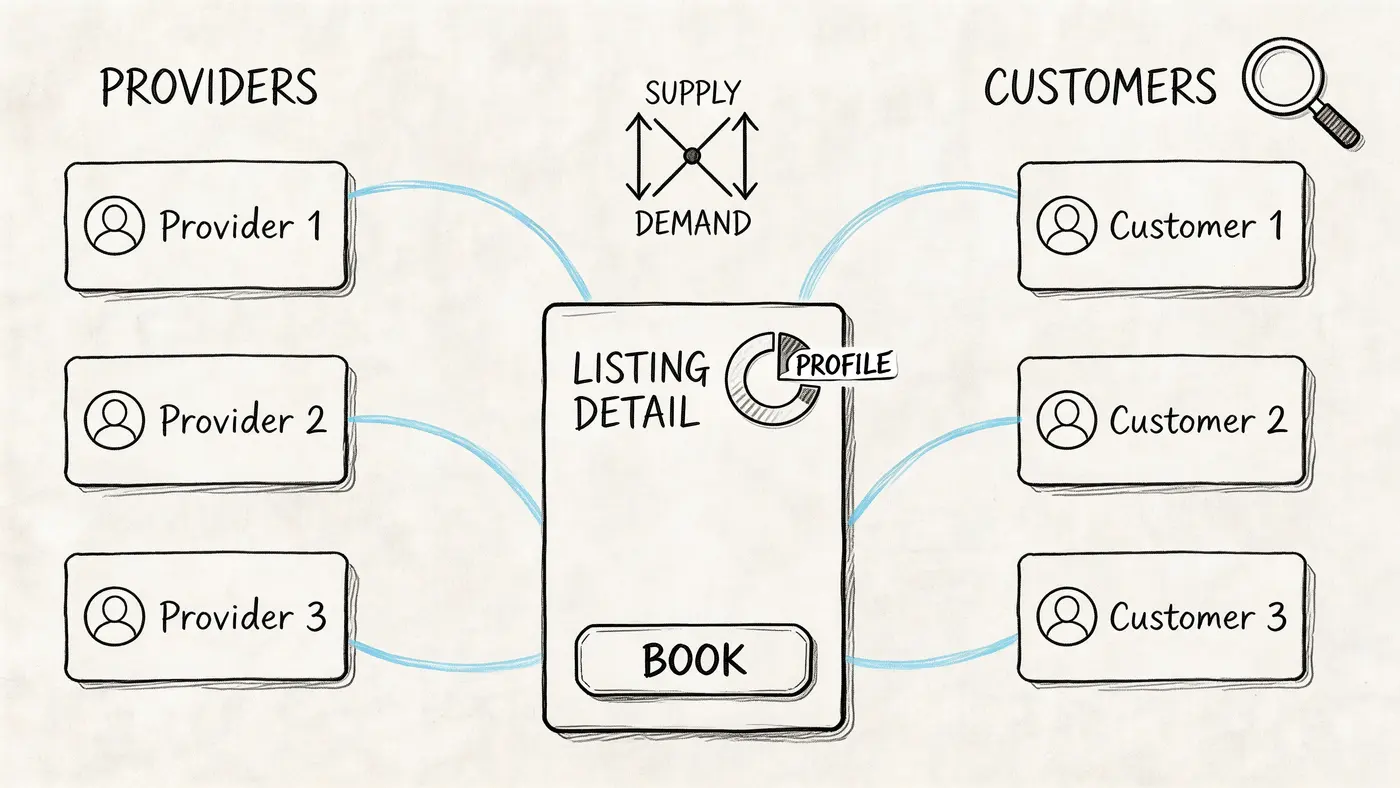
Marketplace maps are harder because you’re balancing two experiences at once. The demand side wants speed, trust, and a good match. The supply side wants visibility, fair economics, and a smooth workflow. A test that helps one side can subtly damage the other.
That’s why generic customer journey map examples often fail here. They ignore the fact that the platform isn’t selling one conversion. It orchestrates a match.
Map both sides before you test anything major
For a marketplace like Airbnb, Fiverr, Uber, DoorDash, or TaskRabbit, I’d maintain at least two linked maps:
- Buyer or requester journey: discovery, search, evaluation, booking or request, fulfilment, review
- Supplier or provider journey: signup, profile completion, listing activation, response, fulfilment, payout, retention
The overlap matters most at search results, listing pages, pricing display, messaging prompts, and booking CTAs.
One should be cautious with broad experiments here. Changing result ranking, profile requirements, or price visibility can affect conversion quality, cancellations, response rates, and supply health at the same time.
Better hypotheses for two-sided products
Useful test ideas tend to be tightly scoped:
- Demand-side signup: Test lighter entry flows without blocking browse behaviour.
- Supplier profile prompts: Test progressive prompts that encourage profile completion after value is demonstrated.
- Search results: Test layout, filtering cues, and trust information before altering ranking logic.
- Listing details: Test CTA language such as booking versus contacting, especially where trust is a barrier.
- Price presentation: Test estimated totals versus staged transparency carefully, with support metrics in view.
This is one area where revenue tracking alone isn’t enough. You also need quality indicators. Did the match complete? Was the experience rated well? Did cancellations rise? Did suppliers churn after the change?
The journey map should make those dependencies obvious. If a test improves requests but lowers provider acceptance, it’s not a win. If it improves transaction value but damages repeat use, you may be borrowing from future growth.
Otter A/B is helpful here when teams define multiple goals per experiment and look beyond clickthrough. Marketplace optimisation is about match quality and transaction health, not just more taps on the primary button.
8 Customer Journey Map Examples Compared
| Journey Type | Implementation Complexity 🔄 | Resource Requirements ⚡ | Expected Impact ⭐📊 | Ideal For | Key Advantages 💡 |
|---|---|---|---|---|---|
| E-Commerce Product Purchase Journey Map | Medium, needs ecommerce integration, multi-stage tracking | Moderate, web dev, analytics, transaction volume | ⭐⭐⭐⭐, measurable conversion & AOV lifts; direct revenue attribution | Shopify / WooCommerce stores, online retailers | High ROI on page & checkout tests; clear revenue signals; quick wins on high-traffic pages |
| SaaS Onboarding and Feature Adoption Journey | Medium, event tracking, feature-flagging, cohort analysis | Moderate, product/dev time, analytics, new-user volume | ⭐⭐⭐⭐, improved activation, faster time-to-value, higher adoption | Product teams, PMs, UX designers for SaaS products | Reduces friction in activation; measurable expansion revenue; quick headline/CTA wins |
| Digital Agency Client Campaign Journey Map | Medium–High, multi-client workflows, reporting, access controls | Moderate, snippet integration, client coordination, training | ⭐⭐⭐, scalable creative testing; clearer client deliverables | Agencies running A/B programs across multiple clients | Brandable reports; rapid test launches; unlimited variant testing for creative scale |
| Content Marketing and Lead Generation Journey | Low–Medium, content page tests, requires traffic for significance | Low–Moderate, content team, analytics, email integration | ⭐⭐⭐, higher CTRs and lead volume; improved lead quality | Growth marketers, content teams, lead-gen sites | Easy headline/CTA wins; measurable lead conversion; integrates with nurture flows |
| Mobile App Onboarding and Push Notification Journey | High, mobile SDKs, app updates, store constraints | High, engineering, mobile analytics, retention cohort tracking | ⭐⭐⭐⭐, improved DAU, retention, LTV with validated variants | Mobile product teams optimizing onboarding & re-engagement | Fast feedback loops; push copy/timing gains; retention improvements when integrated well |
| B2B SaaS Enterprise Sales Journey Map | High, long cycles, small samples, multi-stakeholder tests | High, sales alignment, CRM integration, extended test durations | ⭐⭐⭐, better demo conversions & lead quality; pipeline impact over time | Enterprise SaaS teams focused on pipeline and deal velocity | Pricing & case-study optimization; measurable pipeline/qualification improvements |
| E-Learning and Online Course Enrolment Journey | Low–Medium, landing/pricing tests; seasonal variability | Moderate, marketing, course creators, enrolment tracking | ⭐⭐⭐, higher enrolments; pricing elasticity insights | EdTech platforms and course creators | Clear enrolment metrics; pricing tests reveal demand; fast wins on popular courses |
| Marketplace / Sharing Economy User Matching Journey | High, two-sided dynamics, causal complexity | High, cross-side experiments, transaction/GMW tracking | ⭐⭐⭐⭐, amplified GMV and transaction improvements via network effects | Marketplaces (rideshare, rentals, freelance) balancing supply & demand | Network-effect amplification; measurable transaction value impact; platform-wide optimization gains |
Your First Test Is Minutes Away
Customer journey maps become valuable when they change what your team ships. Not when they sit in Miro, not when they impress stakeholders, and not when they confirm what everyone already suspects. Their job is to tell you where to act.
That action doesn’t need to be dramatic. In fact, the best first tests aren’t. A headline that sharpens intent. A CTA that reduces hesitation. A form that asks for less. A checkout step that removes doubt. A feature prompt that appears at the right moment instead of the earliest possible moment. Small changes, placed well, outperform ambitious redesigns because they target real friction without forcing users to relearn the whole experience.
That’s the practical thread running through all eight examples. The map is not the output. The hypothesis is. Once a map reveals a weak point, your next question should be specific. What can we change here that might alter behaviour? Then make the answer testable.
A strong workflow looks like this. Pick one touchpoint with clear intent and visible friction. Define a single hypothesis. Choose a primary KPI that reflects business impact, not vanity. Add a guardrail metric if the change could create side effects. Launch the variant cleanly. Let the result teach you something. Then update the journey map so it reflects what customers respond to, not what the team assumed they would respond to.
That last part matters. Good journey maps evolve. They start as diagnostic tools and become decision systems. Over time, they show not only where customers struggle, but also which changes improved the journey, which failed, and which trade-offs are worth revisiting. That’s how mapping stops being a workshop exercise and starts becoming operating infrastructure for CRO.
If you’re deciding where to begin, choose the point in your journey where three things overlap. Strong traffic. Strong intent. Clear friction. For ecommerce, that might be product detail or checkout. For SaaS, it’s often the welcome screen or first activation step. For content funnels, it’s usually CTA placement or form friction. For enterprise, it could be demo request flow or pricing-page clarity. Don’t spread effort across five low-signal experiments. Start with one high-conviction opportunity and learn fast.
Otter A/B makes that first move easier because you don’t need a heavyweight setup to test meaningful changes. The snippet is lightweight, the dashboard is simple enough to move quickly, and the reporting ties experiments back to outcomes such as purchases, average order value, and revenue per variant. That matters because the point of experimentation isn’t to produce more tests. It’s to produce better decisions.
So don’t wait for a perfect map, complete alignment, or an oversized roadmap slot. Pick one friction point from your journey. Write one hypothesis. Launch one test. Your map only starts making money when you use it.
Otter A/B helps growth teams turn customer journey insights into live experiments without the usual drag. You can test headlines, CTAs, layouts, and checkout changes with a lightweight SDK that loads very quickly, avoids flicker, and tracks revenue outcomes alongside conversion goals. If you want a faster way to move from mapped friction to statistically grounded decisions, start with Otter A/B.
Stop guessing
Ready to start testing?
Set up your first A/B test in under five minutes. No credit card required.
- 14-day free trial
- No credit card required
- Cancel anytime