VWO AB Testing Guide: How It Works and Who Should Use It
VWO AB testing explained: test types, setup steps, result checks, privacy notes for UK sites, and how it compares to Otter A/B.
Your team has a new landing-page headline ready, a designer prefers a different button, and someone wants to rebuild the checkout. Everyone has a reasonable argument. What you don't have is a reliable way to decide which change deserves the traffic.
VWO A/B testing gives you a way to compare experiences rather than opinions. But installing a testing platform isn't the same as running a trustworthy experiment. For a UK marketing team, the useful result is a change that improves business outcomes without compromising consent, slowing the page or hiding a fall in order value.
What VWO A/B Testing Is and How a Test Runs
Think of a retailer trying alternative signs outside otherwise identical shops. The important part isn't which sign the manager likes. It's whether comparable shoppers respond differently.
VWO is a commercial experimentation platform that applies that principle to websites. Say your product page currently places delivery information below the purchase button. You want to know whether moving it beside the button helps shoppers complete their orders.
The existing page is the control. The changed page is the variant, and completed purchases are the goal. A traffic split determines how eligible visitors are randomly allocated between them.
The visitor's journey through a test
- Page arrival: The visitor loads an eligible page, and the experiment checks whether they should participate.
- Assignment and exposure: The platform selects a version and records that the visitor received it, subject to the measurement permissions you've configured.
- Goal measurement: A purchase, form submission or other chosen action is associated with that assignment.
- Result calculation: The reporting engine compares outcomes, including uncertainty rather than just the largest total.
Assignment normally persists so returning visitors don't keep switching experiences. That persistence needs an appropriate storage and privacy design.
VWO combines a visual editor, goal tracking and statistical reporting. Client-side testing changes the page through browser JavaScript; server-side testing puts the decision into application code.
For merchants translating these ideas into storefront work, Shugert's guide to A/B testing for Shopify stores provides useful platform-specific context.
A guardrail metric is the experiment's safety check, such as revenue per visitor or checkout errors. It helps you avoid approving a change that improves the goal while damaging something more important.
VWO Test Types and When Each One Fits
A test is like a fair taste test between recipes. The test type determines whether you change a seasoning, compare complete dishes or investigate combinations of ingredients.
Choose the smallest experiment that answers the question. A headline question rarely needs a rebuilt page, while a different checkout architecture usually needs more than a visual edit.
VWO test types compared
| Test type | What changes | Typical use | Traffic and effort |
|---|---|---|---|
| Split URL A/B | Complete page versions on separate URLs | Full redesign or new landing page | Moderate traffic requirements; developer time for the alternative page |
| Visual A/B | Elements edited in the browser | Headline, button or image swaps | Moderate traffic requirements; low editing effort for simple changes |
| Multivariate | Several elements tested in combinations | Finding effective pairings of elements | High traffic requirements because every combination needs observations |
| Personalisation | Experiences assigned to defined audiences | Returning versus new visitors | Plan around eligible segment size; define goals within each audience |
| Server-side or feature flag | Logic, pricing or content controlled in application code | App features, pricing or search ranking | Developer involvement; suitable for performance-sensitive functionality |
“Moderate” isn't a sample-size recommendation. Your baseline conversion rate, detectable effect and analysis method determine the actual traffic requirement.
Match the method to the question
Visual A/B testing suits contained presentation changes. Moving delivery copy or replacing a product image gives a marketer a manageable question, although dynamic components can still require engineering help.
Split URL testing suits structurally different pages. Keep campaign parameters, analytics and onward journeys consistent so you're comparing designs rather than accidentally comparing different acquisition or tracking setups.
Multivariate testing is more demanding because traffic is spread across combinations. If your page struggles to support a straightforward comparison, adding combinations won't solve that problem.
Personalisation is an audience strategy, not proof that the tailored experience works. Compare it with an appropriate control before making it permanent.
Server-side experiments are useful when the thing you're testing is behaviour rather than appearance. A feature flag controls availability; random assignment and outcome measurement make that release an experiment.
Match the format to both eligible traffic and available team time. The most elaborate option is rarely the best starting point.
Privacy and Performance Checks for UK Sites
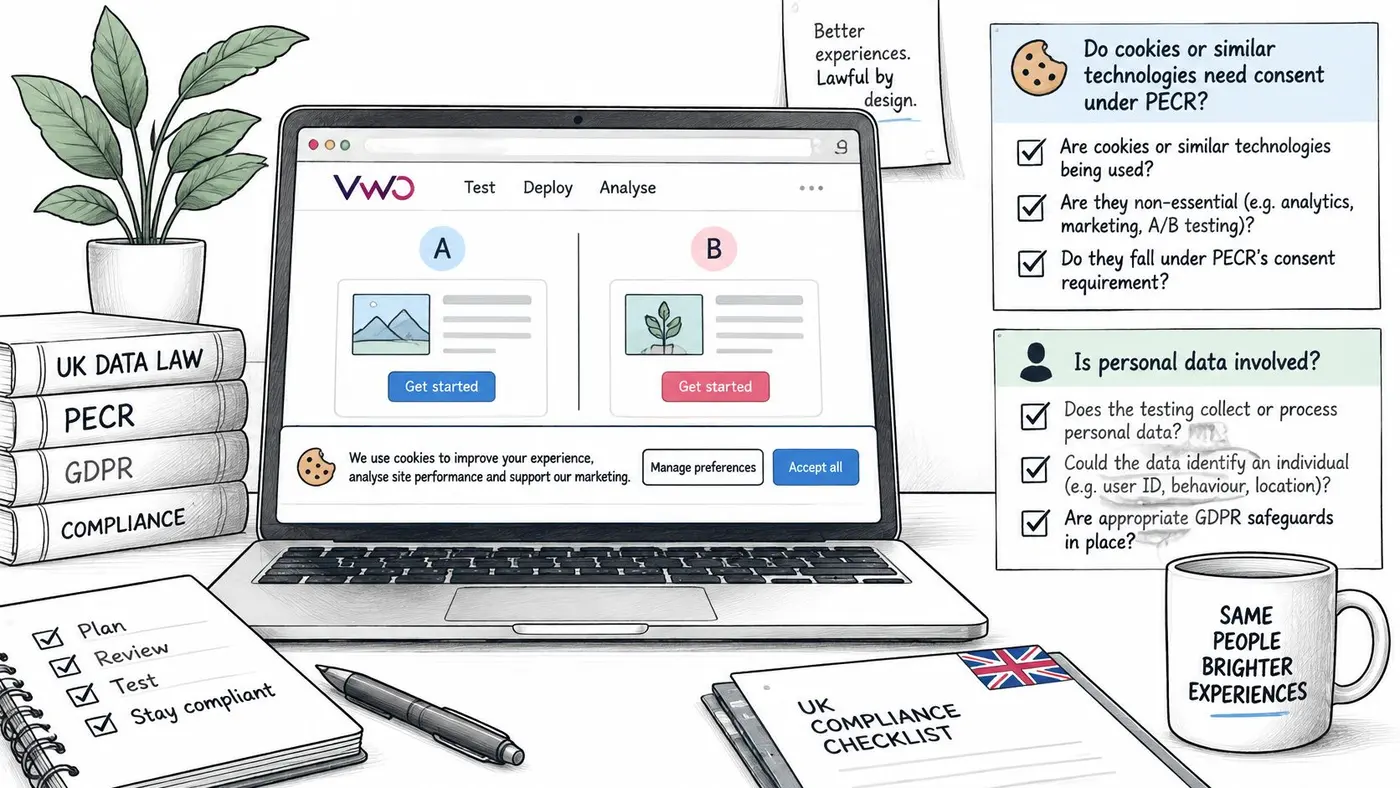
An experiment isn't automatically exempt from consent requirements because its purpose is optimisation. Think of privacy as permission to enter a room, not a label you attach to the clipboard once you're inside.
There are separate questions: whether storage or access technologies require consent under PECR, and whether you're processing personal data under UK GDPR. Cookie Script's UK-focused guidance describes a potential statistical-purposes exception for some aggregate service-improvement tests, with clear information and a simple objection mechanism, but explains that this doesn't remove applicable UK GDPR duties.
The implementation checklist should sit beside your experiment settings, not in a document nobody opens.
Design the measurement boundary
The ICO's consent guidance requires consent to be specific, informed and supported by affirmative action and an audit trail, with withdrawal as easy as giving consent. Your experiment events need to respect the permissions that apply to their particular purposes.
- Document the purpose. Record what the test improves, which information it needs, retention rules and the parties handling it.
- Minimise identifiers. Prefer aggregate reporting where suitable, and don't attach customer details merely because an integration makes it easy.
- Check consent before transmission. Gate identifiable exposure and purchase events before they reach analytics destinations, not after collection.
- Support withdrawal and objection. Make both routes understandable and ensure the technical implementation responds to them.
- Measure rendering behaviour. Check assignment latency, first variant paint and layout shift across consent states and devices.
- Report the denominator. Show exposure and conversion counts alongside the population you could lawfully measure.
Keep privacy and validity connected
Excluding visitors who decline consent can change the population you analyse. Define whether your primary result represents consented traffic or another lawfully measurable population, and compare consent states only where the underlying measurement is permitted.
The ICO's privacy-by-design guidance supports building safeguards into the design and evaluating consent mechanisms through user testing. In practice, test the banner, assignment logic and rendering sequence together.
Use the privacy and consent implementation guide to structure the technical review. Privacy and page performance are experiment design constraints, not checks to postpone until launch day.
How to Set Up and Launch a VWO Test
Setting up a test is like writing a lab protocol: decide what counts as evidence before the results arrive. The editor is only part of that work.
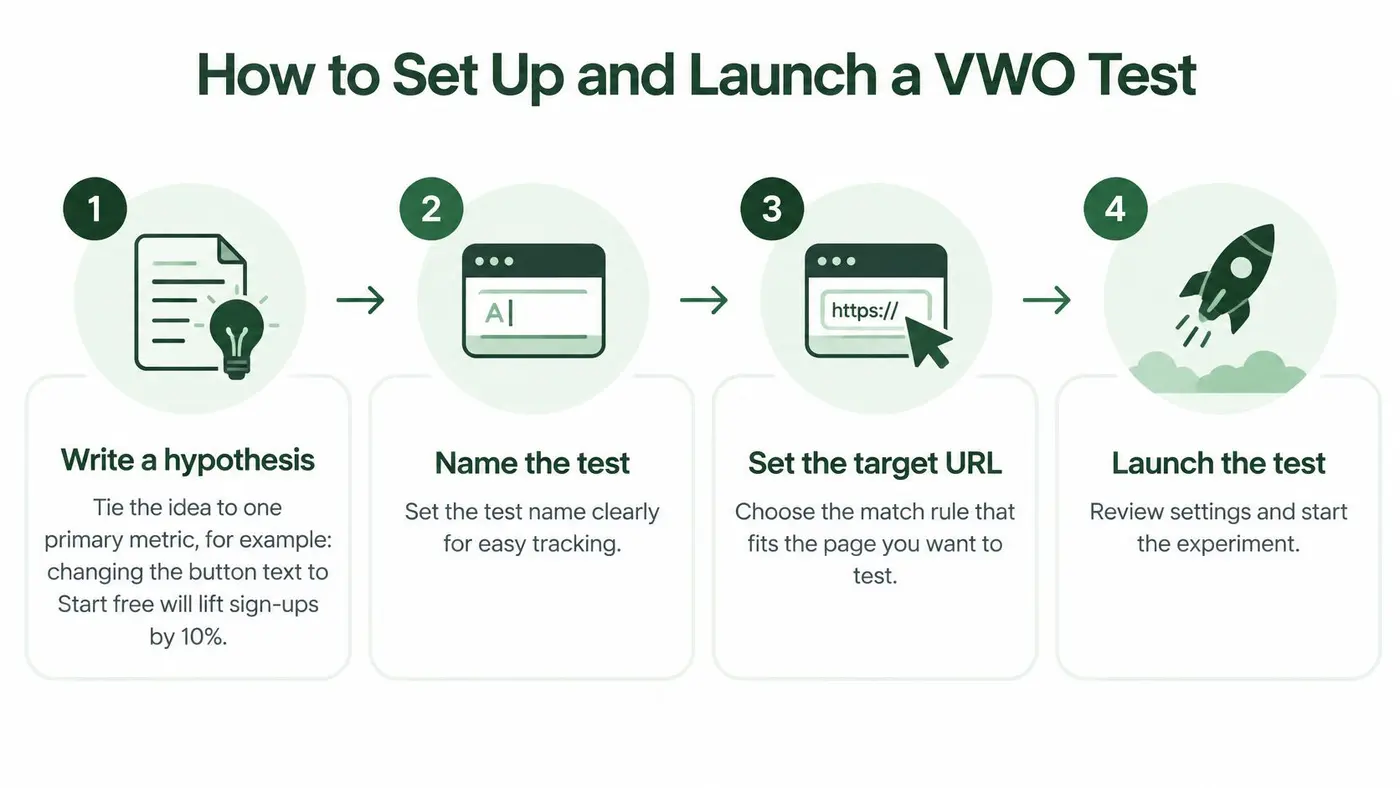
This process overview provides the starting sequence; the launch checklist adds the measurement and quality checks.
Build an experiment you can interpret
-
Write a hypothesis with a reason. For example: placing the delivery estimate beside the purchase button will increase completed purchases because shoppers won't need to search for it. Choose completed purchases as the primary metric, rather than treating every click as equally important.
-
Name the test and target the right pages. Use a descriptive name that identifies the page, proposed change and owner, then select the appropriate URL-matching rule. Check query strings and exclusions carefully, since an overly broad rule can enrol unrelated pages.
-
Build the variant and preserve the control. Use the visual editor for suitable text, HTML, attribute or styling changes, and involve a developer for complex components. Don't bundle unrelated alterations into the variant if you need to understand which idea caused the result.
-
Configure and verify conversion goals. Complete the journey yourself and confirm that the intended event fires once, with the correct value where relevant. A button click isn't a completed form, and a payment-page view isn't necessarily a successful purchase.
-
Set the traffic allocation. Start with an even allocation unless your risk assessment or experimental design gives you a reason to use different weights. Confirm whether the setting governs all site traffic or only visitors eligible for this experiment.
-
Preview the complete journey. Force each version through the platform's preview tools and check desktop, mobile, consent states and important browser journeys. Inspect keyboard navigation and error states too, since a visually correct button can still be unusable.
-
Calculate the sample and fix the stopping rule. Enter the baseline conversion rate, smallest worthwhile lift and chosen statistical settings into a sample-size calculator, then use eligible daily traffic to estimate feasibility. Record the required visitors per version and stopping conditions, using a method compatible with the reporting engine rather than stopping when the graph looks encouraging.
-
Launch and monitor implementation health. Check rendering, assignments, events and error reports promptly after release. If a material variant change is necessary, stop and restart or create a clearly separated experiment rather than pooling different experiences.
Keep the decision record
A finished setup includes a dated record containing the hypothesis, primary metric, guardrails, required sample, stopping rule and accountable owner. Save the targeting and tracking definitions too, so another teammate can interpret the result without reconstructing your intentions.
For a visual walkthrough alongside your own configuration, use this video.
Key VWO Features Beyond the Split Test
A scoreboard tells you who scored. Match footage helps you investigate how it happened. VWO's supporting tools serve a similar role, but behavioural observations suggest explanations rather than proving them.
Find friction before choosing a change
Heatmaps and click maps can highlight ignored controls or clicks on elements that aren't interactive. They don't directly measure where someone looks, so avoid presenting mouse movement as eye tracking.
Session recordings provide journey-level context. A visitor scrolling past a purchase button might indicate poor placement, but it could also mean they weren't ready to buy. Form analytics can help identify fields worth investigating, without establishing that every departure was caused by the field itself.
VWO supporting features at a glance
| Feature | What it shows | Typical use |
|---|---|---|
| Heatmaps and click maps | Patterns of clicking, scrolling or pointer activity | Layout and button-placement investigation |
| Session recordings | Reconstructed visitor interactions | Investigating behaviour behind an outcome |
| Form analytics | Field-level interaction and abandonment patterns | Sign-up and checkout diagnosis |
| Targeting rules | Which URLs, devices, locations or audiences qualify | Restricting an experiment to mobile visitors |
| Custom CSS and JavaScript | Programmatic changes beyond simple visual edits | Dynamic components and edge-case fixes |
| Revenue and custom goals | Purchase value and business-specific outcomes | Checkout value and revenue analysis |
| Personalisation and feature flags | Audience experiences and controlled feature availability | Tailored journeys and staged releases |
Connect observations to business outcomes
Targeting should reflect the problem you're investigating. If recordings suggest a mobile navigation issue, enrolling desktop visitors can dilute the question rather than make the test more informative.
Custom code needs equally precise scope. Separate variant-specific changes from code intended for every participant, and verify what executes in the control. Otherwise, a shared script can accidentally alter the baseline.
Revenue goals help connect behaviour to commercial value. In DHL's 2025 UK shopper findings, 80% of British shoppers said they would abandon a purchase if their preferred delivery option wasn't available.
That finding supports investigating delivery choices and messaging, not promising a conversion uplift from moving a badge. If the preferred service doesn't exist, persuasive copy can't provide it.
Diagnostic caution: Use behavioural tools to develop hypotheses. Use a controlled experiment to evaluate the proposed solution.
Feature availability follows the plan and modules your team purchases. Confirm the current package before building a workflow around recordings, form analytics or feature management.
Reading Results Without Fooling Yourself
Calling a winner when a variant first moves ahead is like a referee ending a match after the opening goal. You've observed a lead, not necessarily a dependable outcome.
A useful dashboard must support a decision you defined before launch. Look beyond the colour of the winner label and inspect the evidence behind it.
Pre-ship result checks
| Check | What to look for | Red flag |
|---|---|---|
| Sample size | Required sample reached under the planned analysis | Stopping at the first favourable peak |
| Full business cycle | Weekdays, weekends and relevant purchase delays represented | A short window dominated by a particular trading pattern |
| Probability to beat control | Predeclared decision threshold met under the selected statistical method | Treating probability and significance as interchangeable |
| Guardrail metrics | Order value, returns and page performance within agreed limits | Conversion rises while revenue per visitor falls |
| Sample ratio | Observed allocation consistent with configured weights | An unexplained allocation imbalance |
| Segment consistency | Device and acquisition results support the interpretation | An apparent win concentrated in promotional traffic |
| Novelty effect | Benefit persists beyond the initial exposure period | Early attention disappears with continued use |
Read the statistical label correctly
Bayesian probability and frequentist significance answer different questions. A probability that a variant beats control isn't the same as a p-value, and neither tells you whether the gain pays for implementation.
Use the guide to calculating a significant difference to clarify the comparison before interpreting a result. Don't assume a fixed-horizon analysis permits unrestricted repeated stopping checks.
Commercial context matters too. ONS retail sales figures for December 2025 show that online sales accounted for 28.3% of total retail sales in Great Britain. That establishes the channel's importance, not a conversion benchmark or proof that a December result will generalise to quieter trading periods.
Investigate the easy-to-miss failures
A sample ratio mismatch means the observed allocation is inconsistent with the intended split beyond expected random fluctuation. Investigate eligibility rules, missing events and rendering failures before trusting the outcome.
For practical planning prompts, Stimulead's guidance can help you set guardrails for split testing. Define the tolerable harm before seeing the result.
Ship when the evidence and safeguards pass. Continue when evidence is insufficient, and stop or investigate when the variant breaches a safety condition.
VWO Strengths, Limits and Lightweight Alternatives
Choosing a platform is like choosing between a fitted workshop and a portable toolkit. The workshop earns its cost when your team uses the equipment; unused capability still takes time to learn and maintain.
VWO's breadth suits an established optimisation programme. Research tools, experimentation and personalisation can support a connected workflow, provided your purchased modules cover the work you intend to do.
Its visual editor suits marketer-led presentation changes. It doesn't eliminate engineering work on dynamic applications, complex checkout flows or sensitive business logic.
Compare the operating model
VWO and a lightweight tester compared
| Criteria | VWO | Otter A/B |
|---|---|---|
| Scope | Experimentation with research, personalisation and feature-management options | Focused website A/B testing and goal tracking |
| Setup effort | Suite configuration and a broader learning curve | Snippet-based installation and focused test setup |
| Best-fit team | Dedicated CRO programme with specialist involvement | Small to mid-sized teams testing headlines, CTAs and layouts |
| Script weight and flicker | Measure on your pages and review rendering configuration | Measure on your pages before deciding |
| Plan transparency | Check current module and traffic allowances | Every plan includes every test type, goal type, integration and analytics feature |
| Consent handling | Configure against your consent and measurement design | Configure against your consent and measurement design |
Reporting and governance matter when several people own the outcome. Larger teams should evaluate permissions, approval processes and access to experiment records in the package they're considering, rather than assuming every capability comes with every plan.
The learning curve matters when your testing needs are narrow. A team maintaining a single acquisition page may gain little from configuring a broad suite before it has a dependable experimentation routine.
Evaluate costs beyond the subscription
Check current commercial terms against the traffic you expect to enrol and the modules you need. Budget developer review, QA and analysis time alongside the subscription.
Client-side changes can introduce flicker or layout instability when rendering happens late. Anti-flicker measures also need scrutiny because hiding content while scripts load creates its own user-experience trade-off.
Test the testing tool on your own pages. A vendor's general performance claim can't replace measurements from your templates, scripts and devices.
Use a conversion rate optimisation tools comparison to build a shortlist, then run a representative implementation check. Choose the platform your team can operate reliably, not the one with the longest feature list.
Decide Whether VWO Fits Your First Test
The right platform is the one that matches the work you're ready to do. Buying more capability won't compensate for unclear goals, unreliable tracking or insufficient traffic.
Choose VWO if you need a broad experimentation and research environment, have developer and CRO capacity, and can support the coordination that comes with a larger programme.
Choose a lightweight tool if your immediate work is testing key pages and your team needs a focused workflow rather than a wider suite.
Start with the decision you need to make, then choose the software that helps you make it reliably.
Choose neither for now if eligible traffic can't support a useful experiment or your conversion tracking is unreliable. Fix measurement and obvious usability problems first; concentrate future testing on a high-traffic page rather than dividing a small audience across many experiments.
Today, write a hypothesis tied to a primary metric. Calculate the sample requirement from your baseline and smallest worthwhile improvement, assign an owner, and record the stopping conditions before anything goes live.
Otter A/B offers focused website experiments with a visual editor, configurable traffic allocation and purchase and revenue tracking. Visit Otter A/B to use our free planning calculators without an account, or try running a real experiment and inviting teammates during the card-free trial.
Stop guessing
Ready to start testing?
Set up your first A/B test in under five minutes. No credit card required.
- 14-day free trial
- No credit card required
- Cancel anytime