Website AB Testing: A Step-by-Step Guide
Learn how to plan, run and analyse website AB testing, from sample sizes and traffic splits to flicker fixes, revenue goals and when to ship a winner.
Conversion rates fell by 6.1% in Contentsquare's 2025 benchmark, while brands that encouraged deeper exploration and longer sessions achieved a 5.4% increase in conversions, according to Hookflash's account of the findings. That's a useful challenge to the assumption that every shorter journey is a better journey. Removing steps only helps if shoppers can still find what they need and complete their purchase.
Website A/B testing compares an existing experience with a variation by randomly assigning visitors and measuring a defined outcome. The useful question isn't which design gets more clicks. It's which change creates more commercial value without making the store slower, harder to use or inaccessible to shoppers who could previously buy.
Check Your Traffic Before You Test
A store converting at 3% needs more traffic than many teams expect to detect a modest improvement: the Adobe ecommerce conversion optimisation guide provides planning context spanning approximately 1.7% to 3.4% for UK ecommerce and an estimate of about 52,000 users per variant to detect a 10% relative lift, from 3% to 3.3%. That improvement is commercially useful, but the absolute gap is small.
External benchmarks aren't targets. Your product category, acquisition mix and definition of conversion determine whether the comparison is useful at all. Start with your own eligible visitors, not a headline industry average.
Translate the lift into a traffic requirement
Visitors needed per variant at 95% confidence and 80% power
| Baseline conversion | Relative lift to detect | Target rate | Visitors per variant (approx.) |
|---|---|---|---|
| 3% | 10% | 3.3% | About 52,000 |
| 3% | 20% | 3.6% | About 13,000 |
| 3% | 5% | 3.15% | About 208,000 |
| 1.9% | 10% | 2.09% | About 83,000 |
The first row uses the cited planning estimate. The remaining rows are illustrative estimates scaled from it, using the inverse-square relationship between detectable lift and sample size, with a baseline-rate adjustment for the final row. Treat the stated confidence and power as planning settings for a two-sided test, not confirmation that every calculator will reproduce these rounded figures.
Use the sample size calculator for the actual launch decision. Otter recommends checking sample size before launching any test to establish whether there's enough traffic.
Say a product page receives 1,500 eligible visitors daily in a hypothetical test with an equal split. Each arm receives 750 daily visitors, so collecting the first row's sample would take approximately 70 days. That's a calculation for this scenario, not a recommended universal duration.
Check whether the timetable is realistic
- Establish a stable baseline. Pull a representative historical window using users or sessions, never a mixture.
- Check the calendar. Leave room for complete trading cycles, campaign changes and delayed purchases.
- Choose a feasible experiment. If collection would take too long, move to a higher-traffic journey or test a more substantial hypothesis.
Practical rule: Don't lower the evidence requirement just because the page doesn't receive enough traffic.
A larger change can be easier to detect, but it also carries more implementation risk. Choose it because customer evidence supports it, not merely because the sample-size calculation looks better.
How to Set Up a Website A/B Test Step by Step
The Government Digital Service experimentation methodology separates research, hypothesis formation, design, build, quality assurance, execution and analysis, and supports running across at least two complete business cycles. Keep those dependencies intact. Building the variant before defining success invites a convenient interpretation later.
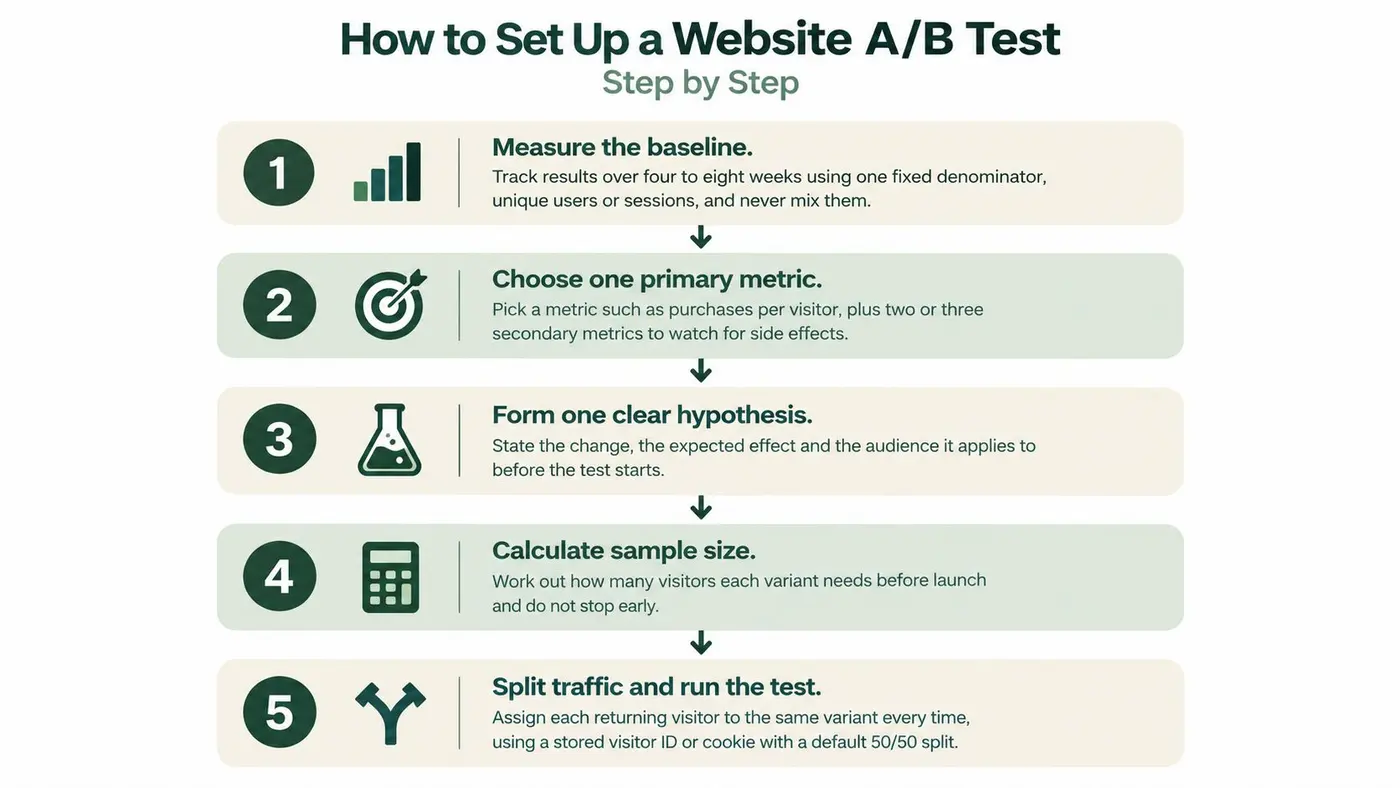
The process overview gives the main checkpoints.
Define the decision before building the page
-
Measure the baseline. Select a representative historical period and calculate conversions using a fixed denominator. Keep the eligibility rules consistent with the proposed experiment, otherwise you'll size the test for an audience you won't actually measure.
-
Choose the primary metric and guardrails. Purchases per eligible visitor is a sensible starting point for a shop test, with checkout completion, order value and mobile performance protecting against unwanted side effects. Write down the acceptable deterioration for each guardrail before anyone sees results.
-
Write a falsifiable hypothesis. For example: moving delivery information above the add-to-basket button will increase purchases per visitor because shoppers need delivery certainty before committing. Specify the audience, expected direction and minimum commercially worthwhile effect, rather than saying the new layout should perform better.
-
Calculate sample size and duration. Use the measured baseline, detectable effect, allocation and chosen statistical settings. Estimate duration from eligible traffic reaching the tested experience, not total site traffic, and record what happens if the planned end arrives without enough observations.
Build and validate the experience
-
Make one material change. Keep unrelated elements stable so the result answers the hypothesis. A coordinated delivery-information module can be a single treatment, but changing the headline, discount, imagery and checkout together won't tell you which intervention mattered.
-
QA before exposing shoppers. Validate allocation, analytics events, consent handling, mobile rendering and purchase attribution. Test success and failure paths, including a rejected payment, a validation error and navigation back to the product page, so tracking reflects actual behaviour rather than the easiest demonstration.
-
Pre-register the stopping and analysis rules. Record the required sample, minimum duration, exclusions, primary metric and intended segments. Launch only when the team agrees what will count as a win, a loss or an inconclusive result.
For ecommerce-specific hypothesis ideas, Grumspot's ecommerce testing playbook is a useful companion. Use examples to sharpen your own customer question, not to assume that another website's winning treatment will transfer to yours.
The order matters because each decision constrains the next. A polished variant can't repair an experiment with the wrong denominator.
In Otter A/B, the setup sequence is to name the test, set the target URL, define the variants, add DOM changes and set conversion goals. Enter those settings from the agreed experiment plan rather than inventing the plan while configuring the test.
Save the hypothesis, screenshots and implementation notes together. If someone else takes over the analysis, they should be able to understand exactly what visitors experienced and which decision the experiment was intended to support.
Splitting Traffic and Stopping Page Flicker
Sticky assignment is essential. A returning visitor should keep seeing the assigned variant, or their eventual purchase may follow exposure to competing experiences. Use a persistent visitor identifier or cookie, subject to the site's consent requirements.
The assignment model is easier to understand when you separate recognising a visitor from choosing their experience.

Fixed allocation or adaptive allocation
Start with equal allocation unless there's a reason to weight exposure. In our manual split tests, the configured traffic weights determine each new visitor assignment. A cautious rollout can favour control, but that slows learning about the less-exposed variant.
Don't confuse changing the allocation with moving existing visitors between experiences. Preserve returning visitors' assignments and document any allocation changes so the analyst can interpret the exposure history.
Our multi-armed bandit tests start with an even traffic split and refresh the new-visitor split about every five minutes, based on primary-goal results. That suits situations where directing more traffic towards the apparent leader matters more than maintaining a fixed comparison.
Adaptive allocation needs analysis suited to that design. I'd reserve it for lower-stakes changes rather than using it as the default for a consequential pricing or checkout decision.
Prevent the original page appearing first
Most Otter tests on Shopify change the page in place with JavaScript. The browser can therefore display the original content before the variant applies, producing page flicker and potentially exposing the visitor to both messages.
For a visual walkthrough alongside these implementation checks, use the video below.
Place the experiment script early in the document head and keep variant changes small. If you hide content until assignment and rendering finish, include a timeout fallback that restores the page when the script fails.
- Test a cold load. Clear the cache and throttle the mobile connection in browser developer tools.
- Watch the whole transition. Look for displaced buttons, briefly visible prices and blank content.
- Check failure behaviour. Block the experiment script and confirm shoppers can still browse and purchase.
Hiding the entire page indefinitely is worse than a visible transition. Prefer the narrowest intervention that prevents misleading exposure without obstructing the journey.
Choosing Goals and Revenue Guardrails
Clicks are a signal, not a commercial result. Match each metric to its role before deciding what the dashboard should prioritise.
Metrics by role in a website A/B test
| Metric | Role in the test | Trap to check |
|---|---|---|
| Click-through rate | Early signal for headline and CTA tests | Can rise while purchases fall |
| Add-to-basket rate | Intermediate step for product page changes | Doesn't establish whether the order completes |
| Checkout completion | Guardrail for cart and checkout changes | Small samples; check per device |
| Purchase conversion rate | Primary goal for most shop tests | Needs volume; can take time to resolve |
| Revenue per visitor | Primary goal when order value may change | Large orders can skew it; inspect outliers |
| Average order value | Explains why revenue moved | Can fall as conversion rises; never read it alone |
| Refund or cancellation rate | Guardrail for pricing, offers and claims | Delayed outcomes need an extended observation window |
| Page load time on mobile and Core Web Vitals | Guardrail for heavier scripts | Measure the tested page, not just the site average |
For a visual-editor or split URL test, our setup process sets revenue or purchases as the primary goal and previews each variant on the store before launch. Pick the outcome that matches the hypothesis: purchase rate for purchase completion, revenue per visitor when the treatment may change basket value.
Use the revenue impact calculator to translate a plausible improvement into commercial terms. Keep projections separate from observed experiment revenue.
Treat speed as part of the treatment
Oxford Web Services' UK performance discussion reports that 29% of UK sites fail Core Web Vitals. A site-wide benchmark doesn't establish whether your variant preserves performance on the devices and networks shoppers use.
A heavier variant may increase clicks among visitors who stay while driving slower mobile users away. A simpler variant could attract fewer exploratory clicks yet produce more completed orders per eligible visitor.
Measure the experience from assignment onwards, not only after the variant finishes loading. Otherwise, visitors lost during rendering can disappear from the analysis that supposedly proves the variant works.
- Pre-register performance limits. Define acceptable changes in loading, responsiveness and visual stability.
- Report relevant segments. Inspect device and connection quality where measurement supports it.
- Document measurement coverage. State which consented traffic enters the analysis and whether coverage differs between arms.
Formbricks' guidance on how to optimize the customer journey offers useful context for connecting individual interactions to the complete purchase path. That broader view prevents a local improvement from being mistaken for an overall gain.
If a guardrail breaches the agreed margin, the variant doesn't ship just because the primary metric looks persuasive.
Testing Accessibility as an Experiment Variable
A new CTA colour, modal or form layout is an accessibility treatment, whether the team labels it that way or not. It changes how shoppers perceive information, move through controls and recover from mistakes.
Don't ask only whether the average visitor converts more often. Ask whether shoppers can still complete the same task using a keyboard, screen reader, magnification or alternative input method.
Make task completion the guardrail
For each variant, run a keyboard-only purchase journey and a screen-reader journey alongside WCAG checks. Automated checks are useful for detectable markup problems, but they won't establish whether a delivery selector makes sense or whether a payment error is understandable.
- Successful form completion. Confirm labels, instructions and required fields remain usable.
- Error recovery. Trigger invalid entries and check that errors are announced and linked to the relevant field.
- Focus order. Open and close overlays, then verify focus returns to a sensible control.
- Task completion. Check that shoppers can select options, review totals and submit the order without a pointer.
A conversion gain doesn't justify introducing a barrier that prevents another shopper from buying.
Combine those checks with qualitative feedback from people using the relevant access methods. Where consent, instrumentation and sample size permit, inspect task outcomes for accessibility-relevant groups, but don't assume that you can reliably identify screen-reader users from ordinary analytics.
Don't remove excluded shoppers from the result
Keep visitors who encountered a broken journey in the assigned population. Removing them can manufacture a stronger conversion rate by deleting the people the variant failed.
You can inspect a diagnostic subset to understand the mechanism, but the rollout decision must include the consequences for everyone exposed. If quantitative segment evidence is sparse, describe that uncertainty and use direct usability testing rather than declaring that no measured difference proves equal access.
Known accessibility failures should be fixed, not maintained as an experimental control while the team waits for a revenue verdict.
Reading Results Without Fooling Yourself
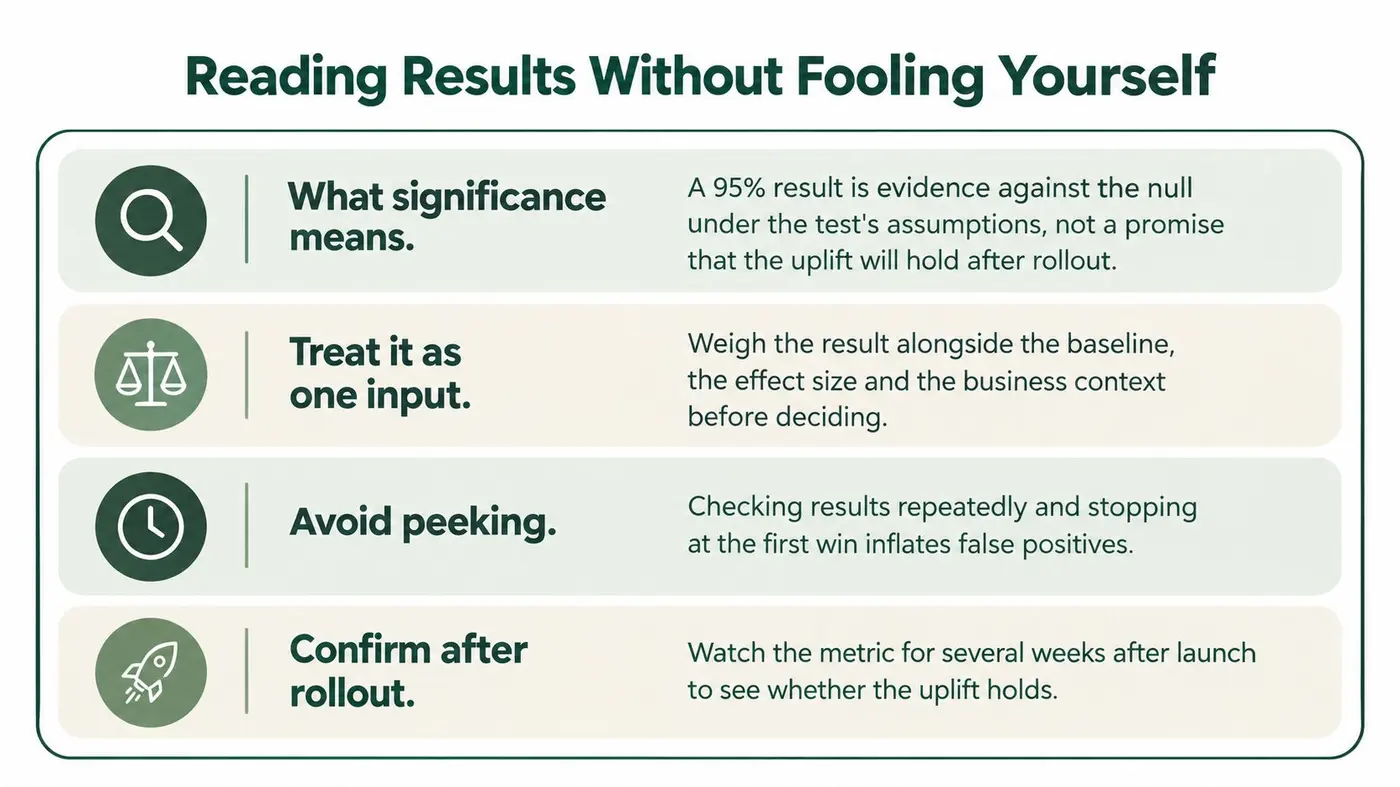
A 95% significance result is evidence against the null hypothesis under the test's assumptions, not a promise that the observed uplift will persist. It also doesn't establish that the effect is commercially worthwhile.
Check the effect estimate and uncertainty alongside the decision threshold. A result compatible with both a negligible improvement and a meaningful gain may not resolve the business question, even if a dashboard gives it a positive label.
The main interpretation checks belong together.
Separate monitoring from declaring a winner
For a fixed-horizon test, checking repeatedly and stopping at the first favourable spike inflates false-positive risk. Monitor for broken tracking and harmful experiences, but make the efficacy decision using the stopping rule chosen before launch.
The Michael Bell conversion optimisation checklist supports checking allocation, sufficient conversions, device and acquisition-source segments, and possible effects from promotions, seasonality and consent. Those are validity checks, not optional explanations to add after an inconvenient result.
Use the significance calculator to assess the comparison once its inputs and assumptions are sound. A calculator can't repair duplicated visitors, missing purchases or an experiment stopped opportunistically.
Apply a consistent decision rule
Turning a test result into a decision
| Outcome | Condition | Action |
|---|---|---|
| Significant winner | Planned sample reached, guardrails hold, device results consistent | Ship, then monitor through a complete post-launch observation window |
| Significant winner | Refunds, checkout or page speed worse than the agreed margin | Don't ship; redesign and retest |
| Significant but early | Stopped before the planned sample or required business cycles | Treat as unproven; run to the planned end |
| Not significant | Planned sample reached | Record no detectable effect; consider a bigger change |
| Winner on one device only | Desktop improves, mobile is flat or worse | Investigate before shipping; don't average the segments away |
| Too few conversions | Below the agreed minimum per arm | Record as inconclusive; extend collection or raise eligible traffic |
Set the conversion floor through the power calculation rather than choosing an arbitrary universal count. Revenue outcomes also need attention to their distribution, since unusually large orders can dominate a small sample.
Predefine device and major acquisition-source analyses. If you discover an interesting region or audience after examining results, treat it as a new hypothesis, not a confirmed exception.
Finally, wait for relevant delayed outcomes before closing the verdict. Archive the treatment, sample, exclusions, effect estimate, guardrail outcomes and decision so another colleague can audit the reasoning without reconstructing the dashboard.
Common Problems and How to Fix Them
An accessibility regression is a failed experiment, not a separate compliance ticket. The QualiBooth 2025 ecommerce accessibility report gave UK ecommerce an average accessibility score of 75/100, despite placing it among Europe's stronger markets. Check the actual purchase journey before accepting an aggregate conversion gain.
Repair the cause before rerunning
- Uneven allocation. Redirects, automated traffic or a broken assignment cookie can distort exposure. Compare eligible assignment counts with the configured weights before interpreting purchases.
- Variant-only conversion drop. The goal may be missing, duplicated or attached to an element the treatment replaced. Validate real clicks and a test purchase in preview, including the recorded variant.
- Duplicated or internal traffic. Team testing and repeated event delivery can inflate counts. Exclude identified internal traffic and deduplicate using the correct visitor and transaction identifiers.
- Consent gaps. Assignment, rendering and analytics may start under different consent conditions. Document the included population and verify identical handling across variants.
- Novelty and promotions. Returning shoppers may react to change itself, while an offer changes purchase motivation. Annotate affected periods and use a predefined sensitivity analysis rather than deleting inconvenient days.
- Wrong denominator. A user-based baseline can't be compared directly with session-based results. Recompute the baseline and test outcome consistently.
Debugging priority: Establish that both arms were delivered and measured correctly before explaining why shoppers preferred either one.
After a material implementation repair, start a clean experiment rather than merging broken and corrected observations. Preserve the original decision rules where the hypothesis is unchanged; if the repair changes the treatment or audience, recalculate the plan and document a new version.
Confirm the Order Before You Launch Your First Test
Choose a high-traffic page, a primary goal and a material change. Keep the launch checklist short enough that the person releasing the experiment can verify every item.
- Planning agreed. Baseline, sample requirement, expected duration and hypothesis are recorded.
- Experience checked. Allocation, returning-visitor behaviour, mobile rendering and failure fallbacks work.
- Measurement validated. Real clicks and a test purchase attribute to the correct variant, with revenue recorded correctly.
- Decision fixed. Guardrail margins, observation windows and stopping conditions have named owners.
Run the experiment in Otter A/B using the platform-specific setup guidance for your store. Our testing pages cover Shopify, WordPress, Webflow, Next.js, Framer and HubSpot.
Write the release decision before launching: ship if purchases per visitor improve, checkout completion holds, accessibility checks pass and mobile performance stays within the agreed margin; otherwise, don't ship.
Otter A/B offers unlimited tests, unlimited visitors, revenue tracking and the full feature set on every plan. Visit Otter A/B to configure your first experiment, validate its purchase goals and compare variants on commercial outcomes rather than clicks alone.
Stop guessing
Ready to start testing?
Set up your first A/B test in under five minutes. No credit card required.
- 14-day free trial
- No credit card required
- Cancel anytime