Core Web Vitals Optimization: A Practical 2026 Guide
Core Web Vitals optimization explained for 2026. Improve LCP, INP and CLS with field-data audits, prioritised fixes and lightweight experimentation.

Only 43.4% of UK mobile sites pass all three Core Web Vitals thresholds, and Google judges a page “good” only when at least 75% of real-user visits meet LCP ≤ 2.5 seconds, INP ≤ 200 milliseconds and CLS ≤ 0.1. Core Web Vitals optimisation therefore means improving the experience of the slower, less powerful and less predictable users, not merely raising a Lighthouse score.
A page can look fast on a developer's laptop and still feel frustrating on a mid-range phone using a constrained connection. A shopper may see the product image quickly but wait for a filter to respond, or reach for a checkout button that shifts when a banner arrives. Those moments sit at the intersection of performance, conversion and experimentation.
Why Core Web Vitals Matter in 2026
Only 43.4% of UK mobile sites pass all three Core Web Vitals, while desktop performance reaches 53% (Edmonds Commerce's UK performance analysis). That gap is roughly ten points before a team considers retail templates with large hero imagery, third-party scripts or busy checkout interfaces. A desktop lab run can therefore conceal the conditions faced by visitors on smaller screens, slower processors or less reliable networks.
Core Web Vitals are judged at the 75th percentile of real-user visits, not by a convenient average. At least three quarters of measured visits must meet each threshold separately: LCP at or below 2.5 seconds, INP at or below 200 milliseconds, and CLS at or below 0.1 (Chrome User Experience Report documentation). A good average cannot offset a slow mobile tail. If enough visitors wait for the main content, an interaction or the layout to settle, the page can still fail.

The three signals behind the assessment
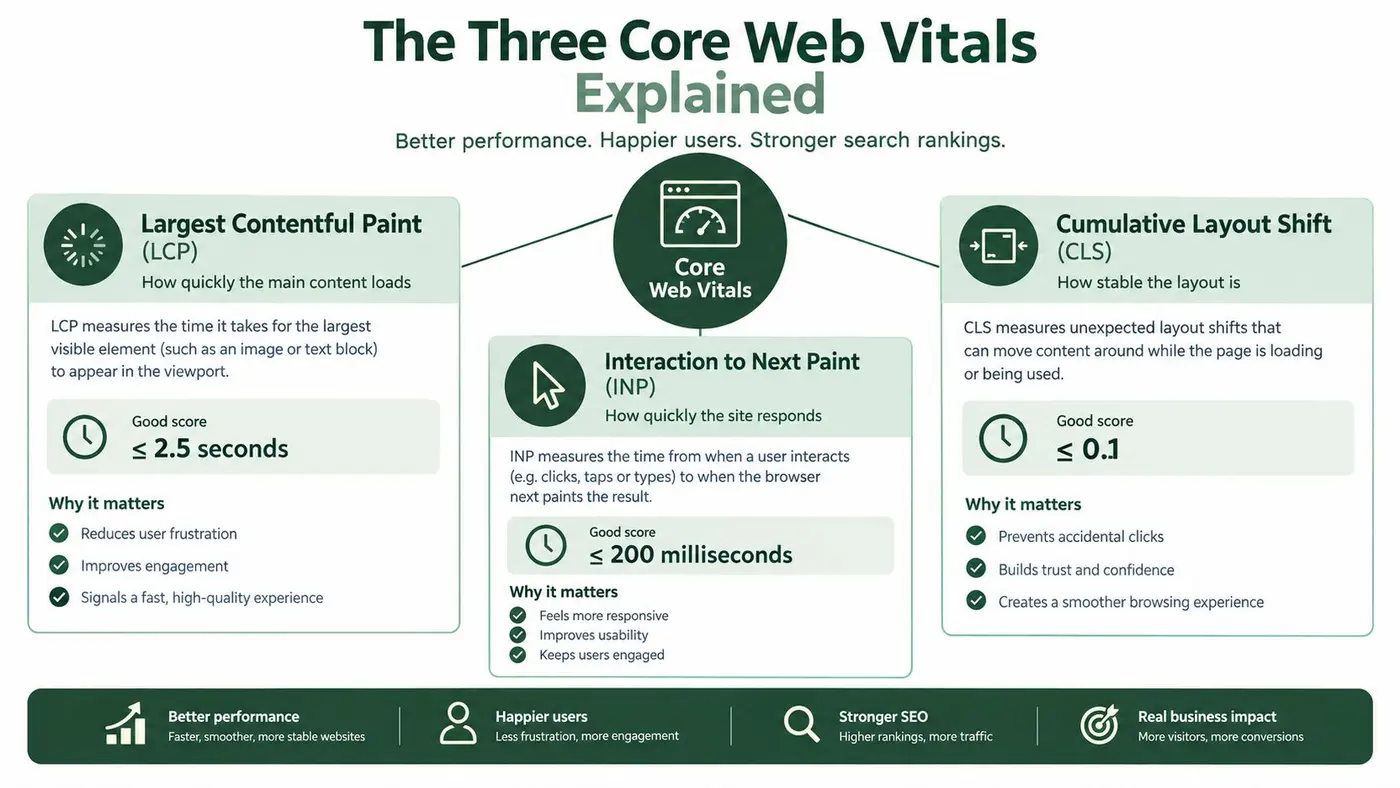
Largest Contentful Paint, or LCP, measures loading performance. It marks when the largest meaningful element in the initial viewport becomes visible, often a hero image, product image or substantial heading.
Interaction to Next Paint, or INP, measures responsiveness across the visit. It captures the delay before the browser provides visual feedback after actions such as tapping a filter, opening a menu or adding an item to a basket.
Cumulative Layout Shift, or CLS, measures visual stability. It records unexpected movement, such as a product card shifting because an image lacks reserved space or a promotional bar appearing above a button.
These metrics give growth and engineering teams a shared experiment guardrail. A conversion test may increase clicks while delaying a checkout interaction. A headline replacement may change block height and move nearby controls. Personalisation code may compete with the resources needed to render the page or process a tap. Track the primary conversion result alongside LCP, INP and CLS, segmented by device and real-user conditions.
Performance belongs beside mobile conversion work rather than in a separate engineering queue. Teams examining checkout friction can use guidance on cutting mobile checkout abandonment, because responsiveness and purchase completion belong to the same journey.
Practical rule: Treat the 75th percentile as a release target, not a reporting detail.
The Three Core Web Vitals Explained
Think of a page as a shop opening for a customer. LCP is the moment the front display is ready. INP is how quickly staff respond when the customer asks for help. CLS is whether the floor plan stays still while the customer walks towards the till.
LCP measures the first useful impression
LCP starts with navigation and ends when the largest qualifying element in the visible area renders. The good threshold is 2.5 seconds or less. A page can finish loading many secondary assets later and still give a good first impression if its primary content appears promptly.
The common causes of weak LCP are straightforward but often distributed across different teams. The server may respond slowly, the browser may discover the hero image late, critical CSS may be delayed, or JavaScript may block rendering. Experiment code can add another dependency if it waits to identify a variant before showing the main content.
If your LCP element is a hero image, inspect its discovery path before compressing it without first checking how the browser finds the resource. The browser needs to find the resource early, receive an appropriately sized version and paint it without unnecessary competition from non-critical assets. For a focused explanation of this metric, see Largest Contentful Paint guidance.
INP measures the whole conversation
INP has a different shape from LCP. It isn't about the first visible moment. It asks whether the page remains responsive when the visitor starts interacting, including taps, clicks and keyboard input.
The good threshold is 200 milliseconds or less. A page may look ready while the main thread is occupied by long JavaScript tasks from analytics, consent tools, chat, filters, cart logic or experimentation callbacks. In that situation, the user sees a button but the browser can't process the action promptly.
A 2025 analysis of more than 208,000 websites found that roughly 30% of mobile sites had poor INP, while only about 40% of mobile origins met all three good thresholds (Google's Search Console guidance). The lesson is practical: test the interactions that matter to the business, not just the initial page load.
CLS measures whether the interface keeps its promises
CLS captures unexpected layout movement. A product image without dimensions, an advert that expands late, a web font swap or an injected experiment block can move content after the visitor has started reading or tapping.
The good threshold is 0.1 or less. Reserve space before content arrives, define dimensions for media and embeds, and avoid inserting new material above existing content unless the visitor requested it. A variant that changes a CTA label can affect its width and height, so visual stability must be checked for every tested layout.
For another plain-language perspective, Up North Media's performance guide provides useful context on how the three signals relate to user experience.
Auditing Core Web Vitals the Right Way
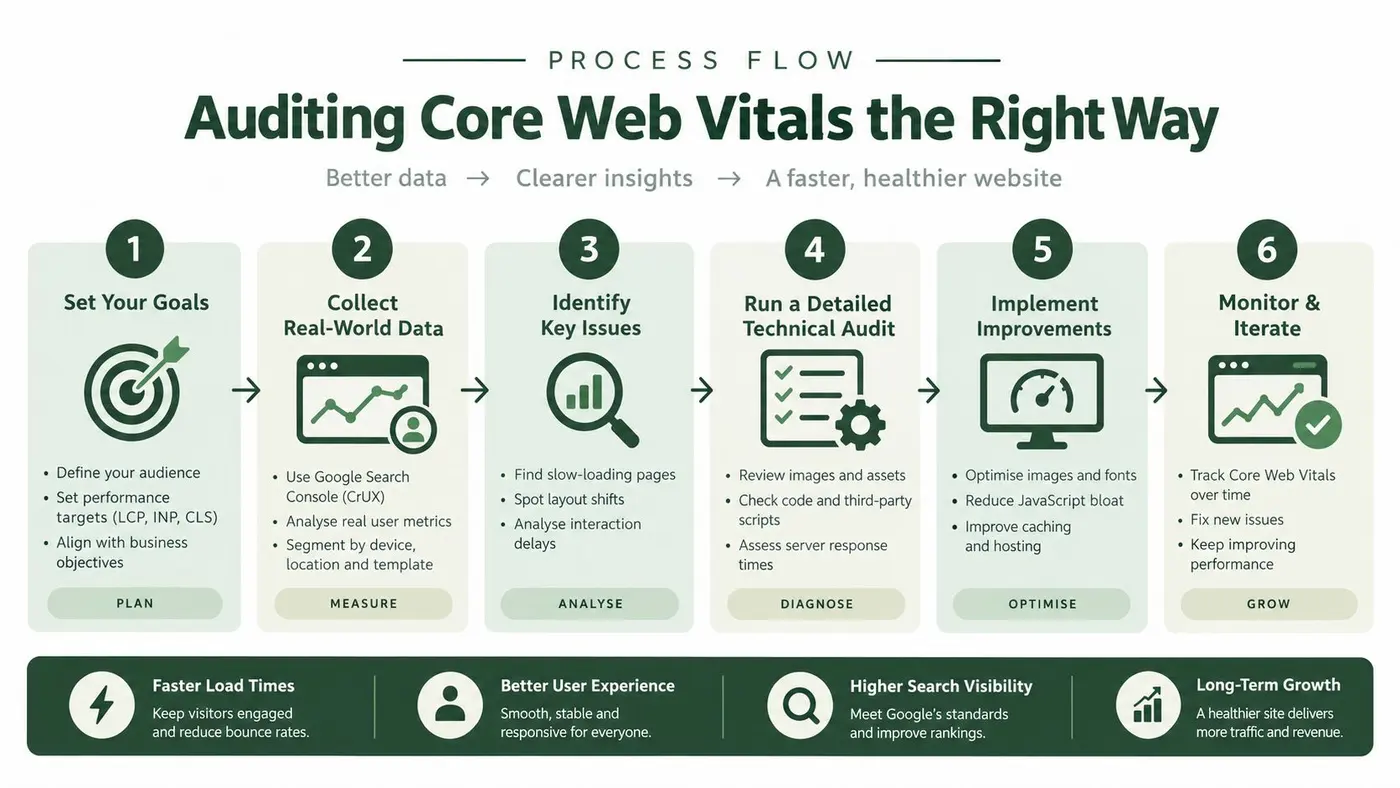
An audit must answer two questions: Are real visitors experiencing a failure? And which browser or application behaviour creates it? Field data establishes the first point. Lab tools help investigate the second. Treat the process like a medical checkup: real-user data shows the symptom across the population, while controlled tests help isolate the cause.
Start with field distributions
Use CrUX to examine experiences recorded from real Chrome users. Its API provides LCP, INP and CLS data at origin and URL level, allowing comparisons between the whole site, important templates and campaign landing pages. Review the distribution and 75th percentile, not a single average that can hide slow mobile visits.
Search Console adds grouping around related URLs. It can reveal whether several pages share a template defect or whether one unusually heavy landing page is the outlier. That distinction determines the scope of the fix.
The pass condition applies separately to every metric. Each metric must meet its threshold for at least 75% of real-user visits, as described in Google Search Central's page experience documentation. Passing LCP does not compensate for failing INP or CLS. A page needs acceptable results across all three signals.
Segment the people and pages behind the result
Your Real User Monitoring layer should separate:
- Device class: Compare UK mobile and desktop results instead of blending them into one site-wide figure.
- Template: Isolate home, category, product, search, basket and checkout pages.
- Interaction: Track filters, search, add-to-basket, menus and checkout controls for INP.
- Variant: Connect LCP, INP and CLS to the control or experiment variant.
- Connection and browser context: Find problems that disappear in a fast office environment.
This prevents a familiar error: improving the median while the 75th-percentile mobile tail remains slow or unstable. It also gives experiment owners a safer decision rule. If one category variant harms LCP, the team can pause that variant without redesigning every page.
Use lab tools to diagnose, not certify
Lighthouse, Chrome DevTools' Performance panel and WebPageTest become useful after field data identifies a problem. Lighthouse can expose render-blocking resources, oversized images and long tasks under controlled conditions. WebPageTest lets you inspect waterfalls and repeat tests across selected environments.
Lab scores cannot replace field measurement. A page may look strong in a controlled run while real visitors encounter a late hero image, delayed interaction or a layout shift that the test did not reproduce. Use the lab to form and test a technical hypothesis, then use RUM and CrUX to judge whether the release helped the audience that matters.
Prioritised Optimisation Techniques That Move the Numbers
Optimisation works best when the team fixes the bottleneck that controls the failing metric. A generic compression pass may reduce asset weight without improving the browser task, image discovery path or layout behaviour that determines the 75th percentile.
UK ecommerce testing illustrates the scale of the LCP problem. An assessment of 460 pages from approximately 150 large online retailers found that only 1–2% achieved a good LCP result, while the average page took 12–14 seconds to show its main content, roughly 4.8–5.6 times the 2.5-second target (Koozai's UK ecommerce speed assessment).
Fix LCP before polishing secondary assets
Start by identifying the LCP element on each important template. If it's a hero image, make it discoverable in the initial HTML, serve a correctly sized modern format and avoid lazy-loading it when it sits above the fold. If it's text, deliver the critical font and CSS path without allowing non-essential resources to block the first render.
A useful order of work is:
- Improve server response: Review caching, origin work and edge delivery so the browser receives the document promptly.
- Prioritise the main asset: Preload only the resource that genuinely controls LCP, rather than creating a crowded priority queue.
- Reduce render blockers: Defer non-critical JavaScript and styles, and keep critical CSS focused.
- Control image delivery: Use responsive sources, explicit dimensions and a suitable compression strategy.
- Remove avoidable competition: Audit tags, widgets and fonts that load before the primary content.
The first three actions often require coordination with platform or infrastructure owners, but they can affect many pages at once. For paid acquisition teams, The Advertising Suite's guidance on landing page speed offers useful context on why the arrival experience deserves attention beyond organic search.
Reduce long tasks for INP
Once the page is visible, turn to the main thread. Break large tasks into smaller units, yield between chunks of work and avoid rebuilding the entire interface after a small interaction. Debounce expensive search or filter handlers where appropriate, but don't use debouncing to hide a slow operation.
Audit tag managers, consent managers, chat tools and experiment callbacks. Remove listeners that don't serve the current page, delay non-critical telemetry and render only the interface needed for the current interaction. A compressed script can still produce poor INP if it executes too much work at the wrong moment.
Stabilise the layout for CLS
CLS fixes are usually concrete. Add width and height or an aspect ratio to images and video, reserve slots for adverts and embeds, and allocate space for banners before they appear. Keep injected content below existing content unless the user has asked for it.
Lazy loading needs the same judgement. Below-the-fold media can wait, but the browser should not be forced to discover the main visual late. The guide to lazy loading implementation is useful when deciding which assets should be deferred and which should remain part of the critical path.
Keeping A/B Testing and Experimentation Safe for CWV
A test can win on conversion and still damage the experience that produced the conversion. Variant assignment, DOM replacement, event listeners and telemetry all compete for browser time. If an SDK hides the original content and inserts a replacement late, it can affect both the visitor's perception and the measured CLS.
The risk is especially serious on mobile. UK small-business testing of 450 sites found that only 12 sites, around 2.7%, met both mobile LCP and CLS good thresholds, while the median mobile Lighthouse performance score was 45 (Vistoplex's UK small-business study). Teams shouldn't assume that an otherwise ordinary page has enough performance margin to absorb an uncontrolled experiment.
Build the experiment around the critical path
The safest design is to make assignment as early and as lightweight as the product architecture allows. Server-side or edge-side assignment can reduce client work. Where a client layer is necessary, load it asynchronously, avoid delaying discovery of the hero content and keep variant logic small.
Every tested component needs a stable geometry. A headline, CTA or promotional block should have a predictable container before the variant arrives. That prevents a late DOM swap from pushing the rest of the page down.
Telemetry should wait until it won't compete with the visitor's critical action. Batch non-essential events, avoid expensive synchronous callbacks and measure the performance impact of the control and each variant separately.
Use explicit guardrails
A conversion result isn't enough to declare a winner. Compare conversion and revenue outcomes with field LCP, INP and CLS, segmented by device class, template and variant. A variant that improves a button click but creates a long interaction task on lower-powered phones needs further investigation, not an automatic rollout.
| Criterion | What to check | CWV risk it removes |
|---|---|---|
| Assignment timing | Prefer server or edge assignment where practical | Late work that delays LCP |
| Client footprint | Load a small asynchronous layer | Render blocking and excess main-thread work |
| Component geometry | Define dimensions and stable placeholders | Layout shifts during variant insertion |
| DOM updates | Change only the tested component | Reflow and unnecessary rendering |
| Event handling | Keep listeners narrow and callbacks short | Delayed INP after clicks or taps |
| Telemetry | Batch non-critical measurement | Analytics work during interaction |
| Variant reporting | Segment field metrics by variant | Hidden regressions behind aggregate results |
A lightweight platform can still deserve scrutiny. Check when its code runs, whether it causes flicker, how it handles DOM changes and whether it exposes variant-level performance data. Otter A/B describes a 9 KB SDK designed to load in under 50 milliseconds, with experiment monitoring that associates Core Web Vitals with variants. Treat those product claims as implementation details to verify against your own pages and traffic, not as a substitute for field measurement. Teams planning that workflow can also review performance monitoring guidance.
Choosing the Right CWV and Experimentation Tool Stack
No single tool answers every performance question. A practical stack separates measurement, diagnosis and decision-making. Field tools tell you what visitors experience, lab tools help engineers reproduce causes, and experimentation tools connect product changes with business outcomes.
| Tool or category | Main coverage | Cost position | CWV risk or limitation |
|---|---|---|---|
| Lighthouse | Controlled page audits and diagnostics | Free | Lab conditions don't represent every real-user segment |
| Chrome DevTools Performance panel | Main-thread work, rendering and interaction traces | Free | Requires technical interpretation |
| WebPageTest | Waterfalls, repeatable loading diagnosis and environment comparison | Free access available | It remains synthetic evidence |
| Search Console | Google's grouped field view for eligible pages | Free | Less granular than application-level RUM |
| CrUX and CrUX API | Real Chrome-user distributions at origin and URL level | Free data access | Coverage depends on available Chrome-user data |
| Treo, SpeedCurve or Calibre | Ongoing RUM, dashboards and alerting | Paid | Requires configuration and a defined measurement model |
| Otter A/B | Variant assignment, experiment reporting and business outcomes | Product pricing varies | Validate variant-level LCP, INP and CLS in your traffic |
Start small. Search Console and CrUX can establish whether the problem is real, while Lighthouse and DevTools can help the engineering team isolate the cause. Add a paid RUM platform when you need continuous segmentation, release alerts or interaction-level detail that the free tools don't provide.
The experimentation layer should fit the same operating model. It must support controlled variants without hiding performance regressions behind aggregate conversion results. Ask vendors whether they can show the timing of assignment, identify layout changes and export or expose performance data by variant.
A credible stack doesn't aim to make every dashboard green. It gives marketers, product managers and engineers enough shared evidence to make a responsible trade-off when a change improves one outcome and harms another.
A Release-Time CWV Checklist for 2026
Performance work decays when it lives in a one-off project. New images, tags, campaign modules and experiments arrive through normal product delivery, so Core Web Vitals needs a release habit that catches regressions before they become the new baseline.
Before development
- Choose representative templates: Include the pages that receive important mobile visits, such as category, product, search, basket and checkout templates.
- Record field baselines: Save LCP, INP and CLS distributions by device class, template and, where relevant, connection context.
- Identify the critical element: Confirm which resource controls LCP and which interactions matter most for INP.
- Define the guardrail: Require each experiment to report conversion alongside variant-level performance.
During implementation
- Protect discovery: Don't delay the hero image or critical content while assigning a variant.
- Protect interaction: Keep event handlers short, split long tasks and defer non-essential analytics.
- Protect geometry: Reserve space for images, embeds, banners and tested components before injection.
- Test realistic paths: Run the product journey, not only the landing page. Include filters, add-to-basket and checkout actions where they apply.
- Compare control and variant: A control can regress too, but a variant-specific regression points directly to the experiment implementation.
Before and after release
Use Lighthouse or WebPageTest for a repeatable lab comparison on key templates. Then inspect RUM alerts and variant-level measurements, with the 75th percentile as the decision point rather than an attractive average.
Search Console and CrUX field views won't change at the same instant as a code deployment. Give field data enough time to represent the revised audience mix, while using RUM for earlier operational signals. If a release improves conversion but worsens mobile INP, pause the rollout and find the responsible task before celebrating the test.
A good release gate asks two questions: did the change achieve its product goal, and did real users remain able to use the page comfortably?
Putting It All Together and Frequently Asked Questions
A manageable rollout can follow three phases.
Days 1–30: Instrument CrUX, Search Console and RUM views. Identify the worst templates, confirm the LCP element and record the interactions that matter.
Days 31–60: Ship the highest-confidence fixes. Improve resource discovery, reduce main-thread work and reserve layout space. Attach lab checks and field alerts to the release process.
Days 61–90: Introduce or refine experiments with explicit CWV guardrails. Judge winners by conversion, revenue and real-user performance, not by conversion rate alone.
How quickly will improvements appear in field data?
Lab tools can show a technical change quickly. Field datasets represent user experience over a measurement window, so the result becomes trustworthy only as new visits accumulate. Use RUM for operational feedback and CrUX or Search Console for the broader field view.
Does a poor score automatically cause a ranking drop?
Core Web Vitals are part of Google's page experience signals, but ranking isn't determined by one metric in isolation. Treat the thresholds as a quality and risk control, while continuing to address relevance, content quality, accessibility and technical discoverability.
How should a single-page application handle INP?
Measure the interactions users perform after the initial route has loaded. Profile search, filtering, navigation, cart updates and form submission in DevTools, then reduce synchronous rendering and yield between expensive updates.
Can A/B tests run without harming CWV?
Yes, if assignment, DOM changes and telemetry are designed around the critical path. Reserve component space, minimise client work, avoid flicker and monitor each variant's LCP, INP and CLS in real traffic.
Otter A/B helps teams test headlines, CTAs and layouts while connecting experiment variants with conversion and performance monitoring. Visit Otter A/B to explore a lighter experimentation workflow and make CWV guardrails part of your next test.
Stop guessing
Ready to start testing?
Set up your first A/B test in under five minutes. No credit card required.
- 14-day free trial
- No credit card required
- Cancel anytime