How to Track Conversions with Confidence in 2026
Learn how to track conversions the right way in 2026 with practical steps for GA4, GTM, consent, and revenue attribution that marketers actually use.

On Monday morning, you open GA4, your shop dashboard, and your ads platform. All three show a different conversion number for the same weekend. One says sales were healthy, one says revenue dropped, and one claims a campaign drove conversions that your backend can't find. That's the moment teams realise they don't have a tracking setup. They have a collection of tags.
If you want to know how to track conversions with confidence in 2026, GA4 event setup is only part of the job. The quiet failures usually sit elsewhere: Consent Mode v2 signal wiring, the tracking gap between analytics and backend orders, and variant-level revenue attribution inside tests. Those are the things that decide whether your reports support decisions or mislead them.
UK teams have an unusually clear benchmark for this discipline. GOV.UK treats conversion measurement as part of service performance, not just marketing reporting. Its framework says transactional services should measure transaction volume, cost per transaction, and success or conversion rate, defined as the proportion of users who attempt a task and successfully complete it, and it lays out a repeatable process for measurement and iteration in the GOV.UK performance framework. That mindset is the right starting point for ecommerce, SaaS, lead gen, and experimentation work too.
Defining Your Conversion Taxonomy and KPIs
Three dashboards disagreeing is usually a taxonomy problem before it's a tooling problem. Teams often send one event called “conversion”, another called “purchase”, and a third called “generate_lead”, then wonder why reporting breaks when someone builds a Looker Studio chart or an A/B test goal.
Start with outcomes, not tags
Define conversions in layers:
- Primary conversion is the business outcome that matters most. For ecommerce, that's usually a completed purchase. For SaaS, it may be a paid subscription start or a qualified demo booked.
- Secondary conversion supports the primary outcome. Think account creation, checkout started, pricing page visit, or lead form completion.
- Micro conversion shows movement through the journey. Add to basket, email capture, feature activation, plan selection, or renewal reminder click all belong here.
A useful way to pressure-test this is to ask a blunt question: if this event doubled tomorrow, would finance care? If the answer is no, it probably isn't primary.
| Funnel type | Primary conversion | Secondary conversion | KPI fed |
|---|---|---|---|
| Ecommerce | checkout_complete | add_payment_info | Revenue, AOV, conversion rate |
| Lead gen SaaS | qualified_lead | demo_request_submitted | Pipeline quality, CAC payback |
| Subscription SaaS | subscription_started | trial_started | Conversion rate, payback period |
| Retention flow | subscription_renewal | billing_details_updated | Renewal rate, retained revenue |
Write KPIs as formulas
Most tracking plans fail because the KPI lives in one doc and the event naming lives somewhere else. Tie them together.
Use formulas such as:
-
Revenue = sum of
purchase.value -
AOV = sum of
purchase.value/ count of uniquetransaction_id - Conversion rate = transactions / sessions, using the same market definition highlighted in Whito Research's UK conversion rate benchmarks
- CAC payback = acquisition cost divided by recognised gross margin contribution over time
- CRR can mean different things across teams, so define it explicitly in the tracking plan before anyone reports on it
Practical rule: Every KPI should point to one event name, one owner, one formula, and one source system.
That forces clean decisions. A completed purchase is not the same as a successful payment authorisation if refunds, fraud review, or delayed capture can still change the commercial outcome. A qualified lead is not a form submission if sales later disqualifies half of them.
For teams refining UX goals before tagging, UX conversions by Wonderment Apps is a useful lens because it pushes you to define the user action behind the metric, not just the metric label. If you need a sharper internal framework for selecting the business metrics that matter, this guide to understanding KPIs is the right companion before anyone touches GTM.
Instrumenting Events With the dataLayer and GTM
Once the taxonomy is fixed, implementation gets simpler. The cleanest pattern is still a structured dataLayer.push() owned by the site or app, with Google Tag Manager reading from that payload and dispatching events to GA4, ads platforms, and testing tools.
A purchase schema that won't fight you later
For a UK retailer, I want the site to push a purchase event only after the order is confirmed, with a stable transaction ID and item data attached. The shape matters more than the syntax style.
dataLayer.push({
  event: 'purchase',
  ecommerce: {
    transaction_id: 'ORD-12345',
    value: 129.99,
    currency: 'GBP',
    items: [
      {
        item_id: 'SKU-101',
        item_name: 'Oxford Shirt',
        price: 64.99,
        quantity: 2
      }
    ]
  }
});
In GTM, that normally becomes:
- A Custom Event trigger listening for
purchase -
Data Layer Variables for
ecommerce.transaction_id,ecommerce.value,ecommerce.currency, andecommerce.items - A GA4 Event tag that maps those values into the purchase event parameters
This walkthrough of the Google Tag Manager data layer covers the core mechanics well if your developers and marketers need a common implementation reference.

Client-side versus server-side GTM
Teams often jump to server-side GTM expecting magic. It helps, but only if you understand the trade-off.
Client-side GTM
- Faster to launch: Easier to implement and debug.
- More exposed: Ad blockers, browser restrictions, and consent denials can reduce what reaches vendors.
- Lower ops load: No server container to maintain.
Server-side GTM
- Better control: Useful for routing data to multiple endpoints and reducing some client-side fragility.
- Still not a privacy bypass: Consent rules still apply.
- Higher overhead: Someone has to own the container, deployment, monitoring, and failure handling.
If you're comparing architectures, Orbit AI conversion tracking is a practical reference because it frames setup around event quality rather than just tag firing.
Mistakes that create fake confidence
The common breakpoints are boring, but they cause most reporting errors:
-
Wrong data types:
valuearrives as a string, then downstream tools treat it inconsistently. - Missing items array: Revenue lands, but product reporting and basket analysis become unusable.
- Duplicate purchase events: GTM fires one purchase, a native app pixel fires another, and finance starts asking why analytics exceeds shipped orders.
- Weak transaction IDs: If IDs aren't stable and unique, deduplication becomes unreliable.
A tag firing in preview mode only proves one thing. The browser executed code. It doesn't prove the business event is accurate.
Configuring GA4 Conversions and Consent Mode v2
GA4 makes it easy to blur measurement concepts. That's where teams get into trouble. An event firing is one thing. A key event is another. A business conversion you'd trust for optimisation and reporting is something else again.
Key events versus conversions
Inside GA4, you can mark an event as a key event in Admin. That tells GA4 the event matters. It doesn't automatically solve the harder question, which is whether that event should be used as the commercial definition of conversion across dashboards, media buying, and testing.
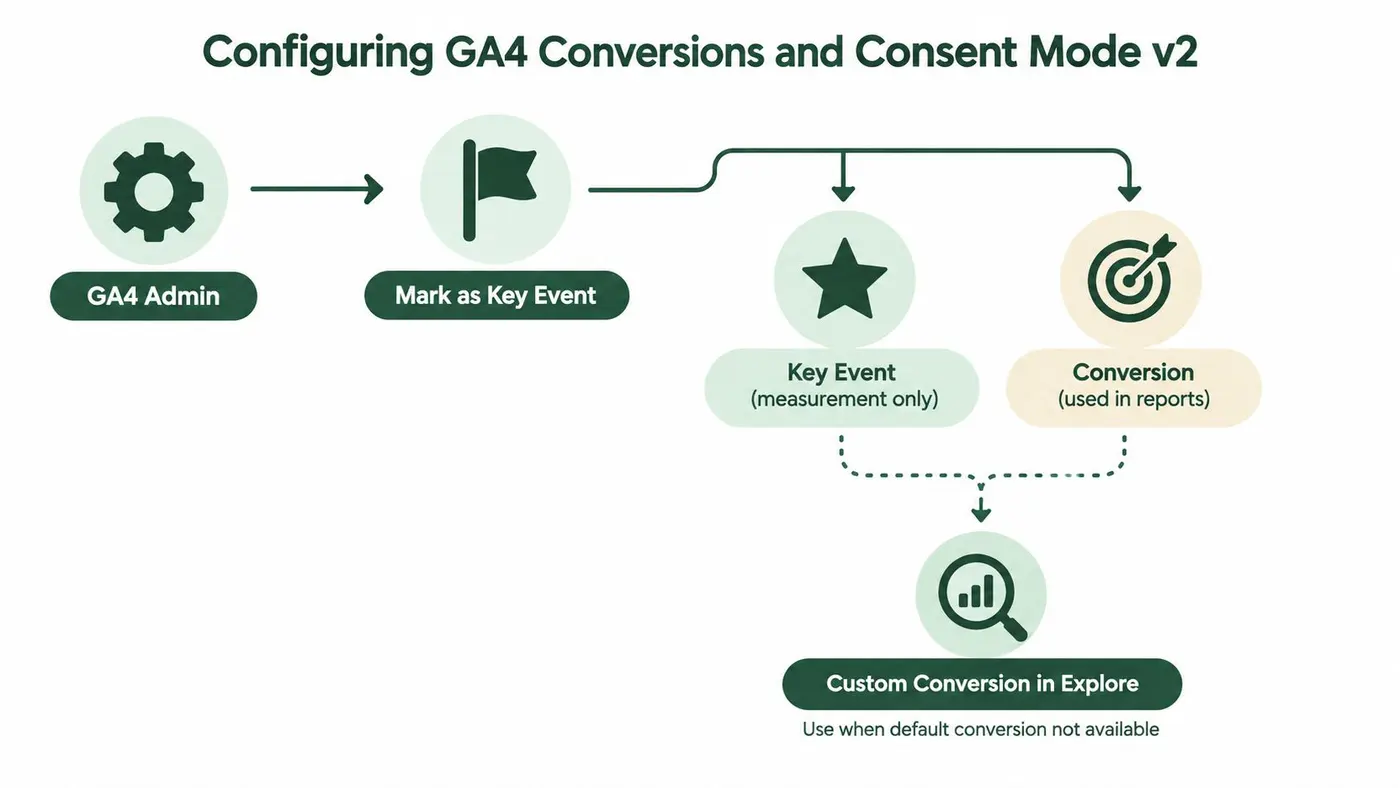
Use these distinctions:
- Key event: Mark this when the action is strategically important and should be highlighted in GA4.
- Conversion for reporting: Use this when the event maps to a business outcome you're willing to compare over time.
- Custom conversion in analysis: Use this when you need a specific rule in Explore or reporting logic that the raw event doesn't provide cleanly.
This guide on conversion tracking with Google Analytics is useful when you need the operational side of that setup.
A related blind spot appears when teams want to understand non-paid discovery paths and query intent inside GA4. This walkthrough on how to find organic keywords in GA4 is useful because it helps connect acquisition context to the conversion events you've configured, rather than treating conversion reporting in isolation.
Consent Mode v2 is not optional in UK setups
For UK and EEA traffic, Consent Mode v2 decides whether advertising measurement remains usable. Google's guidance in UK-focused implementation coverage is clear on the mechanics: ad_storage controls whether advertising cookies can be set, and when consent is denied, measurement continues only via cookieless pings rather than user-level tracking in the way many teams expect, as explained in this overview of Consent Mode v2 implementation.
The signals you must wire correctly are:
ad_storageanalytics_storagead_user_dataad_personalization
If those states don't reach gtag before your conversion tags fire, the reports you inspect later are already compromised.
Here's the practical check sequence I use:
- Confirm the CMP sets a default state before any analytics or ads tag executes.
- Verify updates are passed when a user grants or denies consent.
- Test whether the four consent signals above are present in the browser during the session.
- Only then inspect GA4 and Google Ads conversion reporting.
Place the explainer video after you've understood the wiring logic, not before:
If consent state arrives late, your event can be “correct” in GTM and still be unusable for ad measurement.
Layering Otter A/B Onto Your Tracking Stack
A/B testing doesn't replace analytics. It adds a second layer of truth: which experience produced the result. That only works if variant assignment and purchase data stay joined from the first pageview to the backend-confirmed order.
Variant data has to travel with the user journey
For variant-level revenue to be trustworthy, pass the assigned variant into the dataLayer on every pageview and attach the same variant ID to conversion events. If variant assignment lives only inside the testing tool and purchase lives only inside GA4, you'll end up with two partial stories.
A simple implementation pattern looks like this:
- push
experiment_idandvariant_idon pageview - persist that assignment through the funnel
- include
variant_idwhenpurchaseorqualified_leadfires - validate that the order record can still be matched to the same variant later
What to read and what not to overread
When teams look at an experiment result, they often stop at uplift. That's the weakest metric to stop at. The better reading is:
- conversion rate by variant
- average order value by variant
- revenue per visitor by variant
- backend-confirmed revenue by variant
This is one place where Otter A/B fits naturally alongside GA4. It can track goals from page views, clicks, custom events, revenue, DataLayer events, and GA4 events while keeping the experiment view tied to variant performance. That matters because a headline change can lift clickthrough while lowering order value, and only a revenue-aware read catches that.
| Metric | Otter A/B | GA4 (key event) |
|---|---|---|
| Variant assignment | Native experiment context | Not native to testing logic |
| Conversion rate | By variant | By event and segment |
| AOV | Variant-level when purchase data is passed | Purchase reporting if event mapping is clean |
| Revenue per visitor | Built for experiment interpretation | Requires analysis setup and segmentation |
| Statistical read | Frequentist significance engine | Not an experimentation engine |
Checks before you trust any winner
- Assignment first: Confirm the user receives a variant before any tracked conversion can happen.
- Revenue join: Reconcile revenue per variant with backend order totals, not just front-end event counts.
- Sample warnings matter: If your tool warns on sample size or imbalance, stop. Don't ship because the graph looks exciting.
Winning on click rate and losing on revenue is still losing.
Validating Conversions Against Backend Reality
The most honest conversion report usually isn't in GA4. It's the weekly spreadsheet where someone compares analytics against actual orders, subscriptions, or accepted leads.
UK privacy rules make that reconciliation essential. The ICO's storage and access rule applies beyond cookies to things like pixels, device fingerprinting, link decoration, and browser storage. Separate UK guidance also means some first-party analytics for statistical purposes may operate without prior consent under specific conditions, while advertising, remarketing, and cross-site tracking still require opt-in. Ridley Digital's analysis also recommends measuring the delta between backend outcomes and analytics-recorded conversions as the tracking gap rather than guessing what was lost in aggregate, in this article on why the tracking gap is permanent.
The weekly reconciliation ritual
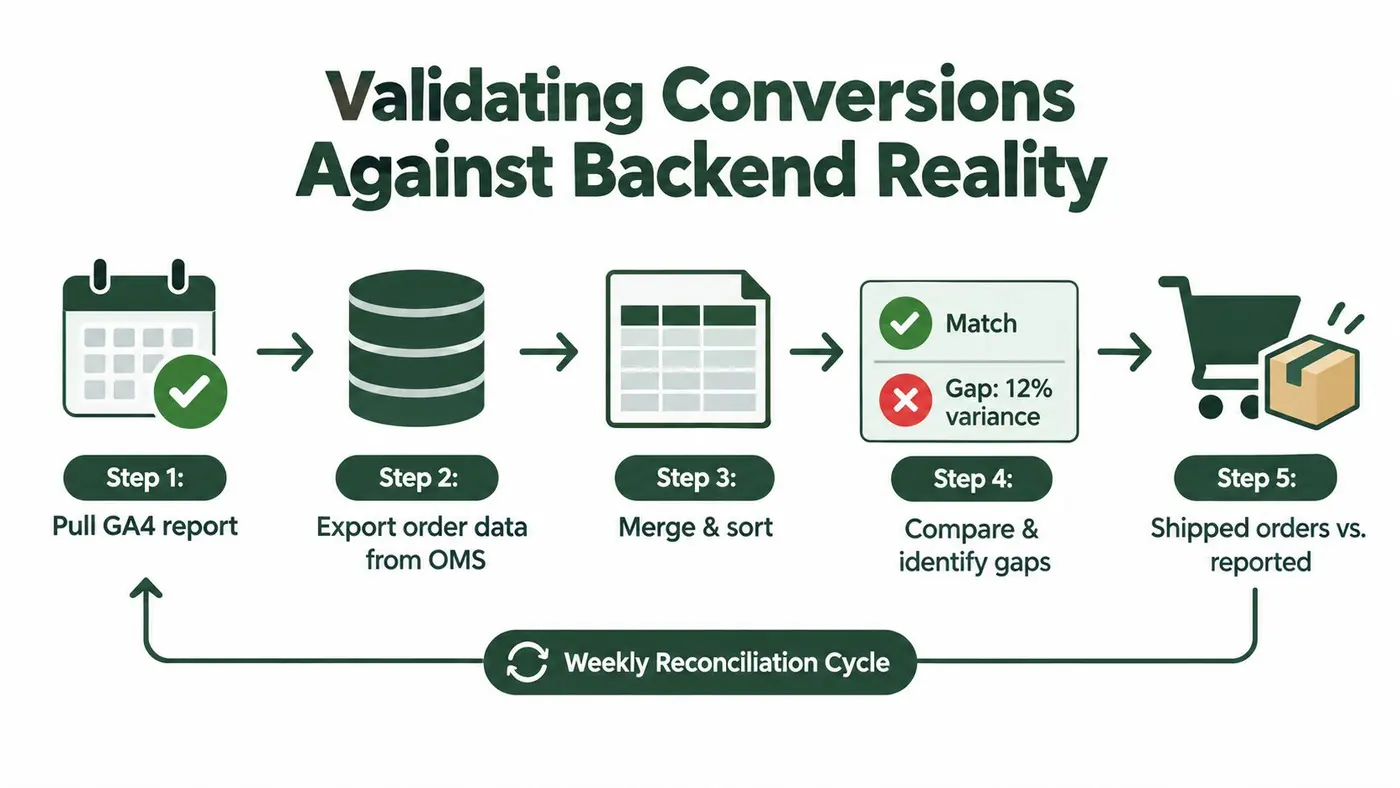
Pull two exports for the same date range:
- Analytics side: transactions, revenue, and conversion counts from GA4
- Backend side: paid orders, accepted subscriptions, or CRM-qualified leads
Then compare them by date, transaction count, and revenue total. The goal isn't perfect cosmetic alignment. The goal is to identify patterns in missing or duplicated reporting.
What usually explains the gap
A mismatch often comes from one of these:
- Consent-denied sessions: The order exists in the backend, but analytics never records a user-level conversion path.
- Duplicate purchase events: Front-end tags and retargeting scripts both record the same order.
- Refund handling differences: Analytics counts a purchase event that your finance or OMS view later netted out.
- Timezone mismatch: The shop records the order on one day, GA4 attributes it to another.
- Broken thank-you journeys: The order completes, but the user never returns to the page where the event should fire.
A lot of teams assume a discrepancy means “GA4 is wrong”. Sometimes it is. Sometimes the order system is using a different commercial state. Sometimes the lead definition changed and nobody updated the event logic. Reconciliation exposes all of that.
Treat dashboards as provisional until this step is done
If you're serious about how to track conversions, backend validation is where the confidence comes from. Everything upstream is interpretation. This is the point where reporting meets what the business shipped, accepted, or renewed.
Tracing Attribution Breakpoints Across UK Funnels
A correctly firing purchase tag does not mean attribution survived the journey. That's the comfortable assumption that breaks media reporting every week.
Where attribution gets stripped
In UK ecommerce and lead-gen funnels, the fragile points are usually outside the tag itself:
- traffic lands with campaign parameters, then a redirect strips them
- the user moves from main site to checkout or booking tool and identifiers reset
- a payment provider returns the customer to a confirmation page without preserving the original acquisition context
- email or SMS visits arrive with poor referrer data
- consent denial removes the identifiers that source stitching depends on
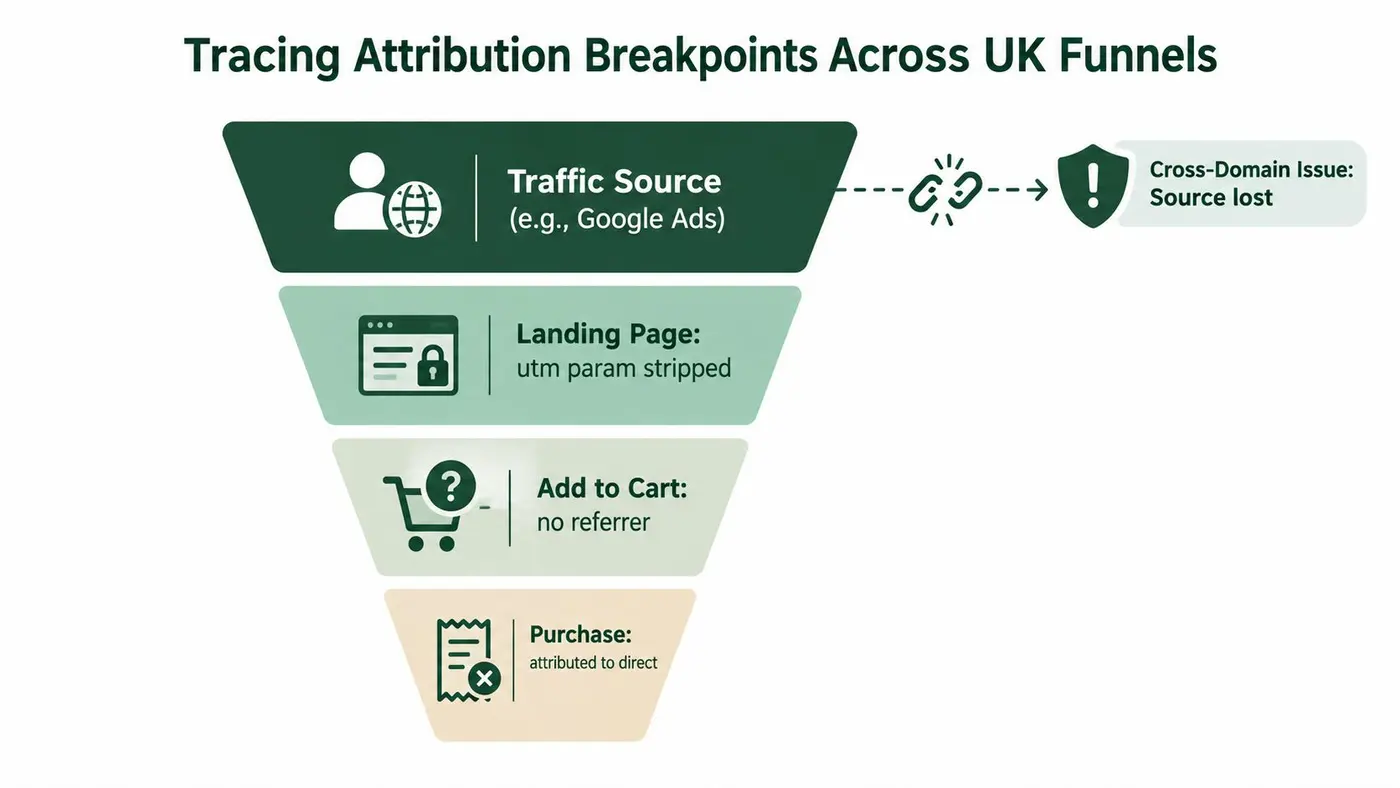
A UK-focused diagnostics piece from PPC Geeks highlights this broader pattern. It notes that checkout, booking, payment flows, consent banners, and missing aggregate identifiers such as GBRAID and related parameters can interrupt attribution, and it also cites a claim that 52% of businesses have broken GA4 setups in some form, including issues like inactive internal traffic filters and incorrect key-event marking, in its review of GA4 campaign diagnostics and PPC tracking.
This is a plumbing problem
The hard part isn't “did the purchase event fire?”. The hard part is “did the source and identity survive until the purchase event fired?”.
Fixes tend to be practical, not glamorous:
- Pass order IDs through the journey: That gives you something stable to reconcile later.
- Link domains deliberately: Main site, checkout, payment, and confirmation pages need a shared attribution plan.
- Protect campaign parameters: Don't let redirects or app handoffs strip them before session start.
- Use dedicated campaign parameters for owned channels: Email and SMS often need stricter hygiene than teams expect.
- Consider server-side purchase dispatch where appropriate: Especially when front-end thank-you pages are unreliable.
A working tag can still produce “direct” revenue if source data disappears two steps earlier.
That's why attribution debugging belongs in journey mapping sessions, not only in GTM preview mode.
Troubleshooting Checklist and Best Practices
When tracking breaks, the symptom rarely points neatly to the cause. Missing conversions might be a consent problem. Undercounted revenue might be duplicate suppression gone wrong. Inflated experiment results might come from exposure deduplication failure, not a real lift.
Quarterly checks worth keeping
Run these checks on a fixed schedule:
- Validate dataLayer pushes: Confirm event names, values, transaction IDs, and item arrays are present and typed correctly.
- Check GA4 debug parity: Make sure the event you expect in the browser is the one GA4 receives.
- Review consent signals: Confirm the consent state arrives before analytics and ads tags execute.
- Test server container reachability: If you use server-side GTM, verify events are passing through the container.
- Inspect experiment exposure logic: Make sure users aren't being assigned or counted more than once.
- Check cross-domain linker state: Walk the full journey from landing page to thank-you page.
- Compare analytics against backend totals: Treat that delta as an operational metric, not an occasional audit.
Operating habits that keep tracking healthy
The best teams treat tracking as an operating discipline:
- Name an owner: One person should approve schema changes and sign off before launches.
- Version-control the GTM container: You need rollback discipline, not just publish access.
- Keep the tracking plan live: Event definitions drift unless someone updates documentation when the site changes.
- Review before every experiment: A/B tests amplify bad tracking as efficiently as they amplify good UX.
The practical test is simple. If a budget decision, bid strategy, or product rollout depends on the number, someone should be able to explain exactly how that number was generated and what it excludes. If they can't, the dashboard is decorative.
If you want variant-level conversion data that stays tied to revenue, not just clicks, Otter A/B gives teams a lightweight way to run experiments against real business outcomes. It fits neatly into the tracking stack described above, especially when you need to compare conversion rate, average order value, and revenue per visitor by variant without losing sight of backend reality.
Stop guessing
Ready to start testing?
Set up your first A/B test in under five minutes. No credit card required.
- 14-day free trial
- No credit card required
- Cancel anytime