Google Tag Manager Data Layer Explained for CRO Teams
Master the Google Tag Manager data layer for analytics and A/B testing. Learn implementation patterns, event structures, debugging tips, and Otter A/B
Your experiment dashboard says the new checkout headline is winning. GA4 shows the expected conversions, revenue looks healthy, and the test is ready for a confident rollout. Then the production team deploys the variant, and the lift disappears. In many UK ecommerce implementations, the problem isn't the experiment logic. It's the Google Tag Manager data layer, which may have dropped the exposure event, fired before the variant existed, or failed to carry the purchase context into the tag that reports revenue.
That makes the data layer more than a technical convenience. It's the message board between your website and the tools that measure user behaviour. Your site posts facts to it, Google Tag Manager reads those facts, and tags pass selected values to platforms such as GA4, advertising systems, warehouses, and experimentation tools. If the message is late, ambiguous, or overwritten, every downstream report can look plausible while describing the wrong users.
Why Your A/B Test Data Might Be Lying to You
A CRO specialist often finds the fault after the test has finished. The variant appeared, but variant_viewed fired before the experiment script assigned the visitor. The purchase arrived later with no revenue fields. Elsewhere, a developer reinitialised window.dataLayer, removing context collected earlier in the journey.
Broken tracking rarely announces itself. Reports can still contain conversions, page views, and revenue, while experiment attribution points to incomplete or incorrect assignments. That is how an A/B test can produce a convincing result from the wrong population.
Treat the data layer as a message board
A useful working analogy is a shared message board beside the checkout. The website posts structured messages such as:
- Experiment exposure: Which experiment and variant the visitor saw.
- Funnel progress: Which checkout step the visitor reached.
- Commercial outcome: Which order was completed, in which currency, for what value, and with which products.
- Page context: What type of page or product the visitor was viewing.
GTM does not reliably infer these facts from the page's visual layout. It listens for pushed objects, uses the event key to identify moments that can trigger tags, and reads data-layer variables to populate tag parameters. Google's Tag Manager documentation describes this connection between interactions, triggers, variables, and downstream analytics.
Practical rule: Define the data contract before configuring the tag. A trigger cannot repair an event that never arrived, a value that was overwritten, or a field whose name changed between templates.
The UK implementation detail matters. GOV.UK guidance describes the data layer as a JavaScript array initialised on page load, with objects pushed when pages load or users click. GTM reads the latest object and adds it to its model rather than replacing the model. A new page recreates the layer, so page-level context can remain available for events on that page but will not automatically survive navigation. The maintained GOV.UK implementation guidance shows why this pattern remains relevant to operational analytics in a UK digital service environment.

Before changing a tag, inspect the event sequence. Confirm that the experiment assignment existed before exposure, that the event carried every field its trigger expected, and that a refresh could not push the same transaction again. In UK ecommerce, those timing and duplication checks usually expose the fault faster than another comparison of dashboard totals.
How the Data Layer Actually Works Under the Hood
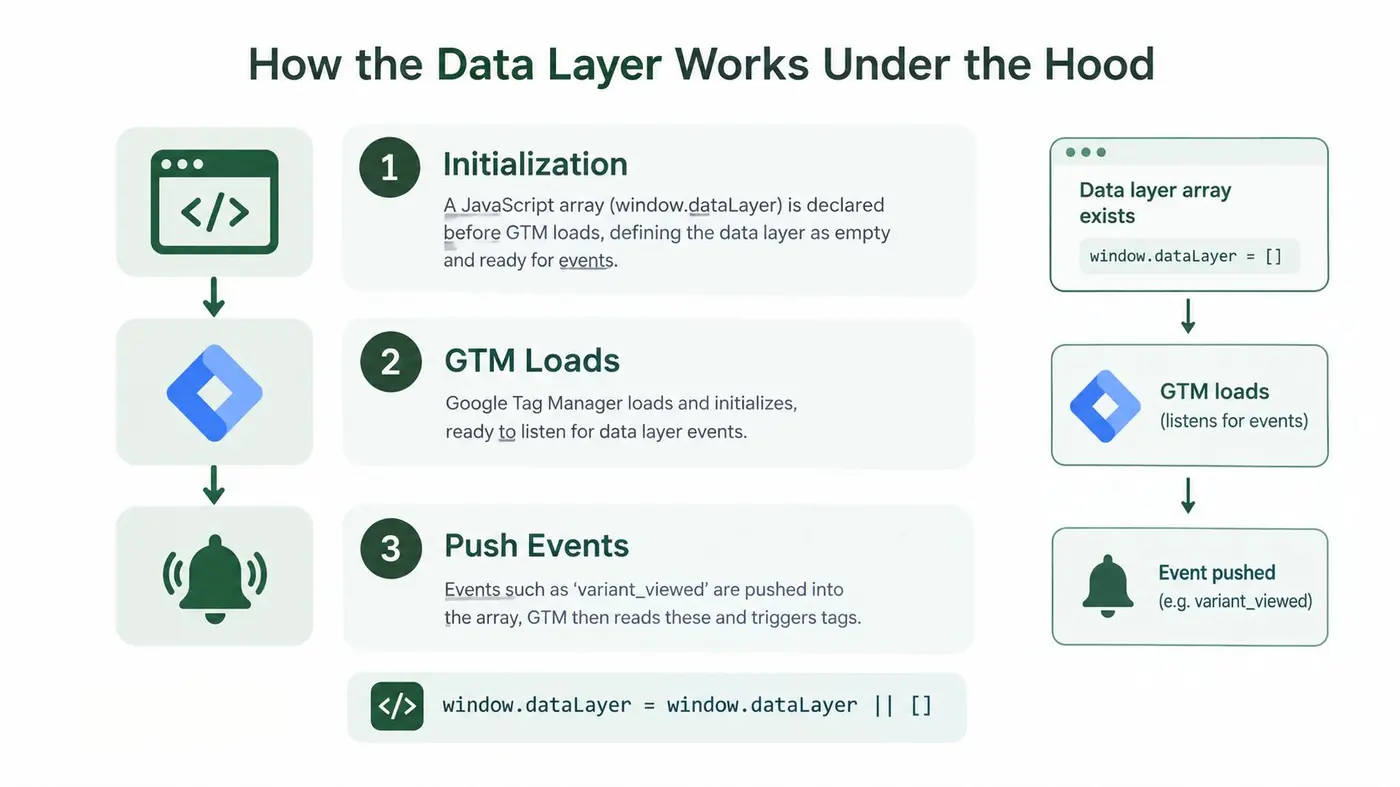
A UK ecommerce test can assign a customer to a variant, yet lose that assignment before the exposure event reaches analytics. The Google Tag Manager data layer has two practical parts: the window.dataLayer JavaScript array, and objects added with push. GTM processes those messages in sequence. GOV.UK's analytics guidance documents this operating pattern.
Initialise before the container
Start with a safe array declaration:
window.dataLayer = window.dataLayer || [];
This preserves an existing array or creates one when none exists. Load the GTM container against that array. If page context or an experiment assignment must be available at the earliest processing point, push it before the container loads:
window.dataLayer = window.dataLayer || [];
window.dataLayer.push({
  page_type: 'product',
  page_category: 'footwear'
});
Sequence matters. A later window.dataLayer = [] can replace the array already connected to GTM, leaving earlier messages outside the container's model. The browser may show no obvious error, while tags quietly lose fields. Dynamic interactions should use push, not a new array assignment.
Push a complete event message
An interaction that must trigger a tag needs an event key:
window.dataLayer = window.dataLayer || [];
window.dataLayer.push({
  event: 'variant_viewed',
  experiment_id: 'checkout_headline',
  variant_id: 'short_copy'
});
GTM can use variant_viewed as a Custom Event trigger and expose experiment_id and variant_id through Data Layer Variables. The event name marks the moment of exposure. Without it, the object may update context but will not create the distinct event that the trigger is waiting for.
Understand accumulation and reset
GTM reads each pushed object and updates its internal model. Later messages can add fields while earlier page context remains available on that page. That supports a sequence in which product context loads first, experiment assignment follows, and a checkout action arrives later.
Navigation resets the practical scope. The data layer is recreated on each new page, so values do not persist automatically. A server-rendered checkout page must receive the experiment assignment again if revenue reporting depends on it. Do not assume a product-page push survives the move to checkout.
For container and tag sequencing, follow the Google Tag Manager setup guide. Initialise once, push deliberate messages, and test every dependency between assignment, exposure, consent, and purchase.
Designing Event Schemas That Scale Across Tools
Most failures start with a naming decision, not a JavaScript error. One team pushes variantName, another configures variant_id, and a third sends the value as testVariant. Each implementation can work in isolation. Together, they create a translation layer that eventually loses values.
Google describes the data layer as a JavaScript object used by GTM and gtag.js to pass information to tags and trigger actions from events or variables. Google's data layer documentation also provides the foundation for using structured ecommerce information. For UK retailers, that structure needs to make currency, order value, shipping, and product details explicit, with monetary values represented consistently in GBP where GBP is the transaction currency.
Separate context from moments
Page-level variables describe the state of the page:
{
  page_type: 'product',
  product_category: 'boots',
  currency: 'GBP'
}
Event-level fields describe something that happened:
{
  event: 'add_to_cart',
  product_id: 'SKU-104',
  value: 89.00,
  currency: 'GBP'
}
This distinction prevents a common mistake: putting an exposure value into persistent page context and expecting every downstream tool to interpret it as an exposure event. If the action matters for reporting or triggering, give it a named event. If it describes the surrounding page, keep it as context.
Use one naming convention across the site. snake_case is readable and aligns naturally with many analytics event names, but camelCase can work too. Consistency matters more than the choice. Treat key names as case-sensitive API fields, not informal labels.
Comparison table
| Field | Well-Structured Example | Common Mistake |
|---|---|---|
| Event name | event: 'purchase' |
event: 'orderDone', with no shared definition |
| Experiment ID | experiment_id: 'pdp_headline' |
test: 'A', which hides the experiment identity |
| Variant | variant_id: 'benefit_first' |
variantName: 'B', with no stable value |
| Currency | currency: 'GBP' |
Omitting currency or mixing formats |
| Order value | value: 129.00 |
Sending a formatted display string |
| Shipping | shipping: 4.99 |
Leaving delivery cost inside an unlabelled total |
| Products | items: [{ item_id, price, quantity }] |
One unstructured product description |
| Deduplication | A stable transaction identifier | A purchase push on every confirmation render |
The event contract should be written for every consumer, not just GTM. Document which fields are required, when they become available, and whether they belong to the event or the page. A clear Google Analytics event tracking approach will help your team map the same object into GA4 without inventing a second vocabulary.
Implementation Patterns for Experiments and Revenue Tracking
A broken timing rule can make an A/B test report the wrong variant or count the same order twice. Give each business action one explicit data layer push, triggered only after the required state exists. The event needs a stable name and the fields each receiving tag expects.
Variant exposure
Fire the exposure event after the visitor has been assigned a variant and that variant is present in the rendered experience.
window.dataLayer = window.dataLayer || [];
window.dataLayer.push({
  event: 'experiment_impression',
  experiment_id: 'pdp_headline',
  variant_id: 'benefit_first',
  assignment_time: new Date().toISOString()
});
In GTM, create a Custom Event trigger for experiment_impression. Add Data Layer Variables for experiment_id, variant_id, and assignment_time, then map them into the analytics or experimentation tag. A generic page-view trigger is unsafe when the assignment script runs later. It can create an impression before the platform has a trustworthy variant.
Checkout progression
Push each checkout event only after the customer has entered the step successfully:
window.dataLayer = window.dataLayer || [];
window.dataLayer.push({
  event: 'checkout_step_view',
  checkout_step: 'delivery',
  cart_id: 'cart-reference'
});
The site must control deduplication. Refreshes, browser-back actions, and reactive component renders should not create repeated business events unless the reporting definition explicitly allows them. A stable step identifier lets GTM distinguish delivery from payment. A cart reference gives the QA team a value to compare during a session.
Purchase confirmation
Send revenue after the order is confirmed:
window.dataLayer = window.dataLayer || [];
window.dataLayer.push({
  event: 'purchase',
  transaction_id: 'order-reference',
  value: 129.00,
  currency: 'GBP',
  shipping: 4.99,
  items: [
    {
      item_id: 'SKU-104',
      item_name: 'Leather boot',
      price: 124.01,
      quantity: 1
    }
  ]
});
Use a Custom Event trigger for purchase and Data Layer Variables for every required field. The confirmation page also needs a rule that prevents a second push on reload. A transaction identifier gives downstream systems a deduplication field, but the implementation still needs to define exactly when the push is permitted.
A revenue event is not a page-view side effect. Treat it as a business transaction with an owner, a timing rule, and a deduplication strategy.
This event-driven pattern follows Google Tag Manager implementation guidance: site interactions are pushed explicitly, GTM uses the event key to fire triggers, and variables populate parameters sent to GA4 and other tags.
The Consent Mode Timing Trap That Breaks Experiment Attribution
UK teams face a real timing conflict. Experiment assignment may happen as soon as the page renders, while analytics collection may need to wait for a consent decision. If you push an exposure into a measurement flow before the required permission exists, you risk using data in a way your privacy design doesn't permit. If you wait until after consent, the visitor may have changed page or completed the experiment interaction without a recorded assignment.
UK-oriented GTM guidance explicitly calls for UK GDPR compliance, consent collection, and ongoing verification. The ecommerce implementation checklist from Dolphin Analytics highlights the practical gap: teams need to decide what can be stored, when events can be pushed, and how delayed analytics cookies affect experiment assignment.
Separate assignment from measurement
A useful design separates the fact of assignment from the act of sending measurement data. The data layer can receive a carefully minimised experiment state according to your privacy review, while measurement tags remain governed by the consent state. Don't put unnecessary identifiers or personal information into the layer because a tag could technically read them.
For a consent-aware flow, your implementation might:
- Resolve the consent state: Let the consent management platform publish its state in the agreed format.
- Assign according to the approved design: Record the variant only in the way your privacy team has authorised.
- Queue or replay exposure safely: If analytics consent arrives later, send the exposure only when the tag is permitted to run, using a stable assignment value.
- Keep storage decisions explicit: Decide whether assignment belongs in the data layer, approved storage, or neither. The data layer itself isn't a substitute for a lawful storage design.
- Reconcile suppressed outcomes: Treat consent-restricted users as a defined measurement condition, not as automatically equivalent to users who were fully observable.
The central risk is not only missing volume. If exposure capture happens for one group before consent but not for another, your experiment population can become uneven. Late capture can also record an outcome without reliably connecting it to the variant that caused the experience. Your analysis should therefore report the conditions under which assignment and conversion were observable, rather than presenting incomplete data as a clean result.
Legal review, consent configuration, and CRO instrumentation meet. A technically elegant push is still the wrong implementation if it bypasses the site's consent policy.
Here is a practical explanation of the timing problem in context:
Debugging Data Layer Issues Before They Corrupt Your Results
Debugging starts with the event timeline, not the final report. Open GTM Preview and inspect the event stream as you load the page, receive consent, expose a variant, advance through checkout, and complete a test purchase. For each event, check the Data Layer and Variables panels separately. The first shows what was pushed, while the second shows what GTM resolved for the tag at that moment.
Use a repeatable QA pass
-
Check initialisation: Confirm that
window.dataLayerexists before the container processes the relevant page event. - Check exact names: Compare the pushed key with the GTM variable name, including capitalisation and underscores.
- Check event timing: Select the event that fired the tag and verify that every required value was already present.
- Check trigger scope: Confirm that the tag fires on the intended custom event, not on every page view or every container event.
- Check duplicates: Refresh a confirmation page and inspect whether the purchase push repeats.
- Check navigation: Move between pages and verify that required context is intentionally reintroduced.
The browser console gives you a second view:
window.dataLayer
Inspect the array in order. Look for an exposure message before the conversion message, the expected ecommerce object on purchase, and unexpected assignments such as a direct window.dataLayer = [] later in the page lifecycle.
Read failures as sequence problems
An undefined variable usually means the key wasn't available when GTM evaluated it. A missing custom event usually means the push lacks an event key or the trigger uses a different spelling. A value that disappears mid-session often points to an overwrite or a page transition where the site didn't publish the necessary state again.
Use a controlled test order and record the expected event sequence. Otter A/B's GTM testing guidance is useful for teams that need to inspect the Data Layer tab while validating experiment events. Don't approve a test from a dashboard screenshot alone. Match the tag firing log to the browser behaviour and to the underlying order or lead record.
Connecting Your Data Layer to Otter A/B for Reliable Experimentation
The data layer becomes valuable for CRO when it gives the experiment platform two dependable facts: which variant was assigned and which goal occurred. For a headline test, that may mean an experiment_impression event containing the experiment and variant identifiers, followed by a conversion event when the customer submits a form or completes a purchase. For a layout test, the same contract can remain stable while the page changes around it.
A platform can only analyse the data it receives. If the exposure event fires before assignment, the result has no reliable treatment label. If the purchase event omits value, currency, or product information, the test may report conversions without showing the commercial outcome that matters to the retailer.
Keep the integration event-driven
A practical event set might include:
-
Variant exposure:
experiment_impression, withexperiment_idandvariant_id. - Primary conversion: A named event for the action that defines success.
-
Purchase:
purchase, with a stable transaction reference, GBP currency where applicable, order value, shipping, and item details. - Supporting behaviour: Checkout or engagement events that help diagnose why a variant won or lost.
Otter A/B can read experiment assignments and goal completions through its lightweight SDK, and its GTM integration lets teams deploy the connection through the tag manager rather than editing site code for every configuration change. Its reporting includes conversion and revenue-oriented measures, including revenue per variant and average order value, so the data layer needs to expose commercial fields consistently rather than treating revenue as an afterthought.
The wider UK adoption of GTM explains why this integration pattern is familiar to many teams. A 2026 industry scan reported 482,614 matched Google Tag Manager domains in the United Kingdom, placing the UK second after the United States in that dataset, as reported in the UK GTM adoption reference. GOV.UK's architecture decision to use GTM was published on 25 October 2017, while Scottish Government Design System guidance dated 26 March 2025 instructs teams to add the data-layer snippet for advanced implementation. Those milestones show a pattern that has moved from an internal government implementation choice to a standard working surface for UK analytics teams.
Otter A/B gives CRO teams a way to run headline, CTA, layout, and revenue-focused experiments while connecting variant assignments and goals through Google Tag Manager. Review your event schema first, then visit Otter A/B to explore an experimentation workflow built around cleaner measurement and clearer business outcomes.
Stop guessing
Ready to start testing?
Set up your first A/B test in under five minutes. No credit card required.
- 14-day free trial
- No credit card required
- Cancel anytime