Website Push Notification Guide for Marketers
Learn how to use website push notifications to drive engagement & conversions. This guide covers strategy, KPIs, A/B testing, and best practices for 2026.
You're probably in one of two situations right now. Either your site gets solid traffic but too many visitors disappear after one session, or you already send email and paid retargeting campaigns and still feel there's a gap between first visit and repeat action.
That gap is where website push notification strategy gets interesting.
Many organizations treat push as a broadcast tool. They install a platform, turn on a default permission prompt, send a few sale alerts, then decide the channel is mediocre because results plateau fast. In practice, push works best when you run it like a conversion programme. The opt-in prompt is a landing page. The notification itself is ad creative. The click destination is a post-click experience. Every step can be tested, segmented, and improved.
That's why the strongest push programmes don't start with message volume. They start with disciplined experimentation, clear success metrics, and respect for consent.
What Exactly Is a Website Push Notification
A website push notification is the browser equivalent of a polite tap on the shoulder. A visitor gives permission once, and your site can later send a short message to that person's device even when they aren't actively on your website.
That one detail matters more than commonly understood. Push doesn't ask for an email address. It doesn't require an app install. It relies on browser permission and the user's willingness to hear from you again.
How it feels to the user
From the user's perspective, the flow is simple:
- They visit your site
- They see a permission request
- They allow notifications
- They later receive short alerts they can click
Those alerts usually show up like any other system notification. The user sees a title, a snippet of copy, sometimes an image, and a click takes them to a relevant page.
That makes push different from both email and app push.
- Email lives in an inbox, competes with newsletters, receipts, sales messages, and spam filtering.
- App push depends on someone installing your app first, which is a much bigger commitment.
- Website push sits in the middle. It's fast, direct, and low-friction.
Why marketers care about that difference
A key advantage isn't novelty. It's context.
If someone browsed a product category, read a pricing page, or abandoned a basket, push lets you re-engage them while that intent is still relatively fresh. Used well, it's a compact reminder channel. Used badly, it becomes background noise very quickly.
Practical rule: Treat push like a high-attention interrupt. If the message wouldn't justify interrupting someone for a second, it probably shouldn't be sent.
There's also a historical reason the channel still feels less settled than email. Braze's overview of web push history notes that email dates back to the 1960s, mobile app push to 2009, and the basic form of web push only to the mid-2010s. That makes web push one of the newest mainstream engagement channels.
What that means in practice
Because the channel is newer, the rules, browser behaviours, and prompt patterns have evolved quickly. That's why rigid “best practice” advice often ages badly. What worked for opt-in flows a short while ago may now underperform or clash with browser expectations.
For UK marketers, that's useful rather than frustrating. Website push is well suited to testing because it's browser-based, lightweight, and doesn't depend on building a full app experience first. If your team thinks in CRO terms, you should see push as a funnel with three jobs:
- Earn permission
- Deliver relevance
- Create a measurable next action
Everything else is execution.
The Business Case for Push Notifications
The business case for push gets stronger when you stop comparing it only to email and start comparing it to the cost of lost attention.
A visitor arrives from SEO, paid search, social, or affiliate traffic. They browse. They leave. If you haven't captured an email address, that session often becomes a dead end. Push gives you another route back to that user without relying on a form fill or an app install.
What the channel can justify commercially
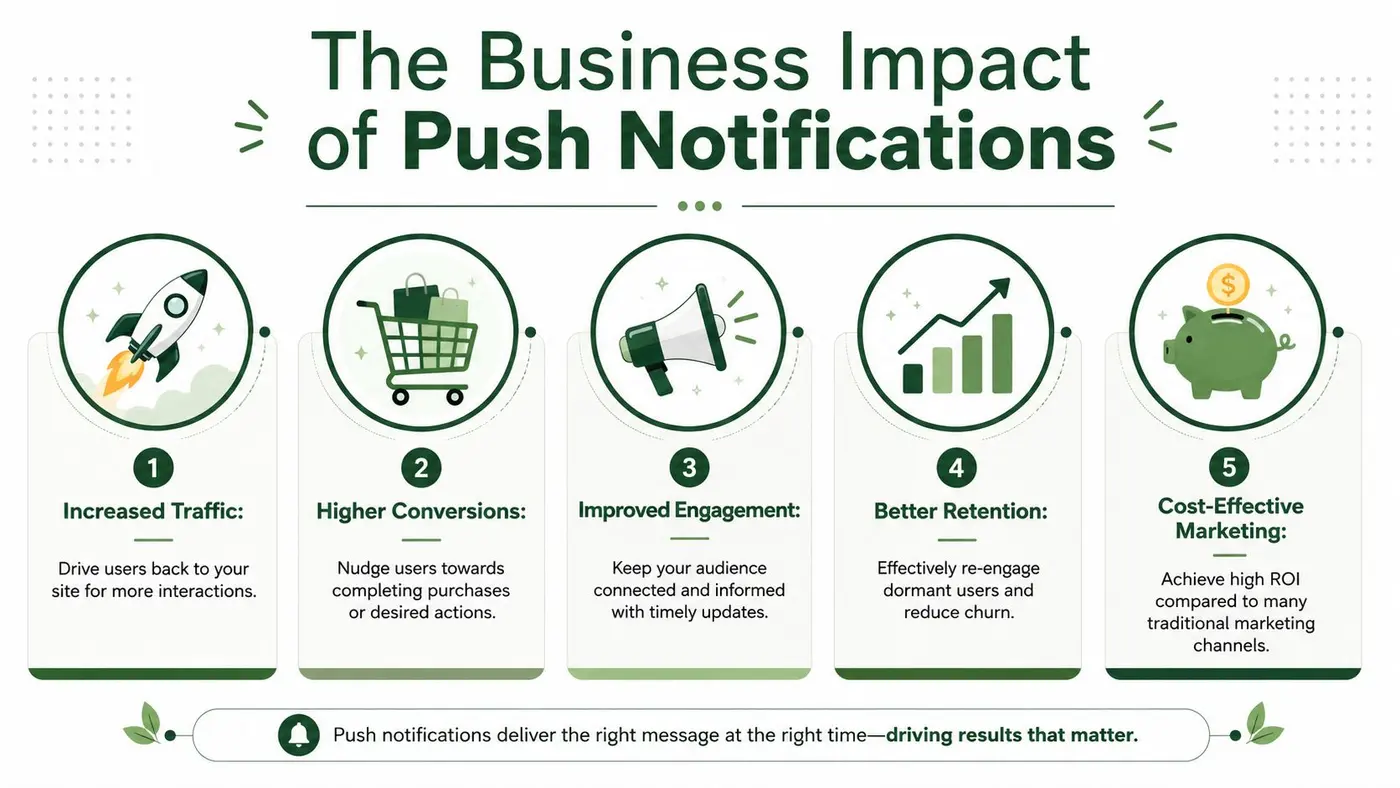
The headline numbers explain why brands keep investing in it. Sleeknote's roundup of web push benchmarks reports that web push open rates commonly range from 45% to 90%, and that 35% of people who click a web push make a purchase. The same source says brands sent over 413 million web push messages in 2024, while e-commerce sent 55% more push notifications in 2024 than in 2023.
Those figures aren't UK-only, but they're enough to make one point clear. This is no longer a fringe channel.
Where push earns its place
A good push programme usually supports four business jobs at once:
- Repeat traffic. Publishing teams use push to bring readers back when a new article, guide, or update goes live.
- Revenue recovery. E-commerce teams use it for basket reminders, price-drop alerts, and back-in-stock messages.
- Launch amplification. SaaS teams use it to announce features, webinars, trials, or product updates.
- Retention support. Subscription businesses use it to bring inactive users back before they drift further away.
What makes this practical is speed. A flash sale that lands too late by email can still work through push. A product restock can be acted on while inventory is still available. A content alert can catch a user before intent fades.
Why it fits a CRO mindset
Push also amplifies its impact because each improvement compounds across the lifecycle.
If you improve opt-in quality, your subscriber base gets healthier. If you improve targeting, more messages stay relevant. If you improve click-through behaviour, more sessions return. If you improve the landing page after the click, revenue rises without increasing send volume.
Push is one of the few channels where the same traffic you already paid for can become a re-marketable audience with very little extra friction.
That's the part many teams miss. They ask whether push “works” as if it were a single campaign. The better question is whether your site should have a permission-based re-engagement layer at all. For many stores, publishers, and SaaS sites, the answer is yes. The channel fills the gap between anonymous traffic and owned audience.
How Website Push Notifications Work Technically
Marketers don't need to write the implementation, but they do need to understand the moving parts. If you don't, you'll end up asking for campaigns that engineering can't support cleanly, or you'll misread delivery issues as creative problems.
At a high level, website push runs through a three-party architecture. Your backend creates the notification request. A browser push service handles delivery routing. The user's device receives the alert.
The three systems involved
According to DesignGurus' explanation of push architecture, web push delivery depends on three components: your backend, the browser push service such as APNs or FCM, and the user's device. The device maintains a persistent encrypted connection to that push service, which is why notifications can arrive even when the web app isn't running.
That's the technical reason a browser tab doesn't need to stay open.
A simple way to think about it is this:
| Part | What it does | Why marketers should care |
|---|---|---|
| Your backend | Decides what to send and to whom | Segmentation and campaign logic live here |
| Push service | Routes the message | Delivery depends on this handoff working cleanly |
| User device | Displays the alert | User settings and permissions still affect visibility |
The service worker and subscription layer
The other concept worth knowing is the service worker. It's the background script that helps the browser receive and display notifications even when the site itself isn't open in a normal active tab.
From a marketing angle, the important point isn't code syntax. It's dependency. If the service worker is misconfigured, subscriptions aren't stored correctly, or expiration handling is weak, you'll see inconsistent delivery and stale audience counts.
That's why implementation details in platform documentation matter. A developer reference such as Otter A/B's notifications documentation is useful because it shows the kind of event handling and trigger logic technical teams need to define clearly before marketers rely on campaign reporting.
If subscriber management is messy, campaign analysis becomes unreliable. You can't optimise a channel when the underlying audience state is wrong.
What this means for campaign planning
Technical literacy changes how you brief campaigns.
Instead of saying “send this to all subscribers”, you start asking better questions:
- Are subscriptions still valid?
- Is permission still active?
- Does the browser support the experience you want?
- Can the click open the correct page state on mobile and desktop?
- Are delivery failures being logged anywhere useful?
That level of understanding won't turn a marketer into an engineer. It will, however, help you avoid one of the most common push mistakes: blaming creative when the issue is implementation.
Crafting Your Push Notification Strategy
A push strategy falls apart when every send is a one-off campaign. The teams that get value from website push build a system around audience state, lifecycle timing, and message intent.
That starts with deciding what the channel is for. Not every notification should sell. Some should welcome, some should recover, some should educate, and some should bring a high-intent visitor back at the right moment.
Segment before you send
The fastest way to damage push performance is to treat all subscribers as one audience.
Useful segmentation often starts with behaviour:
- Browsed but didn't buy
- Added to basket but left
- Purchased recently
- Read specific content categories
- Visited pricing or demo pages
- Went inactive after prior engagement
Then layer message purpose on top. A person who read documentation pages needs a different prompt from someone who looked at sale items twice in one week.
A lot of marketers already understand this discipline in email. If you need a refresher on how lifecycle thinking applies across channels, What Is Email Marketing is a good primer because the same segmentation logic carries over, even though the delivery mechanics differ.
Build around lifecycle moments
The strongest push calendars are triggered by user behaviour, not by your content calendar alone.
Consider a practical lifecycle model:
-
Welcome A new subscriber should get a clear first interaction that confirms what they signed up for.
-
Browse continuation If someone shows repeated interest in a category or feature area, send a relevant return prompt.
-
Conversion recovery Basket abandonment, pricing-page exits, or interrupted onboarding are strong candidates for push.
-
Post-conversion follow-up Use push to support usage, repeat purchase, or next-best action rather than immediately pushing another sale.
-
Re-engagement Dormant subscribers need a reason to come back, not a generic “we miss you” message.
Match strategy to technical reality
Push strategy also needs to respect how the channel is implemented. SitePoint's explanation of web push delivery notes that the payload is typically sent as an encrypted HTTP POST to the push service, with browser-generated subscriptions using ECDH on the P-256 curve plus an authentication secret. In practical terms, that cryptographic design protects message contents, but it also means teams need proper service-worker handling, subscription persistence, and renewal or expiration logic.
That last part matters strategically. If subscription handling is weak, your segmentation logic becomes less trustworthy over time.
Write for interruption, not for reading
Push copy should feel tighter than email and more useful than a display ad.
A workable internal checklist is:
- Lead with relevance
- Make the action obvious
- Send to a page that matches the message
- Avoid vague announcements
- Keep each notification focused on one job
Good push copy respects attention. It doesn't try to cram a campaign into a tiny space. It gives the user one reason to click now.
Measuring Success with the Right KPIs
Push gets mismanaged when teams obsess over send volume and basic clicks. Those numbers matter, but they don't tell you whether the channel is improving business performance.
The right measurement approach looks at the full funnel. You need to know how well you acquire subscribers, how reliably you reach them, how often they act, and whether that action creates value downstream.
The KPI table that actually matters
Here's the dashboard I'd want before approving more push volume.
| KPI | What It Measures | Why It Matters |
|---|---|---|
| Opt-in rate | The share of visitors who grant notification permission | Shows whether your prompt timing, value proposition, and audience fit are working |
| Subscriber quality | How engaged or conversion-prone subscribers are after opting in | Prevents you from chasing list growth that produces weak downstream results |
| Delivery rate | The proportion of attempted notifications that are actually delivered | Helps separate audience decay or technical issues from messaging issues |
| Click-through rate | The share of delivered notifications that generate a click | Indicates how well your targeting, copy, and timing create immediate interest |
| Conversion rate | The share of clickers who complete the target action | Connects push traffic quality to business outcomes |
| Revenue per notification | Commercial return generated per send or campaign | Forces the channel to justify itself beyond engagement metrics |
| Unsubscribe or permission loss trend | How often users stop receiving notifications | Signals over-sending, weak relevance, or poor expectation setting |
What each KPI tells you diagnostically
A low opt-in rate doesn't always mean your audience dislikes push. It can mean you asked too early, explained too little, or triggered the browser prompt before trust existed.
A strong click-through rate with weak conversion rate usually points to a post-click problem. The message did its job. The landing page, offer, or continuity didn't.
Weak delivery and flat clicks often indicate an operational issue rather than a creative one. That's why reporting hygiene matters. If your team needs a broader framework for turning metrics into usable performance reporting, this guide to how KPIs are measured is a useful reference point.
Operator's view: Push reporting should answer “what broke?”, “what improved?”, and “what produced revenue?” If your dashboard can't answer those three questions, it's incomplete.
Don't confuse bigger lists with better performance
One of the easiest mistakes in push is celebrating subscriber growth while ignoring engagement decay.
A larger audience is only useful if it remains reachable and relevant. That's why I'd always review KPIs in sequence:
- First, permission quality
- Then, delivery health
- Then, click intent
- Finally, conversion and revenue
That order matters. It keeps your analysis honest.
Optimising for Higher Engagement and Conversions
Push becomes a serious growth channel when you stop asking “what should we send?” and start asking “what exactly should we test?”
The whole lifecycle can be optimised. The permission prompt is testable. Audience rules are testable. Timing is testable. Message structure is testable. The post-click destination is testable. That's why push belongs inside a CRO programme, not beside it.
Start with the opt-in prompt
Many teams burn the channel before the first notification is sent. They trigger the native browser request on arrival, before the visitor has seen any value. That often produces low-quality subscribers or outright rejection.
The UK-specific issue is consent quality. AIQ's guidance on web push best practices highlights a commonly missed point: most advice explains how to send web push, but not how to improve permission rates without violating browser rules or creating weak subscribers. It also notes the tradeoff between higher opt-in rates and lower downstream engagement, which is especially important when UK businesses need transparency aligned with UK GDPR-style expectations.
That's the first optimisation lens. Don't test only for more opt-ins. Test for better subscribers.
Useful prompt experiments include:
-
Timing tests Show the ask on entry, after scroll, after product view, or after a second session.
-
Value proposition tests Compare “Get updates” against a sharper promise tied to stock alerts, editorial updates, or price changes.
-
Context tests Trigger the permission flow only after behaviour signals interest.
-
Expectation-setting tests Explain what kind of notifications people will receive before the browser dialog appears.
Then test the message itself
Once a user has subscribed, the next layer is campaign creative.
I'd usually test variables such as:
| Test area | Example variants | What you're trying to learn |
|---|---|---|
| Headline angle | urgency vs benefit vs curiosity | Which framing drives attention from that segment |
| Body copy | direct CTA vs softer reminder | Whether users need pressure or clarity |
| Send timing | same day vs later follow-up | When intent is strongest |
| Destination | PDP vs category page vs basket | Which landing page converts best |
| Audience rules | broad segment vs narrow trigger group | Whether relevance beats scale |
Keep the tests clean. If you change audience, creative, and landing page at once, you won't know what caused the result.
A quick visual walkthrough can help if your team is newer to experimentation workflows:
Measure beyond the click
Many push programmes stall because they optimise for click-through rate and accidentally train themselves to prefer curiosity over commercial value.
A click that bounces doesn't help. A flashy prompt that fills the list with poor-fit subscribers doesn't help either.
The best push tests don't produce the highest click rate. They produce the strongest downstream action from the right audience.
That means every A/B test should have a primary business metric attached to it. For e-commerce, that may be purchase completion. For SaaS, it could be trial activation or feature usage. For publishing, it may be return session depth or subscriber conversion.
If you run push like a media buying channel, you'll optimise messages. If you run it like CRO, you'll optimise the whole journey. The second approach usually wins.
Best Practices and Privacy Considerations
Privacy discipline isn't a legal footnote in push. It's part of performance.
Subscribers decide quickly whether your notifications are useful or intrusive. If the early experience feels vague, excessive, or manipulative, they stop listening. That means strong privacy and strong conversion practice often point in the same direction.
The rules worth keeping
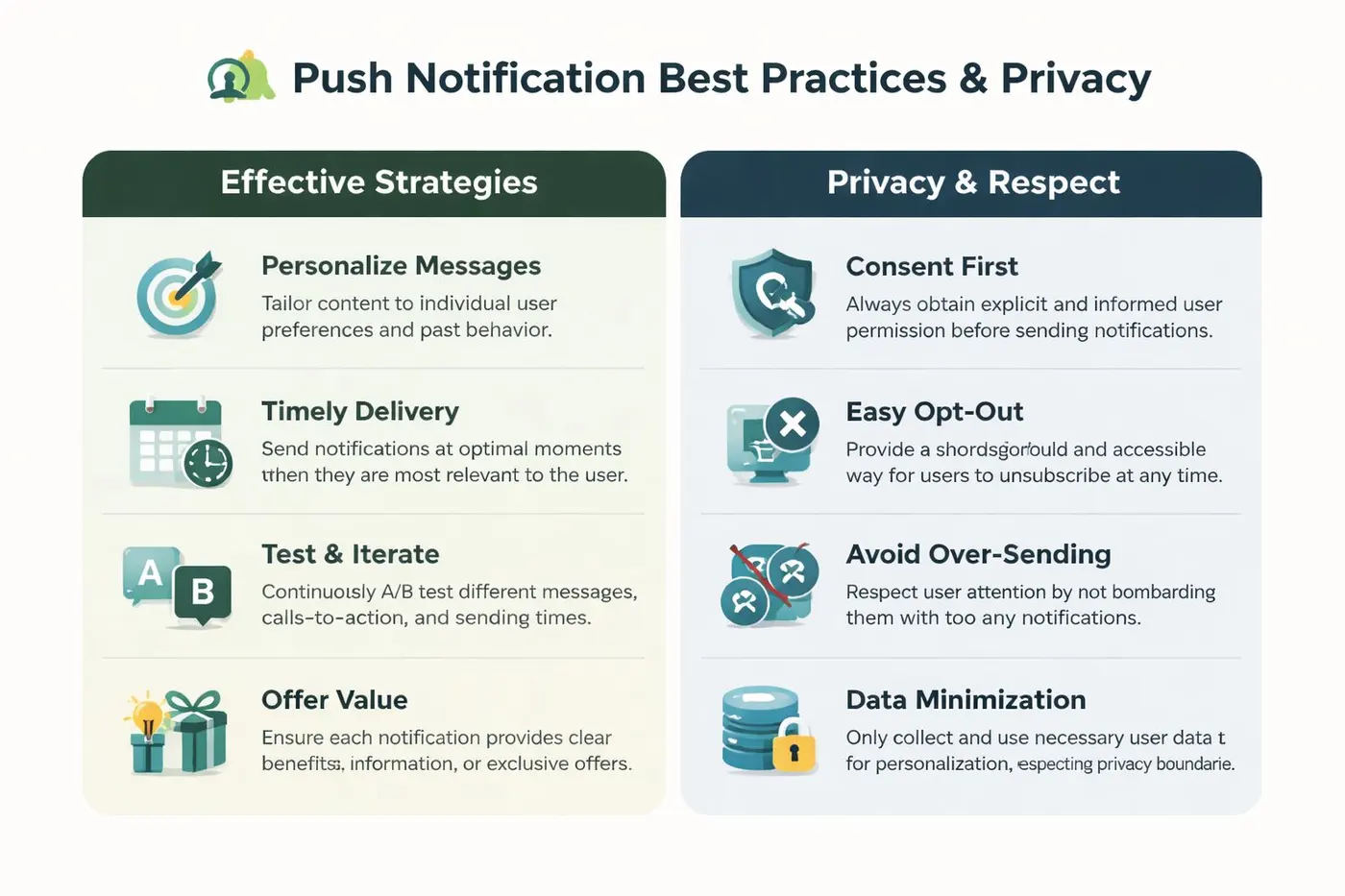
I'd reduce sustainable push practice to a short operating checklist.
-
Earn consent clearly Tell people what they're signing up for before you trigger the browser permission request.
-
Send for a reason Every notification should have a clear user benefit, not just a business objective.
-
Make opt-out easy Friction in unsubscribing doesn't create retention. It creates resentment.
-
Limit frequency If your team has to argue hard for a send, that's often a sign it shouldn't go out.
-
Use personalisation carefully Relevance helps. Overfamiliarity can feel invasive fast.
Why privacy improves results
UK teams already know the broad direction of travel. Be transparent. Limit data use to what's necessary. Match the message to the permission granted. If you need the baseline reference for how your organisation explains data handling and user rights, your own public-facing policy should be easy to find, such as Otter A/B's privacy page.
The tactical point is simple. Respect improves list quality.
When subscribers understand what they opted into, they're less likely to ignore or revoke permissions. When send cadence is controlled, each notification carries more weight. When targeting is based on real behaviour rather than lazy broadcasting, engagement stays healthier.
Treat discipline as a competitive advantage
The brands that do push well don't act like every message is free. They act like attention is scarce.
If your team is building a formal experimentation process around this channel, a practical companion read is A/B testing best practices. The value isn't in copying test ideas blindly. It's in learning how to structure experiments so you can improve responsibly rather than just send more.
Responsible push strategy usually looks less aggressive from the outside, but it tends to produce a stronger channel over time.
That's the right goal. Not maximum notifications. Maximum relevance.
If you want to test push prompts, landing pages, and post-click experiences with less engineering overhead, Otter A/B is built for that workflow. It helps teams run fast website experiments on headlines, CTAs, layouts, and revenue-driving journeys, so you can improve the parts of push strategy that determine results.
Stop guessing
Ready to start testing?
Set up your first A/B test in under five minutes. No credit card required.
- 14-day free trial
- No credit card required
- Cancel anytime