Top Online Payment Systems for Ecommerce in 2026
Find the best online payment systems for ecommerce in our 2026 guide. Compare fees, security, and platforms like Shopify. Boost conversions with our checkout
You launch a promotion, traffic looks healthy, product pages are doing their job, and carts fill up. Then checkout underperforms. Customers hesitate, fail, or disappear right when money should change hands. That's the moment many ecommerce teams realise their payment setup isn't just back-office plumbing. It's part of the conversion path.
For UK merchants, that decision has become harder and more important. Shoppers don't all want the same method. Some want cards. Some expect Apple Pay or Google Pay. Some are comfortable paying straight from their bank. If your stack doesn't match the customer, the sale can stall even when everything else on the site is working.
The right way to evaluate online payment systems for ecommerce isn't to ask which provider is “best”. It's to ask which payment mix gives your store the best balance of conversion, average order value, operational simplicity, and customer trust. That's the framework that matters in practice, especially when you're making your first serious platform or provider decision.
Why Your Checkout Page Is Leaking Revenue
A familiar pattern shows up in almost every store audit. Product discovery is fine. Add-to-cart rate looks acceptable. Then the last step underperforms, and the team starts talking about “cart abandonment” as if it's a generic ecommerce tax.
Usually, it isn't generic. It's specific.
A customer reaches checkout on mobile, sees a long card form, can't be bothered to fetch their wallet, and leaves. Another customer is ready to buy but doesn't trust an unfamiliar payment flow. A third hits a failed authentication prompt, retries, and gives up. None of those failures are caused by the product. They're caused by payment friction.
That's why I treat payments as part of conversion optimisation, not as a finance-only decision. If your team is already analysing drop-off points in the funnel, the payment layer belongs in that review just as much as page speed, copy, and form design. A broader look at ecommerce conversion funnel leaks usually makes this obvious very quickly.
What checkout friction looks like in the real world
The revenue leak rarely announces itself as “your gateway is wrong”. It shows up in smaller signals:
- Too much effort: Mobile users have to type card details manually.
- Too little choice: The shopper's preferred method isn't available.
- Too much uncertainty: Security prompts feel abrupt or poorly explained.
- Too many moving parts: Redirects, reloads, and errors break momentum.
Practical rule: If a customer is ready to pay, the checkout should remove decisions, not add new ones.
The mistake many first-time merchants make is choosing a provider from a feature list alone. They compare fees, skim integrations, and stop there. But a payment system shapes the customer experience at the most sensitive point of the journey. It affects whether the order completes, how trustworthy the brand feels, and how easy the next purchase will be.
The shift that matters
The useful question isn't “How do I accept payments online?” It's “Which payment experience fits my customers, my device mix, and my basket profile?”
That shift changes how you choose everything that follows. It changes which methods you offer, how you rank them, what you test, and how you measure success.
Decoding the Jargon How Money Moves Online
Payment terminology puts a lot of merchants off because it sounds more technical than it needs to be. The easiest way to understand it is to stop thinking like a systems architect and start thinking like a restaurant owner.
In that model, the payment gateway is the waiter. It takes the customer's order and carries it safely to the back. The payment processor is the kitchen. It turns the request into something the rest of the operation can act on. The issuing bank is the customer's side of the transaction, deciding whether the card or payment source can approve it. The acquiring side receives the approved transaction for the merchant. Settlement is the point where the money lands.
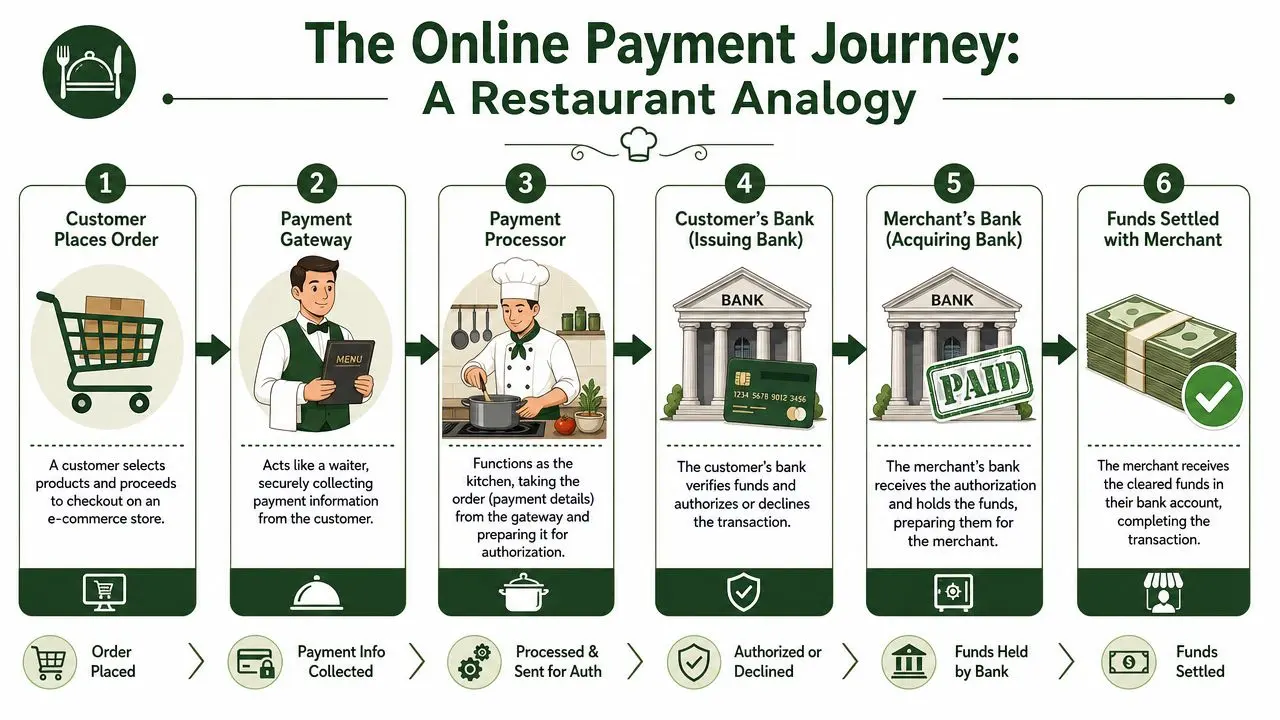
The six-step payment journey
When a customer clicks pay, this is what happens behind the scenes:
-
The order is submitted
The customer confirms the purchase and enters or selects a payment method. -
The gateway captures payment details securely
This is the customer-facing layer. It's what your checkout uses to collect card or wallet information. -
The processor routes the transaction for authorisation
The request is formatted, checked, and sent through the relevant networks. -
The customer's bank approves or declines
The issuer checks available funds, fraud signals, and authentication outcomes. -
The merchant side receives the authorisation
Approval comes back through the chain so the order can proceed. -
Funds settle later
Authorisation and settlement aren't the same thing. The customer may see the payment as approved before the merchant receives cleared funds.
Why this architecture exists
This split system can feel overly complex until you remember the job it has to do. The front end has to stay simple for the customer. The back end has to handle security, routing, authorisation, and reconciliation without slowing the experience down.
UK payments architecture is designed this way for a reason. The industry view reflected in the supporting material is that e-commerce payment methods need to complete authorisation, risk checks, and routing in milliseconds to reduce abandonment. That's why modern stacks separate the gateway, processor, acquirer, and issuer for parallel handling, as described in this payment architecture and workflow overview.
A smooth checkout page often depends less on what the customer sees and more on how well the invisible systems coordinate behind it.
The terms merchants actually need to know
You don't need to memorise every payments acronym. You do need a working grasp of the pieces that affect your decision:
- Gateway: The secure layer that collects payment details.
- Processor: The service that communicates transaction requests through payment rails.
- Acquirer: The merchant-side banking relationship that accepts card payments.
- Issuer: The customer's bank or card provider.
- Merchant account: The account structure used to receive payment funds, whether directly or through a platform arrangement.
- Settlement: The transfer of approved funds into the merchant's account.
What this means for implementation
If you're choosing between providers, don't just compare logos and fees. Ask what parts of the chain they own and what parts they outsource. An all-in-one platform can simplify setup and support. A more modular arrangement can give you control, method flexibility, or negotiating power later.
That doesn't mean one model is always better. It means the architecture affects your customer experience, your reporting, and your ability to fix problems quickly when something breaks.
Cards Wallets BNPL and Beyond
The most useful payment stack isn't the one with the longest list of methods. It's the one that matches how your customers want to pay.
That's especially true in the UK, where online behaviour is mixed rather than uniform. Globally, mobile wallets accounted for roughly half of all e-commerce payment transactions in 2024, while their share was projected to grow at an 18.1% CAGR through 2030. But UK behaviour still includes strong card usage, with around 30% of UK online shoppers using debit cards in 2020, according to Statista's payment method comparison. That combination matters. If you only optimise for wallets, you'll miss card-first shoppers. If you stay card-only, you'll create friction for mobile users who expect faster checkout.
Payment methods aren't interchangeable
Each payment method brings a different mix of trust, convenience, cost, and integration complexity.
Cards remain the baseline. They're familiar, widely understood, and still expected by nearly every shopper. The downside is that manual entry creates more friction than stored credentials or wallet-based authentication, especially on mobile.
Digital wallets such as Apple Pay and Google Pay shine when speed matters. They reduce typing, often feel more secure to the shopper, and work particularly well for phone-led sessions. If mobile is a large share of your traffic, wallets usually deserve stronger prominence than they get.
BNPL can help in categories where hesitation comes from affordability rather than intent. Fashion, furniture, beauty bundles, and higher-ticket impulse purchases often benefit from giving shoppers a way to spread payment. The trade-off is operational. BNPL adds another provider relationship, another customer support edge case, and another layer of checkout presentation to manage.
Open banking and account-to-account payments are becoming much harder to ignore in the UK. The Open Banking Implementation Entity reported 11.7 million active open banking users in March 2025, up from 9.7 million in March 2024, with 768 million payments initiated in 2024 and payment values of £29.4 billion, as summarised in this UK ecommerce payment systems overview. For merchants, that makes open banking more than a niche option. It becomes a serious candidate for use cases where bank-based payment feels natural, particularly on larger baskets or where fees matter.
Payment Method Comparison for UK Ecommerce
| Method | Typical Customer | Conversion Impact | Average Fee Range |
|---|---|---|---|
| Cards | Broadest audience, including shoppers who expect standard checkout | Strong baseline, but friction rises on mobile if manual entry is required | Varies by provider and pricing model |
| Digital wallets | Mobile-first shoppers, repeat buyers, convenience-led customers | Often strong where speed and low-friction authentication matter | Varies by provider and wallet setup |
| BNPL | Shoppers considering larger or discretionary purchases | Can help where payment flexibility reduces hesitation | Usually higher complexity and provider-dependent costs |
| Open banking | Fee-sensitive merchants, higher-value orders, customers comfortable with bank authorisation | Can perform well in the right use case, but presentation and trust messaging matter | Varies by provider and implementation model |
What usually works by use case
A useful way to think about method choice is by basket and context.
- Low-friction mobile checkout: Prioritise wallets and keep cards available.
- Desktop or research-heavy purchases: Cards often remain central, with wallets as a convenience option.
- Higher average order value: Test BNPL and open banking alongside cards.
- Repeat purchase businesses: Favour methods that reduce re-entry and feel familiar on return visits.
The right payment mix is rarely “more methods”. It's the shortest list that covers how your best customers prefer to buy.
For a first implementation, most UK stores should start with a strong card experience, visible wallet support, and a deliberate decision on whether open banking or BNPL earns a place based on product type and basket economics.
Understanding the True Cost and Staying Secure
Most merchants compare payment systems by headline transaction pricing and stop too early. That's understandable, because pricing pages are often designed to look simple while hiding the parts that create complexity later.
The first distinction to understand is blended pricing versus Interchange++. Blended pricing packages fees into a single easier-to-read rate. It's simpler to forecast and easier for smaller teams to manage. Interchange++ exposes the underlying fee components more clearly, which can offer more control, but it also makes billing harder to interpret unless someone on the team actively reviews payment data.
What “cost” actually includes
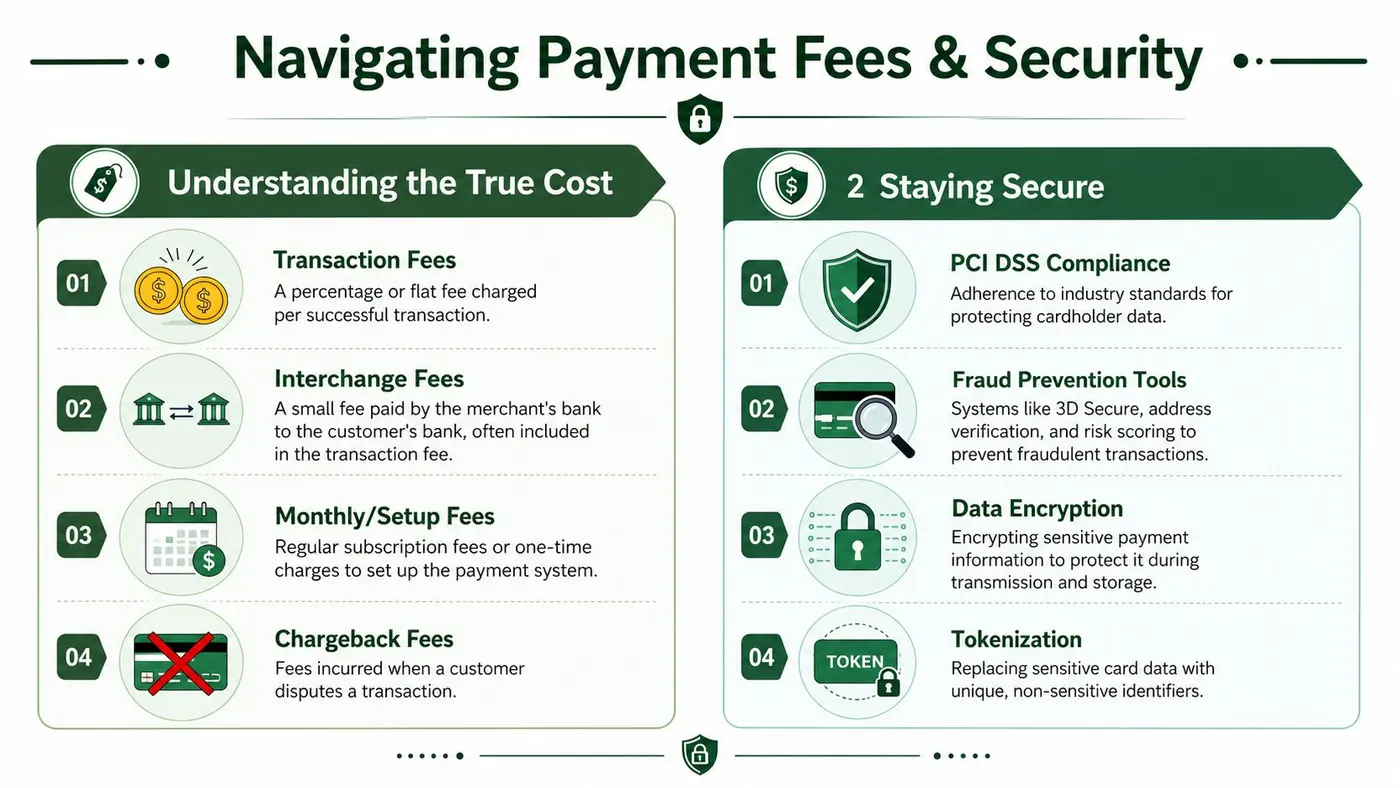
Your real payment cost usually includes more than the visible transaction fee.
- Transaction charges: The cost taken on successful payments.
- Monthly or platform fees: Common with more custom or enterprise-oriented setups.
- Chargeback fees: Relevant if your category attracts disputes.
- Operational cost: Time spent reconciling, handling failed payments, and supporting customers through edge cases.
A provider that looks more expensive on paper can still be cheaper in practice if it improves acceptance, reduces support overhead, or gives cleaner reporting. The opposite is also true. A “cheap” provider can become expensive if failures are hard to diagnose or if reconciliation turns into a monthly headache.
Security that actually matters to merchants
Most merchants don't need to become PCI specialists, but they do need to understand what good security looks like operationally.
Start with the customer-facing basics. Tokenisation, encryption, and fraud controls matter because they reduce the amount of sensitive data your business touches directly. That lowers risk and usually simplifies compliance. Strong checkout design also matters. Abrupt security challenges can protect the transaction while still hurting conversion if they feel confusing or poorly timed.
The infrastructure underneath matters just as much. Modern payment systems often use immutable ledgers and idempotent request handling so retries don't create duplicate charges and every payment remains reconcilable, especially during traffic spikes or provider timeouts. The technical rationale is explained well in this payment system design guide.
Security lens: The safest payment setup isn't just the one that blocks fraud. It's the one that keeps records clean when something fails.
One overlooked risk inside your own stack
A lot of payment security work fails outside the checkout itself. API keys, webhook secrets, and integration credentials often get handled casually during setup, especially in fast-moving ecommerce teams. That's where operational discipline matters. If your developers or agency partners are wiring together gateways, analytics, and order systems, it's worth reviewing these secrets management best practices so sensitive credentials don't end up scattered across scripts, shared docs, or unsecured environments.
The practical buying rule
Don't ask only, “What does this provider charge?” Ask:
- How clear is the pricing model?
- Who owns PCI scope in practice?
- How are disputes and retries handled?
- Will finance trust the reconciliation output?
- Can support staff diagnose payment issues without engineering help?
That's how you avoid choosing a provider that looks tidy in a sales demo and painful in day-to-day operation.
Connecting Payments to Your Ecommerce Platform
The payment decision changes once it meets your platform. A provider that looks perfect on a comparison site can become awkward if it fights your checkout architecture, your theme logic, or your app stack.
For most UK teams, the strategic choice is straightforward at first glance. Use the native platform payment option for speed and simplicity, or integrate a third-party gateway for greater control. In practice, the right answer depends on how much customisation you need and how important specific methods are to your customer base.
Shopify
Shopify merchants usually start with the native path because it's fast to launch and easier to support. The admin experience is cleaner, reporting is centralised, and the checkout is less likely to break because of plugin conflicts or custom logic.
The trade-off appears when you want payment methods or flows that don't fit neatly inside that default setup. If your store needs a specialised open banking option, more control over the checkout sequence, or a non-standard payment mix by market, the convenience of native setup can become a constraint. If you're already reviewing checkout friction, this guide to Shopify conversion optimisation helps frame the broader decision.
WooCommerce
WooCommerce gives you far more freedom, which is both its strength and its trap.
You can choose from a wide range of gateways, customise the payment UX, and build more bespoke flows. That flexibility is useful if your business has unusual requirements, recurring edge cases, or specific back-office systems to connect. But plugin quality varies, update conflicts are common, and support responsibility often gets spread across too many vendors.
For WooCommerce stores, I usually recommend evaluating gateways on four practical questions:
- How stable is the plugin ecosystem around it?
- How clear is the support path when payments fail?
- How much of the checkout can your team safely customise?
- How much technical debt are you creating for future changes?
Webflow and lighter front-end stacks
Webflow-led stores often rely on external ecommerce tooling or a more composable setup. That changes the evaluation. You're less likely to choose purely on merchant convenience and more likely to choose on developer fit, hosted checkout options, and how reliably the payment layer integrates with fulfilment and analytics.
Open banking becomes more relevant than many teams expect. UK consumer behaviour is moving in a way platform teams can't ignore. The Open Banking Implementation Entity reported 11.7 million active open banking users in March 2025, up from 9.7 million in March 2024, signalling a meaningful shift in payment familiarity that integration decisions now need to reflect, as discussed in the earlier source.
A payment method can be strategically right and still be the wrong implementation if your platform can't support it cleanly.
Native versus third-party in plain terms
Use native payments when you want:
- Fast launch
- Simpler support
- Lower implementation risk
- Tighter admin integration
Use third-party or modular options when you need:
- Specific payment methods
- Greater control over checkout behaviour
- Custom reporting or routing
- More flexibility across markets or business models
The best setup is the one your platform can support reliably while still giving customers the methods they expect.
How to Test and Optimise Your Payment Flow
Many companies treat checkout as fixed infrastructure. They redesign product pages, rewrite landing pages, and test banners endlessly, but the payment flow gets left alone after launch. That's a mistake.
Payment choice, hierarchy, wording, and layout all affect whether the customer finishes the order. UK market data also points in the same direction. While contactless card use is high, the best payment mix for conversion varies by device and basket size, which means merchants need to test whether cards, wallets, or bank transfers perform best for specific customer segments, as outlined in this UK payment solutions analysis.

Start with the highest-friction hypotheses
You don't need dozens of tests. You need the right ones.
The strongest early tests usually focus on payment visibility and effort reduction:
- Mobile wallet prominence: Put Apple Pay or Google Pay first on mobile and compare against a card-first layout.
- Express checkout placement: Test wallet buttons above versus below the main checkout form.
- Method grouping: Compare a busy list of payment options against a shorter, prioritised set.
- CTA wording: Test whether “Complete order” feels clearer than “Pay now” in your category.
- Trust messaging: Add concise reassurance near payment selection and see whether completion improves.
Measure more than checkout completion
A payment test can increase conversion while hurting order quality, or improve AOV while slowing first-time purchase rate. That's why the scorecard matters.
Track outcomes such as:
- Conversion rate
- Average order value
- Revenue per visitor
- Payment method share
- Failed payment rate
- Support tickets tied to checkout confusion
If your analytics setup doesn't capture these events clearly, fix that before running too many experiments. A clean measurement plan matters more than a long testing backlog. For this reason, strong conversion tracking with Google Analytics becomes foundational.
Don't optimise for the prettiest checkout. Optimise for the one that completes more profitable orders with less friction.
Segment your tests properly
The biggest miss I see is running one payment test across the whole audience and calling the result a winner. Payment preferences aren't that uniform.
Test by segments that change behaviour:
- Device type: Mobile and desktop often behave differently.
- New versus returning customers: Returning buyers may trust faster methods sooner.
- Basket size: High-value orders can react differently to BNPL or bank-based options.
- Traffic source: Paid social, branded search, and email traffic often arrive with different intent.
A store selling low-friction repeat purchases may find wallets dominate on mobile while cards remain strongest on desktop. Another store with larger baskets may discover that open banking performs well only for a narrow but valuable slice of traffic. Those are strategic findings, not cosmetic ones.
Keep the test design disciplined
Here's the practical rule. Change one meaningful thing at a time unless you're testing a genuinely different checkout concept. If you alter payment order, trust copy, button language, and layout all at once, you may find a winner but learn very little.
This walkthrough is useful if you want to see checkout experimentation ideas in action:
What not to do
Avoid three common mistakes:
-
Copying another brand's payment mix blindly
Their audience, basket profile, and traffic sources may be different. -
Adding every available method
More choice can help, but clutter can also slow decision-making. -
Ending optimisation after launch
Payment behaviour shifts. Device mix changes. Returning-customer share changes. Your checkout should evolve with that.
The best payment flow is usually tested into place, not chosen once in a planning meeting.
Your Checklist for Choosing the Right System
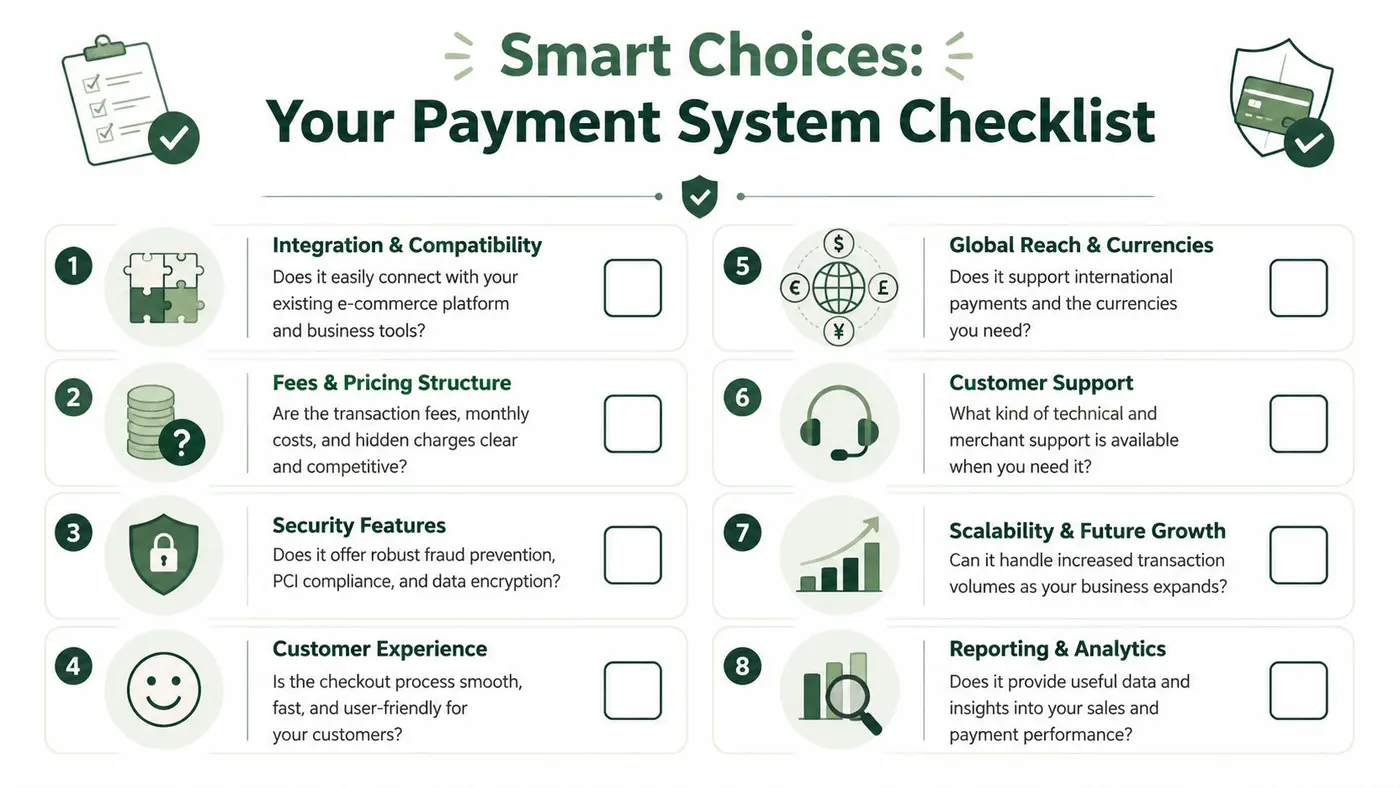
By the time you've compared providers, platforms, and payment methods, the easiest way to make a sound decision is to reduce it to a shortlist of operational questions. A good online payment system for ecommerce should fit your business model now and still make sense when order volume, customer expectations, and channel mix change.
Ask these questions before you sign
-
Does it fit your current platform cleanly?
A strong payment system should work with your existing storefront, analytics, fulfilment, and finance workflows without brittle workarounds. -
Does the payment mix match your customers? Don't choose based on provider marketing. Choose based on how your shoppers behave across mobile, desktop, first purchase, and repeat purchase journeys.
-
Will the pricing still make sense as you grow? Simple pricing can be a good starting point. But if volume increases, cost visibility and negotiating power start to matter more.
-
Can your team support it operationally?
Some setups are easy to launch and hard to troubleshoot. Ask how refunds, disputes, failed payments, and reconciliation are handled day to day. -
Does it protect trust at checkout?
Security controls should be strong without making the payment experience feel broken or suspicious. -
Can it support future methods without a rebuild?
UK payment behaviour keeps shifting. If you later want stronger wallet support or open banking options, your system shouldn't force a complete replatform.
Use the checklist by business type
Different stores should weigh the same questions differently.
A fashion brand with impulse-led mobile traffic may prioritise wallets, checkout speed, and BNPL testing. A homeware merchant with larger baskets may care more about payment flexibility and bank-based options. A lean Shopify team may value simplicity over modular control. A custom WooCommerce build may make the opposite choice and accept more complexity in exchange for flexibility.
If you want another perspective on comparing methods and provider types, Wand Websites' payment solutions guide is a useful companion read because it helps frame the broad solution categories before you narrow them to your own store.
A final decision standard
The best payment system isn't the one with the most recognisable brand or the biggest feature list. It's the one that does four jobs well:
- Lets the right customers pay their preferred way
- Keeps checkout fast and trustworthy
- Stays manageable for your team behind the scenes
- Gives you room to test and improve over time
Choose for fit, not for fashion. Payment systems are strategic when they align with customer behaviour and operational reality at the same time.
That's the standard worth using in 2026, especially in the UK market where method choice is no longer a simple cards-versus-wallets decision.
If you want to turn payment optimisation into a repeatable testing process, Otter A/B makes it easy to experiment with checkout copy, button hierarchy, layout changes, and payment method presentation without slowing the site down. It's built for teams that want to connect tests to conversion rate, AOV, and revenue, then act on the results quickly.
Stop guessing
Ready to start testing?
Set up your first A/B test in under five minutes. No credit card required.
- 14-day free trial
- No credit card required
- Cancel anytime