Website Testing Automation: What It Is and How to Start
Learn what website testing automation covers, which tests to automate, the tools to use and how to keep automated experiments from hurting UX.
Your new checkout button is getting more clicks, and the experiment dashboard looks encouraging. Then someone opens the variant on a phone: the page jumps, the payment form responds slowly, and an error message disappears before they can read it. The apparent winner may not be a better experience.
Website testing automation helps you catch those problems before you trust the conversion result. For growth and product teams, the useful question isn't whether a variant increases clicks. It's whether visitors can complete the journey reliably, quickly and accessibly, and whether your tracking records what happened.
What Website Testing Automation Covers and Why
A product-page change can pass a scripted check and still make a visit harder. Automation repeats defined checks on a site, such as whether a page loads, a form accepts input or checkout reaches the expected step. It compares the result with an expectation, then reports a mismatch for someone to investigate.
A manual tester samples a journey by hand; automation runs the same checks consistently, like a scale weighing each item on a conveyor belt. The scale can flag a difference, but a person still has to decide whether it matters.
The scale of accessibility defects is one reason to test systematically. The UK Government's 2022 to 2024 accessibility monitoring report records findings from its monitoring of public-sector websites and mobile apps, including issues that remained unresolved at retest.
What machines do well
Automation works best when a team can state what a passing result looks like:
- Repeat a journey consistently. Open a product page, select an available option, add it to the basket and proceed to checkout.
- Compare the result with an expectation. Check that the selected option, price and delivery address appear correctly.
- Record evidence. Save the failed check, browser details, screenshot and execution trace.
That evidence turns “checkout seems broken” into a repeatable failure report. Developers can inspect the same state instead of guessing which steps a visitor took.
Where judgement still matters
A script can confirm that an error message appears. It cannot reliably judge whether the wording reassures a worried customer or makes the next action clear. A screenshot comparison can flag a moved button, but it cannot determine whether the new position helps visitors understand the page.
For a useful distinction between repeatable checks and exploratory work, see 99tests' manual testing comparison.
Practical rule: Automate a stated expectation, not a vague hope that the page works.
People still need to interpret failures, explore unexpected behaviour and assess usability. They should also consider speed and accessibility when judging an experiment: a conversion increase can conceal a slower page or a harder-to-use experience. Automation can flag measurable problems, but it cannot replace human judgement about whether the experience works for visitors.
Test Types at a Glance and What Each Catches
Test type What it checks Typical trigger Run frequency Smoke test Core pages load and key links work Every deployment Each release Regression test Checkout, sign-up and forms still behave as before Code change Per pull request or daily Cross-browser test Layout and scripts in Chrome, Safari, Firefox and Edge Release candidate Weekly or per release Accessibility check Automated WCAG rule failures Each build plus a scheduled full scan Per build Performance test LCP, CLS, INP and script cost Template change or schedule Daily lab run, continuous field data Visual regression Layout or pixel differences from a baseline Design or CSS change Per pull request Experiment QA Variant renders, goals fire, no flicker Before each A/B launch Before launch, then during the runTreat these frequencies as starting points for your test plan, not universal requirements. A busy shop might schedule performance checks hourly around a campaign, while a brochure site might choose weekly checks. Match the schedule to how quickly a defect could harm visitors and how often the relevant code changes.
Who acts on a failure
Smoke tests provide a quick deployment check. If the homepage opens but the basket link leads to an error page, the release owner and developer investigate before further promotion.
A regression failure means an established expectation no longer holds, although the cause could be either a defect or an intentional product change. The developer and product owner must agree which it is before changing the test.
Cross-browser failures expose differences in rendering or browser behaviour. Front-end developers should reproduce the issue in the affected browser rather than dismissing it because their usual browser passes.
An accessibility rule failure flags a machine-checkable problem, such as an input without a programmatic label. A developer fixes the implementation, with an accessibility specialist reviewing ambiguous cases.
Checks that need interpretation
Performance failures require the engineering owner to inspect loading, rendering and interaction work. Growth teams should also check whether the slow asset belongs to the campaign rather than the application.
A visual regression failure means the current screenshot differs from the approved baseline. Designers decide whether the change is intended, while developers investigate unexpected movement, clipping or missing content.
Experiment QA failures belong jointly to the marketer configuring the experiment and the engineer responsible for delivery. A missing goal might come from an incorrect configuration, a consent condition or an application event that never fired.
Don't start by implementing every row. Pick the three test types that best protect your most valuable journey, then extend coverage when a specific risk justifies the maintenance work.
How One Automated Test Runs, Step by Step
Start with a checkout journey that your team understands. Use a sandbox payment method and controlled product data so the test doesn't charge real customers, consume live stock or send misleading fulfilment requests.
The process connects a written expectation to a result someone can investigate.
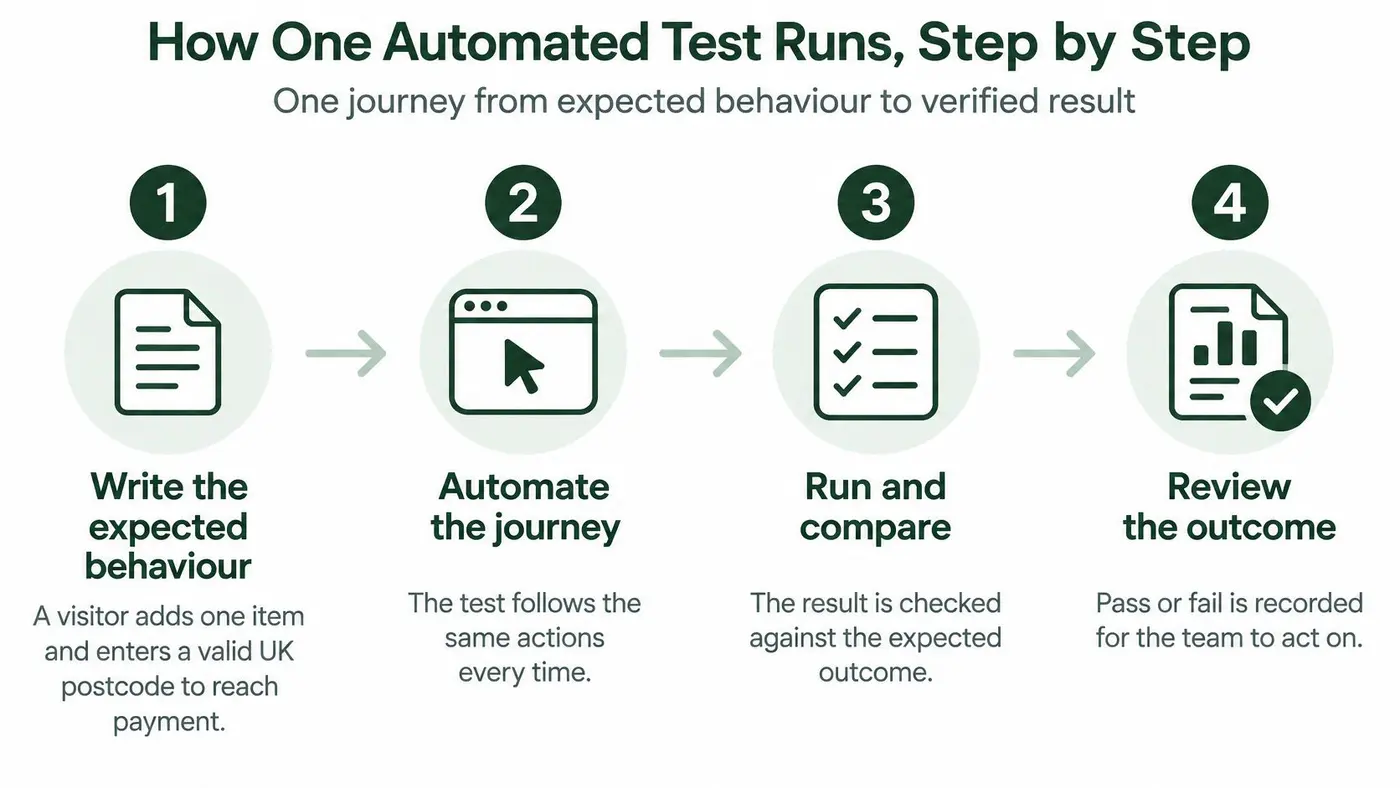
From expected behaviour to evidence
-
Write the expected behaviour. For example, a visitor adds an available item, enters a valid UK postcode and reaches payment with the correct delivery charge. Specify the starting state and expected result so the test doesn't depend on assumptions hidden in someone's head.
-
Script the journey. Use Playwright, Selenium or Cypress to perform the actions, locating controls through accessible roles or dedicated data attributes rather than their position on the page. Wait for observable conditions, such as a delivery option becoming available, instead of adding fixed pauses.
-
Run representative browser configurations. Include desktop and actual mobile browsers, not just a narrow desktop window. Record browser, viewport, consent state and assigned variant so a failure can be reproduced under the same conditions.
-
Assert the outcome, not merely the click. UK retail figures cited by Designstack's conversion optimisation guide put mobile basket abandonment at 76%, compared with 67% on computers, reinforcing the need to validate the complete mobile checkout. Check the order total and confirmation, reconcile purchase and revenue events with the sandbox order, and verify that currency and variant identifiers survive redirects, retries, consent flows and payment callbacks.
-
Report enough detail to reproduce the failure. Attach a screenshot, console errors, relevant network responses and the failed assertion, while redacting personal information and credentials. Route the report to a named owner rather than leaving it in a dashboard nobody checks.
-
Retest the fix under the failed conditions. Re-run the original case and neighbouring cases, such as a rejected payment followed by a successful retry. Check that the repair hasn't created duplicate purchase events or changed attribution.
What a passing run means
Say a variant makes the add-to-cart button more prominent. More visitors might use it, but a purchase event could lose its variant identifier when the payment provider redirects them back. If the team evaluates only basket additions, it could select a variant whose revenue measurement is incomplete.
A passing run proves that the specified assertions held under the tested conditions. It doesn't prove every payment provider, browser state or visitor journey works, nor does it establish that the experiment improves conversion. Keep technical verification separate from the statistical decision.
Tools and Architectures That Fit Each Test Job
Tool category Example tools Strength Limitation Browser automation frameworks Playwright, Selenium, Cypress Scripted user journeys in real browsers Selectors and scripts need maintenance when interfaces change Accessibility engines axe, WAVE Fast automated WCAG rule checks Detect only part of real accessibility issues Performance measurement Lighthouse, WebPageTest, CrUX field data Lab and real-user Core Web Vitals Lab conditions differ from visitor conditions Visual regression tools Screenshot diff tools Catch unintended layout changes Dynamic content causes false alarms Experimentation platforms Otter A/B and other visual testing tools Variant delivery, traffic splits and goal tracking Snippet order and tracking need QAThese categories solve different problems. A browser framework can confirm that checkout reaches confirmation, but it doesn't automatically provide meaningful performance budgets or a complete accessibility assessment. An experimentation platform assigns experiences and measures outcomes, but that isn't equivalent to verifying the application.
Build a pipeline, not a collection of dashboards
A continuous integration pipeline, usually shortened to CI, starts checks when someone proposes or deploys a change. A runner prepares the environment, executes the scripts and stores results against the relevant code revision.
Keep the surrounding architecture simple:
- Controlled environment. Use predictable accounts, products and payment responses, with secrets stored outside the test scripts.
- Shared results. Publish traces, screenshots and trends where developers and product owners can access them.
- Actionable alerts. Send failures to Slack or email with the affected journey, release and owner.
Separate release-blocking failures from advisory findings. A broken payment journey should stop deployment; a small screenshot difference may need design review without blocking unrelated work.
For developers assembling that workflow, our front-end developer tools guide is a useful companion for considering how testing fits alongside implementation and debugging.
Understand what a pass covers
The UK university-homepage comparison described in the accessibility monitoring reference reported markedly different tool results: TAW flagged problems on 100% of pages, while WAVE found errors on 74.2%.
The practical lesson isn't to vote between tools. Define which rules each engine checks, what page states it reaches and which findings require human confirmation. A checker that examines the initial page won't necessarily inspect an error summary revealed only after a failed submission.
A green dashboard means the configured checks passed. It doesn't mean every relevant question was asked.
Choose one tool per job before adding a second. Add another only when you can name the coverage gap it addresses, who will interpret its results and how the team will maintain it.
Running Automated Experiments Without Harming Speed
A variant can win on conversions and still make the site slower. Injected JavaScript, larger images, or late-loading banners may delay content or make controls harder to use. Check mobile results as well as aggregate results, since a gain across all visitors can hide a worse experience on a particular device.
Use Core Web Vitals as a starting point for comparing control and variant: LCP below 2.5 seconds, CLS below 0.1, and INP below 200 milliseconds at the 75th percentile, according to DebugBear's government website performance benchmark.
Metric Good threshold What experiment code can do Check before launch LCP Below 2.5 seconds Delay hero images or block rendering Compare control and variant by device CLS Below 0.1 Shift content with banners or swapped elements Record shifts during variant rendering INP Below 200 milliseconds Add heavy handlers to buttons and fields Exercise CTA and checkout interactions Script cost Set a baseline-relative budget for extra kilobytes and requests Add snippets and variant assets Compare first-party and third-party requestsThese thresholds don't guarantee that a variant is as fast as the control. Set a regression allowance against the control and record the reason for any accepted difference.
This visual summarises the experiment components to inspect.
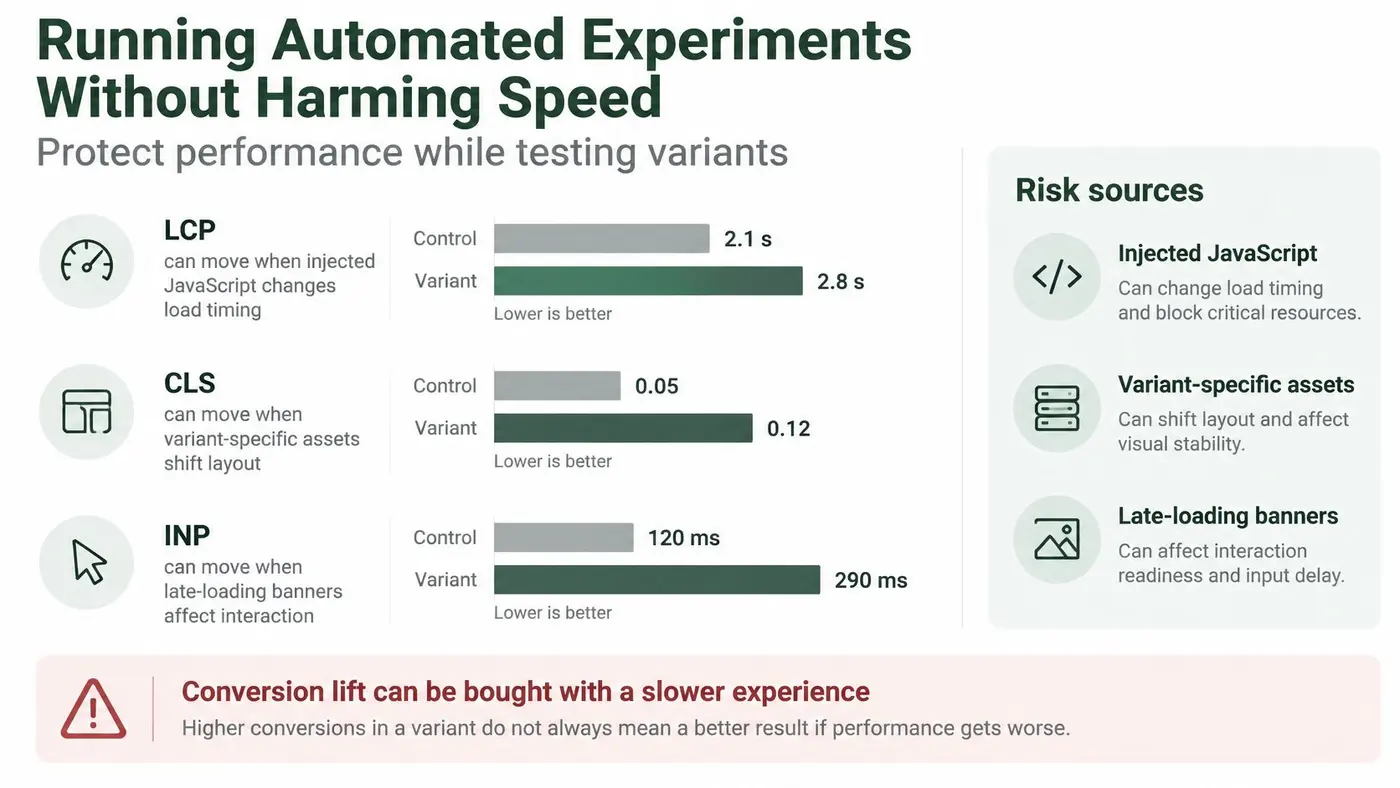
Checks before and during the experiment
-
Check traffic sufficiency before launch. Use a sample size calculator to check whether the site has enough traffic to evaluate the result. Set the primary outcome and stopping approach before launch, so early fluctuations don't drive the decision.
-
Check when the variant appears. On Shopify, most tests change the page in place with JavaScript. Inspect the initial paint, when the variant is applied, and whether the page jumps between versions. The built-in anti-flicker behavior should prevent a visible jump without hiding usable content for too long.
-
Exercise representative devices and networks. Test mobile and desktop with representative throttling, then use the navigation, forms, and checkout. A page-load score alone can miss expensive event handlers that slow down interaction.
-
Compare control and variants side by side. Use repeatable lab measurements to diagnose differences and variant-labelled field measurements to understand visitor experience. Keep device and consent state visible in the analysis, and use this performance monitoring guide to plan ongoing checks.
-
Stop harmful variants. A variant that raises clicks but reduces completed purchases, or breaches the agreed performance budget, needs review and may need to be stopped. When choosing outcomes, include testing campaigns beyond clicks and leads, such as downstream actions that reflect whether visitors completed the intended task.
Make the launch decision explicit
Set up the test by naming it, setting the target URL, defining variants, adding DOM changes, and choosing conversion goals. Include a performance owner and a clear rollback decision alongside those choices.
A variant earns its place when it improves the intended outcome without breaching the performance budget. If the results aren't sufficient to judge either point, keep the uncertainty visible rather than declaring the experience safe.
Testing Accessibility Alongside Conversion Experiments
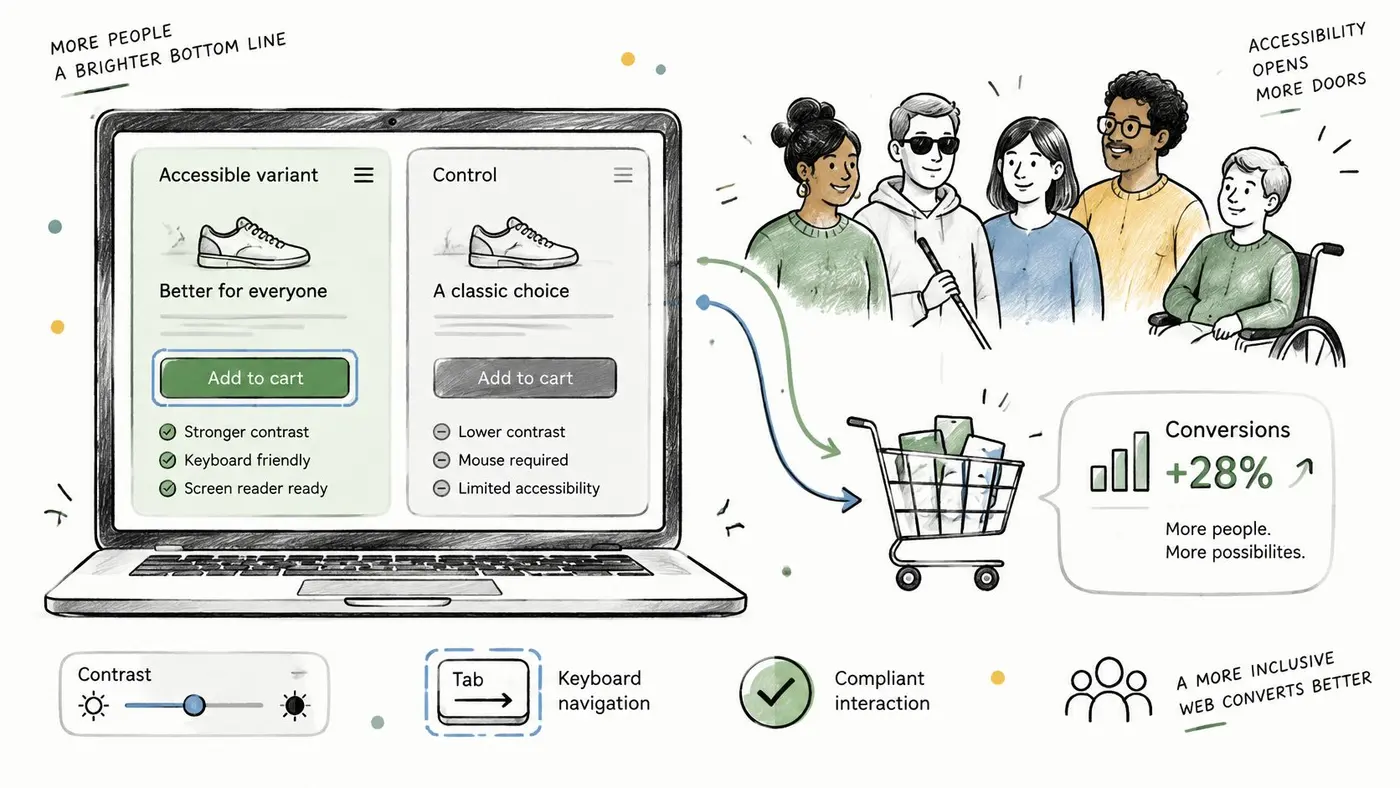
A clearer label or a more useful error message may help more visitors complete a task. Treat that possibility as a hypothesis, not a guaranteed conversion lift.
The UK Click-Away Pound study from 2019, cited in Musemind's conversion statistics overview, found that 69% of disabled consumers abandoned websites they found difficult to use, representing an estimated £17.1 billion in lost annual online sales. This is an older national estimate, not a current forecast or a prediction of your site's recoverable revenue.
Verify the changed components
Check How to automate or verify Outcome to measure Keyboard-only pass Script Tab navigation, then manually verify visible focus on CTAs and fields Completed purchases Screen-reader CTA labels Assert accessible names and manually compare clearer versus conventional wording Add-to-cart and checkout completion Form validation messages Trigger errors, inspect associations and verify announcements with a screen reader Completed orders and support contacts Enlarged content Automate enlarged-view screenshots, then inspect clipping and horizontal scrolling Abandonment by device Consent controls Script keyboard operation and manually check focus order and dismissal Consent rate and revenue from consenting visitorsSegment outcomes by device and browser. Don't infer disability or assistive-technology use from browsing behaviour. For direct evidence about those experiences, recruit participants who use assistive technology.
Automated checks can confirm that a control has an accessible name or that an error region exists. They cannot establish whether an announcement arrives at the right moment, focus remains understandable, or the wording explains how to recover. A person must check those interactions.
Use this video as a companion to hands-on checks, not as verification of your own variants.
Experiment safeguard: Don't use a known accessibility defect as the control condition just to measure whether fixing it helps.
Compare alternatives that both meet your accessibility requirements. For example, test payment error messages that identify the affected field, while varying how clearly they explain the correction.
Measure completed orders and support contacts, and check whether keyboard and screen-reader users can recover. That gives the team a fuller basis for deciding which version works better.
Build Your First Automated Test Plan
Keep the initial scope small enough that someone can investigate every failure. Choose a journey your team owns, prepare predictable test data and assign responsibility before scheduling unattended runs.
Use this checklist to turn that decision into working coverage.
- Choose the valuable journey. Ask the product owner to select checkout, sign-up or enquiry based on business importance.
- Write the expected outcome. Have QA and product agree a plain-language result with an observable success condition.
- Add a deployment smoke test. Make the release owner responsible for investigating failures before promotion continues.
- Add regression and mobile coverage. Assign the relevant developer to maintain the journey and browser configuration.
- Schedule accessibility checks. Run rule checks per build and give changed-component manual review to a named reviewer.
- Set variant performance budgets. Ask the front-end owner to approve loading, stability and interaction checks before exposure.
- Remove unreliable test behaviour. Replace fixed waits, use stable selectors and quarantine flaky cases with a repair owner.
- Verify and record fixes. Have QA reproduce the original conditions and log evidence of closure.
Keep the first scope manageable
Treat each checklist item as a focused setup session, not a commitment to automate the whole site. For environment preparation, use our staging and configuration guide to structure the separation between test preparation and live exposure.
This compact checklist keeps the initial implementation centred on a repeatable journey.
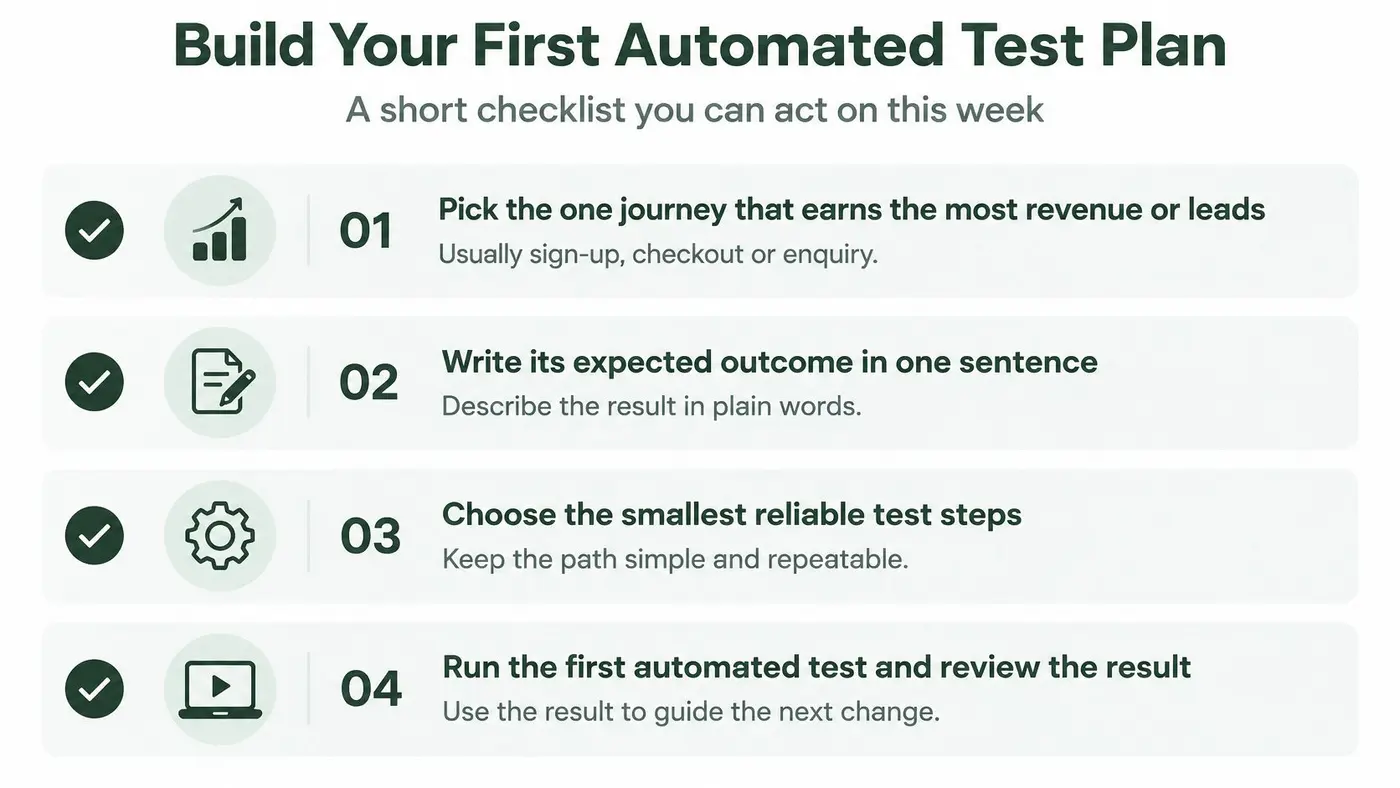
Before accepting a winner, require evidence of confirmed exposure, funnel integrity and tracking completeness. Check that visitors received the intended experience, downstream steps remained usable and recorded outcomes match the underlying transaction or lead records.
Write a one-page first test plan this week. Include the journey, expected outcome, selected test types, performance budget, evidence location and person who acts on each failure.
Otter A/B helps teams create variants, allocate traffic and track conversion goals, with an automatic experiment health checklist on every results page to highlight whether the numbers are safe to trust and what needs fixing. Visit Otter A/B to plan your first experiment and use the free calculators, generators and guides, available without an account, to prepare your checks before launch.
Stop guessing
Ready to start testing?
Set up your first A/B test in under five minutes. No credit card required.
- 14-day free trial
- No credit card required
- Cancel anytime