Master Experimentation: Reporting Best Practices
Master experimentation with 10 reporting best practices. Define KPIs, use confidence intervals, & create reports that drive action & build trust.

You launched the experiment, watched the dashboard for days, and now the result looks clear enough to call. Then the awkward part starts. Someone asks whether the lift is real, someone else wants to know if it matters commercially, and finance wants numbers they can trust before anyone ships a change.
That's where most experimentation programmes wobble. The test itself isn't the hard part. The hard part is turning noisy data into a report that gives stakeholders enough confidence to act. Weak reporting creates three predictable problems. Teams overstate small wins, under-explain uncertainty, or bury the decision under too much statistical detail.
That matters more than many teams realise. In the UK, management quality has improved broadly, but KPI use still lagged as the lowest-scoring area at 0.42 on a 0-to-1 scale, even as overall management scores rose from 0.49 in 2020 to 0.55 in 2023, according to the ONS review of UK management practices. The same publication notes that best practice is to present KPIs as progress narratives, not isolated figures. That's exactly the standard experimentation reports should meet.
Good reporting best practices don't just prove statistical competence. They help commercial teams make faster, cleaner decisions. They reduce rework, stop endless relitigation, and create a usable record of what your team has learned.
Below are 10 reporting best practices that make test results easier to defend, easier to understand, and much more likely to drive action.
1. Define Clear Success Metrics and KPIs Before Testing
Monday's test readout goes sideways fast when nobody agreed on the scorecard before launch. Growth is citing click-through rate, product is focused on activation, and finance wants to know whether revenue moved at all. At that point, the report is no longer evaluating a hypothesis. It is refereeing competing interpretations.
Set the reporting frame before the experiment starts. Choose one primary KPI that determines the decision, a small set of secondary metrics that add context, and guardrails that can block rollout if the variant creates side effects. That discipline does more than tidy up the final slide deck. It prevents teams from promoting whichever metric happens to look best after the fact.
For a Shopify checkout test, completed purchase is often the primary KPI. Revenue per visitor or average order value can sit underneath it as secondary context, while refund rate or checkout abandonment works as guardrails. For SaaS onboarding, activation, retained activation, or qualified sign-up rate usually deserves priority over micro-conversions such as button clicks.
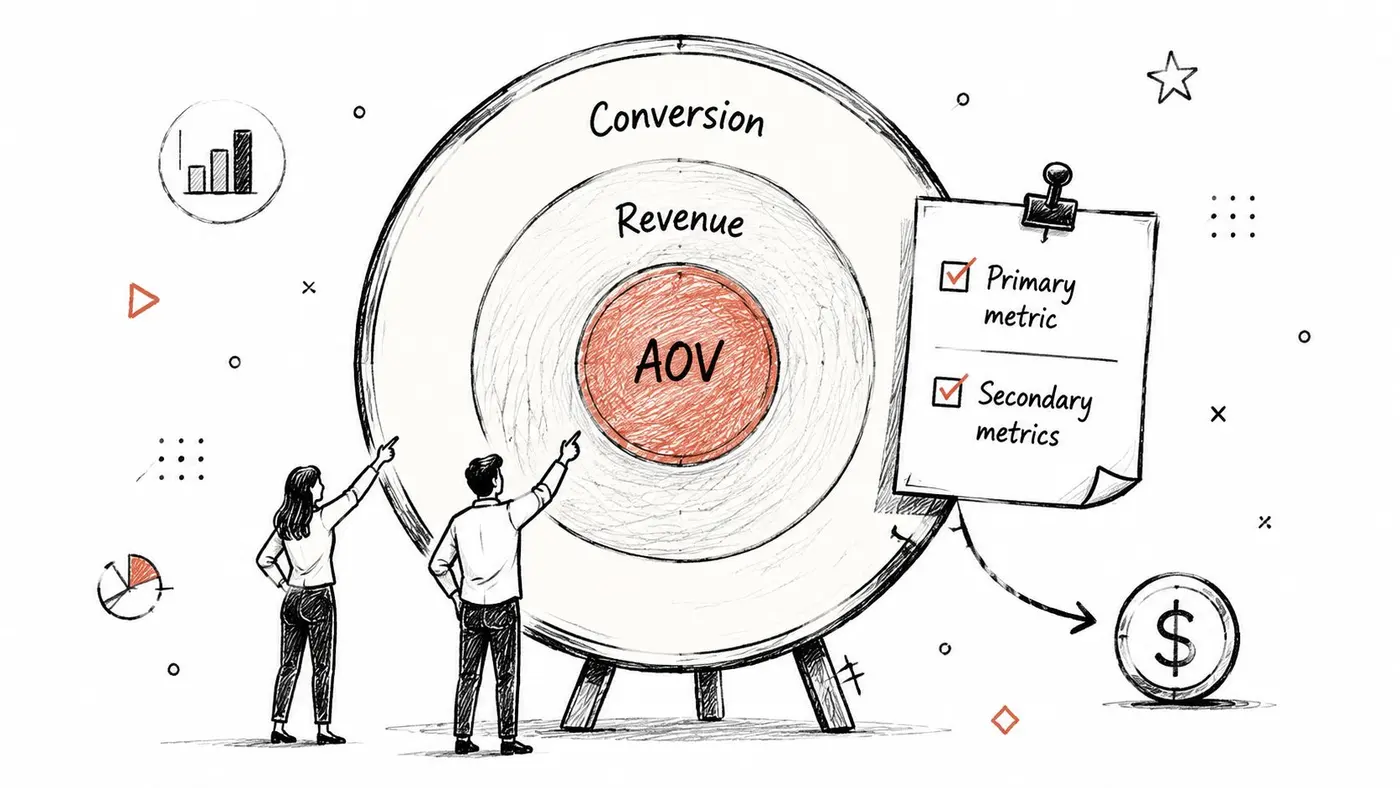
What to lock before launch
Capture these in the test brief and get sign-off before traffic starts:
- Primary KPI: The single metric that decides whether the test succeeded.
- Secondary KPIs: One or two supporting metrics that explain commercial impact or behavioural changes.
- Guardrails: Metrics that can veto rollout if they deteriorate, such as refund rate, cancellation rate, or checkout abandonment.
- Decision rule: The condition for implement, continue, or archive.
- Analysis note: Whether results will be reported at user level, session level, or order level, so nobody changes the denominator later.
One more reporting habit improves this section immediately. Write the metric definitions in plain English, not just shorthand in a dashboard. If a stakeholder cannot tell whether “conversion” means click-to-cart, checkout completion, or first purchase, the report is carrying hidden ambiguity into the decision. Teams that need a refresher on how uncertainty should be explained around those metrics can use this confidence interval explainer for A/B test reporting as supporting context.
Practical rule: If the primary KPI changes after launch, label the result exploratory in the report.
The trade-off is real. Narrowing the report to one primary KPI reduces storytelling freedom, but it improves decision quality. A weak report says, “Variant B improved engagement.” A useful report says, “The test was designed to improve completed purchases. Revenue per visitor was the secondary commercial check. Engagement metrics are included for diagnosis only.” That wording makes the decision criteria auditable, which becomes even more important once you start managing multiple experiments and portfolio-level error rates.
2. Report Statistical Significance with Confidence Intervals, Not Just P-Values
A p-value on its own answers the wrong question for most stakeholders. It doesn't tell them how large the effect probably is, whether the range is commercially meaningful, or whether the result is still too uncertain to ship.
That's why better reporting best practices pair significance with an effect estimate and a confidence interval. If you say a variant is “significant” but don't show the plausible range of impact, you're forcing readers to trust your interpretation rather than inspect the uncertainty themselves.
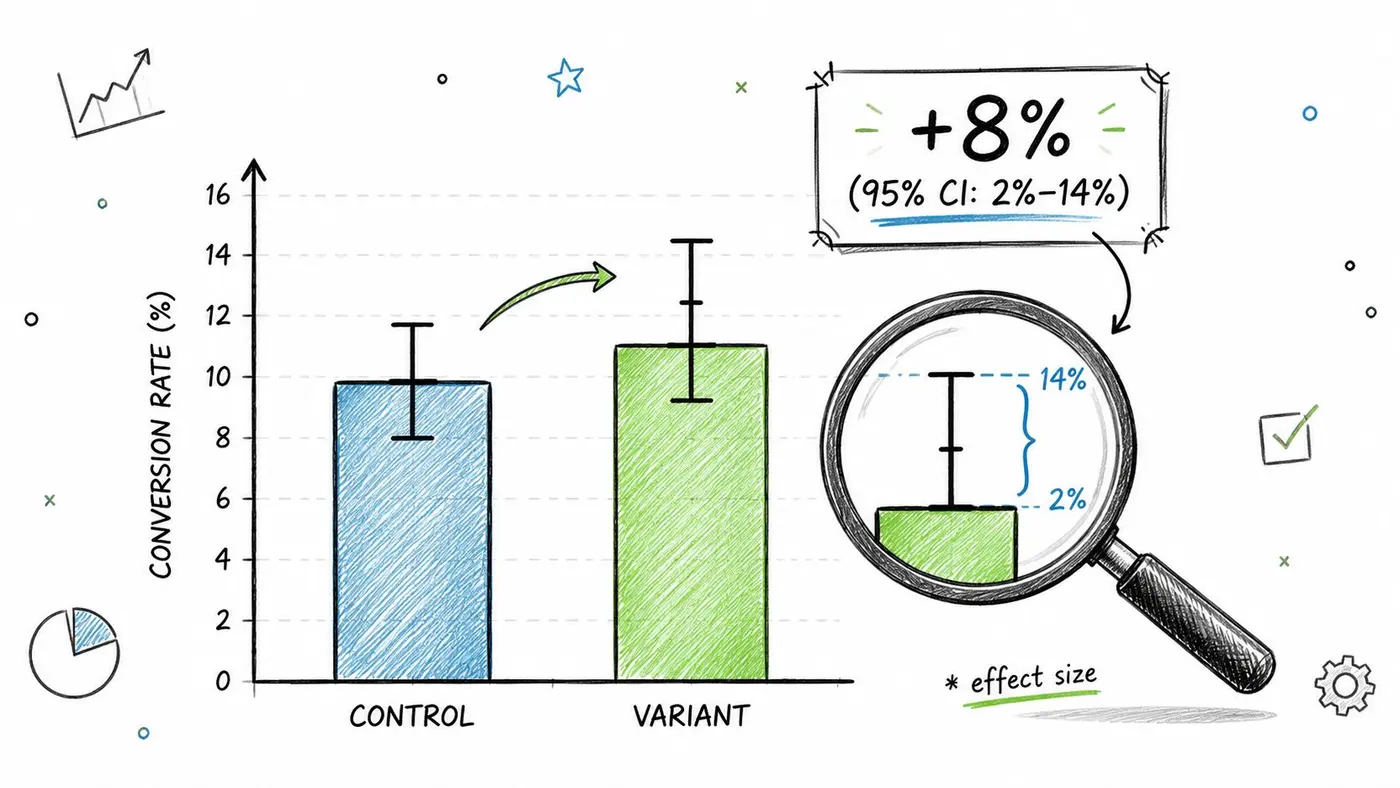
What a better result line looks like
A report becomes much stronger when the result line answers three things at once:
- Direction: Which variant appears better.
- Magnitude: How big the observed difference is.
- Uncertainty: How wide the plausible range remains.
If your team needs a plain-English refresher, this confidence interval explainer from Otter A/B is a useful reference for internal stakeholders who understand testing conceptually but struggle to interpret intervals in practice.
The communication benefit is huge in low-traffic environments. UK marketing teams say limited traffic is their biggest barrier to statistically meaningful A/B testing, with 51% naming traffic as the primary challenge and 47% citing resource constraints in the Ascend2 A/B testing in marketing report. When traffic is constrained, uncertainty is often the story. Your report should show that openly rather than hiding behind a binary “winner”.
Report the interval because that's where the business conversation lives. A tiny positive estimate with a wide range isn't the same as a reliable commercial gain.
This also helps when results are awkward. If the interval still spans trivial uplift and meaningful downside, you don't have enough clarity yet. Saying that plainly is a strength, not a weakness.
3. Separate Intention-to-Treat and Per-Protocol Analysis in Reports
Most experiment reports mix exposure and engagement, then present a single result as if there's no distinction. That creates confusion fast. If users were assigned to a variant but didn't receive the meaningful part of the treatment, the report needs to say so.
Intention-to-treat, usually shortened to ITT, keeps everyone assigned to the variant in the analysis. That makes it the better default for business reporting because it reflects what happens in practical conditions, including missed exposures, partial renders, accidental drop-off, and operational messiness. Per-protocol narrows the lens to users who received the treatment as intended.
Why both views matter
An e-commerce example makes this obvious. Suppose you test a new checkout step. ITT includes everyone routed into that experience, including users who bounced before the new module loaded fully. Per-protocol includes only users who reached and interacted with that module. Those are answering different questions.
Use them like this:
- ITT for rollout decisions: It estimates likely impact after release in normal conditions.
- Per-protocol for diagnosis: It helps you see what the treatment can do when delivery works as designed.
- Explicit exclusions: Any removal must be documented before or alongside analysis, not invented after the result appears.
In practice, this often surfaces implementation issues. A Webflow landing page may show weak ITT performance, but per-protocol suggests strong response among users who saw the revised CTA block. That doesn't mean the test “won”. It means the experience or tracking path may need fixing before you rerun.
Operational advice: Track “assigned to variant” and “experienced treatment” as separate events. If you only log one, you'll never know whether the problem was persuasion or delivery.
This is one of the most underused reporting best practices because it forces uncomfortable honesty. But that's the point. A report should distinguish between “the idea didn't work” and “the treatment wasn't consistently delivered”.
4. Report Both Relative Lift and Absolute Difference for Clarity
Relative lift is persuasive. Absolute difference is grounding. You need both.
Teams love saying a variant drove a double-digit uplift because it sounds decisive. But decision-makers usually need to know what changed in raw terms and whether that change justifies implementation effort, design debt, engineering time, or follow-on risk. A move from 2.0% to 2.4% and a move from 20% to 24% are both a 20% relative increase. Commercially, they're very different stories.
Two audiences, two interpretations
Marketing and growth teams usually process results through momentum. Finance and operations process them through scale. A good report serves both without changing the underlying truth.
For example, a WooCommerce store test might show that a revised product page headline improved purchase rate from 2.8% to 3.2%. Relative lift explains the growth angle. Absolute difference shows the actual movement in points. If you also know average order value and revenue per variant, you can estimate the likely commercial value of rollout and compare it with implementation cost.
Use a simple reporting pattern:
- Control baseline first: Always show where you started.
- Relative lift second: Helpful for quick performance framing.
- Absolute difference third: Essential for grounded interpretation.
- Commercial context last: Revenue, order value, lead quality, or downstream business effect.
This is also where weak reporting often drifts into accidental spin. A report that leads only with relative lift can make small changes look bigger than they are. A report that shows only absolute difference can understate a meaningful gain on a low baseline metric.
Good reporting best practices don't choose one framing. They show both, then explain what the numbers mean for the business decision in front of the reader.
5. Establish Sample Size and Statistical Power Requirements Upfront
Monday morning, the dashboard shows a promising lift after three days. By Thursday, the effect has narrowed. By the end of the week, the team is debating whether to ship anyway because the campaign calendar will not wait. That reporting mess usually starts before the test goes live, when nobody sets a sample size target or defines the minimum effect worth detecting.
Set those requirements in the test brief, not in the post-test writeup.
A decision-grade experiment needs four inputs before launch: baseline conversion rate, minimum detectable effect, confidence level, and target power. Those choices involve trade-offs. A smaller detectable effect gives you more sensitivity, but it also demands more traffic and more time. A higher power target reduces the chance of missing a real win, but it raises the sample requirement. If your traffic cannot support those settings in a reasonable window, adjust the plan early and document the compromise.
That planning step improves reporting because it gives the team a clear standard for interpretation. If the test reaches the required sample and shows a meaningful effect, the conclusion is straightforward. If it falls short, the report should say the result is underpowered and not suitable for a full rollout decision.
A practical reporting note matters here. Sample size is not just a statistical setting. It is a communication control. It prevents teams from treating early volatility as evidence and helps stakeholders understand why a test that looks promising may still be inconclusive.
Use this before launch:
- State the baseline metric: Use the recent control rate, not a guess from an old quarter.
- Define the minimum effect worth shipping: Tie it to commercial value, implementation cost, or downstream impact.
- Set power and confidence deliberately: Choose them once, record them, and keep them consistent across similar tests.
- Estimate runtime from actual traffic: Include expected eligibility, split, and any holdout or exclusion rules.
- Pre-label the decision rule: Validated, directional, or exploratory.
If your team needs a practical model, use this sample size calculation guide and copy the assumptions into the experiment brief and final report.
Low traffic does not make testing impossible. It changes what an honest report can claim. Teams can run longer, cut extra variants, or focus on changes large enough to matter commercially. They can also classify the work as exploratory and avoid decision-grade language. That last option is often the right one for early-stage pages, niche audiences, or B2B funnels with limited volume.
The reporting failure is usually not low power itself. It is confident wording around weak evidence. A stronger sentence is plain: “This test did not reach the pre-defined sample size required for a reliable decision.” That gives stakeholders a useful constraint, protects the test program from avoidable false negatives and false positives, and sets up better portfolio reporting later.
6. Use Segmented Reporting to Reveal Heterogeneous Treatment Effects
A test result averaged across everyone can hide the most useful truth. Variant B might help paid mobile traffic, do nothing for branded desktop traffic, and hurt returning users. If you only report the aggregate, you miss the rollout strategy.
That's why segmented reporting matters. Not because every test needs ten cuts of the data, but because some effects are conditional. Device, traffic source, geography, customer type, and lifecycle stage can all change how a treatment performs.
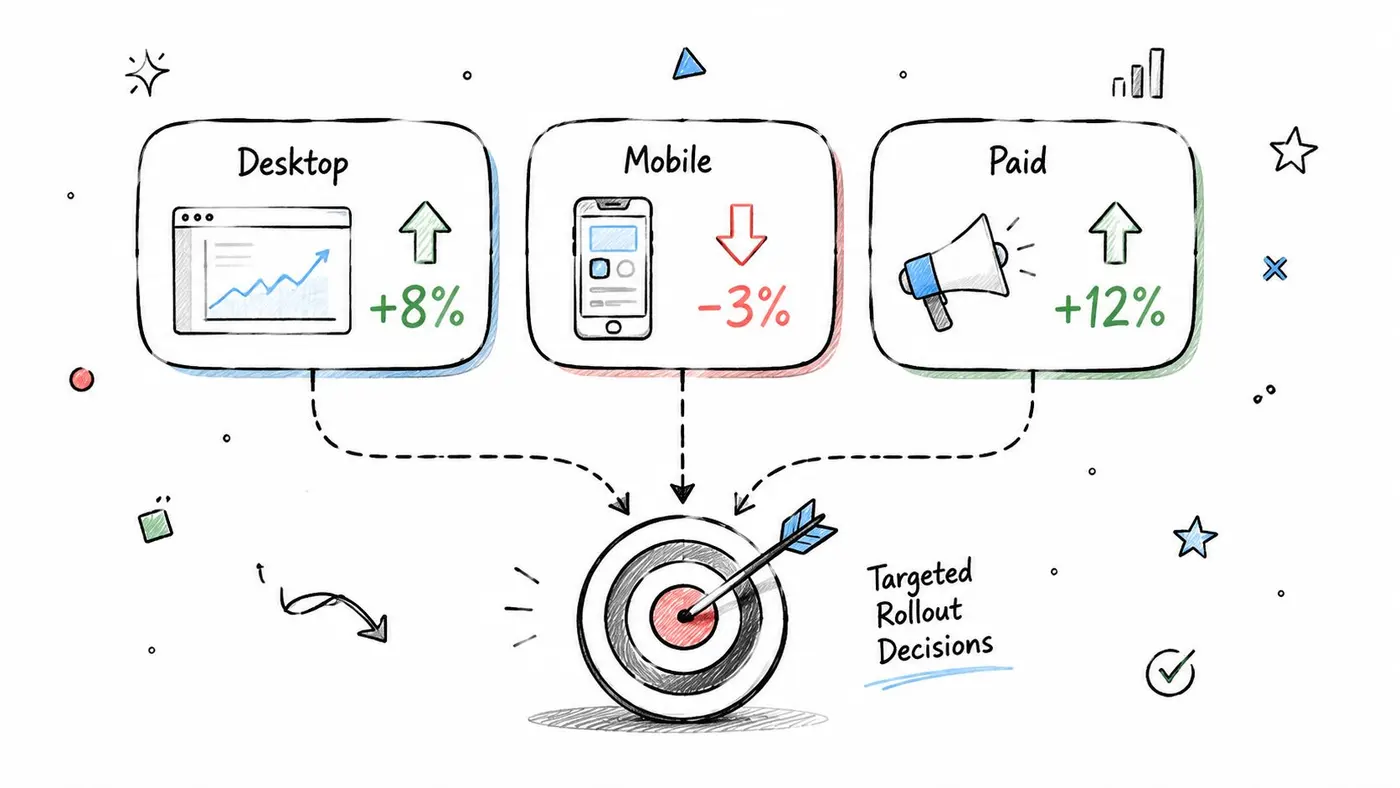
Segment with discipline, not curiosity alone
Segmentation becomes dangerous when teams use it as a rescue mission for a losing test. The right way is to pre-plan a few important segments, then clearly distinguish those from exploratory cuts added after the fact.
A good segment section usually includes:
- Planned segments: Device class, acquisition channel, new versus returning users.
- Minimum evidence rule: Don't make strong claims from tiny subgroups.
- Correction for multiple looks: The more slices you inspect, the easier it is to find noise that looks like signal.
- Rollout implication: If a subgroup clearly benefits and another doesn't, say whether rollout should be targeted.
The broader market trend supports this need for better rigour. In the UK, adoption of A/B testing tooling is still relatively low, while the UK A/B testing software market is projected to grow at a CAGR of 11.2% from 2026 to 2036 and reach USD 4.82 billion by 2036, according to the Future Market Insights figures cited by Mailmend. As more teams start testing, segmented interpretation will matter even more because basic winner-loser reporting won't be enough.
One of the strongest uses of segmented reporting is selective rollout. If a landing page variant helps desktop paid traffic but depresses mobile organic conversion, the right recommendation may be partial deployment, not full launch or full rejection.
7. Executive Summaries and Transparent Test Documentation
A test report usually lands in front of two very different audiences. A growth lead wants the decision in 30 seconds. An analyst, product manager, or skeptical executive wants to know whether the decision can survive scrutiny. Good reporting serves both.
Start with a one-page executive summary built for action. Put the business question, primary result, recommendation, and key caveat at the top. Then keep the underlying documentation close by so anyone can verify how the test was designed, analyzed, and interpreted. This split matters because a report that is easy to read but hard to audit creates avoidable risk. A report that is perfectly documented but hard to scan gets ignored.
The first page should answer four questions in plain language:
- What changed: The treatment, audience, and surface tested.
- Why it mattered: The business problem or decision behind the experiment.
- What happened: The primary metric result, with enough context to show uncertainty.
- What happens next: Ship, iterate, target a subgroup, rerun, or archive.
Keep it concise, but do not flatten the trade-offs. If the treatment improved signups and hurt lead quality, say so. If the result is directionally positive but too uncertain for rollout, say that too. Senior stakeholders do not need every method choice on page one. They do need a recommendation that reflects the actual balance between statistical evidence and business cost.
Transparent documentation does the rest of the work. Store a test record in Notion, Google Docs, or Git that captures the hypothesis, success metrics, metric definitions, assignment logic, exclusions, planned segments, sample assumptions, stopping rule, and final decision. If the team changed anything mid-test, log what changed, when, and why. That habit prevents hindsight edits and makes later reviews much faster.
For teams running experiments inside shared planning workflows, this guide for Google Workspace project managers is a practical reference for keeping decision notes, ownership, and supporting documents in one place.
A simple template helps:
- Decision summary: One paragraph on outcome and recommendation.
- Experiment setup: Hypothesis, dates, audience, traffic split.
- Measurement plan: Primary metric, guardrail metrics, analysis population.
- Exceptions and deviations: Any change from the original plan.
- Evidence pack: Links to query logic, dashboards, screenshots, and raw outputs.
Short summary first. Full paper trail underneath. That is how teams make faster decisions without sacrificing trust.
8. Monitor and Report on False Positive and False Negative Rates Across Your Test Portfolio
A reporting habit I see often in growing experimentation programmes is simple: every test deck looks disciplined on its own, but the portfolio keeps producing results that do not hold up later. The problem usually is not one bad analysis. It is a weak system for managing error across dozens of decisions.
Single-test reporting cannot carry the whole programme once test volume rises. Teams start checking results early, slicing segments after the fact, changing significance thresholds by project, and celebrating isolated wins without asking how often the programme is likely to be wrong. That creates two business risks at once. False positives push weak ideas into rollout. False negatives cause teams to drop changes that may have worked with better planning or more power.
Track those rates at portfolio level, not only test level.
Keep a testing log with the same fields for every experiment: primary metric, guardrails, target sample size, minimum detectable effect, significance threshold, analysis population, final outcome, and rollout decision. Review it on a schedule, monthly or quarterly is usually enough for active teams. The goal is not academic neatness. The goal is to spot whether your reporting process is producing dependable decisions.
Patterns to watch for include:
- Too many marginal wins: often a sign of loose thresholds, repeated peeking, or selective reporting
- A long run of inconclusive tests: usually points to weak sample planning or effects smaller than the programme can reliably detect
- Past winners that fail to replicate: suggests noise is getting promoted into roadmap decisions
- Heavy use of unplanned segment cuts: increases hidden multiplicity, even when the headline report looks clean
Consistency matters more than clever exceptions. A moderate testing cadence with stable decision rules usually produces better learning than a packed calendar full of fragile wins.
This section also needs clear communication, not just better maths. Add one line to the executive summary that states the programme context: for example, whether this result came from a portfolio with frequent exploratory analysis, whether similar wins have replicated, and whether current false negative risk is high because the team is underpowering tests. That gives stakeholders a better basis for deciding whether to scale, rerun, or hold.
If your team struggles to explain the difference between signal, uncertainty, and interpretation, this short guide to qualitative vs quantitative analysis can help frame the conversation.
Portfolio lens: Ask two questions in every review. “Did this test clear the bar?” and “Is our programme producing decisions we will still trust six months from now?”
9. Report Qualitative Insights and User Feedback Alongside Quantitative Results
Numbers tell you what happened. They rarely tell you why.
If you only report lifts, drops, and significance thresholds, you leave implementation teams guessing about the mechanism behind the result. That weakens follow-up decisions. The variant may have won because it reduced confusion, increased trust, changed attention flow, or removed a technical snag. Those are very different stories.
Pair behaviour with explanation
This doesn't require a heavyweight research programme. Even a lightweight qualitative layer can make reports far more useful.
Useful additions include:
- On-page surveys: Ask what nearly stopped the user converting.
- Session recordings: Compare friction points between control and variant.
- Support or sales feedback: Check whether lead quality or objection patterns changed.
- Interview snippets: Short calls with users after a major UX change often surface what metrics miss.
If your team needs to explain this distinction internally, Otter A/B's piece on qualitative vs quantitative analysis is a simple reference point.
This is also where reporting best practices overlap with broader trust and governance concerns. The Glass Lewis article on improving stewardship reporting highlights a common reporting failure in another field: many templates don't distinguish between engagement for information and engagement intended to drive change. That matters because quantity without clear intent can become misleading. The same principle applies in experimentation reports. Don't dump screenshots, heatmaps, and comments into an appendix and call it insight. Separate evidence gathering from actual learning that changes action.
A good qualitative section doesn't just say users “liked” the variant. It explains what users struggled with, what they understood faster, and what that means for the next decision.
10. Create Reproducible Reports with Data Pipelines and Automated Reporting
Monday morning, a stakeholder asks why the lift in the deck does not match the number in the dashboard. If the answer is “someone updated the spreadsheet,” the reporting process is already failing.
Manual spreadsheets work for early tests, but they break once the test volume rises or more than one team needs the same numbers. Hand-copied exports, duplicated formulas, and charts pasted into slides create version drift. They also make audits painful. A reproducible reporting setup turns extraction, analysis, and presentation into one repeatable workflow, so the same inputs produce the same result every time.
The goal is not automation for its own sake. The goal is a reporting system that can survive turnover, scrutiny from finance or leadership, and a growing experimentation portfolio.
A practical stack often looks like this: raw event data in a warehouse, SQL for metric tables, Python or R for statistical calculations, and a reporting layer in Looker Studio, Tableau, or a branded HTML output. Smaller teams can start with Google Sheets plus scripted checks and scheduled queries. That setup is still far better than relying on one analyst's local file and memory of which tab contains the final formula.
Here's a useful walkthrough on the automation side:
What automation should standardise
Automation should remove inconsistency, not judgement. Analysts still need to decide whether the effect is decision-worthy, whether a segment read is credible, and whether implementation issues changed the interpretation. The pipeline should handle the repeatable parts so those conversations start from trusted numbers.
Standardise these first:
- Data pulls: Use the same source tables, event definitions, attribution windows, and exclusion rules each time.
- Statistical calculations: Keep one shared implementation for lift, confidence intervals, ITT outputs, and any multiple-testing adjustments used across the programme.
- Report templates: Use the same sections for executive summary, method, segment results, caveats, and recommendation.
- Distribution: Send one scheduled output to Slack, email, or a dashboard so stakeholders are not comparing different report versions.
The benefits extend beyond convenience. Repeatable pipelines make it easier to explain where a number came from, compare tests consistently across the portfolio, and spot when tracking logic changed underneath the report. That is especially important when marketing, product, analytics, and finance all read the same experiment through different lenses.
If the programme is scaling, automate the plumbing. Keep human attention for interpretation, trade-offs, and the recommendation that follows from the evidence.
10-Point Reporting Best Practices Comparison
| Practice | 🔄 Implementation Complexity | ⚡ Resource Requirements | 📊 Expected Outcomes | 💡 Ideal Use Cases | ⭐ Key Advantages |
|---|---|---|---|---|---|
| Define Clear Success Metrics and KPIs Before Testing | 🔄 Low–Medium, needs cross‑team alignment and discipline | ⚡ Low, planning and stakeholder time | 📊 Business‑aligned, decision‑ready results; fewer false positives | 💡 All A/B tests, especially client or revenue‑focused experiments | ⭐ Ensures focus on revenue impact and prevents chasing vanity metrics |
| Report Statistical Significance with Confidence Intervals, Not Just P‑Values | 🔄 Medium, requires statistical understanding | ⚡ Medium, analysis tools and explanation time | 📊 Quantified uncertainty and effect sizes for practical decisions | 💡 Reports for analysts, data teams, and client presentations | ⭐ Conveys precision and prevents overinterpretation of p‑values |
| Separate Intention‑to‑Treat (ITT) and Per‑Protocol Analysis | 🔄 Medium–High, needs clear treatment definitions | ⚡ Medium, instrumentation and analysis effort | 📊 Conservative (realistic) vs. potential effect estimates | 💡 Tests with partial exposure or adherence concerns | ⭐ Prevents overestimation and supports defensible rollout choices |
| Report Both Relative Lift and Absolute Difference | 🔄 Low, simple additional calculations | ⚡ Low, minor reporting effort | 📊 Balanced view for growth and finance decision‑making | 💡 Cross‑functional reporting (marketing ↔ finance) | ⭐ Avoids misleading claims and aids ROI evaluation |
| Establish Sample Size and Statistical Power Requirements Upfront | 🔄 Medium, requires pretest calculations and plans | ⚡ Low–Medium, analytic time; may increase test duration | 📊 Credible, well‑powered results and realistic timelines | 💡 Confirmatory tests or low‑traffic experiments | ⭐ Prevents underpowered tests and false conclusions |
| Use Segmented Reporting to Reveal Heterogeneous Treatment Effects (HTEs) | 🔄 High, multiple comparisons and interaction tests | ⚡ Medium–High, larger samples and advanced analysis | 📊 Reveals segment winners/losers; informs targeted rollouts | 💡 Personalisation and audience‑specific campaigns | ⭐ Increases actionability by identifying where effects vary |
| Executive Summaries and Transparent Test Documentation | 🔄 Low–Medium, process and writing consistency | ⚡ Low, documentation and storage overhead | 📊 Faster decisions with auditable methodology | 💡 Client reporting, governance, and audit trails | ⭐ Clear decisions and defensible, repeatable process |
| Monitor Portfolio False Positive/Negative Rates | 🔄 High, portfolio tracking and statistics | ⚡ Medium–High, logging, dashboards, periodic audits | 📊 Program‑level error control and healthier testing cadence | 💡 High‑velocity teams and agencies managing many tests | ⭐ Detects systemic issues and prevents pursuing false leads |
| Report Qualitative Insights and User Feedback Alongside Quantitative Results | 🔄 Medium, integrate mixed‑methods narratives | ⚡ Medium, UX research time and tooling | 📊 Explains mechanisms, surfaces risks, guides follow‑ups | 💡 When behavior is unclear or for implementation planning | ⭐ Provides contextual explanations and reduces reversal risk |
| Create Reproducible Reports with Data Pipelines and Automated Reporting | 🔄 High, engineering and reproducible workflows | ⚡ High, engineering/data science resources and maintenance | 📊 Consistent, auditable, and scalable reporting; faster delivery | 💡 Organizations with many tests or repeating client reports | ⭐ Eliminates manual errors and enables real‑time monitoring |
Turn Your Reports into a Growth Engine
Good experimentation teams don't just run better tests. They report them better.
That distinction matters because a test result only creates value when the organisation can understand it, trust it, and act on it. A sloppy report can waste a useful experiment. A strong report can rescue a messy result by showing clearly what was learned, what remains uncertain, and what should happen next.
The ten practices above work because they solve the actual reasons experiment reporting breaks down. Clear pre-defined KPIs stop teams from rewriting success after the fact. Confidence intervals and effect sizes keep uncertainty visible. ITT versus per-protocol analysis separates delivery issues from behavioural response. Relative and absolute framing helps both marketers and finance interpret the same result accurately. Power planning stops teams from making loud claims off thin evidence.
The rest is about operating an experimentation programme like a mature function rather than a string of disconnected tests. Segmentation reveals where rollout should be selective. Executive summaries help busy stakeholders process the signal quickly. Transparent documentation reduces p-hacking and institutional amnesia. Portfolio-level error tracking keeps a fast-moving programme statistically healthy. Qualitative context explains mechanism, not just movement. Automation makes the whole process reproducible enough to scale.
The practical payoff is bigger than cleaner decks. Better reporting shortens decision cycles. It reduces recurring stakeholder objections. It lowers the odds that a weak test result gets shipped because the narrative was more persuasive than the evidence. It also improves learning retention. Teams can look back six months later and still understand what happened, why the decision was made, and whether the outcome held up.
This is especially important as experimentation becomes more common and more visible inside organisations. Many teams still have uneven reporting maturity. Some are just beginning to standardise KPI communication. Others are testing more frequently but still reporting with inconsistent thresholds, improvised templates, and too much dependence on manual work. That creates friction exactly where experimentation should create clarity.
Strong reporting best practices do something simple but powerful. They convert analysis into a decision process. Instead of asking stakeholders to interpret raw numbers, you present a complete and honest account of business impact, uncertainty, operational caveats, and recommended action.
That's how experimentation stops being a dashboard habit and becomes a growth engine.
And if you want that process to be repeatable, the tooling matters. Platforms that combine test delivery, confidence calculations, revenue tracking, shareable reporting, and automated stakeholder updates remove a lot of the friction that used to make good reporting feel optional. It isn't optional. It's the layer that turns testing activity into compounding commercial learning.
Otter A/B helps teams turn experiment results into reports people use. You can track conversion rates, purchases, average order value, revenue per variant, and revenue trends in one place, then share brandable, password-protected reports with clients or internal stakeholders without rebuilding everything by hand. If you want cleaner reporting best practices baked into the workflow, explore Otter A/B.
Stop guessing
Ready to start testing?
Set up your first A/B test in under five minutes. No credit card required.
- 14-day free trial
- No credit card required
- Cancel anytime