Split Testing Definition: How A/B Tests Work
Get a clear split testing definition. Learn how A/B testing works, statistical significance, and essential tools to run experiments that grow your business.
Split testing is a method of comparing two or more versions of a webpage against each other to determine which one performs better, and a trustworthy result usually means reaching 95% statistical significance and at least 200 conversions per variant. If you're trying to decide which page version should win, that's the practical split testing definition that matters most, because it tells you both what the method is and when you can believe the result.
You're probably here because you've changed a headline, redesigned a product page, or built a new landing page and now you're stuck on the same common question: which version should go live? Guessing feels fast, but it's expensive. A prettier page can convert worse. A louder CTA can underperform a quieter one. And a result that looks promising after a few hours can disappear once more visitors arrive.
That's why split testing matters. It gives you a controlled way to compare options, remove opinion from the decision, and choose a version based on actual user behaviour rather than internal debate.
What Is Split Testing Really
A common starting point looks like this. You run a Shopify store, and your current product page feels flat. You think a shorter headline and a more prominent “Add to Basket” button might help. Your designer prefers the current layout. Your founder wants a bigger hero image. Everyone has a view, and none of those views tell you what customers will do.
Split testing solves that problem by turning a design disagreement into an experiment.
In plain English, split testing means showing different versions of a page to different groups of visitors and measuring which version gets more of the outcome you care about, such as clicks, sign-ups, or purchases. Adobe describes split testing as a randomised experiment where incoming traffic is assigned to different groups so teams can observe which experience drives the target action, as outlined in Adobe's guide to optimize website strategies.
Think of it like a bake-off
If two bakers each make a Victoria sponge, you wouldn't ask one friend to taste Cake A on Monday and a different friend to taste Cake B on Friday, then declare a winner. Too many outside factors changed. You'd ask similar people to taste both options under similar conditions, then compare the reactions.
That's the logic behind split testing. You want the versions judged under fair conditions.
Practical rule: Split testing is less about “which page looks better” and more about “which page causes more people to take the action we want”.
Why beginners get tripped up
Most confusion starts because “split testing” gets used as a catch-all phrase. Sometimes people mean any experiment. Sometimes they mean A/B testing specifically. Sometimes they mean testing completely different page designs on separate URLs. That muddle leads to bad setup and bad conclusions.
The rest of this article clears that up. You'll see what split testing technically means, how it differs from A/B testing, what the software is doing behind the scenes, and why the statistical side is what makes the result trustworthy.
Core Concepts A/B vs Split vs Multivariate
At its most technical, split testing is a randomised controlled experiment. Visitors are assigned to different versions, the test begins with a null hypothesis that there's no real difference between them, and a statistical method checks whether the observed gap is likely to be real rather than random chance. That definition aligns with the overview in Wikipedia's A/B testing entry.
The problem is that marketers often blur three different methods together.
The distinction that causes trouble
Baymard-focused guidance highlighted in Adobe's split testing basics notes that many marketers treat A/B testing and split testing as interchangeable, even though they aren't the same thing. The same source says 73% of UK growth marketers make that mistake, and links the confusion to 31% higher sample size requirements in flawed test design, according to Adobe's split testing basics guide.
That matters because the method changes the setup. If you choose the wrong format, you can contaminate the experiment before it even starts.
A simple comparison
| Test Type | What It Tests | Best For |
|---|---|---|
| A/B testing | One element or a small change on the same URL | Testing a headline, CTA text, button colour, or form label |
| Split URL testing | Different page versions on different URLs | Comparing bigger redesigns, different layouts, or distinct page structures |
| Multivariate testing | Multiple elements and their combinations at once | Understanding how combinations of changes interact on high-traffic pages |
A practical way to choose
If you only want to test one change, such as “Start Free Trial” versus “See Pricing”, that's usually A/B testing.
If you've built two substantially different landing pages, such as /pricing-old and /pricing-new, that's split URL testing.
If you want to test several combinations of hero copy, CTA text, and image treatment at the same time, that's multivariate testing. If you want a deeper primer on when that approach fits, this guide on what multivariate testing is is a useful companion.
Why same URL versus different URL matters
The easiest way to remember it is this:
- A/B testing is like swapping one ingredient in the same recipe.
- Split testing is like entering two different cakes into the bake-off.
- Multivariate testing is like trying many ingredient combinations at once.
That's also why email marketers often speak loosely about “A/B testing” even when they're really isolating one variable such as subject line or CTA. If you work across channels, practical examples from Ecommerce Boost's email marketing insights make that difference easier to spot.
If you can't clearly say what changed, where it changed, and whether both versions live on the same page or separate URLs, your test design probably isn't finished.
How a Split Test Works Behind the Scenes
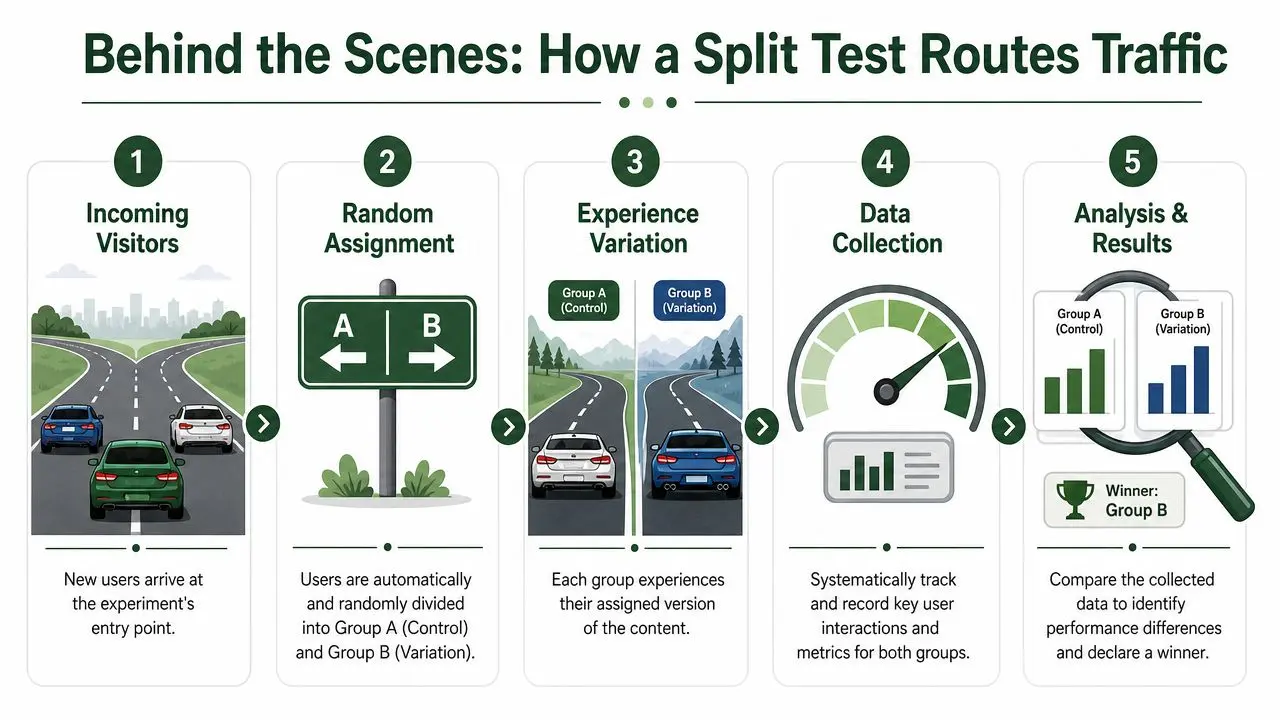
Think of a split test like traffic control on two roads. Cars arrive at a junction, a system sends some down Road A and some down Road B, and then you measure which route gets more people to the destination you care about.
That's almost exactly what testing software does with website visitors.
The basic mechanics
A test usually has a control and a variant.
- Control A is your current version
- Variant B is the changed version
- Visitors are assigned to one or the other
- Goals record what counts as success
In UK digital commerce, tests need precise traffic allocation and clear metric tracking, such as click-through rate, form completions, or purchases. Salesforce's UK overview also notes that while 90% statistical significance can offer some confidence, stronger teams usually hold out for 95% to reduce false positives, as explained in Salesforce's guide to A/B testing.
What the tool is actually tracking
Once traffic is split, the software watches for the outcome you defined before launch.
That outcome might be:
- A click on a primary CTA
- A sign-up for a demo or newsletter
- A purchase on an ecommerce page
- A form completion in a lead generation flow
The key is that both versions are measured against the same goal. If Version B gets more purchases than Version A, the system records that difference and keeps updating the comparison as more visitors pass through.
Why setup quality matters
A test can fail before the first result arrives if the setup is sloppy.
Common issues include:
- Uneven routing where one version gets the wrong mix of traffic
- Broken tracking where clicks or purchases aren't logged consistently
- Slow page delivery where the experiment itself harms the user experience
That last point matters more than many beginners realise. If the testing layer slows the page, you may end up measuring the effect of slower performance rather than the effect of your headline or layout change. Tools differ here. For example, some teams choose lightweight options such as Google Tag Manager-based setups or dedicated testing platforms like Otter A/B when they need controlled traffic splits, goal tracking, and minimal impact on page speed.
Why Statistical Significance Matters
The hardest part of the split testing definition isn't the “split” part. It's the word trustworthy.
You can run two versions of a page and see different results almost immediately. That doesn't mean the difference is real. Sometimes one version is just having a lucky morning.

The coin toss analogy
Say you flip a coin a few times and get heads more often than tails. You still wouldn't conclude the coin is biased. With a tiny sample, short streaks happen all the time.
Split tests work the same way. If one page version gets a few more conversions early on, you can't assume it's definitively better. You need enough data to separate a real signal from random noise.
That's where statistical significance comes in.
What 95 percent confidence means in plain English
In common UK CRO practice, the critical threshold is 95% confidence. Adobe UK guidance describes that threshold as the point where a winner is definitively declared, and notes that observed uplifts in successful campaigns often fall in the 10% to 30% range once that level is reached. The same guidance explains that frequentist tools start with the assumption that there is no difference between variants and only reject that assumption when the p-value drops below 0.05, which corresponds to that confidence threshold.
In plain language, 95% confidence means you're highly confident the difference you observed wasn't just random luck.
A split test doesn't prove a variant is universally better forever. It shows that, under this experiment, the observed difference is strong enough that chance is an unlikely explanation.
If you want a clearer walkthrough of how confidence levels, p-values, and stopping rules fit together, this explanation of testing statistical significance is worth reading.
Why marketers get this wrong
Beginners often stop tests early because the dashboard looks exciting. That's the equivalent of ending the coin toss after a short streak.
The cost of doing that is simple. You roll out a “winner” that didn't outperform. Then revenue, sign-ups, or lead quality dips, and nobody knows whether the page change caused it.
A more rigorous approach reduces that risk. It doesn't make experimentation slow for the sake of it. It makes decisions safer.
This short video gives a helpful visual explanation of the idea.
The business reason this matters
Statistical significance sounds academic until you attach it to a real decision. A homepage rollout, pricing page redesign, or checkout change affects live revenue. If your evidence is weak, your decision is weak.
That's why experienced teams don't ask only, “Which version is ahead?” They ask, “Has this test reached the point where we can trust the lead?”
Your High-Level Split Testing Workflow
Once you understand the terms and the statistics, the workflow becomes much less intimidating. It's really a repeatable decision-making process.
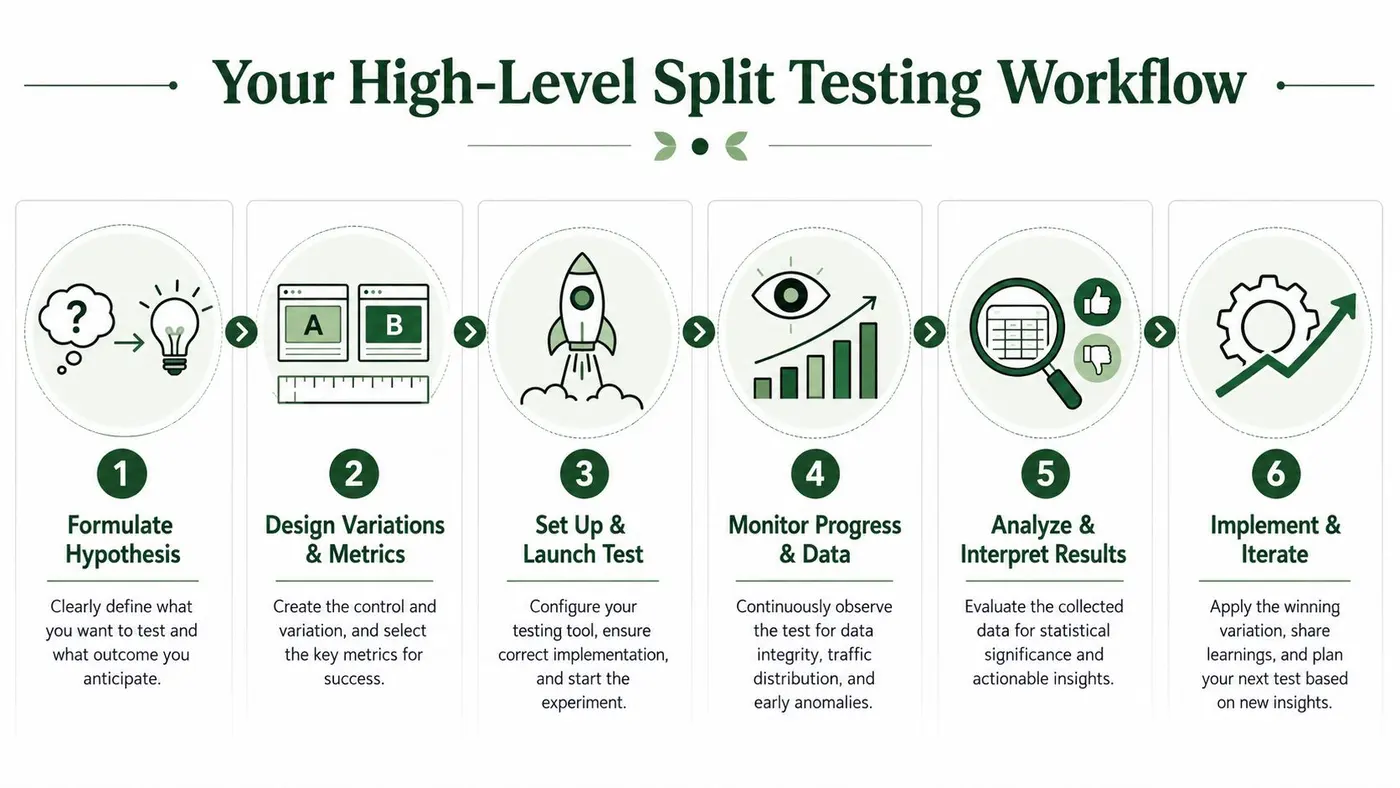
Start with a hypothesis
A good test starts before anyone opens a dashboard.
Instead of saying, “Let's test a new button,” say something like, “Changing the CTA text to emphasise the benefit should increase clicks because visitors will understand the offer faster.” That gives the team a reason, a change, and a measurable outcome.
Useful habit: Write the reason for the test before you build the variant. It keeps you from testing random ideas just because they're easy to launch.
Build the control and variation
Now create the versions you want to compare.
Sometimes that's a tiny change:
- Headline wording on a Webflow landing page
- CTA copy on a Shopify product page
- Form labels on a lead generation page
Sometimes it's a broader page redesign. Either way, define one primary success metric before launch. Don't wait until after the test to decide what counts.
Check sample size before launch
Patience is essential to this process. UK CRO guidance commonly uses a minimum of 200 conversions per variant as a benchmark for statistical power, and the same guidance notes that successful UK split tests often produce 15% to 20% conversion improvement, especially from headline and CTA changes. If you need help planning the test before it starts, this guide on how to calculate sample size can help you work backwards from your traffic and goal volume.
That benchmark doesn't guarantee a winner. It gives you a more reliable base for judging one.
Run, monitor, then interpret
During the live test, your job isn't to celebrate early movement. It's to make sure the experiment is healthy.
Watch for:
- Tracking integrity so purchases or sign-ups are recorded correctly
- Traffic allocation so both versions get the intended audience split
- Anomalies such as broken layouts, missing CTAs, or unusual behaviour
When the test has enough data and reaches the right confidence threshold, interpret the result in context. A winning variant gets implemented. A losing variant still teaches you something useful about your audience.
Turn each result into the next test
Strong experimentation programmes don't stop at one answer. They stack learnings.
If a shorter headline wins, your next test might focus on:
- Message clarity
- CTA prominence
- Supporting proof near the fold
That's how teams move from one-off tests to a system for improving conversion over time.
Common Tests and Pitfalls to Avoid
Most split tests don't start with a dramatic redesign. They start with the pages and moments that shape user decisions every day.
For ecommerce teams, that often means product pages, category pages, cart flows, and landing pages. For product teams, it might be onboarding steps, upgrade prompts, or feature adoption screens. For lead generation, it's often headline, CTA, form length, and trust signals.
Common things worth testing
A few examples come up again and again because they influence behaviour directly:
- Headlines and subheadings that shape first impressions
- CTA wording and placement that affect whether people act
- Page layouts that change attention flow
- Forms that alter friction
- Offer presentation including pricing display, bundles, or proof points
If you're working specifically on conversion-focused pages, these effective landing page strategies offer useful ideas for what to refine before you turn those ideas into formal tests.
The mistakes that ruin otherwise good experiments
Beginners usually don't fail because split testing is too complex. They fail because they skip one of the basics.
- Stopping too early means you mistake noise for a result.
- Testing without a hypothesis means you learn less even when the test finishes.
- Using the wrong method means you call something a split test when it should have been an A/B test, or vice versa.
- Tracking the wrong metric means the experiment answers a less important question than the business needs.
- Changing too much at once makes it hard to know what caused the lift or drop.
The real value of split testing is that it replaces “I think this will work” with “we ran the experiment, and now we know”.
That's the practical heart of the split testing definition. It isn't just a tactic for tweaking pages. It's a disciplined way to make decisions with evidence. When you choose the right test type, route traffic correctly, and wait for a statistically trustworthy result, you stop treating conversion work like opinion and start treating it like measurement.
If you want a simple way to run that process, Otter A/B helps teams create variants, split traffic, track goals, and see when a test reaches statistical significance without turning experimentation into a heavy engineering project.
Stop guessing
Ready to start testing?
Set up your first A/B test in under five minutes. No credit card required.
- 14-day free trial
- No credit card required
- Cancel anytime